Read a ROS Image Message in Simulink
R2026bStart a ROS network.
rosinit
Launching ROS Core...
Status before launching ros core :0
result before launching ros core: Microsoft.Management.Serv     2068 Services                   0    119,296 K
Microsoft.SharePoint.exe     23100 Console                    1    342,088 K
WindowsTerminal.exe          17292 Console                    1     75,132 K

Creating Python virtual environment for ros1.Done.
Adding required Python packages to virtual environment.Done.
Copying include folders.Done.
Copying libraries.Done.
.....Done in 5.6344 seconds.
* Inside getProcessPID function *
Process Name: rosmaster  - rosmaster  --core -p 57282 -w 3
Status before getting PID :0
Result before getting PID :Microsoft.Management.Serv     2068 Services                   0    119,296 K
Microsoft.SharePoint.exe     23100 Console                    1    341,912 K
WindowsTerminal.exe          17292 Console                    1     86,840 K
rosmaster.exe                11424 Console                    1      4,984 K
python.exe                    5336 Console                    1      4,744 K
python.exe                   10428 Console                    1     30,256 K

Result:
WindowsTerminal.exe          17292 Console                    1     86,840 K

Status: 0
PID obtained: 17292
Status after getting PID :0
Result after getting PID :Microsoft.Management.Serv     2068 Services                   0    119,296 K
Microsoft.SharePoint.exe     23100 Console                    1    341,912 K
WindowsTerminal.exe          17292 Console                    1     86,840 K
rosmaster.exe                11424 Console                    1      4,984 K
python.exe                    5336 Console                    1      4,744 K
python.exe                   10428 Console                    1     30,256 K

* Exiting getProcessPID function *
Status after launching ros core :0
result after launching ros core: Microsoft.Management.Serv     2068 Services                   0    119,296 K
Microsoft.SharePoint.exe     23100 Console                    1    341,912 K
WindowsTerminal.exe          17292 Console                    1     86,840 K
rosmaster.exe                11424 Console                    1      4,984 K
python.exe                    5336 Console                    1      4,744 K
python.exe                   10428 Console                    1     30,256 K

Status before deleting node :0
Result before deleting node :Microsoft.Management.Serv     2068 Services                   0    120,436 K
Microsoft.SharePoint.exe     23100 Console                    1    341,912 K
WindowsTerminal.exe          17292 Console                    1     86,840 K
rosmaster.exe                11424 Console                    1      4,984 K
python.exe                    5336 Console                    1      4,744 K
python.exe                   10428 Console                    1     30,348 K
libmwros1server.exe          13256 Console                    1     29,484 K

Status after deleting node :0
Result after deleting node :Microsoft.Management.Serv     2068 Services                   0    120,404 K
Microsoft.SharePoint.exe     23100 Console                    1    341,912 K
WindowsTerminal.exe          17292 Console                    1     86,840 K
rosmaster.exe                11424 Console                    1      4,984 K
python.exe                    5336 Console                    1      4,744 K
python.exe                   10428 Console                    1     30,308 K

Initializing ROS master on http://172.31.78.36:57282.
Initializing global node /matlab_global_node_33098 with NodeURI http://vdi-ah2wsp-001:62664/ and MasterURI http://localhost:57282.
Load sample messages to send including a sample image message, img. Create a publisher to send a ROS Image message on the '/image_test' topic. Specify the message type as '/sensor_msgs/Image'. Send the image message.
imgcell = load('imgdata.mat','img');
img = imgcell.img;
pub = rospublisher('/image_test','sensor_msgs/Image');
send(pub,img)
Open the Simulink® model for subscribing to the ROS message and reading in the image from the ROS.
Ensure that the Subscribe block is subscribing to the '/image_test' topic. Under Simulation tab, select ROS Toolbox > Variable Size Messages. Notice that the Use default limits for this message type is clear. Then, in the Maximum length column, verify that the data property of the sensor_msgs/Image message has a value greater than the number of pixels in the image (921600). Run the model.
open_system('read_image_example_model.slx')
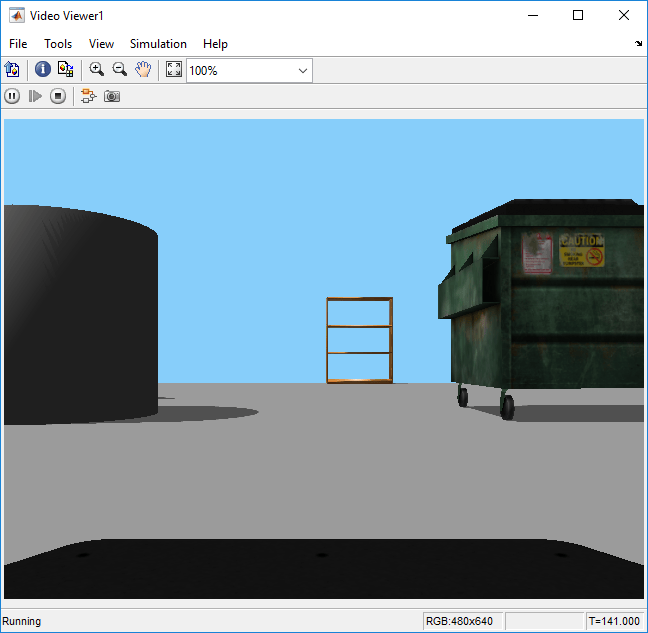
Run the model. The Video Viewer shows the sample image.
Stop the simulation and shut down the ROS network.
rosshutdown
Shutting down global node /matlab_global_node_33098 with NodeURI http://vdi-ah2wsp-001:62664/ and MasterURI http://localhost:57282.
Status before deleting node :0
Result before deleting node :Microsoft.Management.Serv     2068 Services                   0    120,400 K
Microsoft.SharePoint.exe     23100 Console                    1    341,912 K
WindowsTerminal.exe          17292 Console                    1     86,840 K
rosmaster.exe                11424 Console                    1      4,984 K
python.exe                    5336 Console                    1      4,744 K
python.exe                   10428 Console                    1     30,348 K
libmwros1server.exe          12612 Console                    1     33,256 K

Status after deleting node :0
Result after deleting node :Microsoft.Management.Serv     2068 Services                   0    120,372 K
Microsoft.SharePoint.exe     23100 Console                    1    341,912 K
WindowsTerminal.exe          17292 Console                    1     86,840 K
rosmaster.exe                11424 Console                    1      4,984 K
python.exe                    5336 Console                    1      4,744 K
python.exe                   10428 Console                    1     30,308 K

Shutting down ROS master on http://172.31.78.36:57282.
Status before deleting core :0
Result before deleting core :Microsoft.Management.Serv     2068 Services                   0    120,372 K
Microsoft.SharePoint.exe     23100 Console                    1    341,912 K
WindowsTerminal.exe          17292 Console                    1     86,840 K
rosmaster.exe                11424 Console                    1      4,984 K
python.exe                    5336 Console                    1      4,744 K
python.exe                   10428 Console                    1     30,308 K

* Inside killROSProcess function *
Status after Process Killed: 0
Result after Process Killed: SUCCESS: Sent termination signal to the process with PID 17292.

Status after deleting core :0
Result after deleting core :Microsoft.Management.Serv     2068 Services                   0    120,400 K
Microsoft.SharePoint.exe     23100 Console                    1    341,912 K
WindowsTerminal.exe          17292 Console                    1     77,008 K

* Exiting killROSProcess function *

