Inertia
Mass element with fixed inertial properties
Libraries:
Simscape /
Multibody /
Body Elements
Description
The Inertia block adds to the attached frame a point or distributed
mass with fixed inertial properties. The type of mass (point or distributed) depends on
the parameterization selected for the block. A selection of Point
Mass assumes the mass to be concentrated at a point and therefore
devoid of rotational inertia. A selection of Custom assumes
the mass to be distributed in space, allowing it to possess nonzero moments of inertia,
products of inertia, and center-of-mass coordinates (the latter against the reference
frame of the block).
A choice of marker provides a means to identify the inertia in the model
visualization. The visualization opens (by default) in Multibody Explorer
at the start of simulation or upon diagram update. Use the marker to track the motion of
the inertia against the remainder of the model. Various marker shapes are available—an
inertia icon, a sphere, a cube, a frame—each with configurable dimensions. To eliminate
the inertia from the model visualization (while retaining its effects on the model
dynamics), the block provides an option of None.
Examples
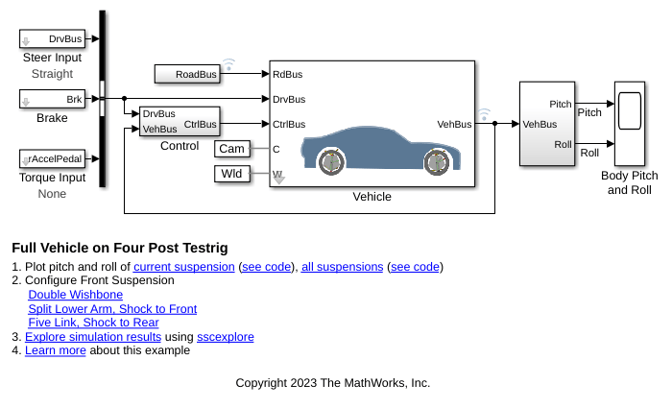
Full Vehicle on Four Post Testrig
Models a passenger vehicle on a four-post testrig. The posts move up and down to replicate the vertical movement of the wheels as it travels along a road. The simulation results and animation show the response of the vehicle body and suspension as it is subjected to the motions from the testrig. The roll and pitch of the vehicle body can be observed, and by varying the inputs wheel hop frequencies can be determined. The vehicle model can be configured to use different suspension types for the front suspension with different linkage combinations.
Ports
Frame
Local reference frame of the inertia element. Connect to a frame line or frame port to define the relative position and orientation of the inertia.
Parameters
Inertia
Inertia parameterization to use. Select Point
Mass to represent a mass with no rotational inertia.
Select Custom to represent a distributed mass
with rotational inertia.
Total mass to attribute to the solid element. This parameter can be positive or negative. Use a negative value to capture the effect of a void or cavity in a compound body (one comprising multiple solids and inertias), being careful to ensure that the mass of the body is on the whole positive.
Dependencies
To enable this parameter, set Type to
Custom or Point Mass.
Alternatively, set Type to Calculate from
Geometry and then set Based on to
Mass.
[x y z] coordinates of the center of mass relative to the block reference frame.
Dependencies
To enable this parameter, set Type to
Custom.
Three-element vector with the [Ixx Iyy Izz] moments of inertia specified relative to a frame with origin at the center of mass and axes parallel to the block reference frame. The moments of inertia are the diagonal elements of the inertia tensor
where:
Dependencies
To enable this parameter, set Type to
Custom.
Three-element vector with the [Iyz Izx Ixy] products of inertia specified relative to a frame with origin at the center of mass and axes parallel to the block reference frame. The products of inertia are the off-diagonal elements of the inertia tensor
where:
Dependencies
To enable this parameter, set Type to
Custom.
Graphic
Type of graphic to use in the visualization of the inertia, specified
as Marker or None.
Set this parameter to Marker to represent the
inertia as a marker, and set this parameter to
None to hide the inertia from the model
visualization.
Shape of the marker, specified as Inertia
Icon, Sphere,
Cube, or
Frame. The motion of the marker reflects the
motion of the inertia itself.
Dependencies
To enable this parameter, set Type to
Marker.
Width of the marker in pixels, specified as a scalar. This width does not scale with zoom level. Note that the apparent size of the marker depends partly on screen resolution, with higher resolutions packing more pixels per unit length, and therefore producing smaller icons.
Dependencies
To enable this parameter, set Type to
Marker.
Parameterizations for specifying visual properties. Select
Simple to specify Diffuse
Color and Opacity. Select
Advanced to specify more visual
properties, such as Specular Color,
Ambient Color, Emissive
Color, and Shininess.
Dependencies
To enable this parameter, set Type to
Marker.
Color of the light due to diffuse reflection, specified as an [R,G,B] or [R,G,B,A] vector with values in the range of 0 to 1. The vector can be a row or column vector. The optional fourth element specifies the color opacity. Omitting the opacity element is equivalent to specifying a value of 1.
Dependencies
To enable this parameter, set Type to
Marker.
Graphic opacity, specified as a scalar in the range of 0 to 1. A scalar of 0 corresponds to completely transparent, and a scalar of 1 corresponds to completely opaque.
Dependencies
To enable this parameter, set:
Type to
MarkerVisual Properties to
Simple
Color of the light due to specular reflection, specified as an [R,G,B] or [R,G,B,A] vector with values in the range of 0 to 1. The vector can be a row or column vector. The optional fourth element specifies the color opacity. Omitting the opacity element is equivalent to specifying a value of 1.
Dependencies
To enable this parameter, set:
Type to
MarkerVisual Properties to
Advanced
Color of the ambient light, specified as an [R,G,B] or [R,G,B,A] vector with values in the range of 0 to 1. The vector can be a row or column vector. The optional fourth element specifies the color opacity. Omitting the opacity element is equivalent to specifying a value of 1.
Ambient light refers to a general level of illumination that does not come directly from a light source. The Ambient light consists of light that has been reflected and re-reflected so many times that it is no longer coming from any particular direction.
Dependencies
To enable this parameter, set:
Type to
MarkerVisual Properties to
Advanced
Color due to self illumination, specified as an [R,G,B] or [R,G,B,A] vector in the range of 0 to 1. The vector can be a row or column vector. The optional fourth element specifies the color opacity. Omitting the opacity element is equivalent to specifying a value of 1.
The emission color is color that does not come from any external source, and therefore seems to be emitted by the marker itself. When a marker has an emissive color, the marker can be seen even if there is no external light source.
Dependencies
To enable this parameter, set:
Type to
MarkerVisual Properties to
Advanced
Shininess of the marker, specified as a scalar in the range of 0 to 128. This parameter affects the sharpness of the specular reflections of the marker. A marker with high shininess has a mirror-like appearance, and marker with low shininess has a more low-gloss or satin appearance.
Dependencies
To enable this parameter, set:
Type to
MarkerVisual Properties to
Advanced
Extended Capabilities
C/C++ Code Generation
Generate C and C++ code using Simulink® Coder™.
Version History
Introduced in R2012a
See Also
MATLAB Command
You clicked a link that corresponds to this MATLAB command:
Run the command by entering it in the MATLAB Command Window. Web browsers do not support MATLAB commands.
Select a Web Site
Choose a web site to get translated content where available and see local events and offers. Based on your location, we recommend that you select: .
You can also select a web site from the following list
How to Get Best Site Performance
Select the China site (in Chinese or English) for best site performance. Other MathWorks country sites are not optimized for visits from your location.
Americas
- América Latina (Español)
- Canada (English)
- United States (English)
Europe
- Belgium (English)
- Denmark (English)
- Deutschland (Deutsch)
- España (Español)
- Finland (English)
- France (Français)
- Ireland (English)
- Italia (Italiano)
- Luxembourg (English)
- Netherlands (English)
- Norway (English)
- Österreich (Deutsch)
- Portugal (English)
- Sweden (English)
- Switzerland
- United Kingdom (English)

