5G Waveform Analyzer
R2026bAnalyze and visualize imported or captured 5G waveforms and export analysis results
Since R2024b
Description
Use the 5G Waveform Analyzer app to analyze and visualize imported or captured 5G waveforms and export analysis results.
Using this app, you can:
Import waveforms from your workspace or from a
.bb,.mat, or.txtfile.Capture waveforms using a connected spectrum analyzer instrument or software-defined radio (SDR).
Capture waveforms by using a signal generator that supports the virtual instrument software architecture (VISA) interface (requires Instrument Control Toolbox™).
Capture waveforms over the air by using an NI™ USRP™ radio supported by Wireless Testbench™ Support Package for NI USRP Radios. The app captures the waveform using the
basebandReceiver(Wireless Testbench) object. For the list of supported radios, see Supported Radio Devices (Wireless Testbench). (since R2026a)
Import the waveform configuration from your workspace or from a
.matfile and specify analysis parameters.Choose from a range of measurement visualization options such as a spectrum analyzer, constellation diagram, various error vector magnitude (EVM) plots, or complementary cumulative distribution function (CCDF) plots (since R2026a).
Export the waveform analysis results to your workspace or to a
.matfile.

Open the 5G Waveform Analyzer App
MATLAB® Toolstrip: On the Apps tab, under Wireless
Communications, click the app icon. 
MATLAB Command Prompt: Enter nrWaveformAnalyzer. (since R2025a)
Examples
This example shows how to analyze and visualize imported or captured 5G waveforms and export analysis results using the 5G Waveform Analyzer app.
Open the 5G Waveform Analyzer App
On the Apps tab of the MATLAB® toolstrip, under Wireless Communications, click the 5G Waveform Analyzer app icon. This app opens the Wireless Waveform Analyzer app configured for 5G waveform analysis.
Import 5G Waveform
To import a waveform, click Import Waveform in the Waveform section, then select Import from File or Import from Workspace. You can use the 5G Waveform Generator app to create, and then export 5G waveforms to a .bb file, .mat file, .txt file, or a workspace variable.
If you import a
.bbfile that contains metadata, includingnrDLCarrierConfigornrULCarrierConfig, the app uses the metadata as the carrier configuration.If you import a
.matfile, use specific variable names such aswaveform,fs, andconfigurationin the file. If these variable names are not present in the.matfile, the app selects the first variable that is a complex 2-D matrix as a waveform andnrDLCarrierConfigornrULCarrierConfigas the configuration, respectively.If you import a
.txtfile, the first column must contain the in-phase (I) samples and the second column must contain the quadrature (Q) phase samples.If you import a structure from the workspace, use the form
struct('waveform',waveform,'fs',fs,'configuration',config). If these field names are not present in the structure, the app selects the first field that is a complex 2-D matrix as a waveform andnrDLCarrierConfigornrULCarrierConfigas the configuration, respectively.
Once you import the waveform, the app lists out the IQ samples source and sample rate in the Waveform Parameters pane. If the sample rate is not listed, you can enter the specified sample rate in Hz. If you select a file that does not contain sample rate information, update the Sample rate (Hz) field manually. If you select a file that does not contain configuration information, you can import waveform configuration or click Edit Waveform Configuration in the Configure section of the app toolstrip to add the carrier configuration.
Import Waveform Configuration
To import a waveform configuration, click Import Waveform Configuration and select Import from File or Import from Workspace. You can import a waveform configuration from:
A
.matfileA workspace variable containing an
nrDLCarrierConfigornrULCarrierConfigobjectA workspace structure with at least one field containing an
nrDLCarrierConfigornrULCarrierConfigobject
To view or modify the waveform configuration, click Edit Waveform Configuration in the Configure section of the app toolstrip.
Capture 5G Waveform
You can capture waveforms using a connected spectrum analyzer instrument that supports the virtual instrument software architecture (VISA) interface or an NI™ USRP™ radio. The waveform capture capability using a connected spectrum analyzer instrument requires:
Instrument Control Toolbox Support Package for Keysight IO Libraries and VISA Interface or Instrument Control Toolbox Support Package for R&S VISA Interface depending on the spectrum analyzer instrument you are using.
Minimum VISA driver versions such as Keysight IO Libraries version 18.1.24715.0 (Keysight Connection Expert 2019) or Rohde & Schwarz R&S VISA version 5.12
Alternatively, waveform capture over the air using an NI™ USRP™ radio requires Wireless Testbench™ Support Package for NI™ USRP™ Radios. The app captures the waveform using the basebandReceiver (Wireless Testbench) object. For a list of supported radios, see Supported Radio Devices (Wireless Testbench).
To capture a waveform, click Capture with Hardware in the Waveform section. Set the instrument parameters such as center frequency, span, sample rate, capture time, and gain, and then click Start Capture .
Analyze and Visualize Waveform
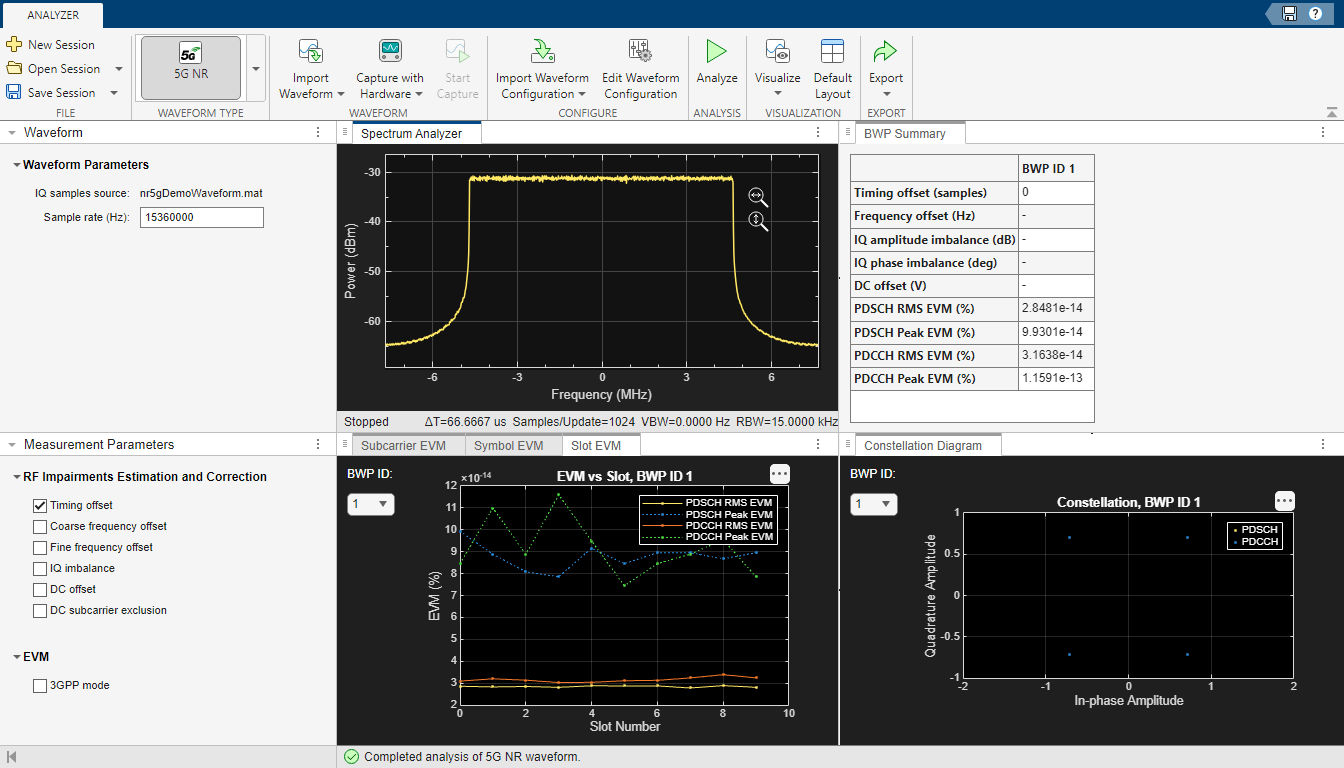
To start the waveform analysis, click Analyze in the Analysis section. You can select the impairment correction method from the Impairment Correction pane. You can choose from a range of visualization options such as a spectrum analyzer, constellation diagram, various error vector magnitude (EVM) plots or complementary cumulative distribution function (CCDF) plots from the Visualize option drop-down menu. Additionally, you can view the BWP summary and channel summary of the waveform. You can select the required bandwidth parts (BWP) from the BWP ID drop-down list in the EVM plots and constellation diagram.
Export Analysis Results
When the analysis is complete, you can export the analysis results to your workspace or to a .mat file. To export the analysis results, click Export and select either Export Results to Workspace or Export Results to MAT File from the drop-down menu. To save the app session, click Save Session in the File section. The session saves the values provided in the dialog boxes, selected visualizations, and the waveform configuration. To open an app session, click Open Session in the File section, and select the saved session you want to open.
Limitations
Instrument connection mode is not supported in MATLAB Online™.
Instrument connection mode is supported only on macOS with Intel® and Windows® platforms.
Instrument connection mode supports only a single receive antenna.
The 5G Waveform Analyzer supports only waveforms that satisfy these conditions:
For downlink waveforms:
Only physical downlink shared channel (PDSCH) and physical downlink control channel (PDCCH) configurations are supported.
For PDCCH EVM computation, the waveform must have at least one PDSCH configuration.
For uplink waveforms:
Only physical uplink shared channel (PUSCH) configuration is supported.
Only single PUSCH configuration per bandwidth part (BWP) is supported.

