Deploy AUTOSAR Adaptive Architecture Model
R2026bThis example shows how to deploy an AUTOSAR(R) adaptive architecture model to a Linux(R) target and use external mode to monitor and tune a component using AUTOSAR Blockset(TM) and Embedded Coder(R). You deploy a headlight control system where three components communicate through adaptive events and methods, then use external mode to calibrate sensor thresholds while observing the end-to-end adaptive communication.
In this example, you:
Open and inspect the architecture model to understand the component topology and adaptive communication paths
Configure the hardware board and toolchain for AUTOSAR adaptive deployment to a Linux target
Deploy the application package to the Linux target using the Linux Runtime Manager app
Start external mode simulation on
OutdoorLightSensorand start remaining executables on the targetTune the light-level threshold in
OutdoorLightSensorand observe headlight responses through adaptive events and methods
Open the Architecture Model
To understand the component topology before deployment, open the HeadLightControlSystem architecture model. This model contains three AUTOSAR adaptive components that communicate using events and methods.
open_system("HeadLightControlSystem")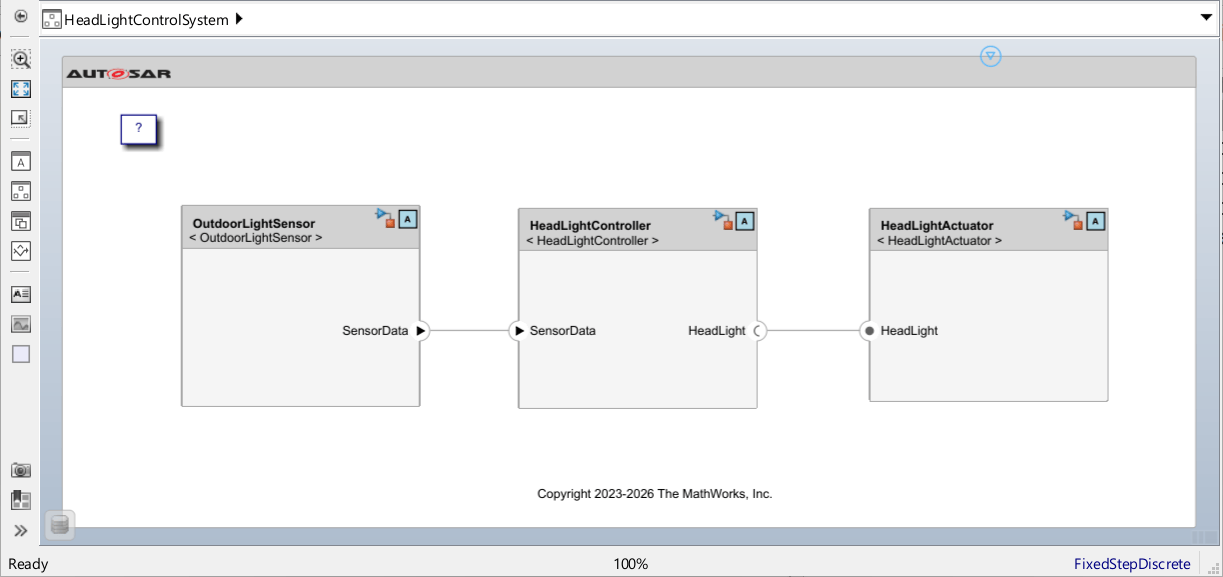
The architecture model contains three components:
OutdoorLightSensorprocesses ambient light data and sends the result toHeadLightControllervia an adaptive event. This component is configured for external mode, which allows you to tune its parameters at run time from your desktop MATLAB session.HeadLightControllerreceives the light-level event and determines whether headlights should turn on or off. It calls a method onHeadLightActuatorto issue the command.HeadLightActuatorreceives method calls and drives the headlight output accordingly.
The adaptive event connecting OutdoorLightSensor to HeadLightController carries the processed light level. The method call from HeadLightController to HeadLightActuator provides the on/off command. This separation of concerns mirrors a realistic AUTOSAR adaptive service-oriented architecture.
Configure Hardware Board and Toolchain
To target a Linux environment for deployment, set the hardware board on the architecture model. The Embedded Coder Linux Docker Container board provides the runtime environment and automatically sets the toolchain to AUTOSAR Adaptive Linux Executable, which produces ara::com-compatible executables for each component.
Prerequisites: You need the Embedded Coder Support Package for Service-Oriented Applications on Linux installed and a running Linux target accessible from your host machine.
To configure the architecture model for Linux target deployment, set the hardware board on the active configuration set. Setting the hardware board automatically configures the appropriate toolchain.
set_param("HeadLightControlSystem", ...
    HardwareBoard="Embedded Coder Linux Docker Container")
To enable run-time parameter tuning for OutdoorLightSensor, in the Code Generation > Interface > Data exchange interface, select External mode to enable external mode for the component.
The hardware board determines the cross-compilation target and runtime libraries. Embedded Coder Linux Docker Container targets a containerized Linux environment that runs the AUTOSAR adaptive runtime. The toolchain automatically set by this board compiles each component into a separate Linux executable that uses ara::com for inter-process communication. For ARM-based targets, use Embedded Coder Linux Docker Container - ARM64 instead.
Deploy the Application to the Target
To make the components available on the Linux target, build and deploy the application package. This step requires the Linux Runtime Manager app and an active connection to your Linux target.
Open the Linux Runtime Manager app by selecting Apps > Linux Runtime Manager from the Simulink toolstrip. In the app:
Select your connected Linux target from the Target dropdown.
Click Prepare > Create & Deploy Application Package to build all three component executables and deploy them to the target.
The build process generates one executable per component: OutdoorLightSensor, HeadLightController, and HeadLightActuator. Each executable links against the AUTOSAR adaptive runtime libraries and uses ara::com bindings for event and method communication. The deployment packages these executables along with the AUTOSAR adaptive manifest files required for service discovery on the target.
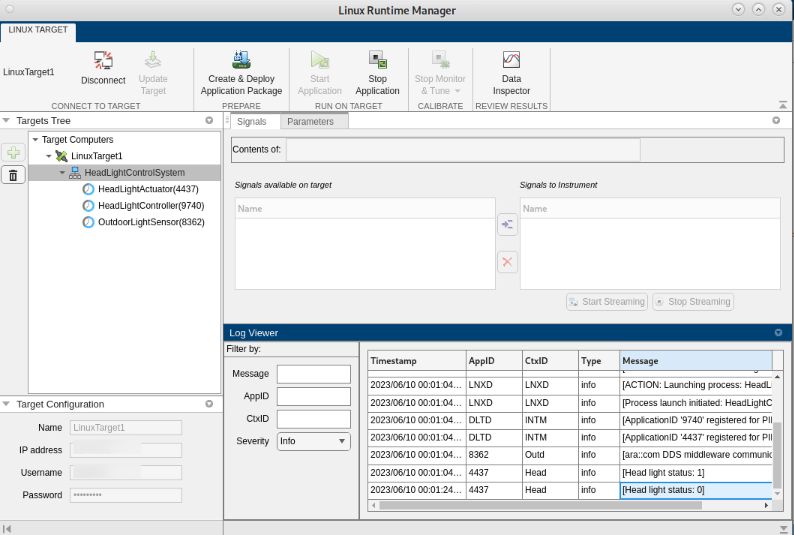
A successful deployment displays a confirmation message in the Linux Runtime Manager diagnostics pane. If the build fails, verify that your Linux target is running and that the toolchain can reach the target via SSH.
Start External Mode Simulation
To monitor and tune OutdoorLightSensor while it communicates with the other components, start external mode on that component and start the remaining executables on the target.
In the Linux Runtime Manager app:
Under the Run section, select
OutdoorLightSensorand choose External Mode as the run mode. This connects your desktop MATLAB session to theOutdoorLightSensorprocess on the target, enabling parameter tuning and signal monitoring.For
HeadLightControllerandHeadLightActuator, select Standalone as the run mode.Click Run All to start all three executables on the target simultaneously.
When external mode connects successfully, the Simulink model on your desktop shows the OutdoorLightSensor component highlighted with a green "External" badge. The Dashboard blocks and scopes in OutdoorLightSensor become live, displaying real-time signal values from the target. HeadLightController and HeadLightActuator run independently on the target without a desktop connection, but they communicate with OutdoorLightSensor through the adaptive event and method bindings.
External mode uses a TCP/IP connection between your desktop and the target. If the connection times out, verify network accessibility to the target and ensure the external mode port (default 17725) is not blocked.
Calibrate and Observe Adaptive Communication
To verify end-to-end adaptive communication, tune the light-level threshold in OutdoorLightSensor and observe the headlight response. The Knob block in OutdoorLightSensor controls the ambient light threshold: values less than 5 represent low-light conditions (headlights turn on), and values greater than 5 represent bright conditions (headlights turn off).
While external mode is active:
In the
OutdoorLightSensorcomponent model, adjust the Knob block to a value of 3. This simulates a low-light condition. The processed light level propagates as an adaptive event toHeadLightController, which determines that headlights should activate and calls the corresponding method onHeadLightActuator.Observe the
HeadLightActuatoroutput indicator. The headlight state changes to ON.Adjust the Knob block to a value of 7. This simulates bright conditions.
HeadLightControllerreceives the updated event and callsHeadLightActuatorto turn headlights OFF.
The round-trip from parameter change to headlight response confirms that adaptive events flow correctly from OutdoorLightSensor to HeadLightController, and that method calls propagate from HeadLightController to HeadLightActuator. The latency you observe depends on the event publishing period configured in the AUTOSAR adaptive manifest and the network characteristics of the Linux target.
You can also monitor signals in real time using Dashboard blocks or Simulation Data Inspector while external mode is active. Any tunable parameter in OutdoorLightSensor downloads immediately to the target executable without stopping or redeploying the application.
Conclusion
You deployed a three-component AUTOSAR adaptive architecture model to a Linux target and used external mode to tune a sensor threshold while adaptive events and methods carried data between components in real time. This workflow validates service-oriented communication without requiring dedicated AUTOSAR adaptive middleware on a physical ECU.
See Also
deployApplicationPackage (Embedded Coder)
Topics
- Build Simulink Model and Deploy Application (Embedded Coder)
- Install Embedded Coder Support Package for Service-Oriented Applications on Linux (Embedded Coder)
- External Mode Simulation of Deployed Applications (Embedded Coder)

