Main Content

Use an Example C Main in an Application

R2026b

This example shows how to build a C executable from MATLAB® code that implements a simple Sobel filter to perform edge detection on images. The executable reads an image from the disk, applies the Sobel filtering algorithm, and then saves the modified image.

The example shows how to generate and modify an example main function that you can use when you build the executable.

Prerequisites

To complete this example, install the following products:

  • MATLAB

  • MATLAB Coder™

  • C compiler (for most platforms, a default C compiler is supplied with MATLAB). For a list of supported compilers, see Supported Compilers.

    You can use mex -setup to change the default compiler. See Change Default Compiler.

Tutorial Files: Sobel Filter

Open this example to obtain the files for this tutorial: sobel.m and hello.jpg.

Description of Tutorial Files

The files you use in this example are:

File NameFile TypeDescription
sobel.mFunction codeMATLAB implementation of a Sobel filtering algorithm. sobel.m takes an image (represented as a double matrix) and a threshold value as inputs. The algorithm detects edges in the image (based on the threshold value). sobel.m returns a modified image displaying the edges.
hello.jpgImage fileImage that the Sobel filter modifies.
function edgeImage = sobel(originalImage, threshold) %#codegen

% edgeImage = sobel(originalImage, threshold)
% Sobel edge detection. Given a normalized image (with double values)
% return an image where the edges are detected w.r.t. threshold value.

assert(all(size(originalImage) <= [1024 1024]));
assert(isa(originalImage, 'double'));
assert(isa(threshold, 'double'));

k = [1 2 1; 0 0 0; -1 -2 -1];
H = conv2(double(originalImage),k, 'same');
V = conv2(double(originalImage),k','same');
E = sqrt(H.*H + V.*V);
edgeImage = uint8((E > threshold) * 255);

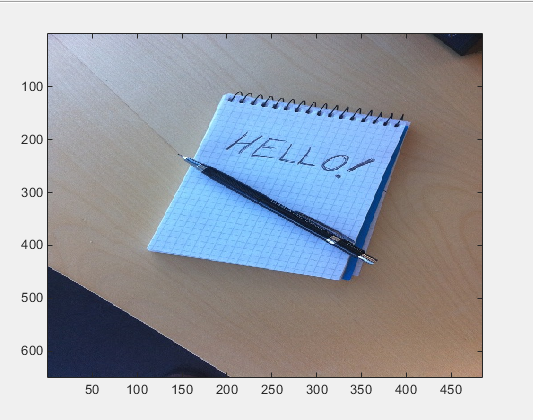
Photograph of the sentence "Hello!" hand-written in large letters on a notepad

Run the Sobel Filter on the Image

  1. Read the original image into a MATLAB matrix and display it.

    im = imread('hello.jpg');
  2. Display the image as a basis for comparison to the result of the Sobel filter.

    image(im);

    Color photograph of the sentence "Hello!", which is hand-written in large letters on a notepad

  3. The Sobel filtering algorithm operates on grayscale images. Convert the color image to an equivalent grayscale image with normalized values (0.0 for black, 1.0 for white).

    gray = (0.2989 * double(im(:,:,1)) + 0.5870 * double(im(:,:,2)) + 0.1140 * double(im(:,:,3)))/255;
  4. To run the MATLAB function for the Sobel filter, pass the grayscale image matrix gray and a threshold value to the function sobel. This example uses 0.7 for a threshold value.

    edgeIm = sobel(gray, 0.7);
  5. To display the modified image, reformat the matrix edgeIm with the function repmat so that you can pass it to the image command.

    im3 = repmat(edgeIm, [1 1 3]);
    image(im3);
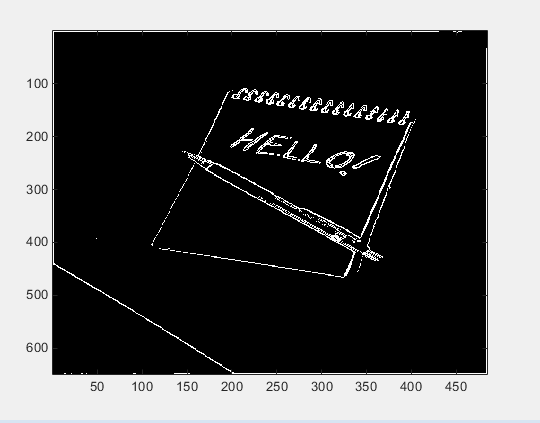
    Greyscale rendering of the color photograph after Sobel filtering. The notepad, the letters in the word "Hello," and the exclamation point are outlined in white on a black background.

Generate and Test a MEX Function

  1. To test that generated code is functionally equivalent to the original MATLAB code and that run-time errors do not occur, generate a MEX function.

    codegen -report sobel

    codegen generates a MEX function named sobel_mex in the current working folder.

  2. To run the MEX function for the Sobel filter, pass the grayscale image matrix gray and a threshold value to the function sobel_mex. This example uses 0.7 for a threshold value.

    edgeImMex = sobel_mex(gray, 0.7);
  3. To display the modified image, reformat the matrix edgeImMex with the function repmat so that you can pass it to the image command.

    im3Mex = repmat(edgeImMex, [1 1 3]);
    image(im3Mex);

    This image is the same as the image created using the MATLAB function.

Generate an Example Main Function for sobel.m

Although you can write a custom main function for your application, an example main function provides a template to help you incorporate the generated code.

To generate an example main function for the Sobel filter:

  1. Create a configuration object for a C static library.

    cfg = coder.config('lib');

    For configuration objects for C/C++ source code, static libraries, dynamic libraries, and executables, the setting GenerateExampleMain controls generation of the example main function. The setting is set to 'GenerateCodeOnly' by default, which generates the example main function but does not compile it. For this example, do not change the value of the GenerateExampleMain setting.

  2. Generate a C static library using the configuration object.

    codegen -report -config cfg sobel

The generated files for the static library are in the folder codegen/lib/sobel. The example main files are in the subfolder codegen/lib/sobel/examples.

/*
 * File: main.c
 *
 */

/*************************************************************************/
/* This automatically generated example C main file shows how to call    */
/* entry-point functions that MATLAB Coder generated. You must customize */
/* this file for your application. Do not modify this file directly.     */
/* Instead, make a copy of this file, modify it, and integrate it into   */
/* your development environment.                                         */
/*                                                                       */
/* This file initializes entry-point function arguments to a default     */
/* size and value before calling the entry-point functions. It does      */
/* not store or use any values returned from the entry-point functions.  */
/* If necessary, it does pre-allocate memory for returned values.        */
/* You can use this file as a starting point for a main function that    */
/* you can deploy in your application.                                   */
/*                                                                       */
/* After you copy the file, and before you deploy it, you must make the  */
/* following changes:                                                    */
/* * For variable-size function arguments, change the example sizes to   */
/* the sizes that your application requires.                             */
/* * Change the example values of function arguments to the values that  */
/* your application requires.                                            */
/* * If the entry-point functions return values, store these values or   */
/* otherwise use them as required by your application.                   */
/*                                                                       */
/*************************************************************************/

/* Include Files */
#include "main.h"
#include "sobel.h"
#include "sobel_emxAPI.h"
#include "sobel_terminate.h"
#include "sobel_types.h"

/* Function Declarations */
static emxArray_real_T *argInit_d1024xd1024_real_T(void);

static double argInit_real_T(void);

static void main_sobel(void);

/* Function Definitions */
/*
 * Arguments    : void
 * Return Type  : emxArray_real_T *
 */
static emxArray_real_T *argInit_d1024xd1024_real_T(void)
{
  emxArray_real_T *result;
  double *result_data;
  int idx0;
  int idx1;
  /* Set the size of the array.
Change this size to the value that the application requires. */
  result = emxCreate_real_T(2, 2);
  result_data = result->data;
  /* Loop over the array to initialize each element. */
  for (idx0 = 0; idx0 < result->size[0U]; idx0++) {
    for (idx1 = 0; idx1 < result->size[1U]; idx1++) {
      /* Set the value of the array element.
Change this value to the value that the application requires. */
      result_data[idx0 + result->size[0] * idx1] = argInit_real_T();
    }
  }
  return result;
}

/*
 * Arguments    : void
 * Return Type  : double
 */
static double argInit_real_T(void)
{
  return 0.0;
}

/*
 * Arguments    : void
 * Return Type  : void
 */
static void main_sobel(void)
{
  emxArray_real_T *originalImage;
  emxArray_uint8_T *edgeImage;
  emxInitArray_uint8_T(&edgeImage, 2);
  /* Initialize function 'sobel' input arguments. */
  /* Initialize function input argument 'originalImage'. */
  originalImage = argInit_d1024xd1024_real_T();
  /* Call the entry-point 'sobel'. */
  sobel(originalImage, argInit_real_T(), edgeImage);
  emxDestroyArray_uint8_T(edgeImage);
  emxDestroyArray_real_T(originalImage);
}

/*
 * Arguments    : int argc
 *                char **argv
 * Return Type  : int
 */
int main(int argc, char **argv)
{
  (void)argc;
  (void)argv;
  /* The initialize function is being called automatically from your entry-point
   * function. So, a call to initialize is not included here. */
  /* Invoke the entry-point functions.
You can call entry-point functions multiple times. */
  main_sobel();
  /* Terminate the application.
You do not need to do this more than one time. */
  sobel_terminate();
  return 0;
}

/*
 * File trailer for main.c
 *
 * [EOF]
 */

Copy the Example Main Files

Do not modify the files main.c and main.h in the examples subfolder. If you do, when you regenerate code, MATLAB Coder does not regenerate the example main files. It warns you that it detects changes to the generated files.

Copy the files main.c and main.h from the folder codegen/lib/sobel/examples to another location. For this example, copy the files to the current working folder. Modify the files in the new location.

Modify the Generated Example Main Function

The example main function declares and initializes data, including dynamically allocated data, to zero values. It calls entry-point functions with arguments set to zero values, but it does not use values returned from the entry-point functions.

The C main function must meet the requirements of your application. This example modifies the example main function to meet the requirements of the Sobel filter application.

This example modifies the file main.c so that the Sobel filter application:

  • Reads in the grayscale image from a binary file.

  • Applies the Sobel filtering algorithm.

  • Saves the modified image to a binary file.

Modify the Function main

Modify the function main to:

  • Accept the file containing the grayscale image data and a threshold value as input arguments.

  • Call the function main_sobel with the address of the grayscale image data stream and the threshold value as input arguments.

In the function main:

  1. Remove the declarations (void)argc and (void)argv.

  2. Declare the variable filename to hold the name of the binary file containing the grayscale image data.

    const char *filename;
  3. Declare the variable threshold to hold the threshold value.

    double threshold;
  4. Declare the variable fd to hold the address of the grayscale image data that the application reads in from filename.

    FILE *fd;
  5. Add an if statement that checks for three arguments.

    if (argc != 3) {
          printf("Expected 2 arguments: filename and threshold\n");
          exit(-1);
    }
  6. Assign the input argument argv[1] for the file containing the grayscale image data to filename.

    filename = argv[1];
  7. Assign the input argument argv[2] for the threshold value to threshold, converting the input from a string to a numeric double.

    threshold = atof(argv[2]);
  8. Open the file containing the grayscale image data whose name is specified in filename. Assign the address of the data stream to fd.

    fd = fopen(filename, "rb");
  9. To verify that the executable can open filename, write an if-statement that exits the program if the value of fd is NULL.

    if (fd == NULL) {
       exit(-1);
    }
  10. Replace the function call for main_sobel by calling main_sobel with input arguments fd and threshold.

    main_sobel(fd, threshold);
  11. Close the grayscale image file after calling sobel_terminate.

    fclose(fd);
int main(int argc, char **argv)
{
  const char *filename;
  double threshold;
  FILE *fd;
  if (argc != 3) {
      printf("Expected 2 arguments: filename and threshold\n");
      exit(-1);
  }
  filename = argv[1];
  threshold = atof(argv[2]);
  
  fd = fopen(filename, "rb");
  if (fd == NULL) {
   exit(-1);
  }

  main_sobel(fd, threshold);
  fclose(fd);
  sobel_terminate();
  
  return 0;
}

Modify the Initialization Function argInit_d1024xd1024_real_T

In the example main file, the function argInit_d1024xd1024_real_T creates a dynamically allocated variable-size array (emxArray) for the image that you pass to the Sobel filter. This function initializes the emxArray to a default size and the elements of the emxArray to 0. It returns the initialized emxArray.

For the Sobel filter application, modify the function to read the grayscale image data from a binary file into the emxArray.

In the function argInit_d1024xd1024_real_T:

  1. Replace the input argument void with the argument FILE *fd. This variable points to the grayscale image data that the function reads in.

    static emxArray_real_T *argInit_d1024xd1024_real_T(FILE *fd)
  2. Change the values of the variables idx0 and idx1 to match the dimensions of the grayscale image matrix gray. These variables hold the size values for the dimensions of the emxArray that argInit_d1024xd1024_real_T creates.

    int idx0 = 484;
    int idx1 = 648;

    MATLAB stores matrix data in column-major format, while C stores matrix data in row-major format. Declare the dimensions accordingly.

  3. Change the values of the emxCreate_real_T function to the image size.

    result = emxCreate_real_T(484, 648);
  4. Define a variable element to hold the values read in from the grayscale image data.

    double element;
  5. Change the for-loop construct to read data points from the normalized image into element by adding an fread command to the inner for-loop.

    fread(&element, 1, sizeof(element), fd);
  6. Inside the for-loop, assign element as the value set for the emxArray data.

    result->data[idx0 + result->size[0] * idx1] = element;
static emxArray_real_T *argInit_d1024xd1024_real_T(FILE *fd)
{
  emxArray_real_T *result;
  double *result_data;
  int idx0 = 484;
  int idx1 = 648;
  /* Set the size of the array.
Change this size to the value that the application requires. */
  double element;
  result = emxCreate_real_T(484, 648);
  result_data = result->data;
  /* Loop over the array to initialize each element. */
  for (idx0 = 0; idx0 < result->size[0U]; idx0++) {
    for (idx1 = 0; idx1 < result->size[1U]; idx1++) {
      /* Set the value of the array element.
Change this value to the value that the application requires. */
      fread(&element, 1, sizeof(element), fd);
      result_data[idx0 + result->size[0] * idx1] = element;
    }
  }
  return result;
}

Write the Function saveImage

The MATLAB function sobel.m interfaces with MATLAB arrays, but the Sobel filter application interfaces with binary files.

To save the image modified by the Sobel filtering algorithm to a binary file, create a function saveImage. The function saveImage writes data from an emxArray into a binary file. It uses a construction that is similar to the one used by the function argInit_d1024xd1024_real_T.

In the file main.c:

  1. Define the function saveImage that takes the address of emxArray edgeImage as an input and has output type void.

    static void saveImage(emxArray_uint8_T *edgeImage)
    {
    }
  2. Define the variables idx0 and idx1 like they are defined in the function argInit_d1024xd1024_real_T.

    int idx;
    int idx1;
  3. Define the variable element to store data read from the emxArray.

    uint8_T element;
  4. Open a binary file edge.bin for writing the modified image. Assign the address of edge.bin to FILE *fd.

    FILE *fd = fopen("edge.bin", "wb");
  5. To verify that the executable can open edge.bin, write an if-statement that exits the program if the value of fd is NULL.

    if (fd == NULL) {
       exit(-1);
    }
  6. Write a nested for-loop construct like the one in the function argInit_d1024xd1024_real_T.

    for (idx0 = 0; idx0 < edgeImage->size[0U]; idx0++)
    {
        for (idx1 = 0; idx1 < edgeImage->size[1U]; idx1++)
        {
        }
    }
  7. Inside the inner for-loop, assign the values from the modified image data to element.

    element = edgeImage->data[idx0 + edgeImage->size[0] * idx1];
  8. After the assignment for element, write the value from element to the file edge.bin.

    fwrite(&element, 1, sizeof(element), fd);
  9. After the for-loop construct, close fd.

    fclose(fd);
static void saveImage(emxArray_uint8_T *edgeImage)
{
  int idx0;
  int idx1;
  uint8_T element;
 
  FILE *fd = fopen("edge.bin", "wb");
 if (fd == NULL) {
   exit(-1);
 }
  /* Loop over the array to save each element. */
  for (idx0 = 0; idx0 < edgeImage->size[0U]; idx0++) {
    for (idx1 = 0; idx1 < edgeImage->size[1U]; idx1++) {
      element = edgeImage->data[idx0 + edgeImage->size[0] * idx1];
      fwrite(&element, 1, sizeof(element), fd);
    }
  }
  fclose(fd);
}

Modify the Function main_sobel

In the example main function, the function main_sobel creates emxArrays for the data for the grayscale and modified images. It calls the function argInit_d1024xd1024_real_T to initialize the emxArray for the grayscale image. main_sobel passes both emxArrays and the threshold value of 0 that the initialization function argInit_real_T returns to the function sobel. When the function main_sobel ends, it discards the result of the function sobel.

For the Sobel filter application, modify the function main_sobel to:

  • Take the address of the grayscale image data and the threshold value as inputs.

  • Read the data from the address using argInit_d1024xd1024_real_T.

  • Pass the data to the Sobel filtering algorithm with the threshold value threshold.

  • Save the result using saveImage.

In the function main_sobel:

  1. Replace the input arguments to the function with the arguments FILE *fd and double threshold.

    static void main_sobel(FILE *fd, double threshold)
  2. Pass the input argument fd to the function call for argInit_d1024xd1024_real_T.

    originalImage = argInit_d1024xd1024_real_T(fd);
  3. Replace the threshold value input in the function call to sobel with threshold.

    sobel(originalImage, threshold, edgeImage);
  4. After calling the function sobel, call the function saveImage with the input edgeImage.

    saveImage(edgeImage);
static void main_sobel(FILE *fd, double threshold)
{
  emxArray_real_T *originalImage;
  emxArray_uint8_T *edgeImage;
  emxInitArray_uint8_T(&edgeImage, 2);
  /* Initialize function 'sobel' input arguments. */
  /* Initialize function input argument 'originalImage'. */
  originalImage = argInit_d1024xd1024_real_T(fd);
  /* Call the entry-point 'sobel'. */
  sobel(originalImage, threshold, edgeImage);
  saveImage(edgeImage);
    
  emxDestroyArray_uint8_T(edgeImage);
  emxDestroyArray_real_T(originalImage);
}

Modify the Function Declarations

To match the changes that you made to the function definitions, make the following changes to the function declarations:

  1. Change the input of the function *argInit_d1024xd1024_real_T to FILE *fd.

    static emxArray_real_T *argInit_d1024xd1024_real_T(FILE *fd);
  2. Change the inputs of the function main_sobel to FILE *fd and double threshold.

    static void main_sobel(FILE *fd, double threshold);
  3. Add the function saveImage.

    static void saveImage(emxArray_uint8_T *edgeImage);
/* Function Declarations */
static emxArray_real_T *argInit_d1024xd1024_real_T(FILE *fd);
static void saveImage(emxArray_uint8_T *edgeImage);
static double argInit_real_T(void);
static void main_sobel(FILE *fd, double threshold);

Modify the Include Files

For input/output functions that you use in main.c, add the header file stdio.h to the included files list.

#include <stdio.h>
/* Include Files */
#include <stdio.h>

#include "sobel.h"
#include "main.h"
#include "sobel_terminate.h"
#include "sobel_emxAPI.h"
#include "sobel_initialize.h"

Contents of Modified File main.c

/*
 * File: main.c
 *
 */

/*************************************************************************/
/* This automatically generated example C main file shows how to call    */
/* entry-point functions that MATLAB Coder generated. You must customize */
/* this file for your application. Do not modify this file directly.     */
/* Instead, make a copy of this file, modify it, and integrate it into   */
/* your development environment.                                         */
/*                                                                       */
/* This file initializes entry-point function arguments to a default     */
/* size and value before calling the entry-point functions. It does      */
/* not store or use any values returned from the entry-point functions.  */
/* If necessary, it does pre-allocate memory for returned values.        */
/* You can use this file as a starting point for a main function that    */
/* you can deploy in your application.                                   */
/*                                                                       */
/* After you copy the file, and before you deploy it, you must make the  */
/* following changes:                                                    */
/* * For variable-size function arguments, change the example sizes to   */
/* the sizes that your application requires.                             */
/* * Change the example values of function arguments to the values that  */
/* your application requires.                                            */
/* * If the entry-point functions return values, store these values or   */
/* otherwise use them as required by your application.                   */
/*                                                                       */
/*************************************************************************/

/* Include Files */
#include <stdio.h>
#include "main.h"
#include "sobel.h"
#include "sobel_emxAPI.h"
#include "sobel_terminate.h"
#include "sobel_types.h"

/* Function Declarations */
static emxArray_real_T *argInit_d1024xd1024_real_T(FILE *fd);
static void saveImage(emxArray_uint8_T *edgeImage);
static double argInit_real_T(void);
static void main_sobel(FILE *fd, double threshold);

/* Function Definitions */
/*
 * Arguments    : void
 * Return Type  : emxArray_real_T *
 */
static emxArray_real_T *argInit_d1024xd1024_real_T(FILE *fd)
{
  emxArray_real_T *result;
  double *result_data;
  int idx0 = 484;
  int idx1 = 648;
  /* Set the size of the array.
  Change this size to the value that the application requires. */
  double element;
  result = emxCreate_real_T(484, 648);
  result_data = result->data;
  /* Loop over the array to initialize each element. */
  for (idx0 = 0; idx0 < result->size[0U]; idx0++) {
    for (idx1 = 0; idx1 < result->size[1U]; idx1++) {
      /* Set the value of the array element.
  Change this value to the value that the application requires. */
      fread(&element, 1, sizeof(element), fd);
      result_data[idx0 + result->size[0] * idx1] = element;
    }
  }
  return result;
}

static void saveImage(emxArray_uint8_T *edgeImage)
{
  int idx0;
  int idx1;
  uint8_T element;
 
  FILE *fd = fopen("edge.bin", "wb");
 if (fd == NULL) {
   exit(-1);
 }
  /* Loop over the array to save each element. */
  for (idx0 = 0; idx0 < edgeImage->size[0U]; idx0++) {
    for (idx1 = 0; idx1 < edgeImage->size[1U]; idx1++) {
      element = edgeImage->data[idx0 + edgeImage->size[0] * idx1];
      fwrite(&element, 1, sizeof(element), fd);
    }
  }
  fclose(fd);
}

/*
 * Arguments    : void
 * Return Type  : double
 */
static double argInit_real_T(void)
{
  return 0.0;
}

/*
 * Arguments    : void
 * Return Type  : void
 */
static void main_sobel(FILE *fd, double threshold)
{
  emxArray_real_T *originalImage;
  emxArray_uint8_T *edgeImage;
  emxInitArray_uint8_T(&edgeImage, 2);
  /* Initialize function 'sobel' input arguments. */
  /* Initialize function input argument 'originalImage'. */
  originalImage = argInit_d1024xd1024_real_T(fd);
  /* Call the entry-point 'sobel'. */
  sobel(originalImage, threshold, edgeImage);
  saveImage(edgeImage);
    
  emxDestroyArray_uint8_T(edgeImage);
  emxDestroyArray_real_T(originalImage);
}

/*
 * Arguments    : int argc
 *                char **argv
 * Return Type  : int
 */
int main(int argc, char **argv)
{
  const char *filename;
  double threshold;
  FILE *fd;
  if (argc != 3) {
      printf("Expected 2 arguments: filename and threshold\n");
      exit(-1);
  }
  filename = argv[1];
  threshold = atof(argv[2]);
  
  fd = fopen(filename, "rb");
  if (fd == NULL) {
   exit(-1);
  }

  /* The initialize function is being called automatically from your entry-point
   * function. So, a call to initialize is not included here. */
  /* Invoke the entry-point functions.
You can call entry-point functions multiple times. */
  main_sobel(fd, threshold);
    fclose(fd);
  /* Terminate the application.
You do not need to do this more than one time. */
  sobel_terminate();
  return 0;
}

/*
 * File trailer for main.c
 *
 * [EOF]
 */

Generate the Sobel Filter Application

  1. Navigate to the working folder if you are not currently in it.

  2. Create a configuration object for a C standalone executable.

    cfg = coder.config('exe');
  3. Generate a C standalone executable for the Sobel filter using the configuration object and the modified main function.

    codegen -report -config cfg sobel main.c main.h

By default, if you are running MATLAB on a Windows® platform, the executable sobel.exe is generated in the current working folder. If you are running MATLAB on a platform other than Windows, the file extension is the corresponding extension for that platform. By default, the code generated for the executable is in the folder codegen/exe/sobel.

Run the Sobel Filter Application

  1. Create the MATLAB matrix gray if it is not currently in your MATLAB workspace:

    im = imread('hello.jpg');
    gray = (0.2989 * double(im(:,:,1)) + 0.5870 * double(im(:,:,2)) + 0.1140 * double(im(:,:,3)))/255;
  2. Write the matrix gray into a binary file using the fopen and fwrite commands. The application reads in this binary file.

    fid = fopen('gray.bin', 'w');
    fwrite(fid, gray, 'double');
    fclose(fid);
  3. Run the executable, passing to it the file gray.bin and the threshold value 0.7.

    To run the example in MATLAB on a Windows platform:

    system('sobel.exe gray.bin 0.7');

    The executable generates the file edge.bin.

Display the Resulting Image

  1. Read the file edge.bin into a MATLAB matrix edgeImExe using the fopen and fread commands.

    fd = fopen('edge.bin', 'r');
    edgeImExe = fread(fd, size(gray), 'uint8');
    fclose(fd);
  2. Pass the matrix edgeImExe to the function repmat and display the image.

    im3Exe = repmat(edgeImExe, [1 1 3]);
    image(im3Exe);

    The image matches the images from the MATLAB and MEX functions.

See Also

Topics