N-Ratio Unbuffer
R2026bN-Ratio Unbuffer block

To add a block to a model, double-click the canvas and start typing the block name. Then, select the block from the list.
Libraries:
DSP System Toolbox /
Signal Management /
Buffers
Description
The N-Ratio Unbuffer block unbuffers data into blocks of length equal to integer N factors of the input frame length. The integer ratio N between the input frame length and the output frame length is given by the Input-to-output frame length ratio parameter.
Here is an illustration that shows how the block unbuffers the data into the specified size.
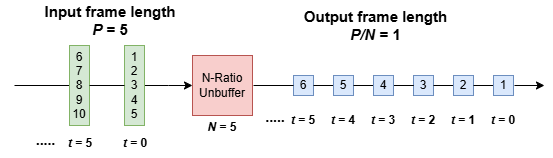
The N-Ratio Unbuffer block optimizes the memory used in the generated code for P- to P/N- frame conversion.
Examples
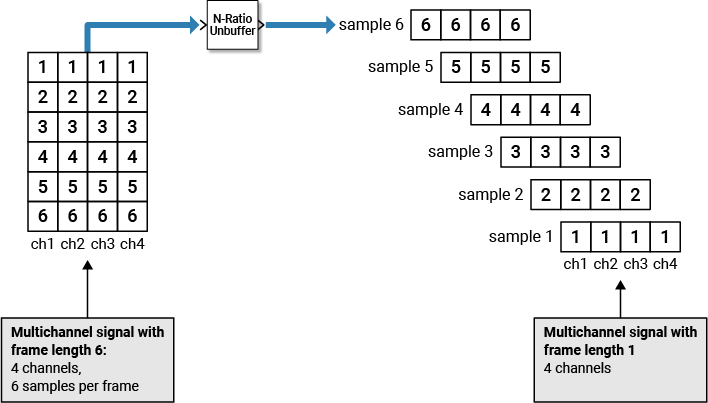
Use the N-Ratio Unbuffer block to unbuffer multichannel signals of frame length N into multichannel signals of frame length 1, where N is a positive integer greater than 1.
This figure is a graphical representation of the unbuffering process.
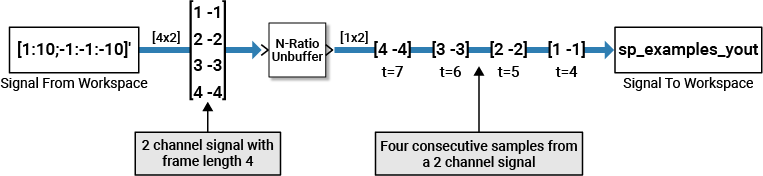
In this example, a two-channel signal with 4 samples per frame is unbuffered into a two-channel signal with 1 sample per frame using the N-Ratio Unbuffer block.
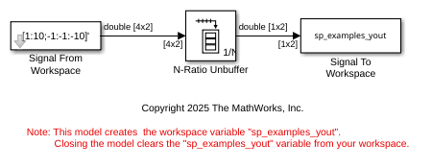
Open the ex_nratiounbuffer_tut model. In this model, the parameters of the Signal From Workspace block have the following values:
Signal = [1:10;-1:-1:-10]'
Sample time = 1
Samples per frame = 4
Form output after final data value by =
Setting to zero
Based on these parameters, the Signal From Workspace block outputs a two-channel signal with a frame length of 4. Save these parameters and close the dialog box by clicking OK.
Double-click the N-Ratio Unbuffer block and set the Input-to-output frame length ratio to 4. The N-Ratio Unbuffer block outputs a signal with a frame length of 1.
Run the model.
The following figure is a graphical representation of what happens when you simulate the model.
Ports
Input
Output
Parameters
Block Characteristics
Data Types |
|
Direct Feedthrough |
|
Multidimensional Signals |
|
Variable-Size Signals |
|
Zero-Crossing Detection |
|

