Generate External C Code to Monitor and Tune Model Data
R2026bThis example shows how to use code descriptor APIs to automatically generate interface code that monitors and tunes data such as signals, states, and parameters in a Simulink® model. You can retrieve information from the generated C code such as variable expressions and entry point function prototypes. You can then write MATLAB® code that translates this information into external code that you can integrate with the generated model code.
Open Example Model
Open the example model CapiSigsParams.
model = "CapiSigsParams";
open_system(model);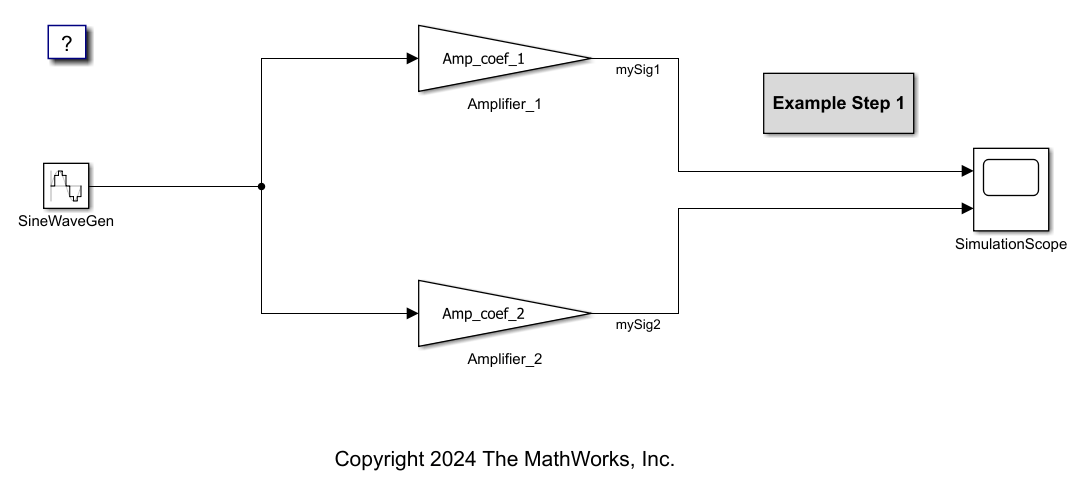
The model contains two Gain blocks, Amplifier_1 and Amplifier_2, that amplify the signal SineWaveGen from the Sine Wave block. The Gain blocks have gain parameters Amp_coef_1 and Amp_coef_2, initialized to –1.0 and 2.0, and output signals mySig1 and mySig2, respectively.
Generate Model Code
To prevent the code generator from optimizing away model signals and parameters, disable the following settings.
Open the Configuration Parameters dialog box. Navigate to the Code Generation > Optimization pane.
From the Default parameter behavior list, select
Tunable.Expand Advanced parameters and clear Signal storage reuse.
Click Apply.
Alternatively, enter the following at the MATLAB command prompt:
set_param(model,DefaultParameterBehavior="Tunable");
set_param(model,OptimizeBlockIOStorage="off");
Generate code for the model, but do not compile the generated code.
evalc("slbuild(model, GenerateCodeOnly=true)");Get Code Expressions for Addressable Variables in Generated Code
In getAddressableVars.m, the getAddressableVars function uses code descriptor APIs to retrieve a list of expressions for addressable (in-memory) variables in the generated code.
The function prototype requires these arguments:
codeDescObj: Code descriptor object describing the model of interestinterfaceTypes: Types of data for which you want to retrieve a list of expressions and addresses
function [expressions, addresses] = getAddressableVars(codeDescObj, interfaceTypes)
The function body performs these steps:
Loop over all interface types available to
codeDescObjand get a list ofDataInterfaceobjects of each specified type.Loop over all
DataInterfaceobjects of a given type and retrieve theirImplementationfield.Check whether the data element associated with each
DataImplementationobject exists and is defined in the generated code. If it does, check whether the data element has internal (static) linkage. Data elements with internal linkage are not visible outside their translation unit (such as in an external main file), and are ignored for this example.Record C expressions and addresses for each eligible data element.
for i = 1:length(interfaceTypes)
    interfaces = codeDescObj.getDataInterfaces(interfaceTypes{i});

    for j = 1:length(interfaces)
        impl = interfaces(j).Implementation;

        if isempty(impl) || ~impl.isDefined()
            continue;
        end

        if isa(impl, 'coder.descriptor.Variable') && contains(impl.StorageSpecifier,'static')
            continue;
        end

        expressions{end+1} = impl.getExpression();
        addresses{end+1} = impl.getAddress();
    end
end
Get a code descriptor object to the model.
codeDescObj = coder.getCodeDescriptor(model);
Call getAddressableVars on the code descriptor object, specifying ModelParameters and InternalData (signals and states) as the target interface types.
[expressions, addresses] = getAddressableVars(codeDescObj, {'ModelParameters','InternalData'});
expressions'
ans = 8×1 cell
{'CapiSigsParams_P.Amp_coef_2' }
{'CapiSigsParams_P.Amp_coef_1' }
{'CapiSigsParams_DW.lastSin' }
{'CapiSigsParams_DW.lastCos' }
{'CapiSigsParams_DW.systemEnable'}
{'CapiSigsParams_B.SineWaveGen' }
{'CapiSigsParams_B.mySig1' }
{'CapiSigsParams_B.mySig2' }
addresses'
ans = 8×1 cell
    {'&(CapiSigsParams_P.Amp_coef_2)'   }
    {'&(CapiSigsParams_P.Amp_coef_1)'   }
    {'&(CapiSigsParams_DW.lastSin)'     }
    {'&(CapiSigsParams_DW.lastCos)'     }
    {'&(CapiSigsParams_DW.systemEnable)'}
    {'&(CapiSigsParams_B.SineWaveGen)'  }
    {'&(CapiSigsParams_B.mySig1)'       }
    {'&(CapiSigsParams_B.mySig2)'       }
According to the output, the generated code contains these addressable variables:
Model parameters
Amp_coef_1andAmp_coef_2, corresponding to the gains of the two Gain blocksStates
lastSinandlastCos, which record values of the sine and cosine wave at the previous timestep, andsystemEnable, which enables the simulation to start and remains zero during the simulationSignals
SineWaveGen,mySig1, andmySig2, corresponding to the output signals of the Sine Wave block and Gain blocks
Get Prototypes for Entry Point Functions in Generated Code
To generate external code that interfaces with the generated model code, you must retrieve expressions for calls to model entry point functions. This example assumes each entry point function has a void-void prototype, so that you can use the prototype as the function call without further processing.
In getEntryPointPrototypes.m, the getEntryPointPrototypes function uses code descriptor APIs to retrieve prototypes for model initialize, step, and terminate functions in the generated code.
The function prototype takes a code descriptor object codeDescObj as argument.
function [prototypes] = getEntryPointPrototypes(codeDescObj)
The function body performs these steps:
Specify that code descriptor should get function interfaces of type
Initialize,Output, andTerminate.Loop over the specified function interface types and get a list of
FunctionInterfaceobjects of each type.Loop over all
FunctionInterfaceobjects of a given type and assemble the function prototype from thePrototype.Namefield.
funcTypes = {'Initialize', 'Output', 'Terminate'};
numTypes = numel(funcTypes);

prototypes = cell(numTypes,1);
for i = 1:numTypes
    interfaces = codeDescObj.getFunctionInterfaces(funcTypes{i});

    for j = 1:length(interfaces)
        prototypes{i,j} = [interfaces(j).Prototype.Name,'()'];
    end
end
Call getEntryPointPrototypes on the code descriptor object, which returns prototypes for the model initialize, step, and terminate functions.
prototypes = getEntryPointPrototypes(codeDescObj)
prototypes = 3×1 cell
    {'CapiSigsParams_initialize()'}
    {'CapiSigsParams_step()'      }
    {'CapiSigsParams_terminate()' }
Generate External Code to Interface with Model Code
Call the generateMain script, which uses the fprintf function (alternatively, you can use writelines with sprintf) to generate an external file grt_main.c from the code descriptor output (data expressions, data addresses, and function prototypes).
generateMain;
Examine the generated main file. Besides calling the entry point functions, the main function calls:
setParamat the 60th timestep, setting the value ofCapiSigsParams_P.Amp_coef_1to1.0logDataevery 30 timesteps, printing the value of model data tostdout
file = fullfile("CapiSigsParams_grt_rtw","grt_main.c");
coder.example.extractLines(file, "#include <stdio.h>", "//EOF", 1, 0);
#include <stdio.h>
#include "rtwtypes.h"
#include "CapiSigsParams.h"

void setParam(real_T* addr, real_T val) {
    *addr = val;
}

void logData(int step) {
    printf("Model time step %d: ", step);
    printf("CapiSigsParams_P.Amp_coef_2 = %lf, ", CapiSigsParams_P.Amp_coef_2);
    printf("CapiSigsParams_P.Amp_coef_1 = %lf, ", CapiSigsParams_P.Amp_coef_1);
    printf("CapiSigsParams_DW.lastSin = %lf, ", CapiSigsParams_DW.lastSin);
    printf("CapiSigsParams_DW.lastCos = %lf, ", CapiSigsParams_DW.lastCos);
    printf("CapiSigsParams_DW.systemEnable = %lf, ", CapiSigsParams_DW.systemEnable);
    printf("CapiSigsParams_B.SineWaveGen = %lf, ", CapiSigsParams_B.SineWaveGen);
    printf("CapiSigsParams_B.mySig1 = %lf, ", CapiSigsParams_B.mySig1);
    printf("CapiSigsParams_B.mySig2 = %lf\n", CapiSigsParams_B.mySig2);
}

int main() {
    /* Initialize model */
    CapiSigsParams_initialize();

    for (int step = 0; step < 100; ++step) {
        CapiSigsParams_step();
        if (step == 60) setParam(&(CapiSigsParams_P.Amp_coef_2), 1.0);
        if (!(step%30)) logData(step);
    }

    /* Terminate model */
    CapiSigsParams_terminate();

    return 0;
}
Compile Code and Run Executable
Integrate grt_main.c into the generated model code. To do so, you can write a custom file grt_make_rtw_hook.m that specifies grt_main.c as:
A custom main file, replacing the default main file
An additional source file to link and compile with the generated model code
A sample hook file is shown below:
function grt_make_rtw_hook(hookMethod, modelName, rtwRoot, templateMakefile, buildOpts, buildArgs, buildInfo)
    switch hookMethod
        case 'after_tlc'
            setTargetProvidesMain(buildInfo, true);

            addSourceFiles(buildInfo, ...
                'grt_main.c', ...
                '$(START_DIR)\CapiSigsParams_grt_rtw', ...
                'CustomCode');
    end
end
Compile the generated code and run the generated executable. For instance, on Windows®:
codebuild('CapiSigsParams_grt_rtw')
!CapiSigsParams.exe
At the 60th timestep, observe that the value of CapiSigsParams_P.Amp_coef_1 becomes 1.0, while the value of CapiSigsParams_P.Amp_coef_2 remains constant.
See Also
getCodeDescriptor | getDataInterfaces | getDataInterfaceTypes | getFunctionInterfaces | getAddress | getExpression | isDefined

