Use Custom Data Type Override Settings for Range Collection
This example shows how to specify custom data type override settings to use during the range collection step in the Fixed-Point Tool.
By default, the Fixed-Point Tool honors the data types and any data type override specified on the model. You can use the Fixed-Point Tool to override data types in your model with doubles, singles, or scaled doubles. To specify custom data type overrides for elements within your model, use the set_param function.
Load a Simple Model
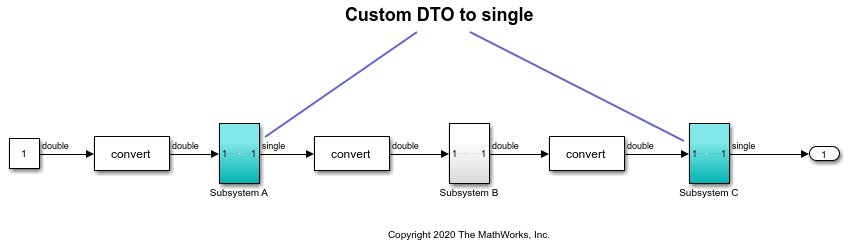
Open the fxp_custom_dto model. The model consists of three subsystems. Update the diagram (Ctrl+D) to display the data types currently set on the model.
open_system('fxp_custom_dto')

The original model uses the double-precision data type for each of the three subsystems within the model.
Override Data Types for a Subsystem
To override the data types in Subsystem A and Subsystem C with singles, use the set_param function:
set_param('fxp_custom_dto/Subsystem A','DataTypeOverride','Single');
set_param('fxp_custom_dto/Subsystem C','DataTypeOverride','Single');
Update the diagram and inspect the model to confirm that the data type override has been applied.
Collect Ranges Using the Fixed-Point Tool
In the Apps tab of the fxp_custom_dto model, select Fixed-Point Tool.
In the Fixed-Point Tool, select New > Range Collection. Under System Under Design (SUD), select fxp_custom_dto. Under Range Collection Mode, select Simulation Ranges.
Under Collect Ranges, select Use current settings. Click Collect Ranges.
The Fixed-Point Tool collects ranges via simulation using the current data type override applied to your model. In this example, the data types of Subsystem A and Subsystem C are overrode with singles, and Subsystem B remains in double precision.
Verify Data Type Override Settings
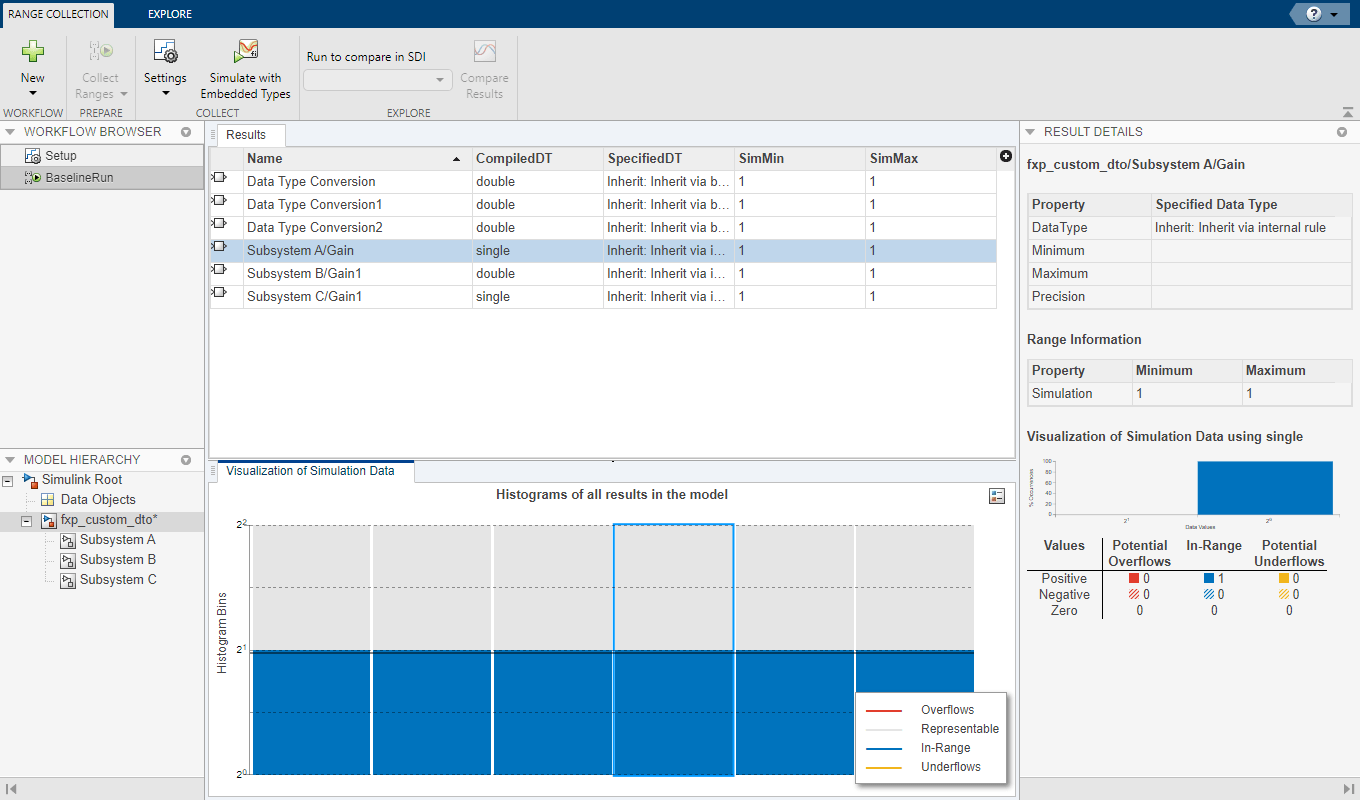
To verify that the custom data type override settings specified using the set_param function were applied to the model during the range collection run, inspect the Results spreadsheet in the Fixed-Point Tool.
The compiled data type (CompiledDT) column for BaselineRun shows that Subsystem A and Subsystem C used the single data type, while the rest of the model was simulation using the double data type.
See Also
Fixed-Point Instrumentation and Data Type Override | Model References in Fixed-Point Tool Workflows

