Critical Path Estimation Without Running Synthesis
The critical path is the combinational path between an input and output that has the maximum timing delay. To find the critical path in your design, use HDL Coder™. To make the critical path timing meet the target frequency that you want your design to achieve, break the critical path by adding delays. The additional delays increase the latency and register usage on the target hardware.
To quickly identify the most likely critical path in your design, use critical path estimation. You then do not have to run synthesis or generate HDL code. Critical path estimation speeds up this iterative process of finding the critical path. It optimizes the critical path until your design timing meets the target frequency that you want.
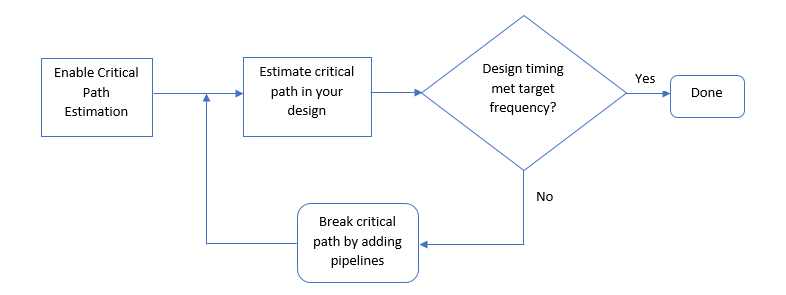
Critical path estimation speeds up the design iteration process. Critical path estimation is an alternative to annotating the critical path by performing FPGA Synthesis and Analysis with the HDL Workflow Advisor.
Critical Path Estimation Process
HDL Coder finds the estimated critical path by performing static timing analysis
with timing data from target-specific timing databases. Generate timing databases
for a specified target device family, target device speed grade, and target tool by
using the genhdltdb function. By default, HDL Coder has timing databases for these target devices:
Altera® Cyclone V
Intel® Stratix V
Xilinx® Artix®-7, speed grade -1
Xilinx Kintex®-7, speed grade -1
Xilinx Kintex UltraScale™, speed grade -1
Xilinx Virtex®-4, speed grade -10
Xilinx Virtex-7, speed grade -1
Xilinx Zynq®, speed grade -1
Xilinx Zynq UltraScale+™, speed grade -1
To create timing databases, HDL Coder characterizes basic design components, such as Simulink® blocks, block architectures, and subcomponents of those blocks, for specific target devices.
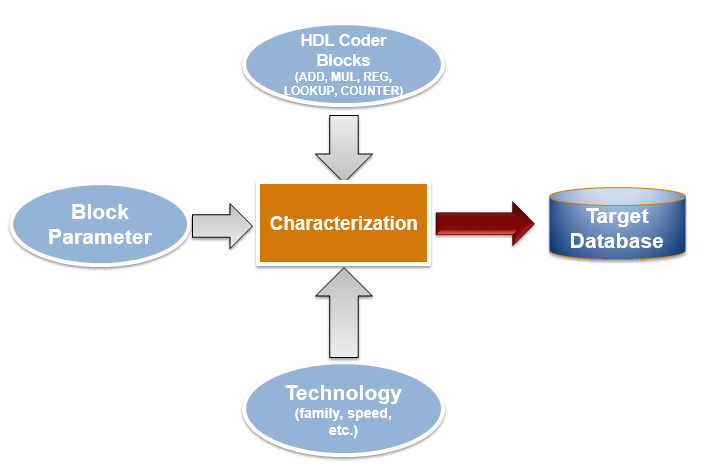
The code generator analyzes your model design to decompose it into the blocks and subcomponents in the timing databases. If your design consists of blocks or subcomponents in the timing databases, the code generator can estimate the timing critical path more accurately. If your design uses components that are not in the timing databases, a separate highlighting script is generated to show the uncharacterized blocks. If the timing data is incomplete for parts of your design, it is possible that the estimated critical path does not match your actual critical path.
If your target hardware is one of the target devices supported for critical path estimation, the timing numbers and estimated critical path are more accurate. If your target hardware is not a supported device, or is not in the same device family, you can estimate the critical path, but it is possible that the timing numbers are not accurate.
Use Critical Path Estimation
You can estimate the critical path for your design in the Configuration Parameters dialog box or at the command line. To estimate the critical path in the Configuration Parameters dialog box:
Enable generation of critical path estimation report.
In the Apps tab, select HDL Coder.
In the HDL Code tab, select Settings > Report Options, and then select Generate high-level timing critical path report.
Set the path of the generated timing databases for your target device. In the Configuration Parameters dialog box, on the HDL Code Generation > Report pane, select the Generate high-level timing critical path report parameter, and then set the path of your generated timing databases by clicking Browse and selecting the target folder.
By default, the target folder shows some of the saved timing database folders based on your target configuration. If the Custom Timing Database Directory box is empty or the target configuration has no timing databases, by default, HDL Coder uses timing databases for the Xilinx Virtex -7, speed grade -1 device to generate the critical path estimation report.
You can also generate timing databases for a specified target device family, target device speed grade, and target tool by using the
genhdltdbfunction.To generate a critical path estimation report without generating HDL code for your model, in the HDL Code Generation > Global Settings > Advanced tab, clear the Generate HDL Code check box.
You do not have to run the complete code generation process to estimate the critical path in your design. This saves time in estimating the critical path, especially for large models.
To generate a critical path estimation report, run
makehdlon your design.
HDL Coder generates a critical path estimation report and displays messages in the MATLAB® Command Window that include a link to a highlighting script and a script that clears the highlighting.
To generate the report at the command line, use this code. Specify the
modelname and dutname variables based on
the design for which you want to estimate the critical path. Set the path of the
generated timing databases for your target device by using the hdlset_param function. When you
enable the generation of the critical path estimation report and do not set the
timing database path for a target device, HDL Coder searches for the default timing databases for the specified target
device family and target device speed grade. If timing databases for the specified
target device are not available, by default, HDL Coder uses timing databases for the Xilinx
Virtex-7, speed grade -1 device to generate the critical path estimation
report. This example uses the sfir_single model.
% Specify model and subsystem names
modelname = 'sfir_single';
dutname = 'sfir_single/symmetric_fir';
open_system(modelname)

% Disable HDL code generation for faster generation
% of critical path estimation report
hdlset_param(modelname,'CriticalPathEstimation','on');
hdlset_param(modelname,'GenerateHDLCode','off');

% If design contains single data types,
% enable native floating-point support
fpconfig = hdlcoder.createFloatingPointTargetConfig('NativeFloatingPoint');
hdlset_param(modelname,'FloatingPointTargetConfig',fpconfig);

% Set path of generated timing databases for target device
hdlset_param(modelname,'TimingDatabaseDirectory','C:\Work\Database');

% Generate report
makehdl(dutname)
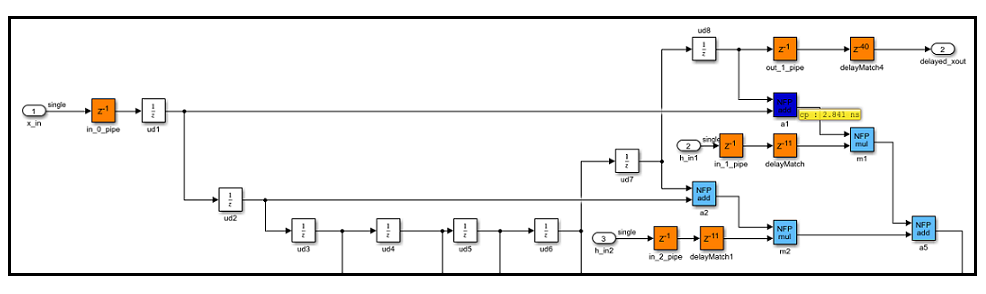
When you click the link to the criticalpathestimated script,
the code generator highlights the critical path in the generated model. In the
generated model, you see the critical path timing information and blocks that are on
this path. This figure shows a section of a Simulink model that has the critical path annotated. The native floating-point
operators are highlighted in light blue and the delays are highlighted in orange.
The block that is part of the critical path is highlighted in dark blue with the
critical path value annotated beside the block. For more information, see Generated Model and Validation Model.
You can clear the highlighting by clicking the link to the
clearhighlighting script.
To optimize the critical path, break the critical path by adding pipeline
registers. If you select Use Floating Point to use native
floating point, set the LatencyStrategy to
Max to improve timing. Regenerate the critical path
estimation report and the script that highlights the critical path in your design.
You can repeat this process until your design timing meets the target frequency that
you want.
Characterized Blocks
A subset of Simulink blocks can be characterized with fixed-point and single-precision native floating-point types. These blocks are part of the timing database for each supported target device. When you generate a code generation reports, the Critical Path Estimation section includes a list of any blocks that could not be characterized.
If you have a MATLAB function block in your design and the HDL
Block Property Architecture is set to MATLAB
Function, when estimating the critical path and generating HDL
code, you might see the MATLAB function block appear as an
uncharacterized block in the code generation reports. To characterize the
MATLAB function block, set the Architecture
to MATLAB Datapath.
When you use MATLAB Function blocks and generate code by using the
MATLAB Datapath architecture, HDL Coder converts the MATLAB algorithm to a Simulink block diagram in the generated model. In the generated model, critical
path estimation can annotate the critical path inside the MATLAB
Function block and across the MATLAB Function block
boundary with other Simulink blocks. See also HDL Optimizations Across MATLAB Function Block Boundary Using MATLAB Datapath Architecture.
Considerations
Critical Path Estimation for Multirate Models
Critical path estimation does not consider the clock-gating information to different sequential elements in your design.
If your model contains multiple sample rates or uses speed and area optimizations that insert pipeline registers, your design becomes multirate and can have multicycle paths. For multirate models, critical path estimation treats the slow and fast data paths as running at the same rate. A data path that has a faster clock-rate might be highlighted as the critical path when the design has another data path at a slower rate. This issue might cause critical path estimation to report inaccurate timing results.
To verify the estimated critical path information, open the HDL Workflow
Advisor and run the Generic ASIC/FPGA workflow for
your target device to the Annotate model with synthesis
result task.
Critical Path Estimation in Native Floating Point Mode
If you have single data types in your design and you use
the Native Floating Point mode by selecting Use
Floating Point, the critical path estimation script sometimes
highlights a single floating-point operator in the generated model. The code
generator highlights a single block because floating-point algorithms are
computation-intensive. The critical path can be an internal register-to-register
path within the floating-point operator.
In this case, to optimize the critical path timing, set the
LatencyStrategy to Max for
the Simulink block corresponding to that operator.
Simulink blocks that use half-precision data types do not participate in
critical path estimation. These blocks are highlighted by using the 0
ns timing delay.
Inaccuracy in Critical Path Estimation
Critical path estimation tries to account for routing delays by using an estimation factor. Without running place and route, it is difficult to accurately account for routing delays.
HDL Coder infers uncharacterized blocks that are combinational in nature as zero-delay combinational blocks. The code generator treats other blocks as registers.
See Also
hdlcoder.FloatingPointTargetConfig | makehdl | genhdltdb | hdlcoder.TimingGenerator

