Replace Arithmetic Operation to Generate Efficient HDL and High-Level Synthesis Code
R2026bBest practices when using division operation in your MATLAB® code for HDL and High-Level Synthesis (HLS) code generation.
Division Operation
One of the fundamental arithmetic operation, division is found in many applications including vector normalization and matrix decomposition. The example starts with floating-point division operation and use fixed-point conversion to map division into efficient implementations before generating code.
Division Using Cordic Algorithm
Cordic algorithm is one of the hardware efficient algorithms for division operations that require only shift-add operations. You can use fixed.cordicDivide method supported for fixed-point data type in MATLAB to generate efficient code.
To facilitate automatic replacement of division operation with fixed.cordicDivide function:
Write the division operation into a separate function called
divide_op.
function y = divide_example(u, v)
  y = divide_op(u, v);
end

function y = divide_op(u, v)
 y = u / v;
end
Replace the
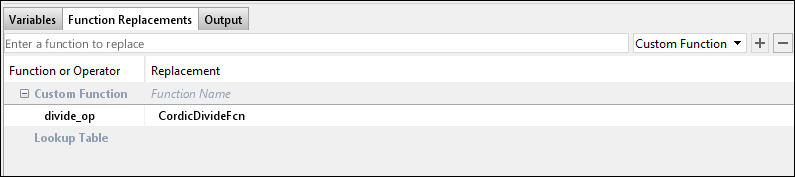
divide_opfunction withCordicDivideFcnwhen converting from floating-point type to fixed-point data type.
function y = CordicDivideFcn(a, b)
 y = fixed.cordicDivide(a, b, numerictype(0,14,14));
end
Perform fixed-point conversion and generate HLS code by using these commands.
% Create HLS configuration object
hlscfg = coder.config("hls");
hlscfg.DesignFunctionName = "divide_example";
hlscfg.TestBenchName = "divide_example_tb";

% Create float to fixed configuration object
cfg = coder.config("fixpt");
cfg.TestBenchName = "divide_example_tb.m";
cfg.LogIOForComparisonPlotting = true;
cfg.TestNumerics = true;
cfg.PlotWithSimulationDataInspector = true;

% Replace divide_op with cordic divide function
cfg.addFunctionReplacement("divide_op", "CordicDivideFcn");

% Invoke fixed-point conversion and generate HLS code
codegen -float2fixed cfg divide_example -config hlscfg -args {0,0}
===================================================
Design Name: divide_example
Test Bench Name: divide_example_tb
===================================================


============= Step1: Analyze Floating-Point Code ==============

Code generation successful.


============= Step1a: Verify Floating-Point Code ==============

### Analyzing the design 'divide_example'
### Analyzing the test bench(es) 'divide_example_tb'
### Begin Floating-Point Simulation (Instrumented)
### Floating-Point Simulation Completed in   4.1788 sec(s)
### Elapsed Time:             5.1482 sec(s)

============= Step2: Propose Types Based on Range Information ==============


============= Step3: Generate Fixed-Point Code ==============

### Generating Fixed-Point MATLAB Code divide_example_fixpt Using Proposed Types
### Generating Fixed-Point MATLAB Design Wrapper divide_example_wrapper_fixpt
### Generating Mex file for ' divide_example_wrapper_fixpt '
Code generation successful: View report
### Generating Type Proposal Report for 'divide_example' divide_example_report.html

============= Step4: Verify Fixed-Point Code ==============

### Analyzing the design 'divide_example'
### Analyzing the test bench(es) 'divide_example_tb'
### Begin Floating-Point Simulation
### Floating-Point Simulation Completed in   0.4921 sec(s)
### Begin Fixed-Point Simulation : divide_example_tb
### Fixed-Point Simulation Completed in   2.6852 sec(s)

Generating comparison plot(s) for 'divide_example' using Simulation Data Inspector.

--------------  Input variable : u  --------------
Generating comparison plot...

--------------  Input variable : v  --------------
Generating comparison plot...

--------------  Output variable : y  --------------
Generating comparison plot...

### Generating Fixed-Point Types Report for 'divide_example_fixpt' divide_example_fixpt_report.html
### Elapsed Time:            40.6588 sec(s)

===================================================
Code generation successful.
### Begin MATLAB to HLS Code Generation...
### Working on DUT: divide_example_fixpt.
### Using TestBench: divide_example_tb.
### Begin HLS Code Generation
### Generating Resource Utilization Report resource_report.html.
### Working on divide_example_fixptClass.hpp as divide_example_fixptClass.hpp.
### Working on divide_example_fixptModule.hpp as divide_example_fixptModule.hpp.
### Generating HLS Conformance Report divide_example_fixpt_hdl_conformance_report.html.
### HLS Conformance check complete with 0 errors, 0 warnings, and 0 messages.
### To rerun codegen evaluate the following commands...

---------------------
cgi    = load('C:\ExampleManager\user.Bdoc.15_7\hdlcoder-ex88808211\codegen\divide_example\hdlsrc\codegen_info.mat');
cfg    = cgi.CodeGenInfo.codegenSettings;
fxpCfg = cgi.CodeGenInfo.fxpCfg;
codegen -float2fixed fxpCfg -config cfg -report
---------------------

Code generation successful.
In the HDL Workflow Advisor, function replacements are done in the Fixed-Point Conversion task using the Function Replacements tab.
Division Using Shift-Add
Non-restoring division algorithm uses only shifts and addition operations and is advantageous to use in hardware. You can use a custom implementation of this division algorithm for fixed-point data types in function shift_add_divider. Write division operation in a separate function which can be replaced after fixed-point conversion with our custom implementation function shift_add_divider.
function y = divide_example(u, v)
  y = divide_op(u, v);
end

function y = divide_op(u, v)
 y = u / v;
end
Perform fixed-point conversion and generate HLS code by using these commands.
% Create configuration object of class "coder.HlsConfig".
hlscfg = coder.config("hls");
hlscfg.DesignFunctionName = "divide_example";
hlscfg.TestBenchName = "divide_example_tb";

% Create configuration object of class "coder.FixPtConfig".
cfg = coder.config("fixpt");
cfg.TestBenchName = "divide_example_tb.m";
cfg.LogIOForComparisonPlotting = true;
cfg.TestNumerics = true;
cfg.PlotWithSimulationDataInspector = true;

% Replace divide_op with shift-add divide function
cfg.addTypeSpecification("divide_example", "u", numerictype(0,14,10));
cfg.addTypeSpecification("divide_op", "u", numerictype(0,14,10));
cfg.addFunctionReplacement("divide_op", "shift_add_divider");

% Invoke fixed-point conversion and generate HLS code
codegen -float2fixed cfg divide_example -config hlscfg -args {0,0}
===================================================
Design Name: divide_example
Test Bench Name: divide_example_tb
===================================================


============= Step1: Analyze Floating-Point Code ==============


============= Step1a: Verify Floating-Point Code ==============

### Analyzing the design 'divide_example'
### Analyzing the test bench(es) 'divide_example_tb'
### Begin Floating-Point Simulation (Instrumented)
### Floating-Point Simulation Completed in   4.8062 sec(s)
### Elapsed Time:             5.5762 sec(s)

============= Step2: Propose Types Based on Range Information ==============


============= Step3: Generate Fixed-Point Code ==============

### Generating Fixed-Point MATLAB Code divide_example_fixpt Using Proposed Types
### Generating Fixed-Point MATLAB Design Wrapper divide_example_wrapper_fixpt
### Generating Mex file for ' divide_example_wrapper_fixpt '
Code generation successful: View report
### Generating Type Proposal Report for 'divide_example' divide_example_report.html

============= Step4: Verify Fixed-Point Code ==============

### Analyzing the design 'divide_example'
### Analyzing the test bench(es) 'divide_example_tb'
### Begin Floating-Point Simulation
### Floating-Point Simulation Completed in   0.5848 sec(s)
### Begin Fixed-Point Simulation : divide_example_tb
### Fixed-Point Simulation Completed in   2.1761 sec(s)

Generating comparison plot(s) for 'divide_example' using Simulation Data Inspector.

--------------  Input variable : u  --------------
Generating comparison plot...

--------------  Input variable : v  --------------
Generating comparison plot...

--------------  Output variable : y  --------------
Generating comparison plot...

### Generating Fixed-Point Types Report for 'divide_example_fixpt' divide_example_fixpt_report.html
### Elapsed Time:             6.6011 sec(s)

===================================================
Code generation successful.
### Begin MATLAB to HLS Code Generation...
### Working on DUT: divide_example_fixpt.
### Using TestBench: divide_example_tb.
### Begin HLS Code Generation
### Generating Resource Utilization Report resource_report.html.
### Working on divide_example_fixptClass.hpp as divide_example_fixptClass.hpp.
### Working on divide_example_fixptModule.hpp as divide_example_fixptModule.hpp.
### Generating HLS Conformance Report divide_example_fixpt_hdl_conformance_report.html.
### HLS Conformance check complete with 0 errors, 0 warnings, and 0 messages.
### To rerun codegen evaluate the following commands...

---------------------
cgi    = load('C:\ExampleManager\user.Bdoc.15_7\hdlcoder-ex88808211\codegen\divide_example\hdlsrc\codegen_info.mat');
cfg    = cgi.CodeGenInfo.codegenSettings;
fxpCfg = cgi.CodeGenInfo.fxpCfg;
codegen -float2fixed fxpCfg -config cfg -report
---------------------

Code generation successful.
Division Using Lookup Table
When the output of division does not have high dynamic range, use lookup table approach to compute reciprocal and then multiply the reciprocal with numerator to perform division operation.
For using a 1-D lookup table, split the division operation into a reciprocal operation and a multiplication. Implement the reciprocal using the lookup table.
function y = recip_example(u, v)
   recip = reciprocal_op(v);
   y = u * recip;
end
The function reciprocal_op need to be in a separate file so that the fixed-point converter can use the results of this function to create lookup table data.
function y = reciprocal_op(v)
  y = 1 / v;
end
Perform fixed-point conversion and generate HLS code by using these commands.
% HLS Configuration
hlscfg = coder.config("hls");
hlscfg.DesignFunctionName = "recip_example";
hlscfg.TestBenchName = "recip_example_tb";

% Fixpt conversion configuration
cfg = coder.config("fixpt");
cfg.TestBenchName = "recip_example_tb.m";
cfg.LogIOForComparisonPlotting = true;
cfg.TestNumerics = true;
cfg.PlotWithSimulationDataInspector = true;

cfg.addTypeSpecification("recip_example", "v", numerictype(0,6,0));

% Lookup table specification
approxConfig = coder.approximation("reciprocal_op");
approxConfig.CandidateFunction = 'reciprocal_op';
approxConfig.InterpolationDegree = 1;
approxConfig.NumberOfPoints = 1000;
cfg.addApproximation(approxConfig);

% Invoke code generation
codegen -float2fixed cfg recip_example -config hlscfg -args {0,0}
===================================================
Design Name: recip_example
Test Bench Name: recip_example_tb
===================================================


============= Step1: Analyze Floating-Point Code ==============

Code generation successful.


============= Step1a: Verify Floating-Point Code ==============

### Analyzing the design 'recip_example'
### Analyzing the test bench(es) 'recip_example_tb'
### Begin Floating-Point Simulation (Instrumented)
### Floating-Point Simulation Completed in   1.0192 sec(s)
### Elapsed Time:             1.7650 sec(s)

============= Step2: Propose Types Based on Range Information ==============


============= Step3: Generate Fixed-Point Code ==============

### Generating Fixed-Point MATLAB Code recip_example_fixpt Using Proposed Types
### Generating Fixed-Point MATLAB Design Wrapper recip_example_wrapper_fixpt
### Generating Mex file for ' recip_example_wrapper_fixpt '
Code generation successful: View report
### Generating Type Proposal Report for 'recip_example' recip_example_report.html

============= Step4: Verify Fixed-Point Code ==============

### Analyzing the design 'recip_example'
### Analyzing the test bench(es) 'recip_example_tb'
### Begin Floating-Point Simulation
### Floating-Point Simulation Completed in   0.2505 sec(s)
### Begin Fixed-Point Simulation : recip_example_tb
### Fixed-Point Simulation Completed in   1.7204 sec(s)

Generating comparison plot(s) for 'recip_example' using Simulation Data Inspector.

--------------  Input variable : u  --------------
Generating comparison plot...

--------------  Input variable : v  --------------
Generating comparison plot...

--------------  Output variable : y  --------------
Generating comparison plot...

### Generating Fixed-Point Types Report for 'recip_example_fixpt' recip_example_fixpt_report.html
### Elapsed Time:             5.9694 sec(s)

===================================================
Code generation successful.
### Begin MATLAB to HLS Code Generation...
### Working on DUT: recip_example_fixpt.
### Using TestBench: recip_example_tb.
### Begin HLS Code Generation
### Generating Resource Utilization Report resource_report.html.
### Working on recip_example_fixptClass.hpp as recip_example_fixptClass.hpp.
### Working on recip_example_fixptModule.hpp as recip_example_fixptModule.hpp.
### Generating HLS Conformance Report recip_example_fixpt_hdl_conformance_report.html.
### HLS Conformance check complete with 0 errors, 0 warnings, and 0 messages.
### To rerun codegen evaluate the following commands...

---------------------
cgi    = load('C:\ExampleManager\user.Bdoc.15_7\hdlcoder-ex88808211\codegen\recip_example\hdlsrc\codegen_info.mat');
cfg    = cgi.CodeGenInfo.codegenSettings;
fxpCfg = cgi.CodeGenInfo.fxpCfg;
codegen -float2fixed fxpCfg -config cfg -report
---------------------

Code generation successful.
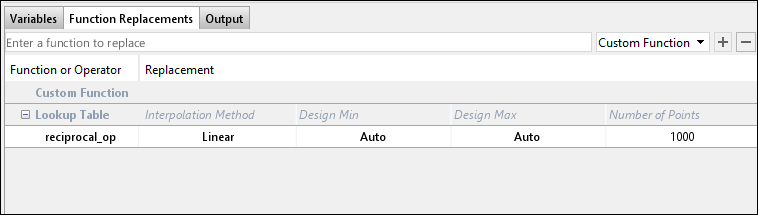
In the HDL Workflow Advisor, lookup table replacements are done in the Fixed-Point Conversion task using the Function Replacements tab. Lookup table parameters like table size and interpolation method can be customized in the HDL Workflow Advisor.
Division Using Power of 2
Dividing a number by a power of two can be more efficiently done using a shift operation. For example, a / 2^exponent is replaced with bitsra(a, exponent), which performs a right bitwise shift. Write division operation in a separate function localDiv which can be replaced after fixed-point conversion with our custom implementation function bitsra.
function y = divbypow2(u, exponent)
    y = localDiv(u, exponent);
end

function y = localDiv(u, exponent)
    y = u / 2^exponent;
end
Perform fixed-point conversion and generate HLS code by using these commands.
hlscfg = coder.config("hls");
hlscfg.DesignFunctionName = "divbypow2";
hlscfg.TestBenchName = "divbypow2_tb";

%% Create configuration object of class "coder.FixPtConfig".
cfg = coder.config("fixpt");
cfg.TestBenchName = "divbypow2_tb.m";
cfg.LogIOForComparisonPlotting = true;
cfg.TestNumerics = true;
cfg.addFunctionReplacement("localDiv", "bitsra");

%% Invoke fixed-point conversion and generate HLS code
codegen -float2fixed cfg divbypow2 -config hlscfg -args {0, 0}
===================================================
Design Name: divbypow2
Test Bench Name: divbypow2_tb
===================================================


============= Step1: Analyze Floating-Point Code ==============

Code generation successful.


============= Step1a: Verify Floating-Point Code ==============

### Analyzing the design 'divbypow2'
### Analyzing the test bench(es) 'divbypow2_tb'
### Begin Floating-Point Simulation (Instrumented)
### Floating-Point Simulation Completed in   0.9545 sec(s)
### Elapsed Time:             1.7025 sec(s)

============= Step2: Propose Types Based on Range Information ==============


============= Step3: Generate Fixed-Point Code ==============

### Generating Fixed-Point MATLAB Code divbypow2_fixpt Using Proposed Types
### Generating Fixed-Point MATLAB Design Wrapper divbypow2_wrapper_fixpt
### Generating Mex file for ' divbypow2_wrapper_fixpt '
Code generation successful: View report
### Generating Type Proposal Report for 'divbypow2' divbypow2_report.html

============= Step4: Verify Fixed-Point Code ==============

### Analyzing the design 'divbypow2'
### Analyzing the test bench(es) 'divbypow2_tb'
### Begin Floating-Point Simulation
### Floating-Point Simulation Completed in   0.2253 sec(s)
### Begin Fixed-Point Simulation : divbypow2_tb
### Fixed-Point Simulation Completed in   1.3156 sec(s)

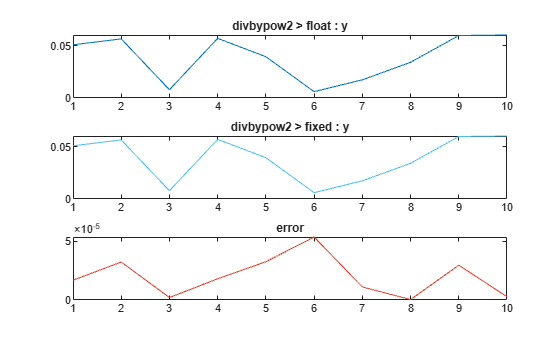
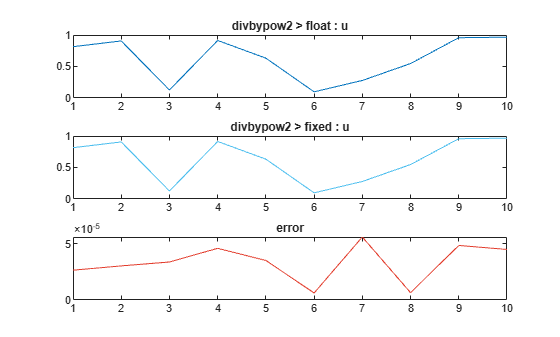
Generating comparison plot(s) for 'divbypow2' using PlotFunction : 'coder.internal.plotting.inBuiltPlotFunctionCLI'...

--------------  Input variable : u  --------------
Generating comparison plot...

Max Positive Error : 5.5836e-05
Max Negative Error : 0
Max Absolute Value : 0.96489
Max Percentage Error : 0.0057868
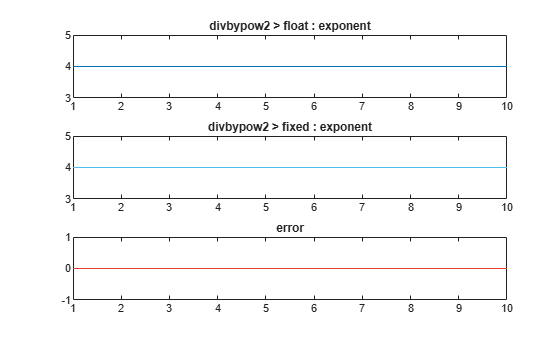
--------------  Input variable : exponent  --------------
Generating comparison plot...

Max Positive Error : 0
Max Negative Error : 0
Max Absolute Value : 4
Max Percentage Error : 0
--------------  Output variable : y  --------------
Generating comparison plot...

Max Positive Error : 5.3795e-05
Max Negative Error : 0
Max Absolute Value : 0.060306
Max Percentage Error : 0.089204
### Generating Fixed-Point Types Report for 'divbypow2_fixpt' divbypow2_fixpt_report.html
### Elapsed Time:             5.5981 sec(s)

===================================================
Code generation successful.
### Begin MATLAB to HLS Code Generation...
### Working on DUT: divbypow2_fixpt.
### Using TestBench: divbypow2_tb.
### Begin HLS Code Generation
### Generating Resource Utilization Report resource_report.html.
### Working on divbypow2_fixptClass.hpp as divbypow2_fixptClass.hpp.
### Working on divbypow2_fixptModule.hpp as divbypow2_fixptModule.hpp.
### Generating HLS Conformance Report divbypow2_fixpt_hdl_conformance_report.html.
### HLS Conformance check complete with 0 errors, 0 warnings, and 0 messages.
### To rerun codegen evaluate the following commands...

---------------------
cgi    = load('C:\ExampleManager\user.Bdoc.15_7\hdlcoder-ex88808211\codegen\divbypow2\hdlsrc\codegen_info.mat');
cfg    = cgi.CodeGenInfo.codegenSettings;
fxpCfg = cgi.CodeGenInfo.fxpCfg;
codegen -float2fixed fxpCfg -config cfg -report
---------------------

Code generation successful.
Division Using cynw Library for Cadence Stratus HLS
Cadence Stratus HLS provides the cynw library, which includes optimized division operations. You can include the cynw library in your MATLAB code using coder.ceval to perform efficient division operations and improve performance of the generated code.
The example shows division between integers with the help of div function from cynw library. To perform fixed-point division corresponding fixpt utilities library needs to be included
function y = cynw_divide(u,v)
y = coder.nullcopy(0);
if coder.target("HLS")
    coder.cinclude("cynw_utilities.h");
    coder.ceval("cynw::div",u,v,y);
else
    y = a/b;
end
Perform fixed-point conversion and generate HLS code by using these commands.
hlscfg = coder.config("hls");
hlscfg.DesignFunctionName = "cynw_divide";
hlscfg.TestBenchName = "cynw_divide_tb";
hlscfg.SynthesisTool = "Cadence Stratus HLS";

%% Create configuration object of class "coder.FixPtConfig".
cfg = coder.config("fixpt");
cfg.TestBenchName = "cynw_divide_tb.m";
%% Ensure fixed-point conversion keeps the variables as integers.
cfg.addTypeSpecification("cynw_divide", "u", numerictype(0,3,0));
cfg.addTypeSpecification("cynw_divide", "v", numerictype(0,3,0));
cfg.addTypeSpecification("cynw_divide", "y", numerictype(0,3,0));

%% Invoke fixed-point conversion and generate HLS code
codegen -float2fixed cfg cynw_divide -config hlscfg -args {0, 0}
===================================================
Design Name: cynw_divide
Test Bench Name: cynw_divide_tb
===================================================


============= Step1: Analyze Floating-Point Code ==============

Code generation successful.


============= Step1a: Verify Floating-Point Code ==============

### Analyzing the design 'cynw_divide'
### Analyzing the test bench(es) 'cynw_divide_tb'
### Begin Floating-Point Simulation (Instrumented)
### Floating-Point Simulation Completed in   0.7871 sec(s)
### Elapsed Time:             1.5551 sec(s)

============= Step2: Propose Types Based on Range Information ==============


============= Step3: Generate Fixed-Point Code ==============

### Generating Fixed-Point MATLAB Code cynw_divide_fixpt Using Proposed Types
### Generating Fixed-Point MATLAB Design Wrapper cynw_divide_wrapper_fixpt
### Generating messages during fixed-point conversion: cynw_divide_fixpt_log.txt
### Generating Mex file for ' cynw_divide_wrapper_fixpt '
Code generation successful: View report
Warning: Expression 'coder.cinclude('cynw_utilities.h');' was not executed by the provided testbench or was constant-folded. Proposed numerictypes in this expression are not applied.
Warning: Expression 'coder.ceval('cynw::div', a, b, y);' was not executed by the provided testbench or was constant-folded. Proposed numerictypes in this expression are not applied.
### Generating Type Proposal Report for 'cynw_divide' cynw_divide_report.html

===================================================
Code generation successful.
### Begin MATLAB to HLS Code Generation...
### Working on DUT: cynw_divide_fixpt.
### Using TestBench: cynw_divide_tb.
### Begin HLS Code Generation
### Generating Resource Utilization Report resource_report.html.
### Working on cynw_divide_fixptClass.hpp as cynw_divide_fixptClass.hpp.
### Working on ml.tcl as ml.tcl.
### Generating HLS Conformance Report cynw_divide_fixpt_hdl_conformance_report.html.
### HLS Conformance check complete with 0 errors, 0 warnings, and 0 messages.
### To rerun codegen evaluate the following commands...

---------------------
cgi    = load('C:\ExampleManager\user.Bdoc.15_7\hdlcoder-ex88808211\codegen\cynw_divide\hdlsrc\codegen_info.mat');
cfg    = cgi.CodeGenInfo.codegenSettings;
fxpCfg = cgi.CodeGenInfo.fxpCfg;
codegen -float2fixed fxpCfg -config cfg -report
---------------------

Code generation successful.
Summary
The above examples showed different ways of implementing division operation that are suitable for hardware. These techniques can be effectively used for HDL and HLS code generation from MATLAB.

