Identify Digits Using PCA for Feature Extraction
This example shows how to identify digits from a data set of handwritten digits using principal component analysis (PCA) for feature extraction.
In image processing, PCA transforms image data from the spatial domain into a new coordinate system defined by the principal components. The principal components are the eigenvectors of the covariance matrix computed from the data set of images, and represent the directions of maximum variance in the data. Thus, the principal components are the most informative directions in the data. Using PCA, you can extract features of images in a data set to classify the category of each image. For more information on PCA for image processing, see Principal Component Analysis of Images.
Load Data Set
Load a data set of handwritten digits into the workspace.
handwrittenDir = fullfile(toolboxdir("vision"),"visiondata","digits","handwritten");
imds = imageDatastore(handwrittenDir,IncludeSubfolders=true,LabelSource="foldernames");
Visualize the data set.
figure
montage(imds,Size=[10 12])
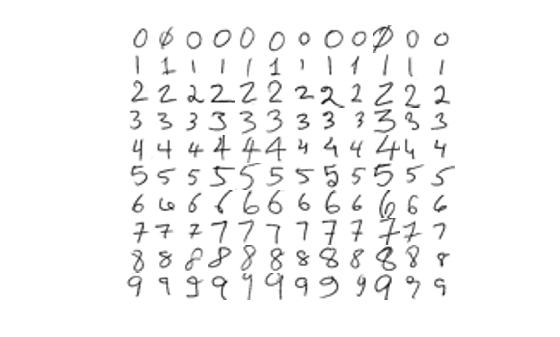
To identify the digit from the image of the handwritten digit, split the data set into training and test data sets. Note that this example sets the random number seed for reproducibility.
rng("default")
[imdsTrain,imdsTest] = splitEachLabel(imds,0.9);
Compute Principal Components of Training Data
Reshape each image in the training datastore as a vector, and create a matrix XTrain, in which each row is a vectorized image from the training datastore. Store the ground truth labels of the images from the training datastore in the variable yTrain.
numTrain = numel(imdsTrain.Files);
I = read(imdsTrain);
I = im2gray(I);
[h,w] = size(I);
p = h*w;
reset(imdsTrain)
XTrain = zeros(numTrain,p);
for i = 1:numTrain
    I = readimage(imdsTrain,i);
    I = im2gray(I);
    I = im2double(I);
    XTrain(i,:) = reshape(I,1,[]);
end
yTrain = double(imdsTrain.Labels);
Perform PCA on the training data matrix XTrain.
[transformMatrixTrain,transformedDataTrain,~,~,~,muTrain] = pca(XTrain);
Fit k-Nearest Neighbor Model
Fit a k-nearest neighbor model to the PCA-transformed training data and the corresponding ground truth labels.
XtrainPCA = transformedDataTrain;
mdl = fitcknn(XtrainPCA,yTrain);
Predict Labels on Test Data
Reshape each image in the test datastore as a vector, and create a matrix, XTest, in which each row is a vectorized image from the test datastore. Store the ground truth labels of the images from the test datastore in the variable yTest.
numTest = numel(imdsTest.Files);
I = read(imdsTest);
I = im2gray(I);
[h,w] = size(I);
p = h*w;
reset(imdsTest)
XTest = zeros(numTest,p);
for i = 1:numTest
    I = readimage(imdsTest,i);
    I = im2gray(I);
    I = im2double(I);
    XTest(i,:) = reshape(I,1,[]);
end
yTest = double(imdsTest.Labels);
Transform the test data using the PCA transform matrix of the training data.
XtestPCA = (XTest-muTrain)*transformMatrixTrain;
Predict the labels of the test data by using the trained k-nearest neighbor model on the transformed test data.
yPred = predict(mdl,XtestPCA);
Compute the accuracy of the predicted labels of the test data.
accuracy = mean(yPred == yTest);
fprintf("Test Accuracy: %.2f%%n",accuracy*100)
Test Accuracy: 70.00%n
See Also
pca (Statistics and Machine Learning Toolbox)

