MATLAB Packages and Package Dependencies
R2026bWhen you have MATLAB® code that is ready to share with others, you can use a package to bundle the code and distribute it. MATLAB Package Manager is a programmatic way to create packages, manage package dependencies, and share packages with your end users.
Creating a package is often one of the final steps in the development process. For information on the full recommended workflow, see Develop and Share Software in MATLAB.
If you instead want to install MATLAB, Simulink®, or other MathWorks® products or support packages, see Install Support Packages Noninteractively.
Why Use Packages?
Packages are useful for bundling code for distribution. MATLAB Package Manager provides a streamlined system for creating and distributing packages, and includes robust dependency management. Using MATLAB Package Manager, you can bundle your code into a package and distribute it through a package repository. End users can search for and install packages from these package repositories. When an end user downloads a package from a repository, MATLAB Package Manager downloads any required dependencies.
If you develop your package code in a TOML-based project, you can also interactively create the package. Projects provide a structured environment for your development work and include organizational support, such as path management, environmental consistency, and automatic dependency analysis. For more information, see Create Projects. For information on how to convert an existing project to the TOML format, see Convert Existing Projects to TOML Format. (since R2026b)
What Is a Package?
A package is a collection of MATLAB code, related files, and a package definition file that defines the package
identity and dependencies. The purpose of a package is to compartmentalize code so that it
can be shared while maintaining its intended functionality. Starting in R2026b, you can
build a package as a single installable package file (.mltbx), formerly
referred to as a toolbox file, or as a folder-based package. For information on how to
interactively build a package, see Interactively Create and Share Packages. For information on how to programmatically build a
folder based package, see Programmatically Turn Your Code Into a Package.
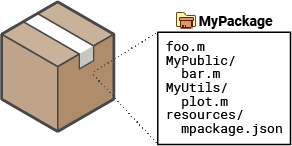
A package consists of a root folder that contains the files and
member folders of the package. The root folder also contains a
resources folder, which contains the package definition file named
mpackage.json.
The package definition file contains identifying information, descriptive information, and package properties. Identifying information can include the package name, version, and unique identifier. Descriptive information can include a summary of the package purpose, its provider, and the MATLAB release compatibility. The properties of a package can include its status, member folders, and any dependencies.
After defining your package, if you build a package file (.mltbx) ,
MATLAB Package Manager stores the package root folder and its contents in a single sharable
file that can an end user can install by double-clicking the file.
When installing a package, MATLAB Package Manager installs all of the code, supporting files, and any other packages that it depends on. MATLAB Package Manager also adds the root folder and all member folders to the path. For information on finding and installing packages, see Find and Install Packages Programmatically.
Automatic Package Dependency Management
Some packages use code that is contained in a second package. These packages depend on the second package, and the second package is referred to as a dependency. As part of its robust dependency management, when MATLAB Package Manager installs a package, it checks that all required dependencies are also installed. In this diagram, package A depends on package B, and package B depends on packages C and D. When MATLAB Package Manager installs package A, it also installs packages B, C, and D if they are not already installed.
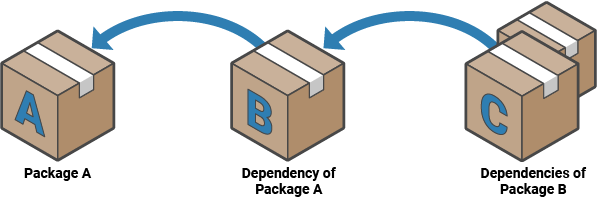
When uninstalling a package, MATLAB Package Manager checks each of the package dependencies and uninstalls them if they are unused. A dependency is considered unused if it was not installed directly and no installed packages depend on it.
Package Repositories
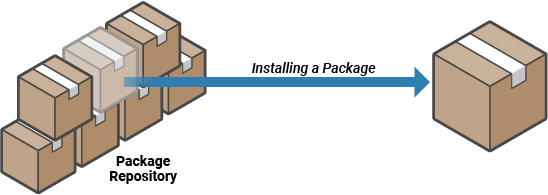
You can add packages that are ready for distribution to a repository, such as MathWorks File
Exchange, and end users can search for and install packages from the repository. A
package repository is a designated location where packages are available for distribution.
MATLAB keeps a list of known repositories. When you search for a package using
mpmsearch or
install a package using mpminstall,
MATLAB Package Manager finds packages in known repositories.
Packages on MathWorks File Exchange can also be searched and installed interactively through the Add-Ons panel. For more information, see Get and Manage Add-Ons. (since R2026b)
View the current list of known repositories using mpmListRepositories. Add and remove repositories from the list of known
repositories using mpmAddRepository and mpmRemoveRepository. For more information, see Distribute Packages Using Folder-Based Repositories.
See Also
Objects
Functions
mpmcreate|mpminstall|mpmuninstall|mpmsearch|mpmlist|mpmupdate|mpmAddRepository|mpmListRepositories|mpmRemoveRepository

