directivity
Compute array directivity
Description
returns the Directivity (dBi) of an array of antenna or microphone elements, D = directivity(array,FREQ,ANGLE)array,
at frequencies specified by FREQ and in angles of direction specified by
ANGLE.
Note
The directivity object functions for arrays and elements differ. The
PropagationSpeed Name-Value pair argument does not appear in the element
version but does appear in the array version.
The integration used when computing array directivity has a minimum sampling grid of 0.1 degrees. If an array pattern has a beamwidth smaller than this, the directivity value will be inaccurate.
directivity(___, plots the
array pattern with additional options specified by one or more Name=Value)Name=Value
pair arguments.
Examples
Compute the directivities of two different uniform linear arrays (ULA). One array consists of isotropic antenna elements and the second array consists of cosine antenna elements. In addition, compute the directivity when the first array is steered in a specified direction. For each case, calculate the directivities for a set of seven different azimuth directions all at zero degrees elevation. Set the frequency to 300 MHz.
Array of Isotropic Antenna Elements
First, create a 10-element ULA of isotropic antenna elements spaced 1/2-wavelength apart.
c = physconst("LightSpeed");
fc = 300e6;
lambda = c/fc;
ang = [-30,-20,-10,0,10,20,30; 0,0,0,0,0,0,0];
myAnt1 = phased.IsotropicAntennaElement;
myArray1 = phased.ULA(10,lambda/2,Element=myAnt1);Compute the directivity.
d = directivity(myArray1,fc,ang,PropagationSpeed=c)
d = 7×1
-6.9897
-6.2294
-6.5187
10.0000
-6.5187
-6.2294
-6.9897
Array of Cosine Antenna Elements
Next, create a 10-element ULA of cosine antenna elements spaced 1/2-wavelength apart.
myAnt2 = phased.CosineAntennaElement(CosinePower=[1.8,1.8]); myArray2 = phased.ULA(10,lambda/2,Element=myAnt2);
Compute the directivity.
d = directivity(myArray2,fc,ang,PropagationSpeed=c)
d = 7×1
-1.9838
0.0529
0.4968
17.2548
0.4968
0.0529
-1.9838
The directivity of the cosine ULA is greater than the directivity of the isotropic ULA because of the larger directivity of the cosine antenna element.
Steered Array of Isotropic Antenna Elements
Finally, steer the isotropic antenna array to 30 degrees in azimuth and compute the directivity.
w = steervec(getElementPosition(myArray1)/lambda,[30;0]);
d = directivity(myArray1,fc,ang,PropagationSpeed=c, ...
Weights=w)d = 7×1
-297.5224
-13.9783
-9.5713
-6.9897
-4.5787
-2.0537
10.0000
The directivity is greatest in the steered direction.
Show that the pattern object function gives the same result as the directivity function. Create a 5x7-element URA operating at 1 GHz. Assume the elements are spaced one-half wavelength apart.
First, set up the URA.
elem = phased.CosineAntennaElement( ... FrequencyRange=[50e6,1000e6]); fc = 500e6; c = physconst("LightSpeed"); lam = c/fc; array = phased.URA(Element=elem,Size=[5,7], ... ElementSpacing=0.5*lam);
Use the pattern object function to display the array directivity for azimuth angles from to , all at elevation.
[pat,az_ang,el_ang] = pattern(array,fc, ... [-45:45],45, CoordinateSystem="polar", ... Type="directivity",PropagationSpeed=c); plot(az_ang,pat) hold on
Using the directivity object function, display the directivity at several discrete angles.
ang = [-30,-20,-10,0,10,20,30; ... 45,45,45,45,45,45,45]; d = directivity(array,fc,ang, ... PropagationSpeed=c); plot(ang(1,:),d,'*') legend("pattern function","directivity function", ... "location","southwest") hold off
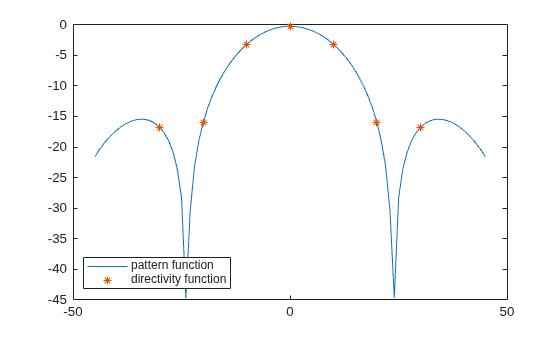
The two computations coincide.
Input Arguments
Phased array, specified as a Phased Array System Toolbox System object.
Frequencies for computing directivity and patterns, specified as a positive scalar or 1-by-L real-valued row vector. Frequency units are in Hz.
For an antenna, microphone, or sonar hydrophone or projector element,
FREQmust lie within the range of values specified by theFrequencyRangeorFrequencyVectorproperty of the element. Otherwise, the element produces no response and the directivity is returned as–Inf. Most elements use theFrequencyRangeproperty except forphased.CustomAntennaElementandphased.CustomMicrophoneElement, which use theFrequencyVectorproperty.For an array of elements,
FREQmust lie within the frequency range of the elements that make up the array. Otherwise, the array produces no response and the directivity is returned as–Inf.
Example: [1e8 2e6]
Data Types: double
Angles for computing directivity, specified as a 1-by-M real-valued
row vector or a 2-by-M real-valued matrix, where M is
the number of angular directions. Angle units are in degrees. If ANGLE is
a 2-by-M matrix, then each column specifies a direction
in azimuth and elevation, [az;el]. The azimuth
angle must lie between –180° and 180°. The elevation
angle must lie between –90° and 90°.
If ANGLE is a 1-by-M vector,
then each entry represents an azimuth angle, with the elevation angle
assumed to be zero.
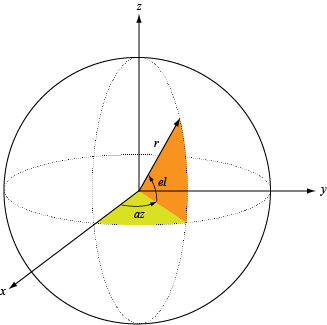
The azimuth angle is the angle between the x-axis and the projection of the direction vector onto the xy plane. This angle is positive when measured from the x-axis toward the y-axis. The elevation angle is the angle between the direction vector and xy plane. This angle is positive when measured towards the z-axis. See Azimuth and Elevation Angles.
Example: [45 60; 0 10]
Data Types: double
Name-Value Arguments
Specify optional pairs of arguments as
Name1=Value1,...,NameN=ValueN, where Name is
the argument name and Value is the corresponding value.
Name-value arguments must appear after other arguments, but the order of the
pairs does not matter.
Before R2021a, use commas to separate each name and value, and enclose
Name in quotes.
Example: CoordinateSystem="polar",Type="directivity"
Signal propagation speed, specified as the equal sign separated pair consisting of
PropagationSpeed and a positive scalar in meters per
second.
Example: PropagationSpeed=physconst("LightSpeed")
Data Types: double
Array weights, specified as the equal sign separated pair consisting of
"Weights" and an N-by-1 complex-valued column
vector or N-by-L complex-valued matrix. Array
weights are applied to the elements of the array to produce array steering, tapering, or
both. The dimension N is the number of elements in the array. The
dimension L is the number of frequencies specified by
FREQ.
| Weights Dimension | FREQ Dimension | Purpose |
|---|---|---|
| N-by-1 complex-valued column vector | Scalar or 1-by-L row vector | Applies a set of weights for the single frequency or for all L frequencies. |
| N-by-L complex-valued matrix | 1-by-L row vector | Applies each of the L columns of "Weights" for the
corresponding frequency in FREQ. |
Note
Use complex weights to steer the array response toward different
directions. You can create weights using the phased.SteeringVector System object or
you can compute your own weights. In general, you apply Hermitian
conjugation before using weights in any Phased Array System Toolbox function
or System object such as phased.Radiator or phased.Collector. However, for the directivity, pattern, patternAzimuth,
and patternElevation methods of any array System object use
the steering vector without conjugation.
Example: Weights=ones(N,M)
Data Types: double
Complex Number Support: Yes
Output Arguments
More About
Directivity describes the directionality of the radiation pattern of a sensor element or array of sensor elements.
Higher directivity is desired when you want to transmit more radiation in a specific direction. Directivity is the ratio of the transmitted radiant intensity in a specified direction to the radiant intensity transmitted by an isotropic radiator with the same total transmitted power
where Urad(θ,φ) is the radiant intensity of a transmitter in the direction (θ,φ) and Ptotal is the total power transmitted by an isotropic radiator. For a receiving element or array, directivity measures the sensitivity toward radiation arriving from a specific direction. The principle of reciprocity shows that the directivity of an element or array used for reception equals the directivity of the same element or array used for transmission. When converted to decibels, the directivity is denoted as dBi. For information on directivity, read the notes on Element Directivity and Array Directivity.
Define the azimuth and elevation conventions used in the toolbox.
The azimuth angle of a vector is the angle between the x-axis and its orthogonal projection onto the xy-plane. The angle is positive when going from the x-axis toward the y-axis. Azimuth angles lie between –180° and 180° degrees, inclusive. The elevation angle is the angle between the vector and its orthogonal projection onto the xy-plane. The angle is positive when going toward the positive z-axis from the xy-plane. Elevation angles lie between –90° and 90° degrees, inclusive.
Grating lobes due to array element spacing greater than ½ wavelength may introduce numerical errors in the computation of array directivity.
Extended Capabilities
C/C++ Code Generation
Generate C and C++ code using MATLAB® Coder™.
Version History
Introduced in R2021a
See Also
MATLAB Command
You clicked a link that corresponds to this MATLAB command:
Run the command by entering it in the MATLAB Command Window. Web browsers do not support MATLAB commands.
Select a Web Site
Choose a web site to get translated content where available and see local events and offers. Based on your location, we recommend that you select: .
You can also select a web site from the following list
How to Get Best Site Performance
Select the China site (in Chinese or English) for best site performance. Other MathWorks country sites are not optimized for visits from your location.
Americas
- América Latina (Español)
- Canada (English)
- United States (English)
Europe
- Belgium (English)
- Denmark (English)
- Deutschland (Deutsch)
- España (Español)
- Finland (English)
- France (Français)
- Ireland (English)
- Italia (Italiano)
- Luxembourg (English)
- Netherlands (English)
- Norway (English)
- Österreich (Deutsch)
- Portugal (English)
- Sweden (English)
- Switzerland
- United Kingdom (English)