Joystick
R2026bRead the state of five-position Joystick
Joystick block
To add a block to a model, double-click the canvas and start typing the block name. Then, select the block from the list.
Libraries:
Raspberry Pi Blockset /
Sense HAT
Description
Read the state of five-position Joystick. The block outputs a value between 0-5 based on the Joystick button pressed. The Joystick button positions are shown.
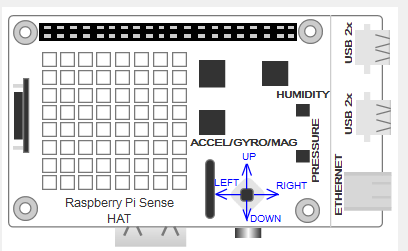
The positions on the Joystick that correspond to the five values of the block output are:
0- when you have not pressed a button
1- when you press the center button
2- when you press the left button
3- when you press the top button
4- when you press the right button
5- when you press the bottom button.
Note
To generate C/C++ code for this block, you must have an Embedded Coder® license.
Ports
Output
Parameters
Programmatic Use: Add Block
To add the block programmatically, use the add_block function with one of these library block paths as the source.
"sensehatlib/Joystick"
Example: add_block("sensehatlib/Joystick","myModel/myBlock",MakeNameUnique="on")
Extended Capabilities
Version History
Introduced in R2017a

