Compare Agents on Continuous Pendulum Swing-Up
R2026bThis example shows how to create and train frequently used default agents on a continuous action space pendulum swing-up environment. This environment is modeled in Simulink®, and represents a simple frictionless pendulum that initially hangs in a downward position. The agent can apply a control torque on the pendulum, and its goal is to make the pendulum stand upright using minimal control effort. The example plots performance metrics such as the total training time and the total reward for each trained agent.
The results that the agents obtain in this environment, with the selected initial conditions and random number generator seed, do not necessarily imply that specific agents are better than others. Also, note that the training times depend on the computer and operating system you use to run the example, and on other processes running in the background. Your training times might differ substantially from the training times shown in the example.
Continuous Action Space Pendulum Swing-Up Simulink Environment
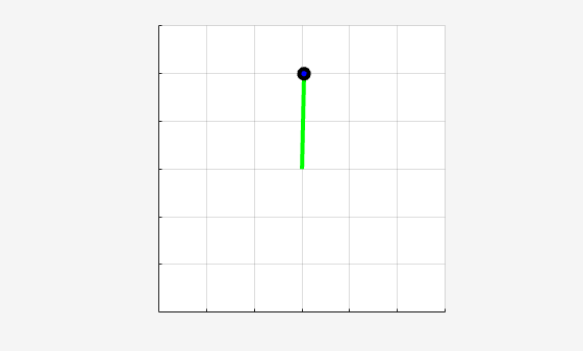
The reinforcement learning environment for this example is a simple frictionless pendulum that initially hangs in a downward position. The training goal is to make the pendulum stand upright using minimal control effort.
Open the model.
mdl = "rlSimplePendulumModel";
open_system(mdl)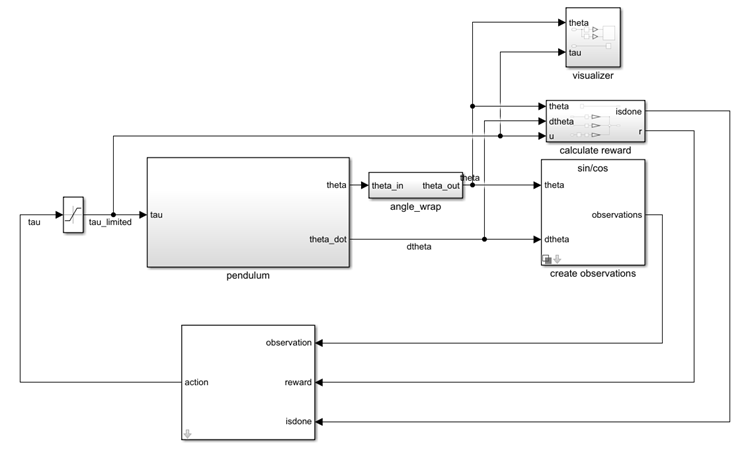
In this model:
The balanced, upright pendulum position is zero radians, and the downward hanging pendulum position is
piradians.The torque action signal from the agent to the environment is from –2 to 2 N·m.
The observations from the environment are the sine, cosine, and derivative of the pendulum angle.
The reward , which the environment provides to the agent at every time step, is
Here:
is the angle of displacement from the upright position.
is the derivative of the displacement angle.
is the control effort from the previous time step.
For more information on this model, see Use Predefined Control System Environments.
Specify Random Number Stream Seed and Algorithm for Reproducibility
The example code might involve computation of random numbers at several stages. Fixing the random number stream at the beginning of some sections in the example code preserves the random number sequence in the section every time you run it, which is a necessary condition to reproduce the results. For more information, see Results Reproducibility.
Specify the random number stream with seed 0 and random number algorithm Mersenne Twister. For more information on controlling the seed used for random number generation, see rng.
previousRngState = rng(0,"twister");The output previousRngState is a structure that contains information about the previous state of the stream. You will restore the state at the end of the example.
Create Environment Object
Create a predefined environment object for the continuous pendulum environment.
env = rlPredefinedEnv("SimplePendulumModel-Continuous")env =
SimulinkEnvWithAgent with properties:
Model : rlSimplePendulumModel
AgentBlock : rlSimplePendulumModel/RL Agent
ResetFcn : []
UseFastRestart : on
Obtain the observation and action information for later use when creating agent.
obsInfo = getObservationInfo(env)
obsInfo =
  rlNumericSpec with properties:

     LowerLimit: -Inf
     UpperLimit: Inf
           Name: "observations"
    Description: [0×0 string]
      Dimension: [3 1]
       DataType: "double"
actInfo = getActionInfo(env)
actInfo =
  rlNumericSpec with properties:

     LowerLimit: -2
     UpperLimit: 2
           Name: "torque"
    Description: [0×0 string]
      Dimension: [1 1]
       DataType: "double"
The object has a continuous action space where the agent can apply torque values between –2 to 2 N·m to the pendulum.
Set the observations of the environment to be the sine of the pendulum angle, the cosine of the pendulum angle, and the pendulum angle derivative.
set_param( ...
    "rlSimplePendulumModel/create observations", ...
    "ThetaObservationHandling","sincos");
To define the initial condition of the pendulum as hanging downward, specify an environment reset function using an anonymous function handle. This reset function sets the model workspace variable theta0 to pi.
env.ResetFcn = @(in)setVariable(in,"theta0",pi,"Workspace",mdl);
Specify the agent sample time Ts and the simulation time Tf in seconds.
Ts = 0.05;
Tf = 20;
Reset the environment and return the environment state.
reset(env)
ans =
  SimulationInput with properties:

               ModelName: "rlSimplePendulumModel"
            InitialState: [0×0 Simulink.op.ModelOperatingPoint]
           ExternalInput: []
         ModelParameters: [0×0 Simulink.Simulation.ModelParameter]
         BlockParameters: [0×0 Simulink.Simulation.BlockParameter]
               Variables: [1×1 Simulink.Simulation.Variable]
               PreSimFcn: []
              PostSimFcn: []
              UserString: ''
    VariantConfiguration: ''
Configure Training Options for All Agents
Create an evaluation object to evaluate the agent 10 times without exploration every 100 training episodes.
evl = rlEvaluator(NumEpisodes=10,EvaluationFrequency=100);
Create a training options object. For this example, use the following options.
Run each training episode for a maximum of 5000 episodes, with each episode lasting a maximum of
Tf/Ts(by default 400) time steps.To have a better insight on the agent's behavior during training, plot the training progress (default option). If you want to achieve faster training times, set the
Plotsoption tonone.Stop the training when the average reward in the evaluation episodes is greater than -740. At this point, the agent can balance the position of the pendulum.
trainOpts = rlTrainingOptions(...
    MaxEpisodes=5000, ...
    MaxStepsPerEpisode=ceil(Tf/Ts), ...
    StopTrainingCriteria="EvaluationStatistic",...
    StopTrainingValue=-740);
For more information on training options, see rlTrainingOptions.
To simulate the trained agent, create a simulation options object and configure it to simulate for ceil(Tf/Ts) steps.
simOptions = rlSimulationOptions(MaxSteps=ceil(Tf/Ts));
For more information on simulation options, see rlSimulationOptions.
Create, Train, and Simulate a PG Agent
The actor and critic networks are initialized randomly. To reproduce the results of this section, specify the seed and algorithm used for random number generation.
rng(0,"twister")First, create a default rlPGAgent object using the environment specification objects.
pgAgent = rlPGAgent(obsInfo,actInfo);
To ensure that the RL Agent block in the environment executes every Ts seconds instead of the default setting of one second, set the SampleTime property of pgAgent.
pgAgent.AgentOptions.SampleTime = Ts;
Set a lower learning rate and a lower gradient threshold to promote a smoother (though possibly slower) training.
pgAgent.AgentOptions.CriticOptimizerOptions.LearnRate = 1e-3;
pgAgent.AgentOptions.ActorOptimizerOptions.LearnRate = 1e-3;
pgAgent.AgentOptions.CriticOptimizerOptions.GradientThreshold = 1;
pgAgent.AgentOptions.ActorOptimizerOptions.GradientThreshold = 1;
Set the entropy loss weight to increase exploration.
pgAgent.AgentOptions.EntropyLossWeight = 0.005;
Train the agent, passing the agent, the environment, and the previously defined training options and evaluator objects to train. Training is a computationally intensive process that takes several minutes to complete. To save time, load a pretrained agent by setting doTraining to false. To train the agent yourself, set doTraining to true.
doTraining =false; if doTraining % Train the agent. Save the final agent and training results. tic pgTngRes = train(pgAgent,env,trainOpts,Evaluator=evl); pgTngTime = toc; % Extract number of training episodes and total steps. pgTngEps = pgTngRes.EpisodeIndex(end); pgTngSteps = sum(pgTngRes.TotalAgentSteps); % Uncomment to save the trained agent and the training metrics. % save("cpsuBchPGAgent.mat", ... % "pgAgent","pgTngEps","pgTngSteps","pgTngTime") else % Load the pretrained agent and results for the example. load("cpsuBchPGAgent.mat", ... "pgAgent","pgTngEps","pgTngSteps","pgTngTime") end
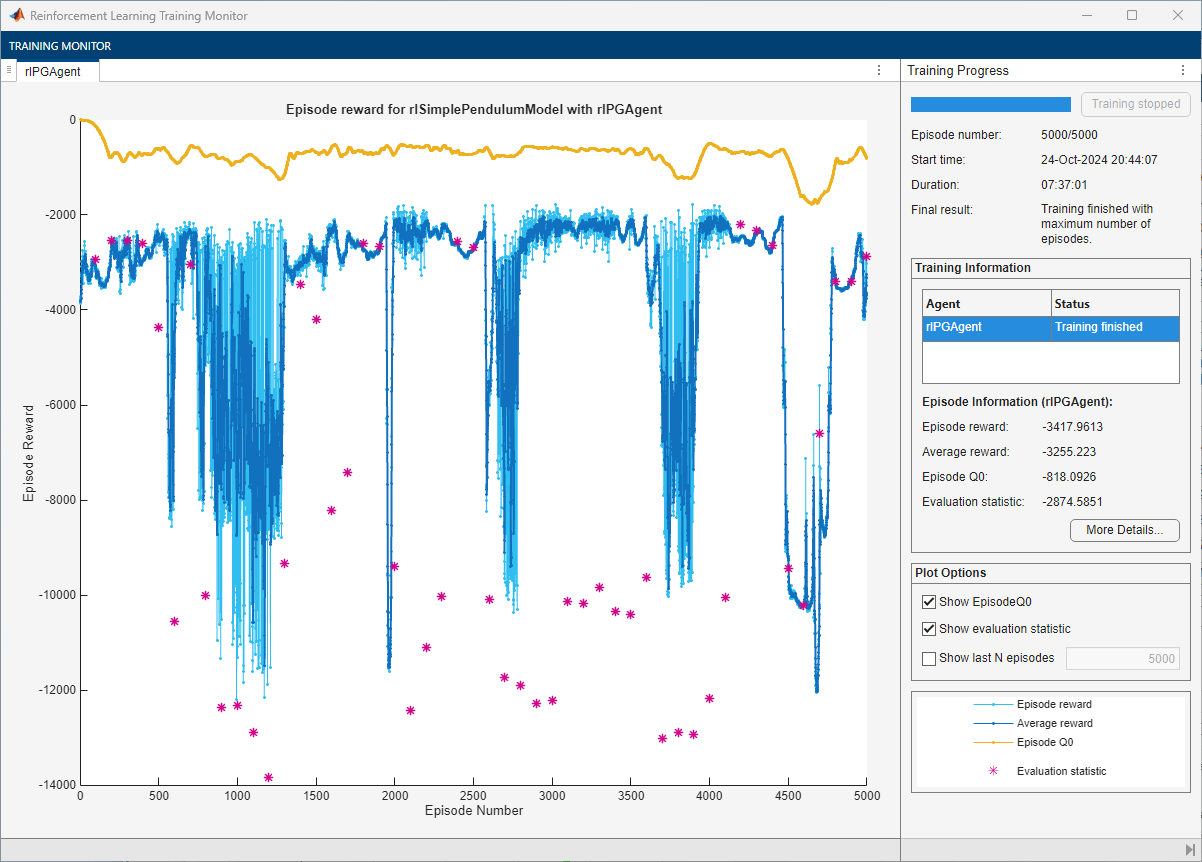
For the PG agent, the training does not converge to a solution. In the following section, check the trained agent within the pendulum swing-up environment.
To reproduce the results of this section, specify the seed and algorithm used for random number generation.
rng(0,"twister")By default, the agent uses a greedy (hence deterministic) policy in simulation. To use the exploratory policy instead, set the UseExplorationPolicy agent property to true.
Simulate the environment with the trained agent for ceil(Tf/Ts) steps. For more information on agent simulation, see sim.
experience = sim(env,pgAgent,simOptions);
pgTotalRwd = sum(experience.Reward)
pgTotalRwd =
-3.7799e+03
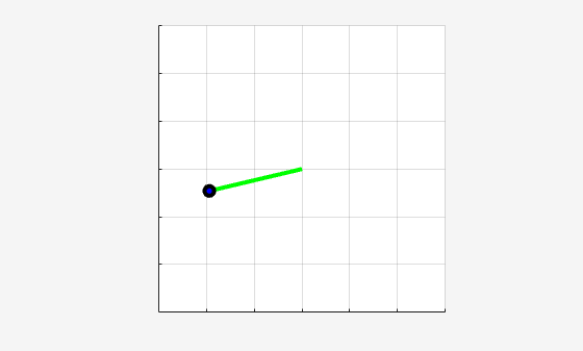
The trained PG agent is able to swing up the pendulum but it cannot stabilize it upright.
Create, Train, and Simulate an AC Agent
The actor and critic networks are initialized randomly. To reproduce the results of this section, specify the seed and algorithm used for random number generation.
rng(0,"twister")First, create a default rlACAgent object using the environment specification objects.
acAgent = rlACAgent(obsInfo,actInfo);
To ensure that the RL Agent block in the environment executes every Ts seconds instead of the default setting of one second, set the SampleTime property of acAgent.
acAgent.AgentOptions.SampleTime = Ts;
Set a lower learning rate and a lower gradient threshold to promote a smoother (though possibly slower) training.
acAgent.AgentOptions.CriticOptimizerOptions.LearnRate = 1e-3;
acAgent.AgentOptions.ActorOptimizerOptions.LearnRate = 1e-3;
acAgent.AgentOptions.CriticOptimizerOptions.GradientThreshold = 1;
acAgent.AgentOptions.ActorOptimizerOptions.GradientThreshold = 1;
Set the entropy loss weight to increase exploration.
acAgent.AgentOptions.EntropyLossWeight = 0.005;
Train the agent, passing the agent, the environment, and the previously defined training options and evaluator objects to train. Training is a computationally intensive process that takes several minutes to complete. To save time, load a pretrained agent by setting doTraining to false. To train the agent yourself, set doTraining to true.
doTraining =false; if doTraining % Train the agent. Save the final agent and training results. tic acTngRes = train(acAgent,env,trainOpts,Evaluator=evl); acTngTime = toc; % Extract number of training episodes and total steps. acTngEps = acTngRes.EpisodeIndex(end); acTngSteps = sum(acTngRes.TotalAgentSteps); % Uncomment to save the trained agent and the training metrics. % save("cpsuBchACAgent.mat", ... % "acAgent","acTngEps","acTngSteps","acTngTime") else % Load the pretrained agent and results for the example. load("cpsuBchACAgent.mat", ... "acAgent","acTngEps","acTngSteps","acTngTime") end
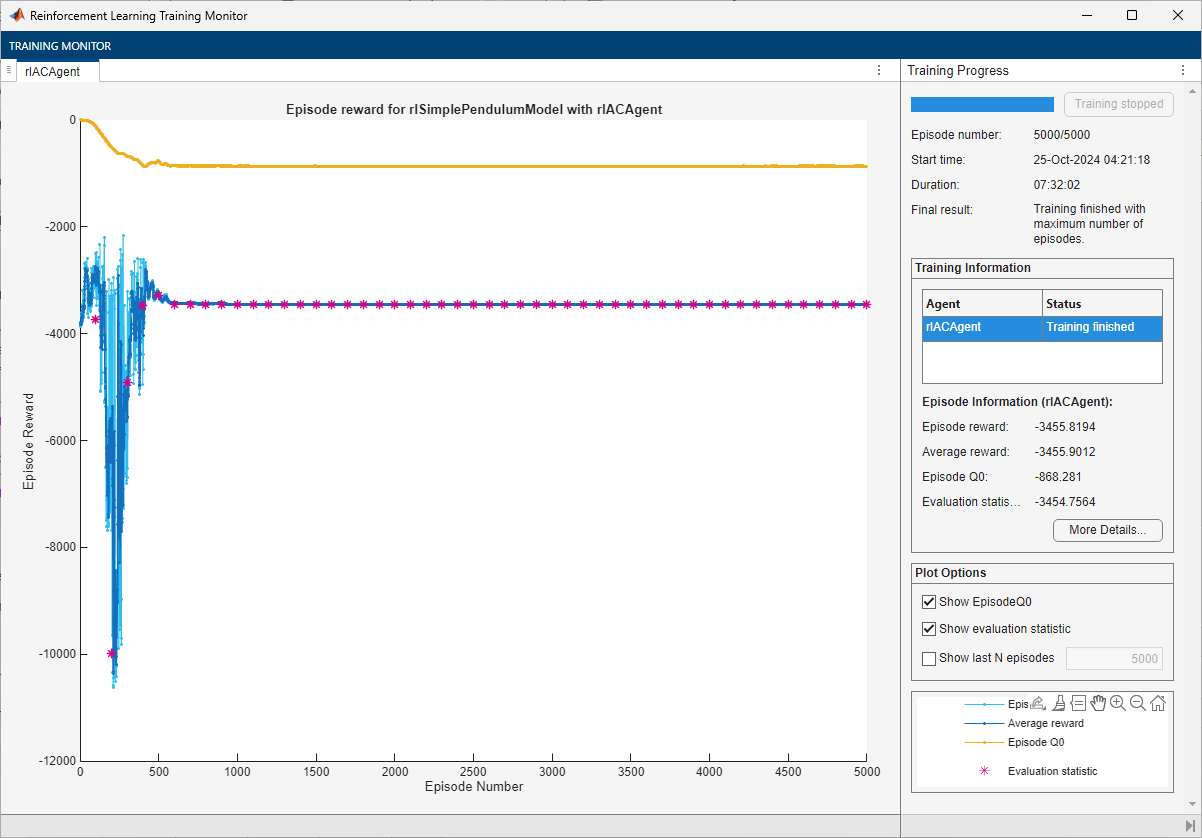
For the AC agent, the training does not converge to a solution. In the following section, check the trained agent within the pendulum swing-up environment.
To reproduce the results of this section, specify the seed and algorithm used for random number generation.
rng(0,"twister")By default, the agent uses a greedy (hence deterministic) policy in simulation. To use the exploratory policy instead, set the UseExplorationPolicy agent property to true.
Simulate the environment with the trained agent for ceil(Tf/Ts) steps. For more information on agent simulation, see sim.
experience = sim(env,acAgent,simOptions);
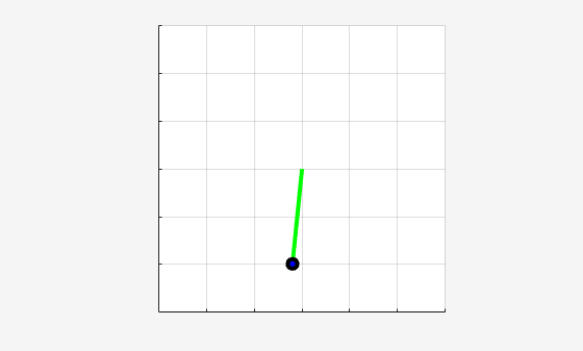
acTotalRwd = sum(experience.Reward)
acTotalRwd =
-3.4558e+03
The trained AC agent does not swing up the pendulum.
Create, Train, and Simulate a PPO Agent
The actor and critic networks are initialized randomly. To reproduce the results of this section, specify the seed and algorithm used for random number generation.
rng(0,"twister")First, create a default rlPPOAgent object using the environment specification objects.
ppoAgent = rlPPOAgent(obsInfo,actInfo);
To ensure that the RL Agent block in the environment executes every Ts seconds instead of the default setting of one second, set the SampleTime property of ppoAgent.
ppoAgent.AgentOptions.SampleTime = Ts;
Set a lower learning rate and a lower gradient threshold to promote a smoother (though possibly slower) training.
ppoAgent.AgentOptions.CriticOptimizerOptions.LearnRate = 1e-3;
ppoAgent.AgentOptions.ActorOptimizerOptions.LearnRate = 1e-3;
ppoAgent.AgentOptions.CriticOptimizerOptions.GradientThreshold = 1;
ppoAgent.AgentOptions.ActorOptimizerOptions.GradientThreshold = 1;
Train the agent, passing the agent, the environment, and the previously defined training options and evaluator objects to train. Training is a computationally intensive process that takes several minutes to complete. To save time, load a pretrained agent by setting doTraining to false. To train the agent yourself, set doTraining to true.
doTraining =false; if doTraining % Train the agent. Save the final agent and training results. tic ppoTngRes = train(ppoAgent,env,trainOpts,Evaluator=evl); ppoTngTime = toc; % Extract number of training episodes and total steps. ppoTngEps = ppoTngRes.EpisodeIndex(end); ppoTngSteps = sum(ppoTngRes.TotalAgentSteps); % Uncomment to save the trained agent and the training metrics. % save("cpsuBchPPOAgent.mat", ... % "ppoAgent","ppoTngEps","ppoTngSteps","ppoTngTime") else % Load the pretrained agent and results for the example. load("cpsuBchPPOAgent.mat", ... "ppoAgent","ppoTngEps","ppoTngSteps","ppoTngTime") end
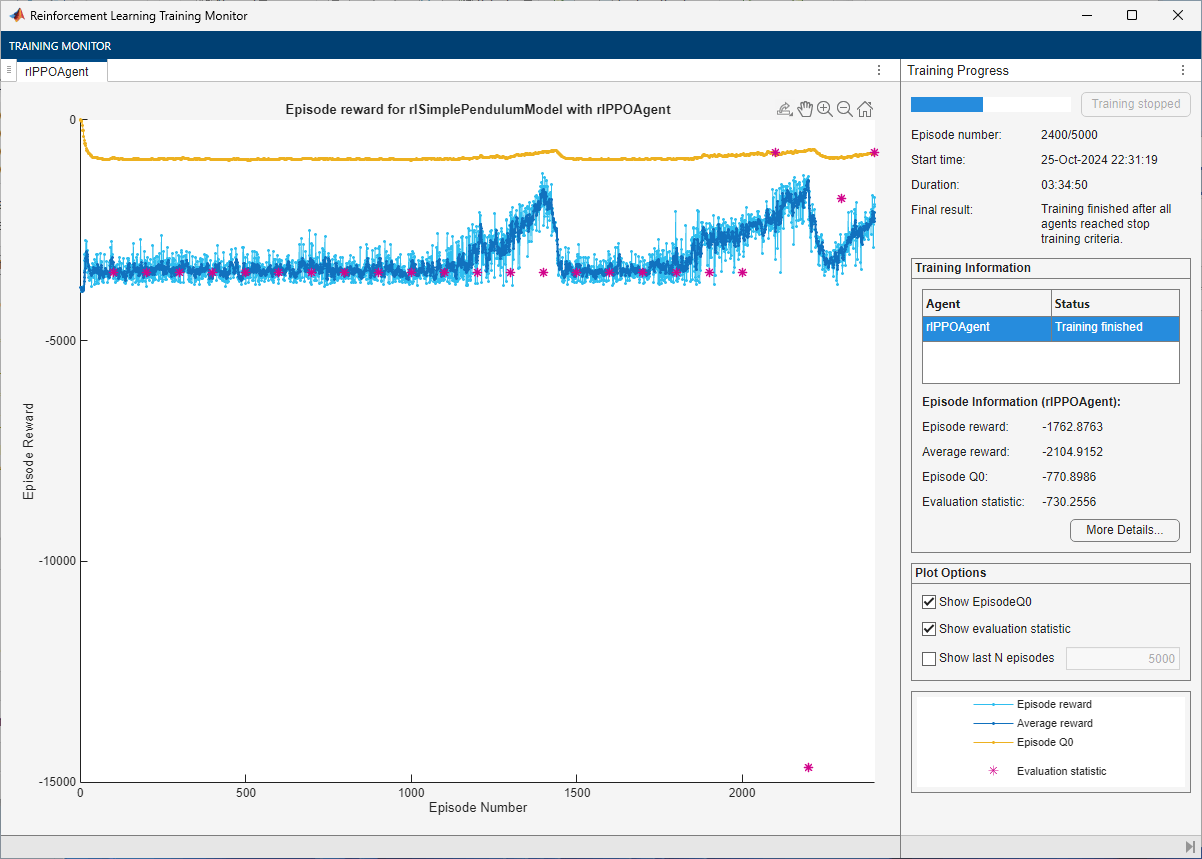
For the PPO agent, the training converges to a solution after 2400 episodes. In the following section, check the trained agent within the pendulum swing-up environment.
To reproduce the results of this section, specify the seed and algorithm used for random number generation.
rng(0,"twister")By default, the agent uses a greedy (hence deterministic) policy in simulation. To use the exploratory policy instead, set the UseExplorationPolicy agent property to true.
Simulate the environment with the trained agent for ceil(Tf/Ts) steps. For more information on agent simulation, see sim.
experience = sim(env,ppoAgent,simOptions);
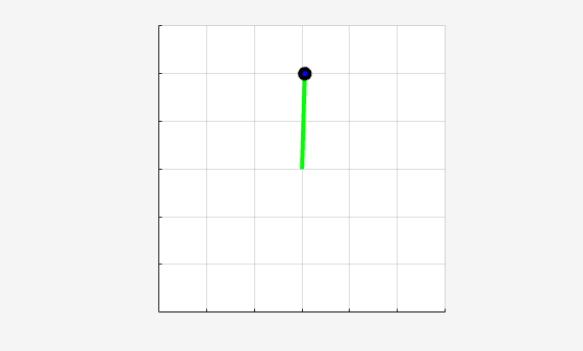
ppoTotalRwd = sum(experience.Reward)
ppoTotalRwd =
-1.9853e+03
The trained PPO agent does not swing up the pendulum.
Create, Train, and Simulate a DDPG Agent
The actor and critic networks are initialized randomly. To reproduce the results of this section, specify the seed and algorithm used for random number generation.
rng(0,"twister")First, create a default rlDDPGAgent object using the environment specification objects.
ddpgAgent = rlDDPGAgent(obsInfo,actInfo);
To ensure that the RL Agent block in the environment executes every Ts seconds instead of the default setting of one second, set the SampleTime property of ddpgAgent.
ddpgAgent.AgentOptions.SampleTime = Ts;
Set a lower learning rate and a lower gradient threshold to promote a smoother (though possibly slower) training.
ddpgAgent.AgentOptions.CriticOptimizerOptions.LearnRate = 1e-3;
ddpgAgent.AgentOptions.ActorOptimizerOptions.LearnRate = 1e-3;
ddpgAgent.AgentOptions.CriticOptimizerOptions.GradientThreshold = 1;
ddpgAgent.AgentOptions.ActorOptimizerOptions.GradientThreshold = 1;
Use a larger experience buffer to store more experiences, therefore decreasing the likelihood of catastrophic forgetting.
ddpgAgent.AgentOptions.ExperienceBufferLength = 1e6;
Train the agent, passing the agent, the environment, and the previously defined training options and evaluator objects to train. Training is a computationally intensive process that takes several minutes to complete. To save time, load a pretrained agent by setting doTraining to false. To train the agent yourself, set doTraining to true.
doTraining =false; if doTraining % Train the agent. Save the final agent and training results. tic ddpgTngRes = train(ddpgAgent,env,trainOpts,Evaluator=evl); ddpgTngTime = toc; % Extract number of training episodes and total steps. ddpgTngEps = ddpgTngRes.EpisodeIndex(end); ddpgTngSteps = sum(ddpgTngRes.TotalAgentSteps); % Uncomment to save the trained agent and the training metrics. % save("cpsuBchDDPGAgent.mat", ... % "ddpgAgent","ddpgTngEps","ddpgTngSteps","ddpgTngTime") else % Load the pretrained agent and results for the example. load("cpsuBchDDPGAgent.mat", ... "ddpgAgent","ddpgTngEps","ddpgTngSteps","ddpgTngTime") end
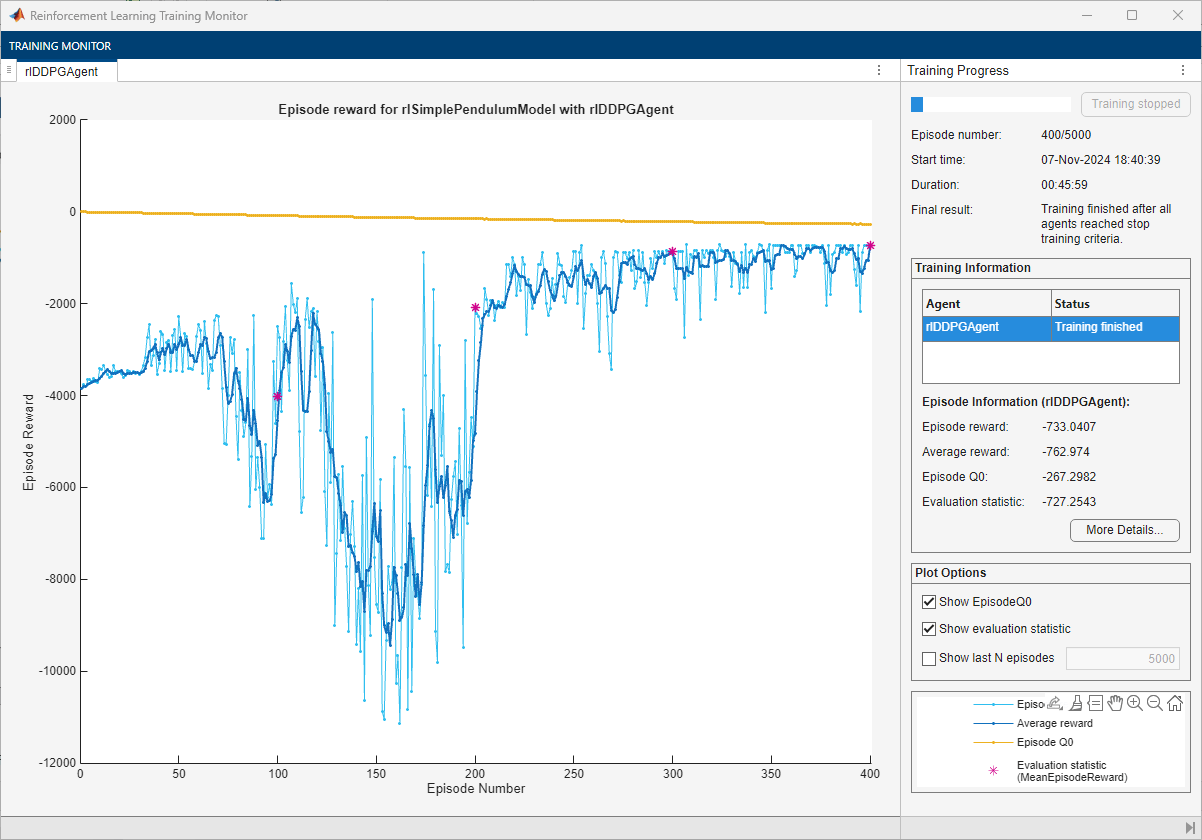
For the DDPG agent, the training converges to a solution after 400 episodes. In the following section, check the trained agent within the pendulum swing-up environment.
To reproduce the results of this section, specify the seed and algorithm used for random number generation.
rng(0,"twister")By default, the agent uses a greedy (hence deterministic) policy in simulation. To use the exploratory policy instead, set the UseExplorationPolicy agent property to true.
Simulate the environment with the trained agent for ceil(Tf/Ts) steps. For more information on agent simulation, see sim.
experience = sim(env,ddpgAgent,simOptions);
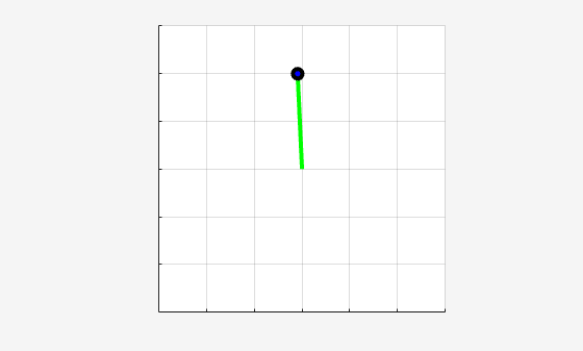
ddpgTotalRwd = sum(experience.Reward)
ddpgTotalRwd =
-727.2543
The trained DDPG agent is able to swing up and stabilize the pendulum upright.
Create, Train, and Simulate a TD3 Agent
The actor and critic networks are initialized randomly. To reproduce the results of this section, specify the seed and algorithm used for random number generation.
rng(0,"twister")First, create a default rlDDPGAgent object using the environment specification objects.
td3Agent = rlTD3Agent(obsInfo,actInfo);
To ensure that the RL Agent block in the environment executes every Ts seconds instead of the default setting of one second, set the SampleTime property of td3Agent.
td3Agent.AgentOptions.SampleTime = Ts;
Set a lower learning rate and a lower gradient threshold to promote a smoother (though possibly slower) training.
td3Agent.AgentOptions.CriticOptimizerOptions(1).LearnRate = 1e-3;
td3Agent.AgentOptions.CriticOptimizerOptions(2).LearnRate = 1e-3;
td3Agent.AgentOptions.ActorOptimizerOptions.LearnRate = 1e-3;
td3Agent.AgentOptions.CriticOptimizerOptions(1).GradientThreshold = 1;
td3Agent.AgentOptions.CriticOptimizerOptions(2).GradientThreshold = 1;
td3Agent.AgentOptions.ActorOptimizerOptions.GradientThreshold = 1;
Use a larger experience buffer to store more experiences, therefore decreasing the likelihood of catastrophic forgetting.
td3Agent.AgentOptions.ExperienceBufferLength = 1e6;
Train the agent, passing the agent, the environment, and the previously defined training options and evaluator objects to train. Training is a computationally intensive process that takes several minutes to complete. To save time, load a pretrained agent by setting doTraining to false. To train the agent yourself, set doTraining to true.
doTraining =false; if doTraining % Train the agent. Save the final agent and training results. tic td3TngRes = train(td3Agent,env,trainOpts,Evaluator=evl); td3TngTime = toc; % Extract number of training episodes and total steps. td3TngEps = td3TngRes.EpisodeIndex(end); td3TngSteps = sum(td3TngRes.TotalAgentSteps); % Uncomment to save the trained agent and the training metrics. % save("cpsuBchTD3Agent.mat", ... % "td3Agent","td3TngEps","td3TngSteps","td3TngTime") else % Load the pretrained agent and results for the example. load("cpsuBchTD3Agent.mat", ... "td3Agent","td3TngEps","td3TngSteps","td3TngTime") end
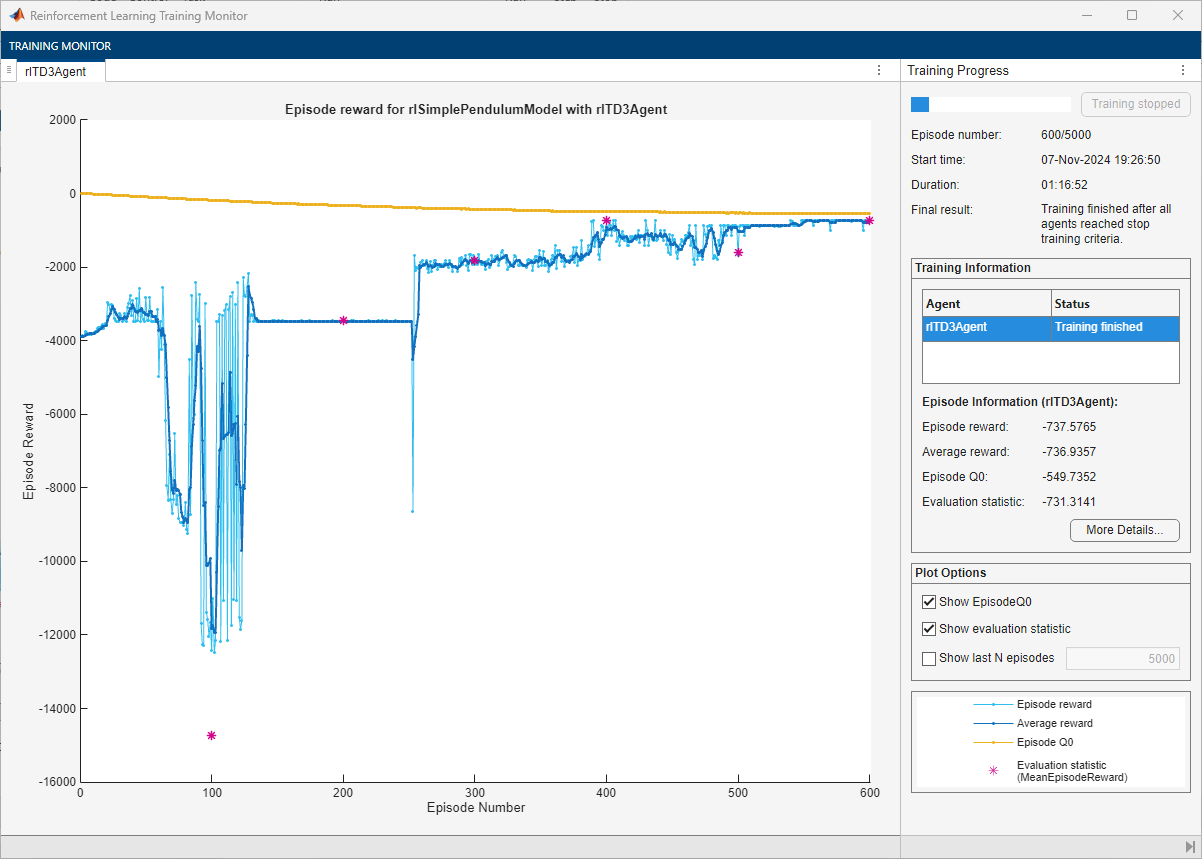
For the TD3 agent, the training converges to a solution after 600 episodes. In the following section, check the trained agent within the pendulum swing-up environment.
To reproduce the results of this section, specify the seed and algorithm used for random number generation.
rng(0,"twister")By default, the agent uses a greedy (hence deterministic) policy in simulation. To use the exploratory policy instead, set the UseExplorationPolicy agent property to true.
Simulate the environment with the trained agent for ceil(Tf/Ts) steps. For more information on agent simulation, see sim.
experience = sim(env,td3Agent,simOptions);
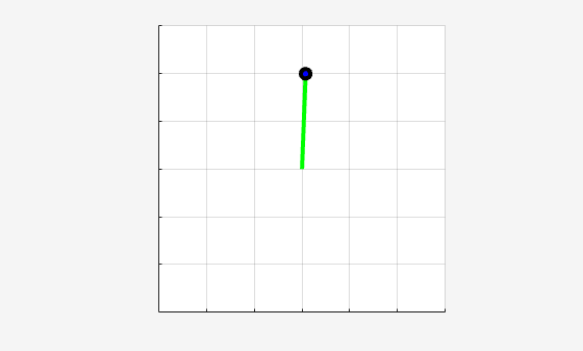
td3TotalRwd = sum(experience.Reward)
td3TotalRwd =
-731.3141
The trained TD3 agent is able to swing up and stabilize the pendulum upright.
Create, Train, and Simulate a SAC Agent
The actor and critic networks are initialized randomly. To reproduce the results of this section, specify the seed and algorithm used for random number generation.
rng(0,"twister")First, create a default rlSACAgent object using the environment specification objects.
sacAgent = rlSACAgent(obsInfo,actInfo);
To ensure that the RL Agent block in the environment executes every Ts seconds instead of the default setting of one second, set the SampleTime property of sacAgent.
sacAgent.AgentOptions.SampleTime = Ts;
Set a lower learning rate and a lower gradient threshold to promote a smoother (though possibly slower) training.
sacAgent.AgentOptions.CriticOptimizerOptions(1).LearnRate = 1e-3;
sacAgent.AgentOptions.CriticOptimizerOptions(2).LearnRate = 1e-3;
sacAgent.AgentOptions.ActorOptimizerOptions.LearnRate = 1e-3;
sacAgent.AgentOptions.CriticOptimizerOptions(1).GradientThreshold = 1;
sacAgent.AgentOptions.CriticOptimizerOptions(2).GradientThreshold = 1;
sacAgent.AgentOptions.ActorOptimizerOptions.GradientThreshold = 1;
Set the initial entropy weight and target entropy to increase exploration.
sacAgent.AgentOptions.EntropyWeightOptions.EntropyWeight = 5e-3;
sacAgent.AgentOptions.EntropyWeightOptions.TargetEntropy = 5e-1;
Use a larger experience buffer to store more experiences, therefore decreasing the likelihood of catastrophic forgetting.
sacAgent.AgentOptions.ExperienceBufferLength = 1e6;
Train the agent, passing the agent, the environment, and the previously defined training options and evaluator objects to train. Training is a computationally intensive process that takes several minutes to complete. To save time, load a pretrained agent by setting doTraining to false. To train the agent yourself, set doTraining to true.
doTraining =false; if doTraining % Train the agent. Save the final agent and training results. tic sacTngRes = train(sacAgent,env,trainOpts,Evaluator=evl); sacTngTime = toc; % Extract number of training episodes and total steps. sacTngEps = sacTngRes.EpisodeIndex(end); sacTngSteps = sum(sacTngRes.TotalAgentSteps); % Uncomment to save the trained agent and the training metrics. % save("cpsuBchSACAgent.mat", ... % "sacAgent","sacTngEps","sacTngSteps","sacTngTime") else % Load the pretrained agent and results for the example. load("cpsuBchSACAgent.mat", ... "sacAgent","sacTngEps","sacTngSteps","sacTngTime") end
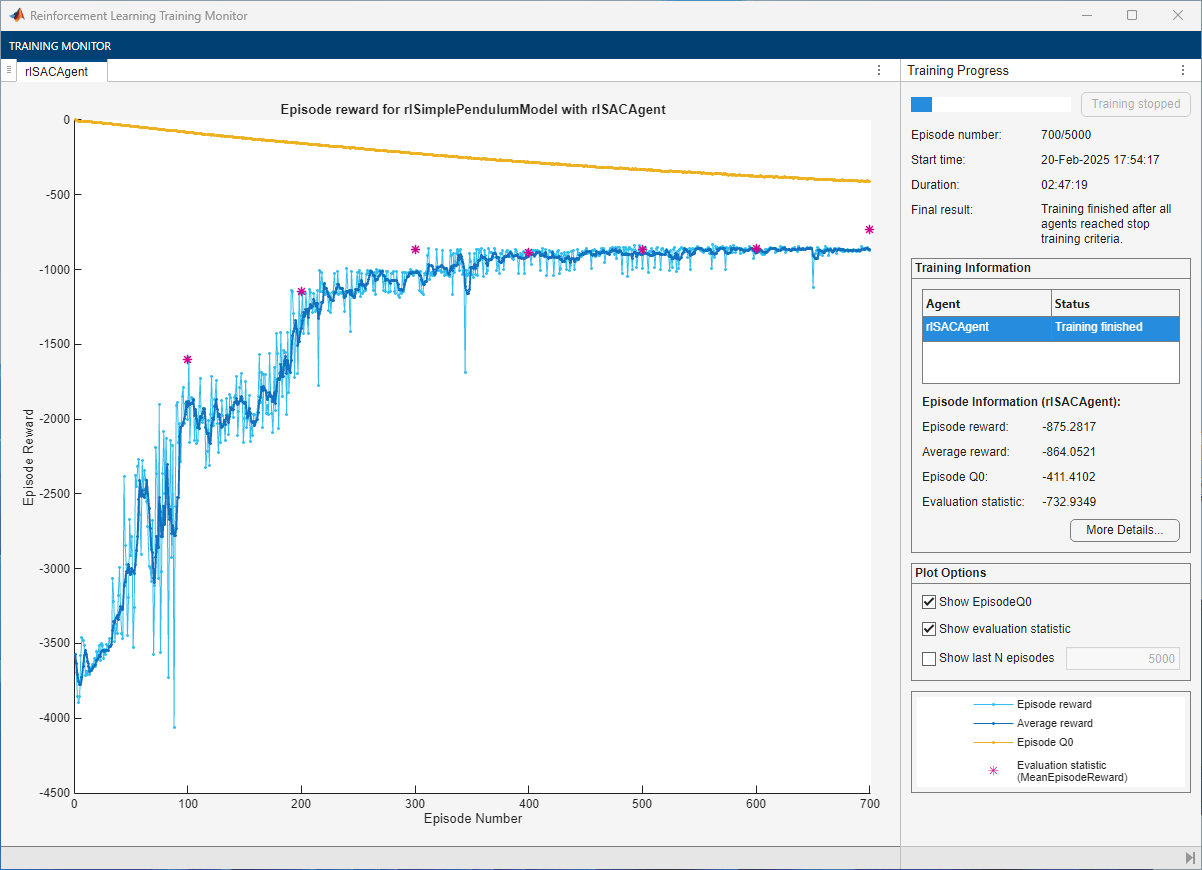
For the SAC agent, the training converges to a solution after 700 episodes. In the following section, check the trained agent within the pendulum swing-up environment.
To reproduce the results of this section, specify the seed and algorithm used for random number generation.
rng(0,"twister")By default, the agent uses a greedy (hence deterministic) policy in simulation. To use the exploratory policy instead, set the UseExplorationPolicy agent property to true.
Simulate the environment with the trained agent for ceil(Tf/Ts) steps. For more information on agent simulation, see sim.
experience = sim(env,sacAgent,simOptions);
sacTotalRwd = sum(experience.Reward)
sacTotalRwd =
-886.4478
The trained SAC agent is able to swing up and stabilize the pendulum upright.
Plot Training and Simulation Metrics
For each agent, collect the total reward from the final simulation episode, the number of training episodes, the total number of agent steps, and the total training time as shown in the Reinforcement Learning Training Monitor.
simReward = [
    pgTotalRwd
    acTotalRwd
    ppoTotalRwd
    ddpgTotalRwd
    td3TotalRwd
    sacTotalRwd
    ];

tngEpisodes = [
    pgTngEps
    acTngEps
    ppoTngEps
    ddpgTngEps
    td3TngEps
    sacTngEps
    ];

tngSteps = [
    pgTngSteps
    acTngSteps
    ppoTngSteps
    ddpgTngSteps
    td3TngSteps
    sacTngSteps
    ];

tngTime = [
    pgTngTime
    acTngTime
    ppoTngTime
    ddpgTngTime
    td3TngTime
    sacTngTime
    ];
Because the training for the PG, AC, and PPO agents does not converge, to avoid visualizing their metrics, set them to NaN.
simReward(1:3) = NaN;
tngEpisodes(1:3) = NaN;
tngSteps(1:3) = NaN;
tngTime(1:3) = NaN;
Plot the simulation reward, number of training episodes, number of training steps and training time. Scale the data by the factor [1 1 5e5 5] for better visualization.
bar([simReward,tngEpisodes,tngSteps,tngTime]./[1 1 5e5 5])
xticklabels(["PG" "AC" "PPO" "DDPG" "TD3" "SAC"])
legend(["Simulation Reward","Training Episodes","Training Steps","Training Time"], ...
    "Location","northwest")
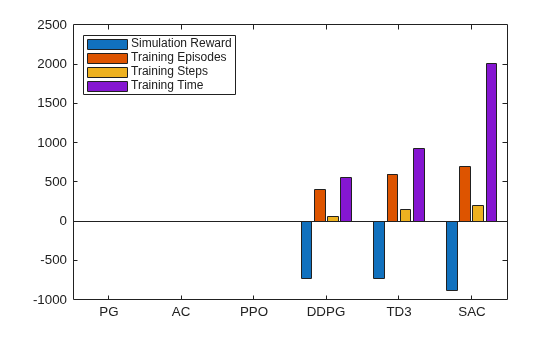
The plot shows that, for this environment, and with the used random number generator seed and initial conditions, DDPG and SAC use about the same number of steps to converge, with DDPG using less training time because of its simpler algorithm. With a different random seed, the initial agent networks would be different, and therefore, convergence results might be different. For more information on the relative strengths and weaknesses of each agent, see Reinforcement Learning Agents.
Save all the variables created in this example, including the training results, for later use.
% Uncomment to save all the workspace variables
% save cpsuAllVars.mat
Restore the random number stream using the information stored in previousRngState.
rng(previousRngState);

