DVB-S2X Super-Frame Generation for Formats 5 to 7
This example shows how to generate a Super-Frame (SF) complex baseband waveform for beam-hopping coverage. The SF waveform consists of several fields that are inserted in the SF structure, such as start of super-frame (SOSF), super-frame format indicator (SFFI), DVB-S2/S2X physical layer frames (PLFRAMEs), and SF-aligned pilots.
Super-Frame Structure
The super-framing structure provides better support for synchronization algorithms using several SF-specific fields such as SOSF, SFFI, and SF-aligned pilots, to enhance the receiver performance. The structure for formats 5 to 7 is of a variable-length in multiples of 1476 symbols and hosts DVB-S2X and DVB-S2 PLFRAMEs with modified PLHeader fields, respectively.
The first field in the SF is the SOSF, which is of length 270 symbols.
The second field is the SFFI, which is of length 450 symbols.
The third field is a super-frame header (SFH), which is of length 720 symbols and contains format-based information.
The last field, attached to the last SF in a dwell, is a postamble whose length varies based on Physical-Layer Header (PLH) protection levels.
The remaining portion of the SF consists of DVB-S2/S2X and the SF-aligned pilots, if they are signaled.
A SF-wide scrambling technique scrambles all symbols in a SF using two scramblers. The reference scrambler scrambles the SOSF and the SF-aligned pilots. The payload scrambler scrambles the SFFI, SFH, PLH, Extended Header Field (EHF), PLH protection level index (PLI) fields, and PLFRAMEs.
The structure divides the format-specific content section of the SF into resource slots called Capacity Units (CU). Each CU is of length 90 symbols and contains the PLFRAMEs symbols. The SF length is an integer multiple of 1476 symbols, where N is the value of the integer multiple. Pilot fields (P) are placed in the SF at a periodicity of 16 CUs. Alternatively, the SF length can be an integer multiple of 1440 symbols if pilots are not signaled when using format 5.
These figures show the SF structure for formats 5 to 7:
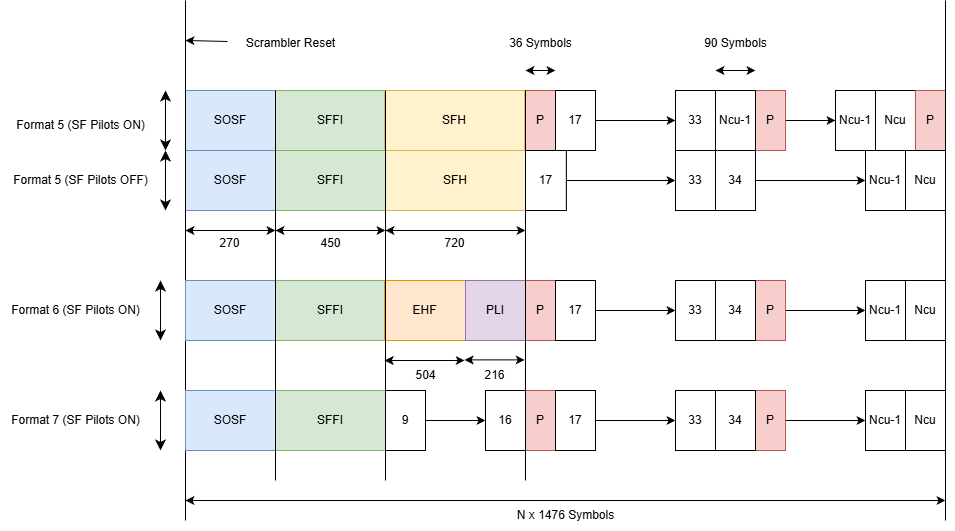
Because the waveform generation divides PLFRAMEs into slots of 90 symbols each, the waveform generator can assign the necessary number of CUs and insert PLFRAMEs into the SF. The system modifies very low signal-to-noise ratio (VL-SNR) frames so that the VL-SNR pilot field lengths are 90 symbols, which avoids any overlap with the SF-aligned pilots. The number of available CUs varies based on the SF length. The dwell time determines how many SFs the system transmits in a dwell.
SF format 5 follows a beam-hopping time plan (BHTP) to define how a beam illuminates coverage areas over a period before repeating the pattern. Formats 6 and 7 adopt a traffic-driven approach to beam-hopping to illuminate coverage areas based on payload availability for power efficiency.
The last SF in a dwell includes a postamble symbol sequence during beam switching. This sequence indicates that the satellite is about to switch off the current beam. The SF contains the postamble and transmits it before the end of a dwell duration. This figure shows the SF structure with the postamble.
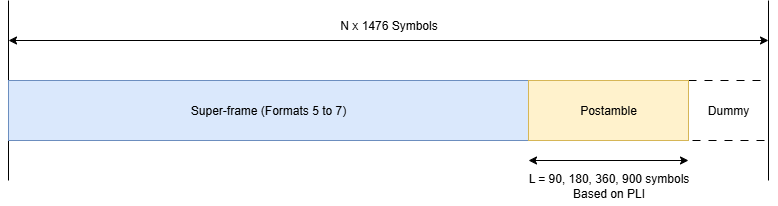
This example demonstrates how to parameterize and generate a SF for a specific beam that covers multiple cells and includes its respective fields. You can generate multiple DVB-S2/S2X PLFRAMEs and insert them into the SF.
SOSF, SFFI, and SF-aligned Pilots
The SOSF field is of length 270 symbols, and is a sequence derived from a Walsh-Hadamard matrix of size 256, padded with a sequence of length 14 symbols. You can select any one of the 256 sequences as the SOSF sequence for the SF. The SOSF sequence is mapped onto the constellation by multiplying the selected sequence by  .
.
The SFFI field is of length 450 symbols. The format can be either 5, 6, or 7. Perform these operations to generate the SFFI field.
Convert the numeric format value to a 4-bit representation
Perform simplex coding as described in Annexure E.2.3 [1], to achieve the required code rate of 4/15
Bit-wise repetition of the encoded bits by a factor for 30 to obtain
XsffiMap constellation using the equation


The pilot field (P) is 36 symbols long and consists of a sequence that you derive from a Walsh-Hadamard matrix of size 32, padded with a sequence of 4 symbols. You can use any one of the 32 sequences as the pilot sequence for the SF. Map the pilot sequence onto the constellation by multiplying the selected sequence by  . The waveform generator places pilot fields after every 16 CUs, but they do not occupy a full CU. Beam-hopping scenarios require SF pilots. You can switch them off only when you use format 5 in continuous transmission mode.
SOSF, SFFI, Pulse-Shaping, and Scrambling Properties of SF
Generate the SF using the HelperSuperFrameGenerator5to7.m object and set its parameters.
Format— Set to 5, 6, or 7.SOSFIndex— Select the appropriate Walsh-Hadamard sequence from the range [0, 255] to use as the SOSF.Pulse-shaping Parameters — These include
SamplesPerSymbol,RolloffFactor, andFilterSpanInSymbols.ScramblingCodeNumbers— Select the Nth gold code for generating the scrambling sequence for the reference and the payload scramblers. The property accepts a row vector of length two, [Nref Npayload]. The value of N is in the range [0, 148,574].
sfWaveGen = HelperSuperFrameGenerator5to7; sfWaveGen.Format =5; sfWaveGen.SOSFIndex =
0; sfWaveGen.ScramblingCodeNumbers = [14 26]; sfWaveGen.RolloffFactor =
0.35; sfWaveGen.FilterSpanInSymbols = 10; sfWaveGen.SamplesPerSymbol = 4;
SF-Aligned Pilots and PLI Properties
These properties signal pilot existence in the SF and the pilot sequence to be used.
PilotIndex— Select an appropriate Walsh-Hadamard sequence from the range [0, 31] to use as the pilot sequence.PLHProtectionIndex— Specify the PLH protection levels to determine repetition factor of PLHs in each PLFrame.SuperFrameLength— Specify the SF length so that it is an integer multiple of 1476 symbols.EHFSequenceIndex— Select an appropriate Walsh-Hadamard sequence from the range [0, 252] to use as the extended header field sequence. This property is only valid for format 6.
sfWaveGen.PilotIndex = 1; sfWaveGen.PLHProtectionIndex = 1; sfWaveGen.SuperFrameLength = 1476 * 50; if isequal(sfWaveGen.Format,6) sfWaveGen.EHFSequenceIndex =0; end
DVB-S2/S2X Frames Properties
These properties generate the PLFRAMEs that constitute a SF.
StreamFormat— Set as either "TS" or "GS", corresponding to transport stream and generic stream, respectively.SuperFrameMode— Set as either "Regular" or "VL-SNR".PLSDecimalCode— Physical layer signaling, specified as a decimal value. Property is applicable when SuperFrameMode is set to "Regular". The list of valid values for this property are listed in ETSI EN 302 307-1 section 5.5.2.2 and ETSI EN 302 307-2 section 5.5.2.2 Table 17a.VLSNRPLSDecimalCode— Physical layer signaling, specified as a decimal value. Property is applicable when SuperFrameMode is set to "VL-SNR". The list of valid values for this property are listed in ETSI EN 302 307-2 section E.3.7.3.3 Table E.9.DFL— Data field length.
sfWaveGen.StreamFormat = "TS";
sfWaveGen.SuperFrameMode = "Regular";
if strcmpi(sfWaveGen.SuperFrameMode,"Regular")
    sfWaveGen.PLSDecimalCode = 52;
else
    sfWaveGen.VLSNRPLSDecimalCode = 114;
end
sfWaveGen.DFL = 42960;
If StreamFormat is "GS", then you must set the user packet length (UPL). UPL can either be 0 or less than the data field length (DFL) value.
if strcmp(sfWaveGen.StreamFormat,"GS")
    sfWaveGen.UPL = 0;
end
disp(sfWaveGen)
  HelperSuperFrameGenerator5to7 with properties:

                   Format: 5
                SOSFIndex: 0
               PilotIndex: 1
    ScramblingCodeNumbers: [14 26]
                HasPilots: true
            RolloffFactor: 0.3500
      FilterSpanInSymbols: 10
         SamplesPerSymbol: 4

  Show all properties
Initialize the random number generator with a seed. Vary the seed to obtain different input data. The value used here, 73, is arbitrary.
seed = 73;
rng(seed);
Create an iterative loop to generate the SF output. These steps describe how to generate a waveform using a beam-hopping scenario.
Define the number of beams used to illuminate a cell (or cells).
Define the number of PLFrames to generate during each dwell.
Define the transport stream number (TSN) that is encoded into the PLS symbols of each PLFrame.
Generate input for the waveform generator or load existing payload bits to use as input to the waveform generator.
% Number of Beams
numBeams = 2;
superFrameOut = cell(numBeams,1);
numPLFramesPerBeam = [16 24];
numPLFramesPerDwell = 4;
TSN = [1,144];
for iter = 1:numBeams
    reset(sfWaveGen);
disp("Beam number " + num2str(iter) + " is being generated.")
    for frameIter = 1:numPLFramesPerBeam(iter)
        % Generate payload for one PLFRAME using generateInputData function
        data = sfWaveGen.generateInputData; % Accepts user-defined input bit payload sequences
        % Generate flag towards the end of dwell to trigger postamble sequence
        terminateDwell = mod(frameIter,numPLFramesPerDwell) == 0;
        % Generate SF waveform generator output
[sfOutputFiltered,sfOutputSymbols] = sfWaveGen(data,TSN(iter),terminateDwell);
        superFrameOut{iter} = [superFrameOut{iter}; sfOutputFiltered];
        if terminateDwell
        % Reset waveform generator to model the beam switching off
            reset(sfWaveGen);
        end
    end
Display the number of CUs that are still unused in the latest SF.
getRemainingCUValue(sfWaveGen);
end
Beam number 1 is being generated.
Super-Frame Number 1 is being generated.
Super-Frame Number 1 is complete.
Super-Frame Number 2 is being generated.
Super-Frame Number 2 is complete.
Dwell Complete
Super-Frame Number 1 is being generated.
Super-Frame Number 1 is complete.
Super-Frame Number 2 is being generated.
Super-Frame Number 2 is complete.
Dwell Complete
Super-Frame Number 1 is being generated.
Super-Frame Number 1 is complete.
Super-Frame Number 2 is being generated.
Super-Frame Number 2 is complete.
Dwell Complete
Super-Frame Number 1 is being generated.
Super-Frame Number 1 is complete.
Super-Frame Number 2 is being generated.
Super-Frame Number 2 is complete.
Dwell Complete
The current Super-Frame has 800 Capacity Units available.
Beam number 2 is being generated.
Super-Frame Number 1 is being generated.
Super-Frame Number 1 is complete.
Super-Frame Number 2 is being generated.
Super-Frame Number 2 is complete.
Dwell Complete
Super-Frame Number 1 is being generated.
Super-Frame Number 1 is complete.
Super-Frame Number 2 is being generated.
Super-Frame Number 2 is complete.
Dwell Complete
Super-Frame Number 1 is being generated.
Super-Frame Number 1 is complete.
Super-Frame Number 2 is being generated.
Super-Frame Number 2 is complete.
Dwell Complete
Super-Frame Number 1 is being generated.
Super-Frame Number 1 is complete.
Super-Frame Number 2 is being generated.
Super-Frame Number 2 is complete.
Dwell Complete
Super-Frame Number 1 is being generated.
Super-Frame Number 1 is complete.
Super-Frame Number 2 is being generated.
Super-Frame Number 2 is complete.
Dwell Complete
Super-Frame Number 1 is being generated.
Super-Frame Number 1 is complete.
Super-Frame Number 2 is being generated.
Super-Frame Number 2 is complete.
Dwell Complete
The current Super-Frame has 800 Capacity Units available.
Visualization
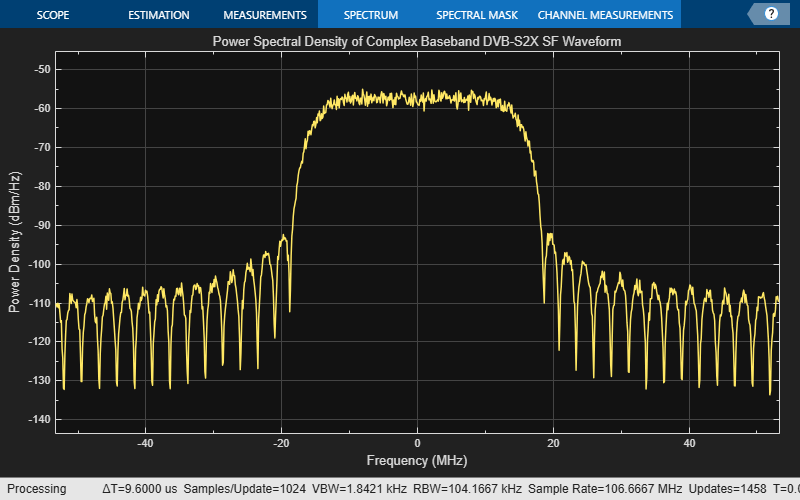
Plot the signal power spectral density at the baseband. Set the channel bandwidth to get an appropriate plot.
chanBW = 36e6;                                                            % Channel Bandwidth
Rsymb = chanBW/(1 + sfWaveGen.RolloffFactor);
Fsamp = Rsymb*sfWaveGen.SamplesPerSymbol;
bbscope = spectrumAnalyzer(SampleRate = Fsamp, ...
SpectrumType = "Power density", ...
Title = "Power Spectral Density of Complex Baseband DVB-S2X SF Waveform");
bbscope(superFrameOut{1});
Further Exploration
The example shows how to generate the SF output for formats 5 to 7. Use these options to create unique waveforms.
Generate waveform for each format.
Vary the number of PLFRAMEs per beam. You can also change the
PLSDecimalCodevalue for each PLFRAME and then generate the SF.Change the number of PLFRAMEs generated per dwell.
Adjust the SF length and observe how the number of SFs per beam changes.
Apply different
PLSDecimalCodevalues and observe the number of SFs generated for each value.Modify
ScramblingCodeNumbersto scramble SFs with different sequences. Perform cross-correlation on the SOSF and SFFI sequences in the SF output.Select different SOSF and pilot sequences by changing their property values.
Supporting Files
The example uses this supporting file.
HelperSuperFrameGenerator5to7.m: Generate DVB-S2X SF waveform samples for formats 5 to 7.
References
ETSI Standard EN 302 307-2 V1.4.1(2024-08). Digital Video Broadcasting (DVB); Second Generation Framing Structure, Channel Coding and Modulation Systems for Broadcasting, Interactive Services, News Gathering and other Broadband Satellite Applications; Part 2: DVB-S2 extensions (DVB-S2X).
ETSI Standard EN 302 307-1 V1.4.1(2014-11). Digital Video Broadcasting (DVB); Second Generation Framing Structure, Channel Coding and Modulation Systems for Broadcasting, Interactive Services, News Gathering and other Broadband Satellite Applications (DVB-S2).
ETSI Standard TR 102 376-2 V1.3.1(2015-11). Digital Video Broadcasting (DVB); Implementation Guidelines for the Second Generation System for Broadcasting, Interactive Services, News Gathering and other Broadband Satellite Applications; Part 2: S2 extensions (DVB-S2X).
ETSI Standard TR 102 376-1 V1.2.1(2015-11). Digital Video Broadcasting (DVB); Implementation Guidelines for the Second Generation System for Broadcasting, Interactive Services, News Gathering and other Broadband Satellite Applications (DVB-S2).
See Also
Objects
Topics
- DVB-S2X Super-Frame Generation for Formats 0 and 1
- DVB-S2X Super-Frame Generation for Formats 2 and 3
- DVB-S2X Link Simulation with RF Impairments and Corrections for VL-SNR Frames
- DVB-S2X Link Simulation with RF Impairments and Corrections for Regular Frames
- DVB-S2X Link Simulation with RF Impairments and Corrections in Wideband Mode

