hisl_0070: Placement of requirement links in a model
R2026bEstablish bidirectional traceability between requirements and model elements through requirement links
Usage: High-Integrity System Modeling
Guideline ID: hisl_0070
Rules
| hisl_0070: Placement of requirement links in a model |
|---|
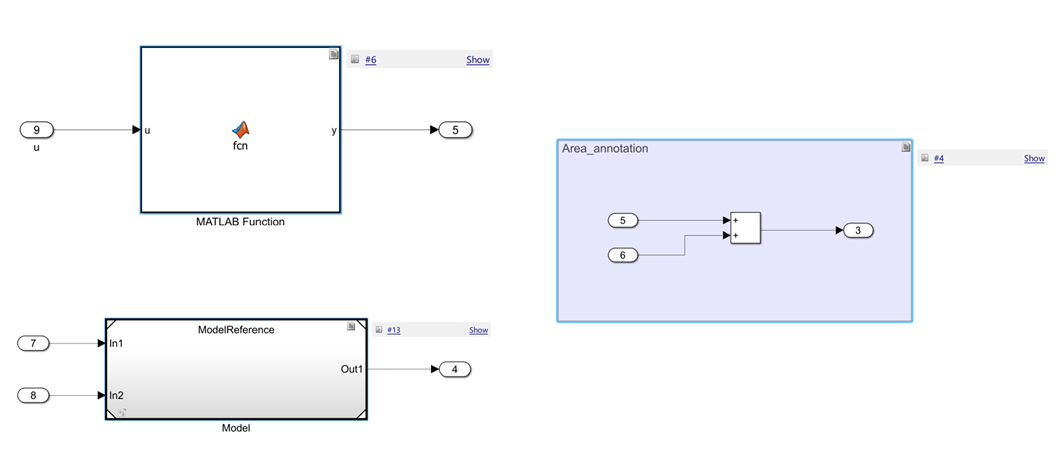
Establish bidirectional traceability between model requirements and the model elements that implement them. Apply requirement links to the lowest-level components. Model elements that do not affect model behavior or generated code are exempt from requirement linking. Rationale Establishing requirement links at the component level captures the relationship of model elements. In addition, maintainability improves because the need to update requirement links for minor logic changes is reduced. Verification Check for components that are not linked to requirements (Simulink Check) Example — Correct Requirement links in Simulink® placed on MATLAB® Function, Model Reference, and Area Annotation components.
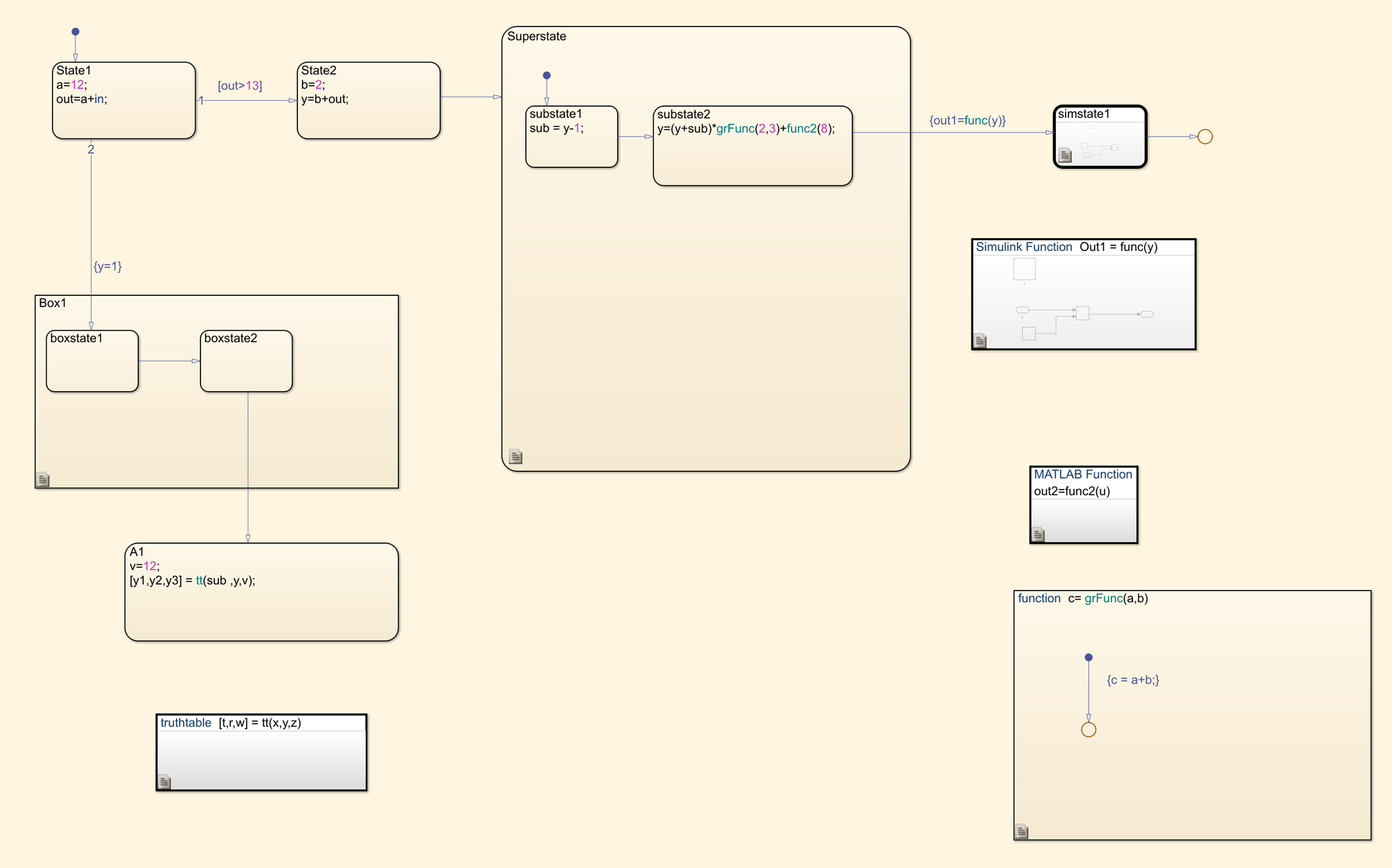
Example — Correct Requirement links in Stateflow® placed on a chart, superstate, box, Simulink function, graphical function, Simulink State, MATLAB Function, and Truth Table components.
|
Tips
Use Requirements Toolbox™ to trace between the model and the requirements from which the model was developed. Apply user tags (Requirements Toolbox) to define model elements as derived and/or safety requirements.
To reduce the number of requirements that are linked to a model, apply requirements at the component-level. A component contains a group of model elements, for example:
In Simulink, a component is a top-level block diagram, subsystem, MATLAB function, or area annotation.
In Stateflow, a component is a chart, superstate, box, Simulink function, graphical function, Simulink State, MATLAB Function, or Truth Table.
In MATLAB, a component is a function.
Components that contain only these model elements are exempt from requirement linking:
Model Info, DocBlock, Commented out model elements, or System Requirements (Requirements Toolbox) blocks
Commented out components
When a linked component contains a nonexempt child model element, the child implements the associated requirement either in part or whole.
Industry Standards
DO-331, Section MB.6.3.2.f - 'Low-level requirements trace to high-level requirements'
IEC 61508-3, Table A.2 (12) - 'Computer-aided specification and design tools'
IEC 61508-3, Table A.2 (9) - 'Forward traceability between the software safety requirements specification and software architecture'
IEC 61508-3, Table A.2 (10) - 'Backward traceability between the software safety requirements specification and software architecture'
IEC 61508-3, Table A.4 (8) - 'Forward traceability between the software safety requirements specification and software design'IEC 62304, 5.2 - 'Software requirements analysis'
ISO 26262-6, Table 2 (1a) - 'Natural language'
ISO 26262-6, Table 3 (1b) – 'Restricted size and complexity of software components'
ISO 26262-6, Table 5 (1a) – 'Natural language'
ISO 26262-6: 7.4.2.a - 'The verifiability of the software architectural design'
ISO 26262-6, Table 7 (1j) – 'Requirements-based test'
ISO 26262-6, Table 7 (1k) – 'Interface test'
ISO 26262-6, Table 8 (1a) – 'Analysis of requirements'EN 50128, Table A.3 (23) - 'Modeling supported by computer aided design and specification tools'
EN 50657, Table A.3 (23) - 'Modeling supported by computer aided design and specification tools'
EN 50657, Table A.3 (18) – 'Modeling'EN 50716, Table A.9 (6) – 'Traceability'

