Use Mask Parameter Object to Control Variant Choices in Masked Variant Assembly Subsystem Block
R2026bYou can define a mask parameter as a variant control variable and set its value to an object that is an instance of a user-defined class that you define. Each instance of the masked subsystem can activate a different variant choice by assigning a different object to the mask parameter from its mask dialog box.
To set up this approach, define:
A superclass that contains the properties and methods for managing variant choices
A subclass for each variant choice that identifies which external subsystem file to activate
Simulink® resolves the active variant choice based on the variant control mode:
In the
labelmode, the subclass method sets the active variant choice directly.In the
expressionmode, Simulink evaluates variant control expressions by comparing a class property against enumeration members and activates the variant choice for which the expression evaluates totrue.
Use this approach when you want to:
Activate variant choices programmatically using class methods
Add new variant choices by defining new subclasses without editing the block configuration
Reuse the same superclass across multiple blocks
For information on the variant activation times and the variant control variable types that the mask workspace supports, see Verify Variable Type Compatibility with Workspace and Variant Activation Time.
For constraints that apply when defining variant control variables in different workspaces, see Workspace Constraints for Variant Control Variables.
Note
The mask parameter value takes precedence over variables with the same name in the model workspace, data dictionary, or base workspace. Verify that you do not have unintended variables with the same name in multiple workspaces.
Switch Between Variant Choices of Masked Variant Assembly Subsystem Block in Label Mode
In this example, you create one MATLAB® class per variant choice. To activate a variant choice, you instantiate the corresponding class using a mask parameter object. You then access the class property to get the names of the variant choices and to set a variant choice to be active.
Explore Model
1. Open the model slexVariantAssemblySubsystemWithMaskInLabel, which contains a masked Variant Assembly Subsystem block, Controller.
open_system("slexVariantAssemblySubsystemWithMaskInLabel")
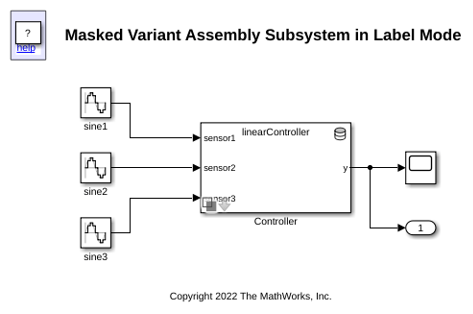
2. Open the Block Parameters dialog box of the Controller block.
The Variant control mode parameter is set to
label.
The Variant choices specifier parameter is set to
obj.getVariantChoices(). The variant choices arelinearControllerandnonlinearController.
objis a mask parameter object. To view it, right-click theControllerblock and select Edit Mask. On the Parameters & Dialog tab, the mask parameter is listed.
For information on supported activation times and variable types that the mask workspace supports, see Verify Variable Type Compatibility with Workspace and Variant Activation Time.
Define Classes for Reference Models
In this example, the vas_controller class is a superclass that includes a property and two methods. The getVariantChoices method returns a cell array of variant choices to be added to the Variant Assembly Subsystem block. From the list of choices, the setActiveVariant method sets the choice, specified as subsystemFile, to be active.
type vas_controller.m
classdef (Abstract) vas_controller
    properties
        subsystemFile char
    end
    methods (Static)
        function list = getVariantChoices()
            list = {'linearController','nonlinearController'};
        end
    end

    methods
        function setActiveVariant(obj,blk)
            set_param(blk,'LabelModeActiveChoice',obj.subsystemFile)
        end
    end
end
The two classes vas_linearController and vas_nonlinearController inherit from the vas_controller superclass. The vas_linearController class stores the name of the active choice as linearController in the inherited property subsystemFile. The class also stores numerator and denominator values used in the Discrete Transfer Fcn block of the linearController model.
type vas_linearController.m
classdef vas_linearController < vas_controller
    properties
        numerator
        denominator
    end

    methods
        function obj = vas_linearController()
            obj.numerator = [1 .7];
            obj.denominator = [1 .09 0.5];
            obj.subsystemFile = 'linearController';
        end
    end
end
Similarly, the vas_nonlinearController class stores the name of the active choice as nonlinearController in subsystemFile. The class also stores breakpoint and table values used in the 1-D Lookup Table of the nonLinearController model.
type vas_nonlinearController.m
classdef vas_nonlinearController < vas_controller
    properties
        breakpoints
        table
    end

    methods
        function obj = vas_nonlinearController()
            obj.breakpoints = -5:5;
            obj.table = tanh(-5:5);
            obj.subsystemFile = 'nonlinearController';
        end
    end
end
Set Parameter Object Value in Parent Model
Double-click the Controller block to open the mask dialog box.
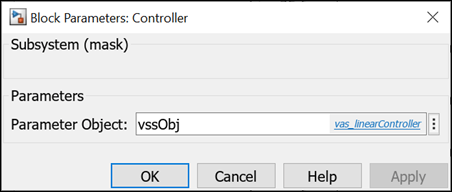
The value that you specify for vssObj in the mask dialog box is mapped to the mask parameter object obj.
Using obj, you can instantiate the class vas_linearController or vas_nonlinearController. You can then call its methods, getVariantChoices and setActiveVariant.
For example, to specify the variant choices of the Controller block, the Variant choices specifier parameter in the Block Parameters dialog box is set to obj.getVariantChoices().
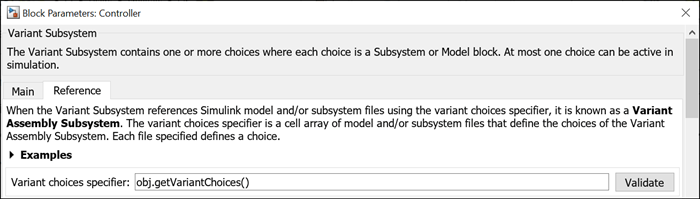
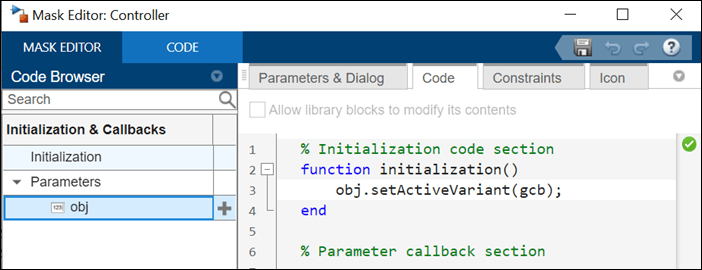
To set an active choice in the Variant Assembly Subsystem block, the obj.setActiveVariant() method is used in its mask initialization code.
Set Active Choice by Instantiating Classes Using Mask Parameter Object
Case 1: linearController Is Active and nonlinearController Is Inactive
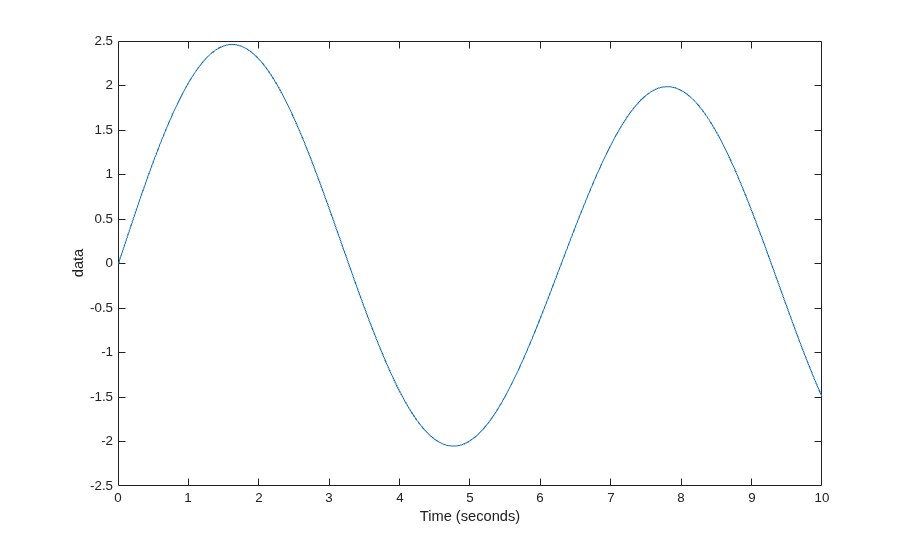
When you specify vssObj as vas_linearController, the value vas_linearController is mapped to the mask parameter object obj. The Variant choices specifier parameter value obj.getVariantChoices() evaluates to a cell array that contains the filenames linearController and nonlinearController to be added as variant choices to the Controller block. obj.setActiveVariant(gcb) in the mask initialization code sets the linearController subsystem to be active.
vssObj = vas_linearController;
out = sim("slexVariantAssemblySubsystemWithMaskInLabel");
plot(out.tout, out.yout);
xlabel("Time (seconds)")
ylabel("data")
Case 2: linearController Is Inactive and nonlinearController Is Active
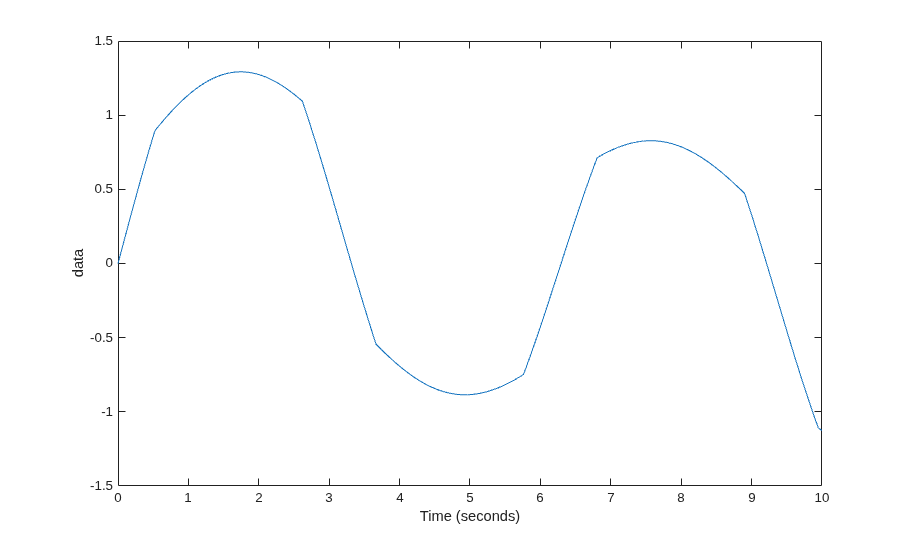
When you specify vssObj as vas_nonlinearController, the value vas_nonlinearController is mapped to the mask parameter object obj. The Variant choices specifier parameter value obj.getVariantChoices() evaluates to a cell array that contains the filenames linearController and nonlinearController to be added as variant choices to the Controller block. obj.setActiveVariant(gcb) in the mask initialization code sets the nonlinearController subsystem to be active.
vssObj = vas_nonlinearController;
out = sim("slexVariantAssemblySubsystemWithMaskInLabel");
plot(out.tout, out.yout);
xlabel("Time (seconds)")
ylabel("data")
Switch Between Variant Choices of Masked Variant Assembly Subsystem Block in Expression Mode
In this example, you create one MATLAB® class per variant choice. To activate a variant choice, you instantiate the corresponding class using a mask parameter object. You then access the class property to get the name of the variant file to be activated. Simulink® then compares the variant filename to the variant choice names by evaluating the variant control expressions and activates the variant choice for the expression that evaluates to true.
Explore Model
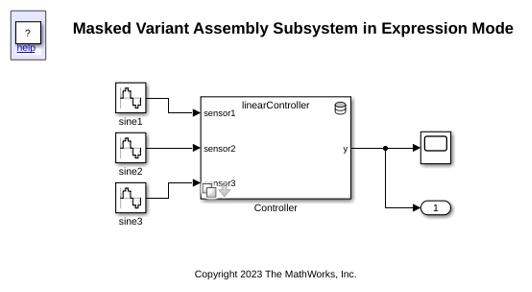
1. Open the model slexVariantAssemblySubsystemWithMaskInExpression, which contains a masked Variant Assembly Subsystem block, Controller.
mdl = "slexVariantAssemblySubsystemWithMaskInExpression";
open_system(mdl)
2. Open the Block Parameters dialog box of the Controller block.
The Variant activation time parameter is set to
update diagram.
The variant condition expressions are
obj.variantFile == slexVasExprControllerTypes.linearControllerandobj.variantFile == slexVasExprControllerTypes.nonlinearController.
objis a mask parameter object. To view it, right-click theControllerblock and select Edit Mask. On the Parameters & Dialog tab, the mask parameter is listed.
For information on supported activation times and variable types that the mask workspace supports, see Verify Variable Type Compatibility with Workspace and Variant Activation Time.
The Controller block has two Subsystem Reference choices, linearController and nonlinearController. The choices are added to the Controller block using the slexVasExprControllerTypes enumeration class. To add more choices, add members to slexVasExprControllerTypes.
type slexVasExprControllerTypes.m
classdef slexVasExprControllerTypes < Simulink.IntEnumType
%

%   Copyright 2023 The MathWorks, Inc.

  enumeration
    linearController(0)
    nonlinearController(1)
  end
end
Define Classes for Reference Models
In this example, the slexVasExprControllerVariant class is a superclass that includes a property, variantFile, of enumerated type slexVasExprControllerTypes.
type slexVasExprControllerVariant.m
classdef (Abstract) slexVasExprControllerVariant
%

%   Copyright 2023 The MathWorks, Inc.

    properties
        variantFile slexVasExprControllerTypes;
    end
end
The two classes slexVasExprLinearController and slexVasExprNonLinearController inherits property from the slexVasExprController superclass. The slexVasExprLinearController class represents the linearController variant. This class stores the name of the active choice as linearController in the inherited property variantFile. The class also stores numerator and denominator values used in the Discrete Transfer Fcn block of the linearController model.
type slexVasExprLinearController.m
classdef slexVasExprLinearController < slexVasExprControllerVariant
%

%   Copyright 2023 The MathWorks, Inc.

    properties
        numerator
        denominator
    end

    methods
        function obj = slexVasExprLinearController()
            % Values for the properties of this variant
            obj.numerator = [1 .7];
            obj.denominator = [1 .09 0.5];
            % Specify which subsystem file it corresponds to
            obj.variantFile = 'linearController';
        end
    end
end
Similarly, the slexVasExprNonLinearController class represents the nonlinearController variant. It stores the name of the active choice as nonlinearController in the inherited property variantFile. This class stores breakpoint and table values used in the 1-D Lookup Table of the nonLinearController model.
type slexVasExprNonLinearController.m
classdef slexVasExprNonLinearController < slexVasExprControllerVariant
%

%   Copyright 2023 The MathWorks, Inc.

    properties % parameters specific to this variant
        breakpoints
        table
    end
    methods
        function obj = slexVasExprNonLinearController()
            % values for the additional parameters
            obj.breakpoints = -5:5;
            obj.table = tanh(-5:5);
            % and the file
            obj.variantFile = 'nonlinearController';
        end
    end
end
Set Active Choice by Instantiating Classes Using Mask Parameter Object
In this example, the value that you specify for ctrlObj in the mask dialog box of the Controller block is mapped to the mask parameter object obj. Using obj, you can instantiate the class slexVasExpLinearController or slexVasExpNonLinearController. You can then access its property, variantFile to get the filename of the variant choice to be activated.
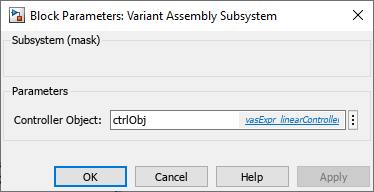
Case 1: linearController Is Active and nonlinearController Is Inactive
When you specify ctrlObj as slexVasExprLinearController, the class slexVasExprLinearController is instantiated. The class properties including variantFile are initialized.
ctrlObj = slexVasExprLinearController;
During simulation, slexVasExprLinearController, the value of ctrlObj, is mapped to the mask parameter object obj. The left side and the right side of the variant control expression obj.variantFile == slexVasExprControllerTypes.linearController each resolve to linearController. The expression evaluates to true and linearController becomes active.
sim(mdl);
Similarly, to set nonlinearController to be active, set ctrlObj to slexVasExprNonLinearController.
ctrlObj = slexVasExprNonLinearController;
sim(mdl);
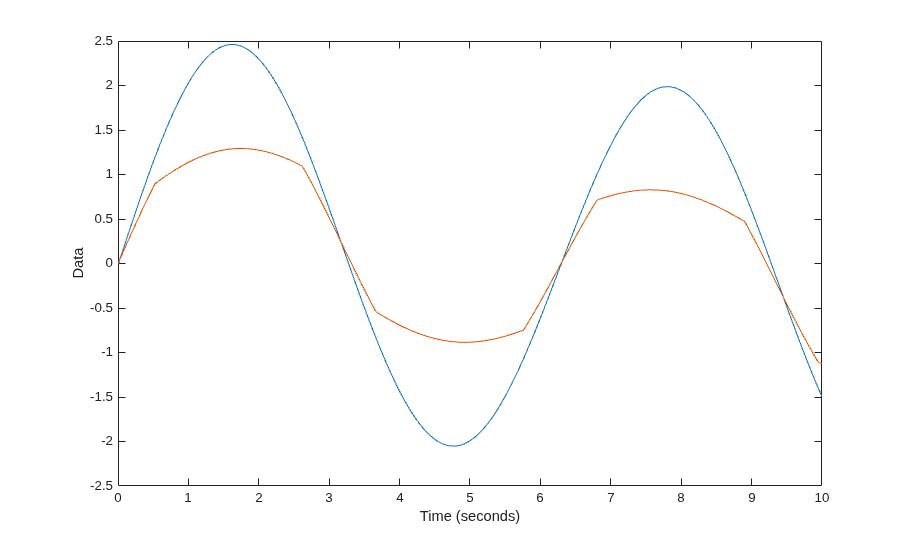
Optionally, you can plot the results for both the variant choices as shown:
in(1:2) = Simulink.SimulationInput(mdl);
in(1) = in(1).setVariable("ctrlObj",slexVasExprLinearController);
in(2) = in(2).setVariable("ctrlObj",slexVasExprNonLinearController);
out = sim(in);
figure
plot(out(1).tout, out(1).yout);
hold on
plot(out(2).tout, out(2).yout)
xlabel("Time (seconds)")
ylabel("Data")
[17-Aug-2026 16:16:44] Running simulations...
[17-Aug-2026 16:16:45] Completed 1 of 2 simulation runs
[17-Aug-2026 16:16:45] Completed 2 of 2 simulation runs