Test Generation on Model with C Caller Block
R2026bThis example shows how to use test generation on a model with a C Caller block and custom C code
Open the Model Containing the C Caller Block and Custom Code
open_system('sldvexCCallerBlock');
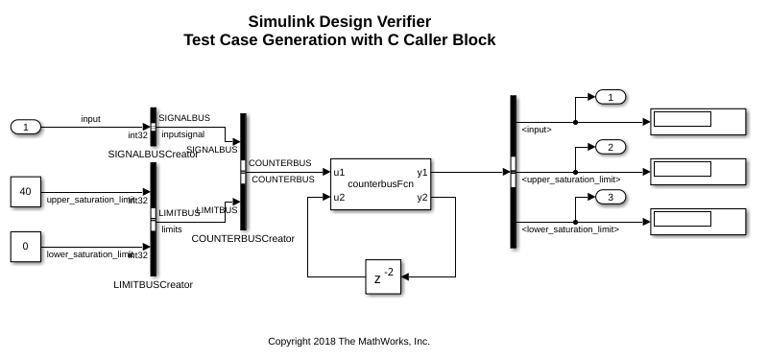
Generate Tests to Ensure Coverage of the Model
Use the sldvrun function to run Simulink® Design Verifier™ analysis.
opts = sldvoptions;
opts.Mode = 'TestGeneration';
opts.ModelCoverageObjectives = 'ConditionDecision';
opts.SaveHarnessModel = 'off';
opts.SaveReport = 'off';

[status, fileNames] = sldvrun('sldvexCCallerBlock', opts);
07-Aug-2026 02:56:29
Checking compatibility for test generation: model 'sldvexCCallerBlock'
Compiling model...done
Building model representation...done

07-Aug-2026 02:56:50

'sldvexCCallerBlock' is compatible for test generation with Simulink Design Verifier.
Generating tests...

..........
07-Aug-2026 02:57:00

Completed normally.

Generating output files:

07-Aug-2026 02:57:02
Results generation completed.

    Data file:
    /tmp/Bdoc26b_3351752_1703115/tpb5085f00/sldv-ex07804984/sldv_output/sldvexCCallerBlock/sldvexCCallerBlock_sldvdata.mat
Verify the Coverage
Use the sldvruntest function to verify that the test suite achieves complete model coverage.
[~, finalCov] = sldvruntest('sldvexCCallerBlock', fileNames.DataFile, [], true);
cvhtml('Final Coverage', finalCov);
Clean Up
To complete the example, close all models.
close_system('sldvexCCallerBlock', 0);

