Create Transitions Between States
Transitions in Stateflow charts define how a system moves from one state to another in response to events, conditions, or time-based criteria.
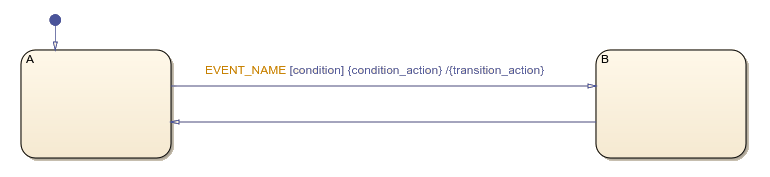
A transition label in Stateflow® consists of four optional parts:
Event triggers specify when the chart evaluates the transition.
Condition guards determine whether the transition can occur.
Condition actions execute when the condition is true.
Transition actions execute when the chart takes the transition.
Transition Types
Transitions connect a source state to a destination state. When the chart takes a transition, the source state becomes inactive and the destination state becomes active.
Default Transitions
A default transition specifies the initial state that becomes active when its parent state activates. Default transitions have no source state, only a destination state.
Default transitions can only include condition actions and transition actions.
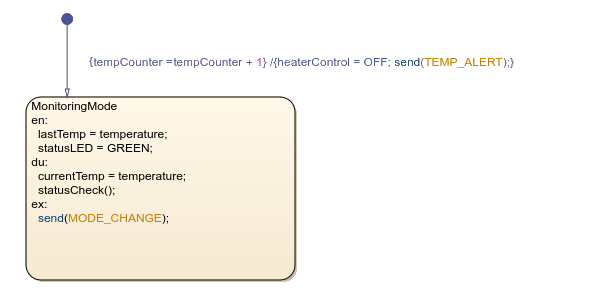
For example, this chart manages a temperature monitoring system with a state called
MonitoringMode. When the system initializes, it starts a temperature
counter. Next, the system turns off the heater and sends a temperature alert.
Self-Loop Transitions
A transition that begins and ends at the same state is called a self-loop transition. Use self-loop transitions to respond to or send events or update data without changing to a different state. For more information, see Self-Loop Transition.
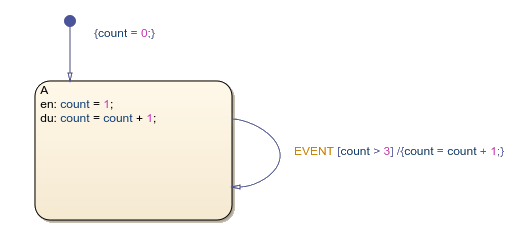
In this example, the default transition sets count equal to
0, and then enters state A. After entering state
A, count increases by 1. After
count is greater than 3, the chart exists the
state, sends the event, adds 1 to count and then
re-enters state A.
Create Conditional Transitions
Condition guards control whether a transition is valid based on the evaluation of an expression. Place condition guards in square brackets.
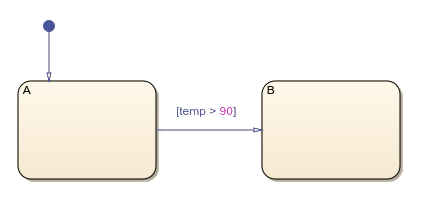
In this chart, the transition from state A to state
B occurs when temp is greater than
90.
Execute Transitions Guarded by an Event
When an event occurs, the chart wakes up and evaluates the transition that is guarded by an event in this order:
The chart evaluates the condition guard of each transition, in order.
If the condition is true, the chart executes the actions of a transition.
The source state becomes inactive and executes any exit actions.
The destination state becomes active and executes any entry actions.
If multiple transitions from the same state are valid for a given event, the chart takes the first valid transition based on execution order. For more information, see Use Events to Execute Charts.
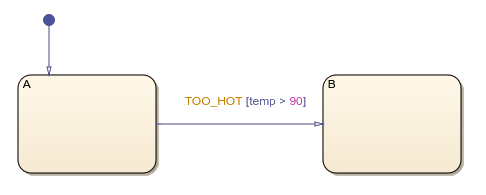
In this chart, the transition from state A to state
B only occurs once the TOO_HOT event occurs and
temp is above 90.
Transition Actions
Transition actions execute when t, after the exit actions of the source state and before the entry actions of the destination state. Use a forward slash to specify transition actions.
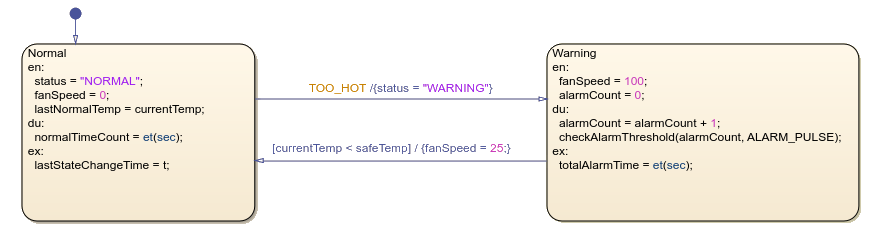
In this chart, when the event TOO_HOT occurs, the chart exits state
A and performs the exit action lastStateChangeTime =
t;. Then, before entering state B, the chart executes the
transition action and sets the value of status to
"WARNING".

