Troubleshoot Condition Actions Executing Repeatedly or at Unexpected Times
R2026bIssue
If your chart has a path that has multiple transitions connected by junctions, the chart may backtrack during evaluation. Backtracking is when a chart partially executes a path, determines that the remaining transitions are invalid, returns to the junction or state at the source of the path, and continues searching for a path. Backtracking can cause:
Condition actions to execute at times you do not expect.
Condition actions to execute multiple times.
The chart to experience performance loss from repeatedly evaluating conditions.
Unintentional backtracking is most common when a junction has multiple incoming transitions and no unconditional outgoing terminal path. The Unexpected backtracking diagnostic identifies these cases.
Backtracking occurs because charts evaluate the outgoing path of an object until either:
The chart encounters a state or terminal junction.
The chart determines no paths are valid.
To fix unintentional backtracking, you can:
Merge the outgoing transitions of the source state or junction into a single path.
Merge the incoming transitions of the junction into a single path.
Add an unconditional, outgoing, terminal path to the junction.
Add an unconditional, outgoing, terminal path to a subsequent junction.
Possible Solutions
Merge Outgoing Transitions of the Source State or Junction
You can fix backtracking by combining the outgoing transitions of a junction or state into a single path.
For example, in this model, graphical function backtrack
experiences backtracking, while graphical function noBacktrack
does not. The backtracking unexpectedly sets the value of local data
x.
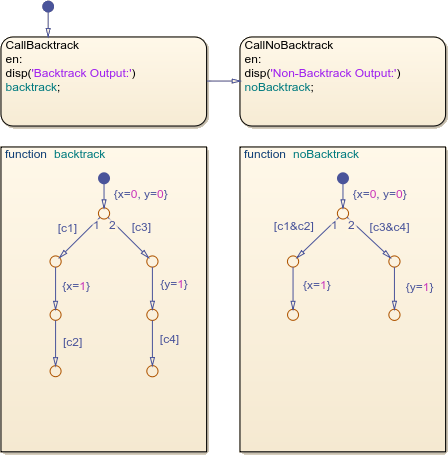
Local data c1, c3, and c4
are true, while c2 is false.
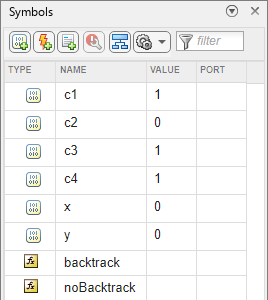
In backtrack, when the model simulates, the chart evaluates the
first path. Since c1 is true and c2 is false,
the chart sets x to 1, stops evaluating the
path, and returns to the original junction. Then, the chart evaluates the second
path. Since c3 and c4 are true, the chart sets
y to 1, reaches the terminal junction, and
stops evaluating the flowchart.
To resolve backtracking, noBacktrack combines the first and
third transitions in each path by using an AND operator. When the model simulates,
the chart evaluates the first path. Since c1 is true and
c2 is false, the chart stops evaluating the path. Then, the
chart evaluates the second path. Since c3 and
c4 are true, the chart sets y to
1, reaches the terminal junction, and stops evaluating the
graphical function.
Merge Incoming Transitions of the Junction
In this model, graphical function backtrack experiences
backtracking, while graphical function noBacktrack does not. The
backtracking causes data to increment multiple times.
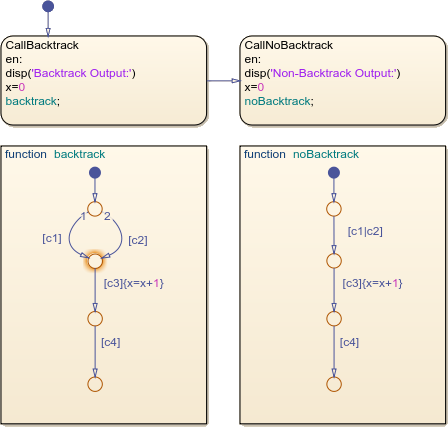
Local data c1, c2, and c3
are true, while c4 is false.
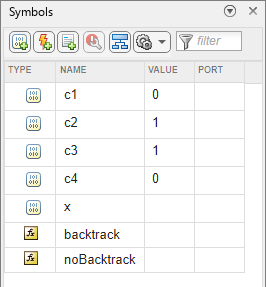
In backtrack, the chart evaluates the first path. Since
c1 and c3 are true, the chart increments
x by 1. Then, since c4 is
false, the chart backtracks and evaluates the second path. Since
c2 and c3 are true, the chart increments
x a second time. Then, the chart determines there are no valid
remaining paths.
To resolve backtracking, noBacktrack combines the two incoming
paths by using an OR operator. When the model simulates, the chart evaluates the
path. Since c1 and c3 are true, the chart
increments x. Then, since c4 is false, the
chart determines there are no valid remaining paths.
Add Direct Unconditional Terminal Path to the Junction
In this model, graphical function backtrack experiences
backtracking, while graphical function noBacktrack does not. The
backtracking causes data to increment multiple times.
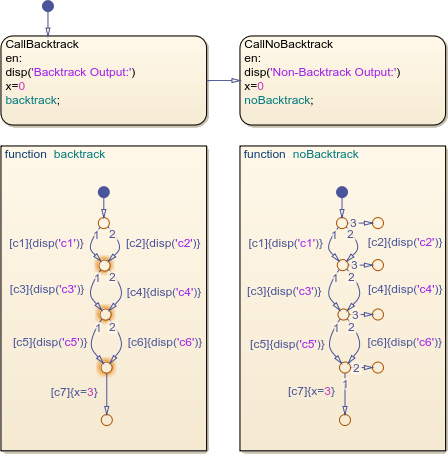
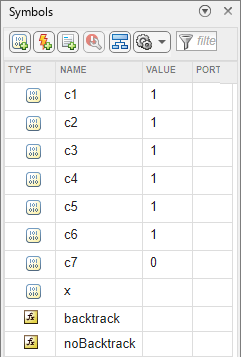
Local data c1, c2, c3,
c4, c5, and c6 are true,
while c7 is false.
In backtrack, when the model simulates, the model evaluates the path containing
conditions [c1], [c3], and
[c5]. The chart reaches false condition [c7]
and backtracks.
When a chart backtracks, it does not return to the source object. Instead, the
chart evaluates the next incoming path, without reevaluating true conditions. In this
case, the chart successfully evaluates the condition [c3], so it
tests the condition [c6], and then [c7].
If a chart determines none of the incoming paths are valid, it backtracks to the
previous junction. In this case, the chart tests conditions [c4],
[c5], and [c7]. The chart continues
backtracking until it finds a valid path or determines all paths are invalid.
To resolve backtracking, noBacktrack has an unconditional
terminal path after each junction. After the chart evaluates conditions
[c1], [c3] and [c5], it
tests the [c7] condition. The chart determines the condition is
false, and tests the next outgoing transition from the junction, which is an
unconditional path to a terminal junction. When the chart reaches the terminal
junction, it stops evaluating the graphical function.
Add Unconditional Terminal Path to Subsequent Junction
In this model, graphical function backtrack experiences
backtracking, while graphical function noBacktrack does not. The
backtracking causes data to increment multiple times.
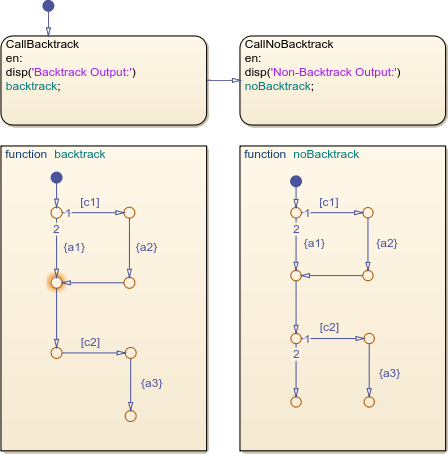
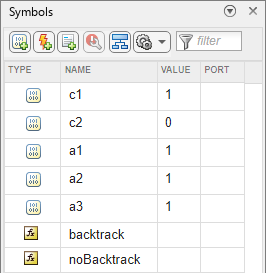
Local data c1 is true, while c2 is
false.
In backtrack, when the model simulates, the chart evaluates the
first path. Since c1 is true, the chart executes action
{a2}. The chart moves along the unconditional transitions and
tests condition [c2]. Since c2 is false, the
chart returns to the junction on which a warning appears.
Then, the chart evaluates the other incoming path. Since the incoming transition
is unconditional, the chart executes action {a1}. When the chart
reaches condition [c2], it determines the path is invalid and no
valid paths remain. The chart stops evaluating the graphical function.
To resolve the backtracking, noBacktrack adds an unconditional
terminal path to a junction that appears later in the path compared to the function
that backtracks. When the model simulates, the chart evaluates the first path. Since
c1 is true, the chart executes action {a2}.
The chart moves along the unconditional transitions and tests condition
[c2]. Since c2 is false, the chart tests the
next outgoing transition from the junction, which is an unconditional path to a
terminal junction. When the chart reaches the terminal junction, it stops evaluating
the graphical function.

