Create Custom Queries to Filter Architecture Views
R2026bYou can create custom queries to filter System Composer™ architecture views using MATLAB classes. You can use custom queries to dynamically filter and display only the architecture elements that meet specific criteria. Using custom queries allows you to create focused, reusable viewpoints for different stakeholders or analyses without modifying the underlying architecture model.
This topic uses Keyless Entry System architecture as an example. To open
this model, enter this command In the MATLAB Command Window.
scKeylessEntrySystem
The architecture model opens in System Composer.
Create Custom MATLAB Class
Create a MATLAB class that inherits from systemcomposer.query.Constraint. You need two override functions:
doStringify: Creates a string representation of the constraints for evaluation in MATLAB workspace.doIsSatisfied: Determines whether the passed in elementelemshould pass the query or not.
This code defines a query named IsLinkedTo that filters the
components based on whether they are linked to a specific requirement.
classdef IsLinkedTo < systemcomposer.query.Constraint
    properties
        reqID
    end
    methods (Hidden)
        function obj = IsLinkedTo(reqID)
            obj = obj@systemcomposer.query.Constraint;
            obj.reqID = char(reqID);
        end

        function str = doStringify(obj)
            str = [metaclass(obj).Name '("'obj.reqID'")'];
        end

        function tf = doIsSatisfied(obj, elem)
            tf = false;

            if isa(elem, 'systemcomposer.arch.Component')
                outLinks = slreq.outLinks(elem);

                for outLink = outLinks
                    linkDestination = outLink.destination;

                    if ~isempty(linkDestination) && isequal(linkDestination.id, obj.reqID)
                        tf = true;
                        return;
                    end
                end
            end
        end
    end
end
Save the class definition in a file named IslinkedTo.m. Check that
the file is on MATLAB path before using the query in a view.
Create View
To create a new view for keyless entry system model, follow these steps.
To open the Architecture Views Gallery, on the Modeling tab, in the Views section, click Architecture Views.
To create a new view, select New > View.
In the View Properties on the right pane, in the Name box, enter a name for this view, for example,
Requirements View. Choose a Color and enter a Description, if necessary.
A new view for the Keyless Entry System model is now created.
Apply Custom Filter
To apply custom filter:
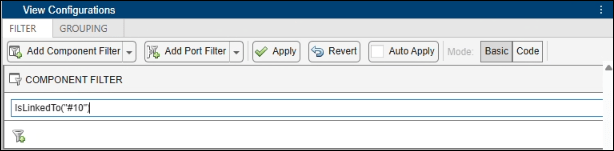
In the View Configurations pane, in the Filter tab, select Add Component Filter > Add Custom Component Filter. Enter a constraint by which to filter.
In the box, enter the complex constraint with the requirement you want to filter, for instance,
IsLinkedTo("#10").Click Apply.
Note
In addition to IsLinkedTo, the project includes the
HasChildren custom query class, which illustrates alternative
filtering pattern. Explore this class to see an additional example of how to extend
systemcomposer.query.Constraint for different architectural analyses.
See Also
Tools
- Architecture Views Gallery | Interface Editor | Requirements Editor (Requirements Toolbox) | Requirements Manager (Requirements Toolbox)
Functions
openViews|createView|getView|deleteView|modifyQuery|setPortQuery|runQuery|removeQuery|addElement|removeElement|getQualifiedName|createSubGroup|getSubGroup|deleteSubGroup|getQualifiedName|lookup
Objects
systemcomposer.view.View|systemcomposer.view.ElementGroup|systemcomposer.query.Constraint|systemcomposer.interface.DataInterface|systemcomposer.interface.DataElement

