Results for

Hello everyone, I am new to Matlab.
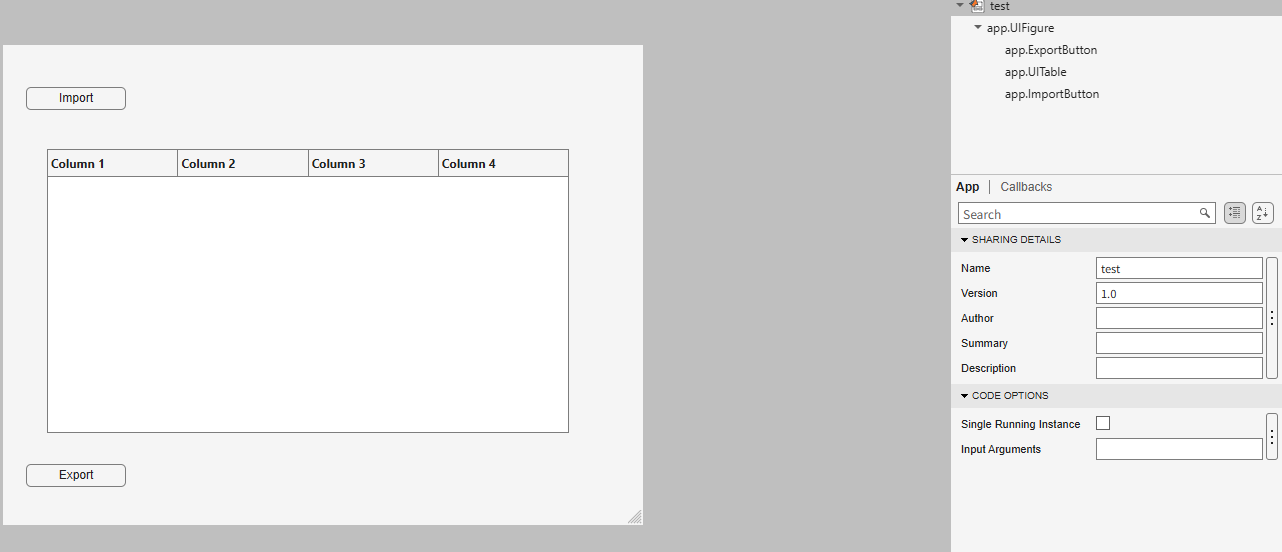
I am trying to create an app to export the 5th column into a new sheet in the imported Excel file when I click Export button.
How can I write code in ExportButtonPushed
classdef test < matlab.apps.AppBase
% Properties that correspond to app components
properties (Access = public)
UIFigure matlab.ui.Figure
ExportButton matlab.ui.control.Button
UITable matlab.ui.control.Table
ImportButton matlab.ui.control.Button
end
% Callbacks that handle component events
methods (Access = private)
% Button pushed function: ImportButton
function ImportButtonPushed(app, event)
[file, location] = uigetfile( ...
{'*.xlsx;*.xlsm', 'Excel files'; '*.txt', 'Text files'; '*.*', 'All files'}, ...
'File Selector');
figure(app.UIFigure)
if isequal(file, 0), return, end
fullPath = fullfile(location, file);
try
[~,~,ext] = fileparts(fullPath);
if any(strcmpi(ext, {'.xlsx','.xlsm','.xls'}))
T = readtable(fullPath, 'Sheet', 1, 'VariableNamingRule', 'preserve');
else
T = readtable(fullPath, 'VariableNamingRule', 'preserve');
end
catch ME
uialert(app.UIFigure, ME.message, 'Read error');
return
end
if width(T) < 5
uialert(app.UIFigure, 'The file needs at least 5 columns.', 'Import error');
return
end
app.UITable.Data = T;
app.UITable.ColumnName = T.Properties.VariableNames;
lengthlist = T{:,5};
end
% Button pushed function: ExportButton
function ExportButtonPushed(app, event)

I have learned that I am never, ever going to use Copilot in Simulink again, and probably never use Copilot in any Microsoft application again either. Two times I asked Copilot for some simple help on how to configure a subsystem block and BOTH TIMES it gave me incorrect information that did not work. After 10 minutes of trying to get accurate information out of Mathworks' own native AI (definitely light on the "I" part), I gave up and when to ChatGPT which immediately gave me the correct answer.
Do better Mathworks. Your bloatware is bad enough, and your rejection of systems engineering standards for your own is also pretty terrible. But your selection of an AI "assistant" is a complete failure.

As a long-standing request from users, we are happy to announce that HDFql now supports MATLAB for managing HDF5 and MAT files.
In short, HDFql (Hierarchical Data Formal query language) is the first high-level, declarative language for managing HDF5 or MAT data. Designed to be as simple and powerful as SQL, it dramatically reduces the learning effort and time required to work with HDF5. With its intuitive syntax, HDFql provides a clean interface for reading and writing HDF5 data across programming languages (C, C++, Java, Python, C#, Fortran, R, and now MATLAB) and platforms (Windows, Linux, and macOS). In addition, HDFql is based on a flexible parallel architecture that transparently leverages available cores and, in MPI clusters, nodes to efficiently process large volumes of data.
Key benefits of HDFql include enabling users to replace dozens of lines of complex HDF5 code with just a few lines of simple code, helping AI models generate better code using far fewer tokens, and making AI-generated code easier for humans to review.
Happy coding, prompting, or reviewing with HDFql in MATLAB!

We use Timecontrol for statistic automations. Yesterday at 2026-10-220 10:00pm CET Time control stopped working. There is new new time in the "Run At" field, although the script should run every 5 minutes. We had the same problem in September, see https://de.mathworks.com/matlabcentral/answers/2184870-thingspeak-timecontrol-stopped-working-at-all?s_tid=srchtitle
Has anybody also prolems with Timecontrol?

The new installer streamlines the process of installing and setting up agentic workflow with MATLAB. If you have been intimidated by the setup process, give this a try!
https://github.com/matlab/agentic-toolkit-installer

I am frequently facing issue with the onramp training of not proceeding to the next task or section, even after successfully completion of the current task or complete section.

For the past several days I have been experiencing a problem with data visualization on two of my ThingSpeak channels.
The data appears to be uploaded and stored correctly, and new entries are still being added to the channels. However, the visualizations are not working correctly.
The standard Field Charts show only a very small number of data points instead of the normal continuous measurements. Most of the points are compressed on the left side of the chart, while one or a few points appear far to the right and are connected by long straight lines. The time axis is also incorrect and sometimes shows repeated dates such as “01 Jan”.
The numeric widgets are affected as well and display incorrect values. Some custom visualizations also remain blank or fail to load.
The problem appeared suddenly and affects two separate channels which had previously been working correctly. I did not make any significant changes to the channels before the problem started.
This seems somewhat similar to the ThingSpeak chart/timeline issue reported in June 2026, when charts were displaying incorrect time ranges and the DAYS/RESULTS settings were not working correctly. However, my current problem also affects numeric widgets and custom visualizations, and the charts show incorrect dates and strangely positioned data points.
Could this be a regression or a similar issue with the ThingSpeak visualization system?
Has anyone else experienced the same problem recently?

The Ran In tag still shows R2026a on Answers and Discussions (as does the Executing In popup), even though both are actually running R2026b.
This seems to be always be an issue whenver the site updates to the latest release. Seems like it should be pretty straightforward to update those message at the same time the underlying release is updated. Or am I underestimating the complexity of that task?
matlabRelease

What if MATLAB could show you not only the final output, but also how your code reaches that result?
Imagine an interactive tool that visualizes variable changes, function calls, matrix transformations, and execution flow as a program runs. Engineers could watch algorithms evolve, identify unexpected behavior, and understand complex simulations through live visualizations.
The idea is to build a Live MATLAB Execution Explorer that combines code tracing, variable timelines, and 3D engineering simulations in one interface.
From debugging control systems to teaching numerical methods, this could transform how students, researchers, and engineers interact with code.
The challenge? Capturing execution data efficiently without significantly affecting performance.
The vision: Turn programming from something we read into something we can see, explore, and understand.
#MATLAB #Simulink #EngineeringInnovation #Simulation #DeveloperTools

I recently had an idea for a side project: building an app/extension that can interactively follow simulations and visualise the live flow of code execution.
For this, I would need access to variables, datasets, and the function call stack during execution, ideally without interfering with the actual code execution.
However, I found that MATLAB's current architecture makes this difficult, as the entire application runs in a single thread and there are no publicly exposed APIs to access runtime variables without interrupting execution.
Can anyone suggest a possible workaround or an alternative approach to achieve this?
I recently had an idea for a side project: building an app/extension that can interactively follow simulations and visualise the live flow of code execution.
For this, I would need access to variables, datasets, and the function call stack during execution, ideally without interfering with the actual code execution.
However, I found that MATLAB's current architecture makes this difficult, as the entire application runs in a single thread and there are no publicly exposed APIs to access runtime variables without interrupting execution.
Can anyone suggest a possible workaround or an alternative approach to achieve this?

Hello everyone
After you read the blog post about all the new goodness in MATLAB 2026b I am sure you'll rush out to install it. If you do one more thing, however, I suggest that you install this add-on from MATLAB File-Exchange since it will make object-oriented code much faster.
"How much faster?" I hear you ask. This much faster:
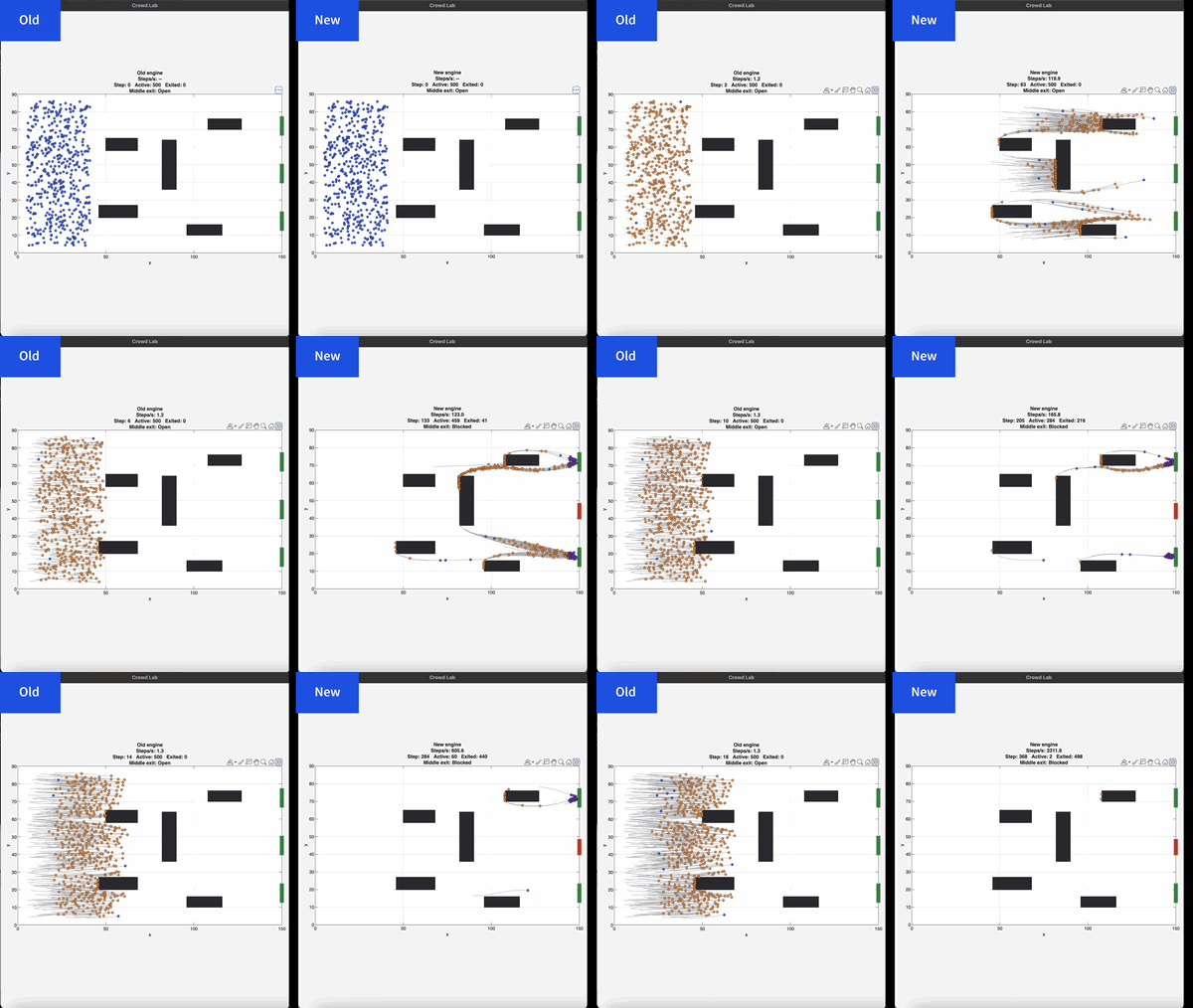
If you prefer numbers to pictures, all of the details are in a blog post from when we released the limited beta: Objects are about to get much faster in MATLAB » The MATLAB Blog - MATLAB & Simulink
"Why didn't we make this the default?" I hear you ponder. Because there is a small chance that the new system will break your code. It's a very small chance and I've personally not seen any code that does get broken. However, such code does exist and we want to be give you the chance to discover this and work with us to make your code compatibile before it does become the default.
I hope you enjoy using 2026b as much as we enjoyed making it.
Cheers,
Mike
I keep forgetting the functions and lack of pratices would be the reason

Extremely--I have real work to do
24%
Maybe talk about something else?
24%
Neutral
24%
Not very much
24%
Let's talk about nothing else
5%
21 votes

Hey, this is a safe space to share your cool projects you know. I have pet ducks, I use ThingSpeak to open the door to their house each morning. I just finished an upgrade to the LED strip lights on my driveway that are controlled via ThingSpeak. And the valves for my drip irrigation system. You got it. Controlled by ThingSpeak. Let me know your last cool project you finished or the one you keep dreaming of starting. I need some more inspiration :)
I contributed a guet post for @Mike Croucher - AI Agent Demystified – Building a Minimalist Agent in MATLAB
Basically, my use case is an coding agent built with MATLAB to code MALTAB, but you can actually roll your own agnet with MATLAB AI Agent SDK for more realistic use cases. Hopefully my post gives you a starting point for a fun exploration!

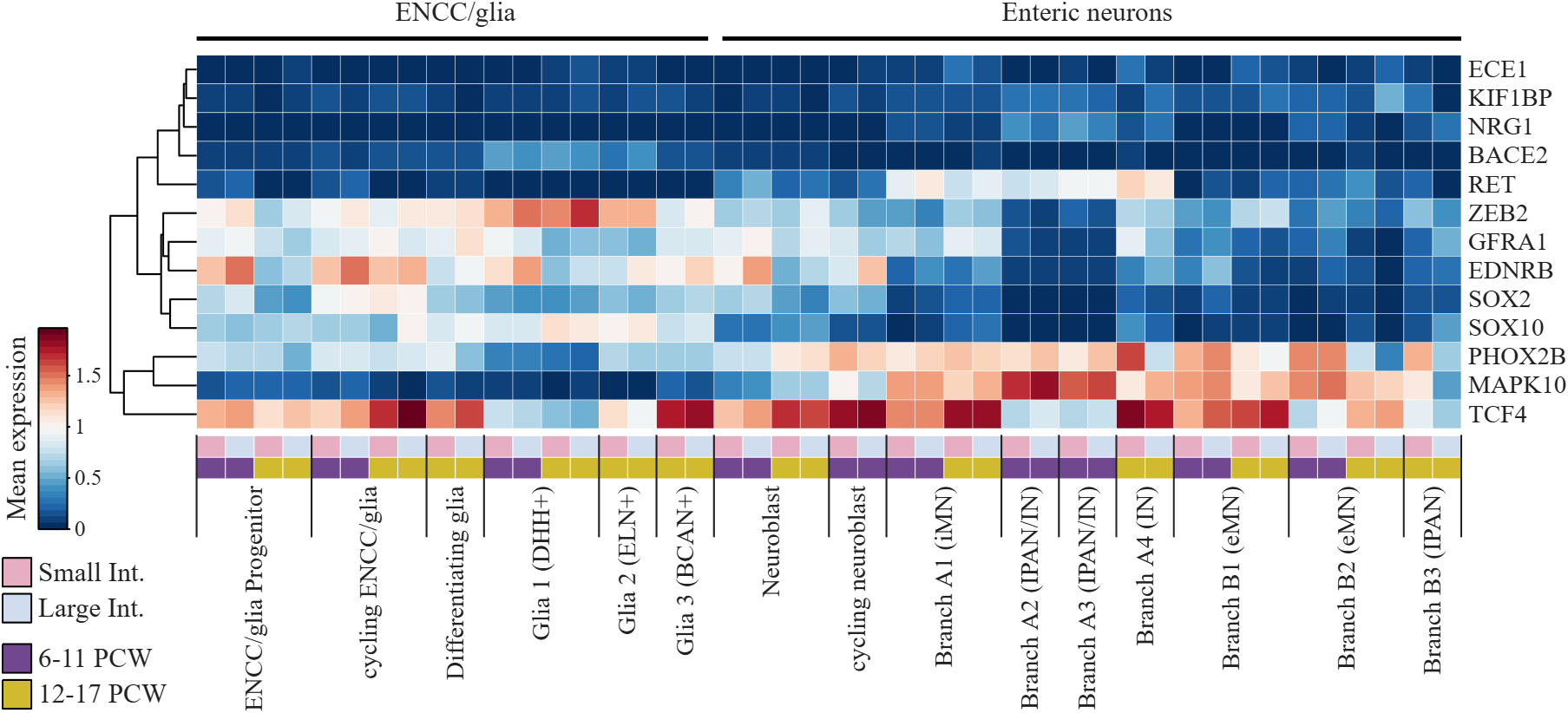
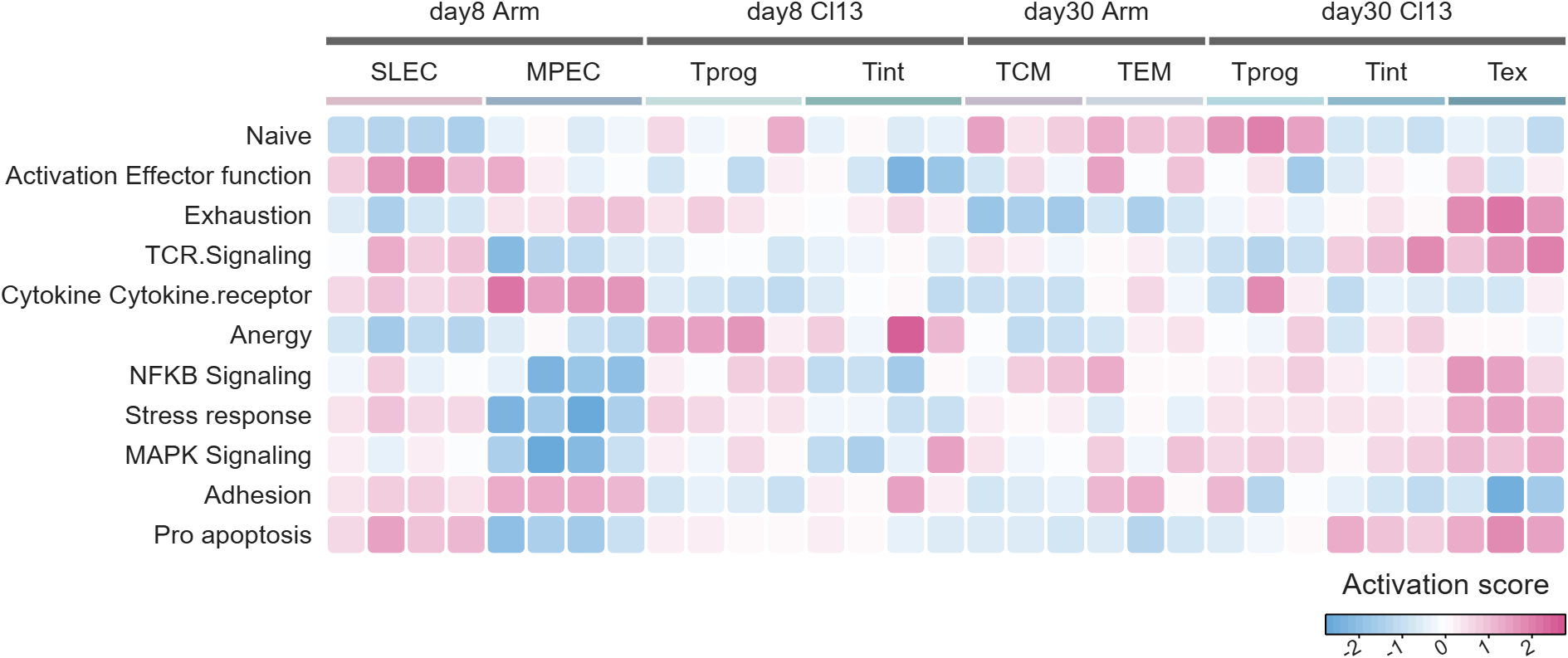
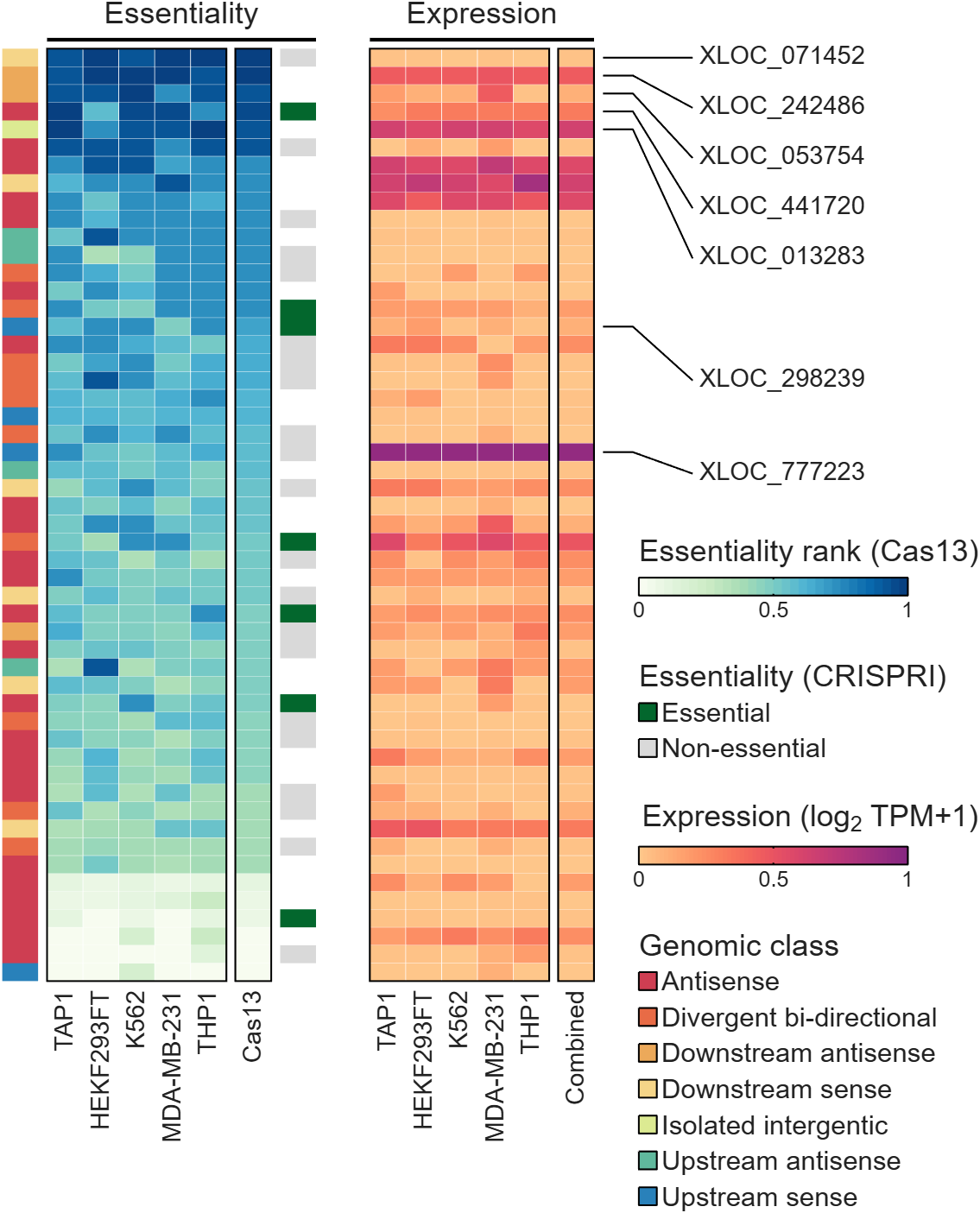
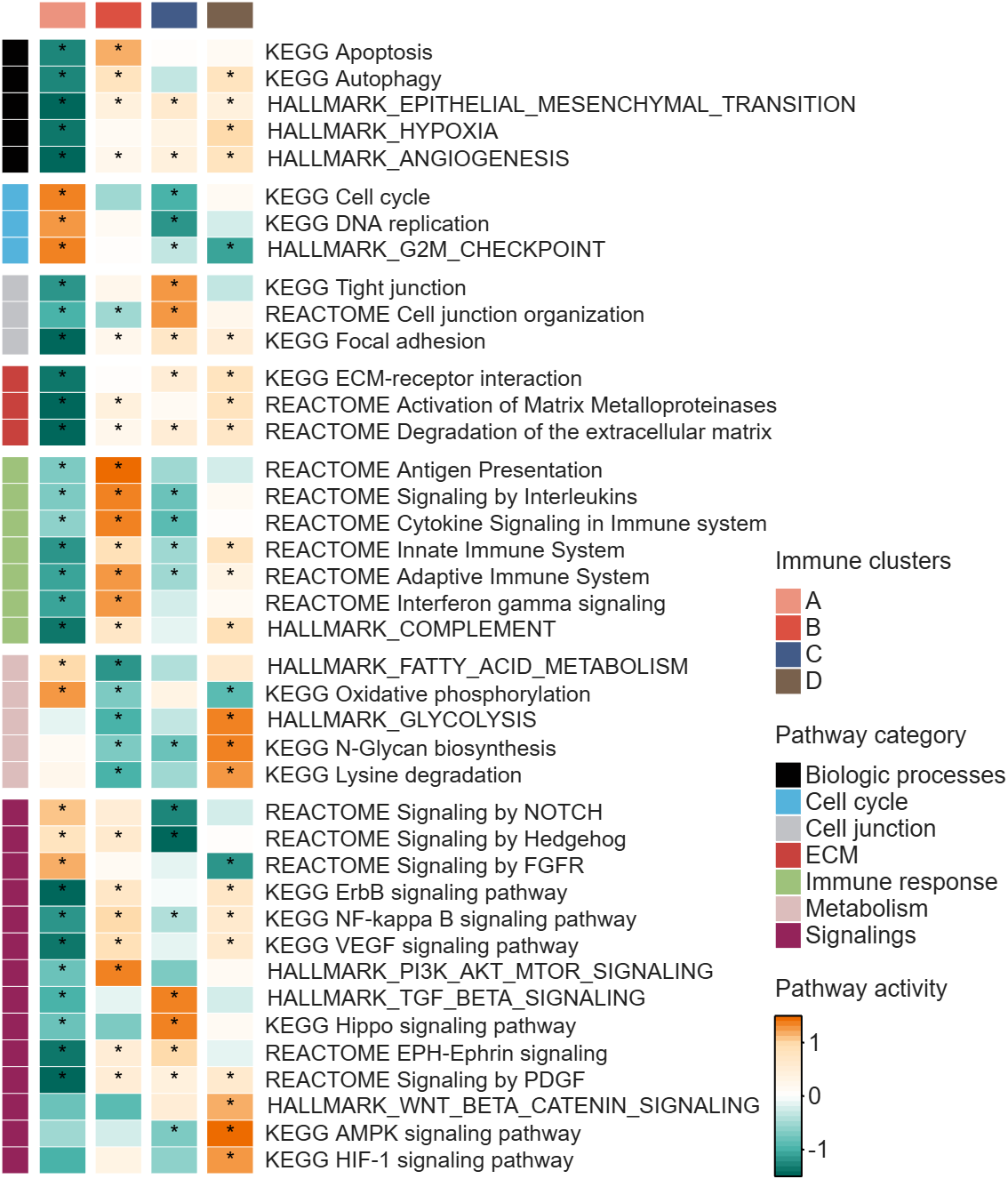
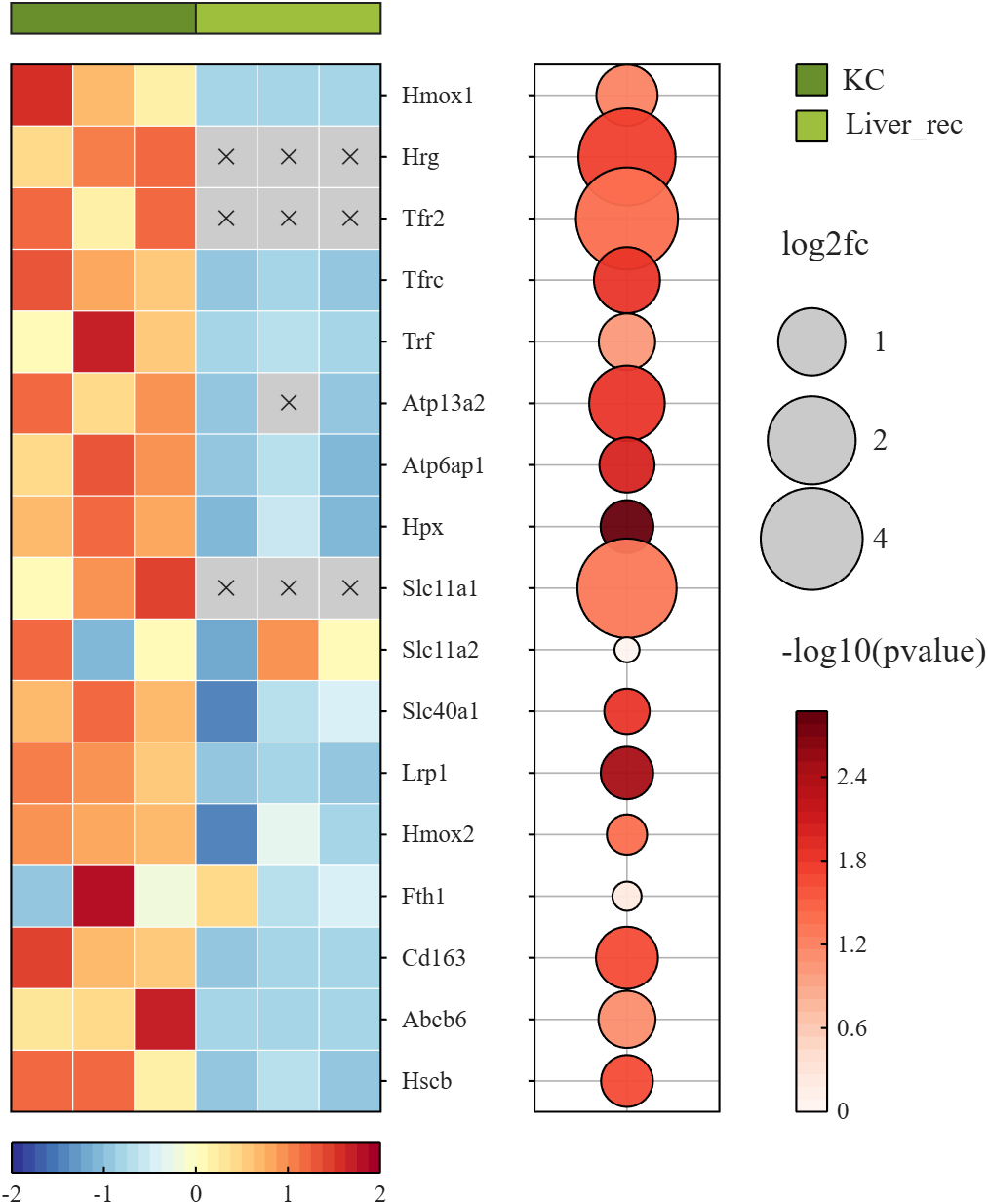
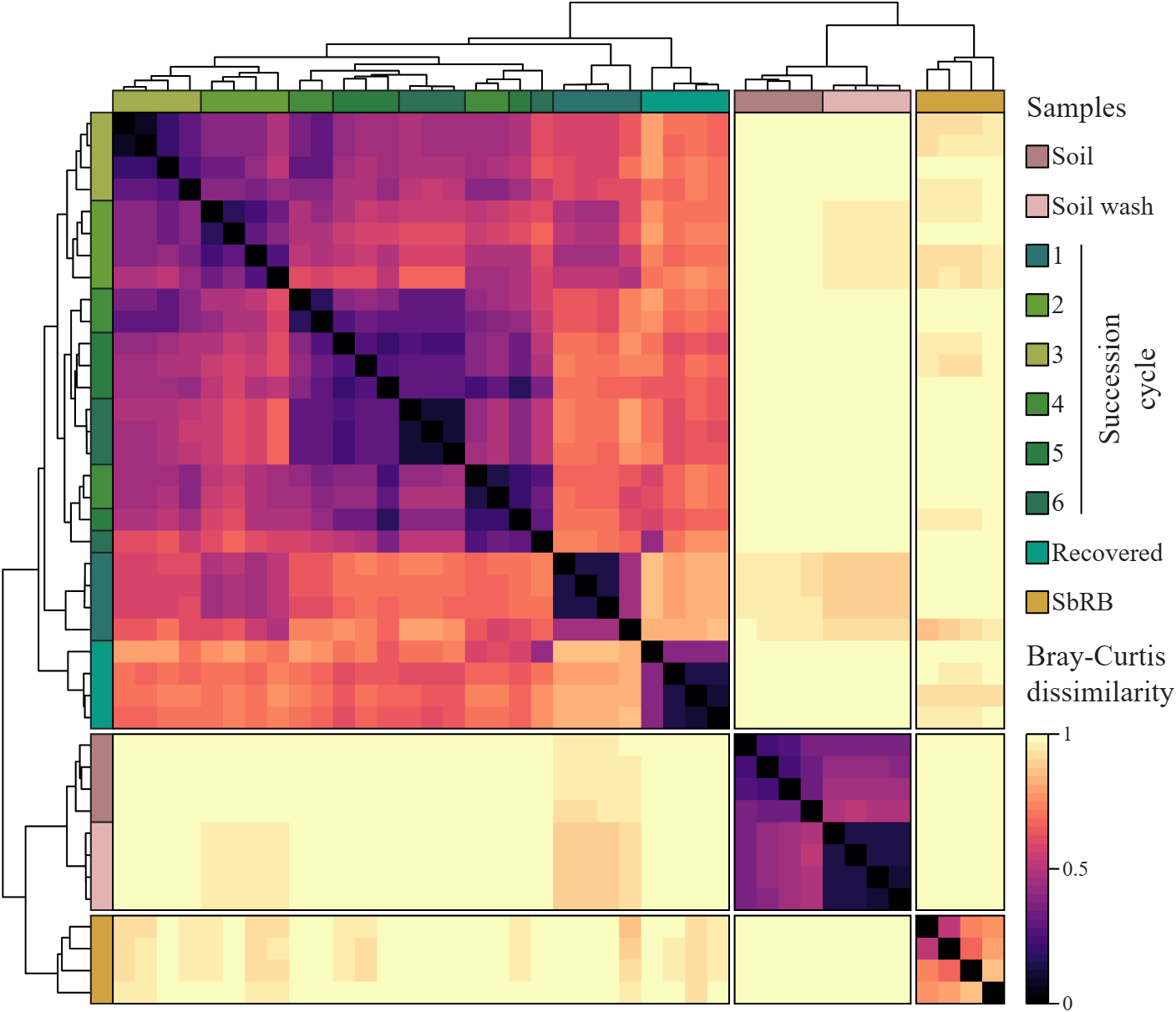
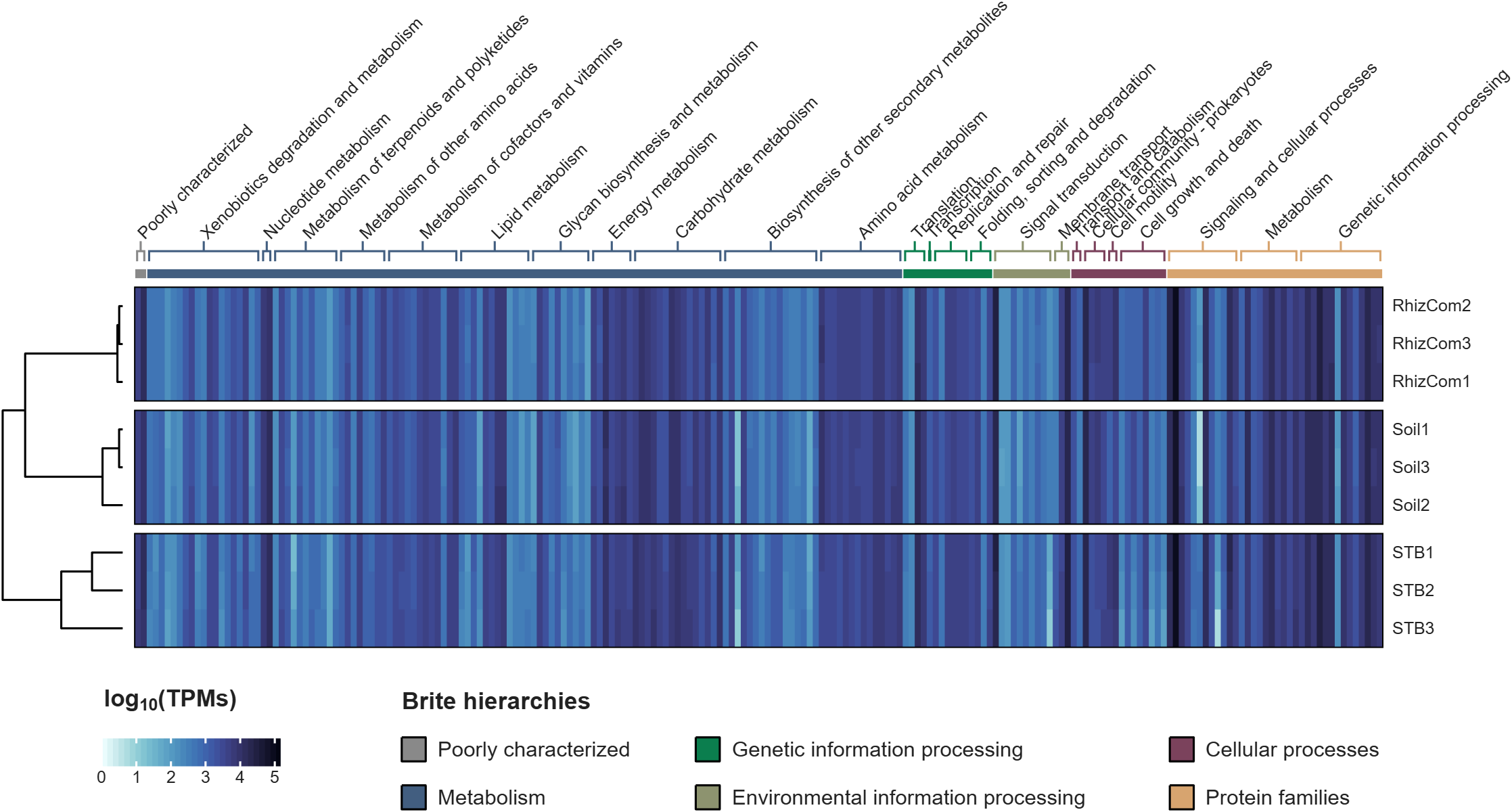
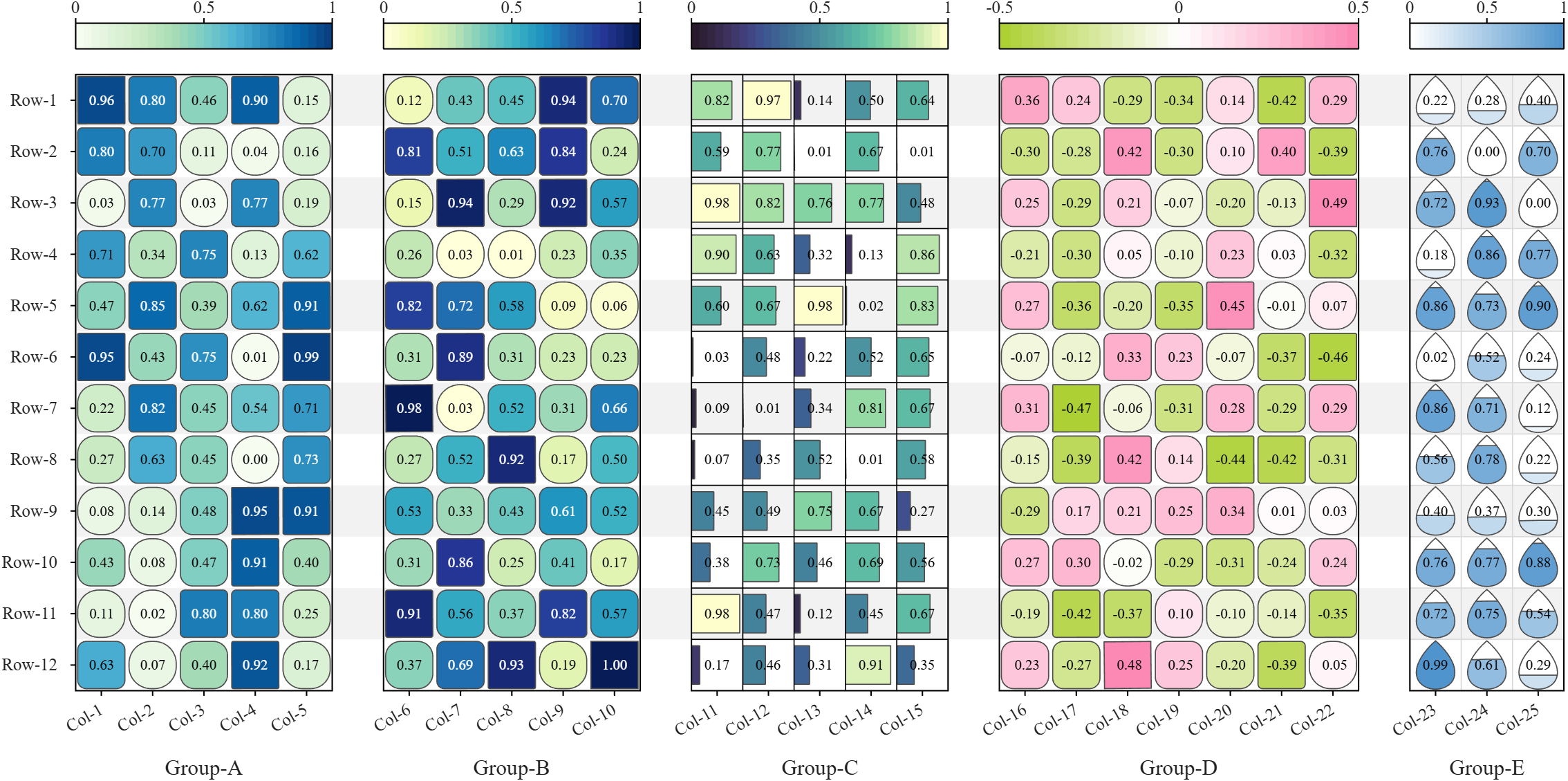
All these examples are plotted using SHeatmap. For details, please refer to the relevant examples in the demo_SColorbar folder included in the toolbox.

Claudifying MATLAB
Duncan Carlsmith
Department of Physics, University of Wisconsin-Madison

Introduction
AI mobile and desktop apps are convenient interfaces for exploration. For programmatic work not subject to variations in AI response, an AI can generate standalone code and web workflows. (See e.g. Web Automation with Claude, MATLAB, Chromium, and Playwright.) Intermediate is your own code that can batch process input data with AI via API.
Large Language Models (LLMs) with MATLAB permits a script to connect to OpenAI Chat Completions and Images, Azure OpenAI, Ollama, and other services that accept the OpenAI format. This submission introduces an educational Live Script Claude API from MATLAB for Coursework that illustrates how to access Anthropic models via API with MATLAB, using example tasks relevant to physics education, and might be adapted for other AI vendor APIs or emulated for other applications. This submission is essentially the Live Script introduction.
The script lists the available Claude models, sends text, images, and PDFs to a chosen model, holds a multi-turn conversation, extracts structured data from a document, lets Claude call MATLAB functions, and grades a set of short answers against a rubric. The examples show how an instructor or a student might use an AI model as a programmable assistant, for feedback on a figure, a check of a lab report, or a first pass at grading.
The Messages API is a web service at https://api.anthropic.com/v1/messages. A program sends it a request in JSON, the text format used for structured data on the web, and receives Claude's reply in JSON. A request names a model, sets a limit on the length of the reply, and carries a list of messages. An optional system prompt holds standing instructions that apply to every turn. The service keeps no memory between requests, so each request carries the whole conversation so far. MATLAB builds each request as a struct and jsonencode converts it to JSON.
Lengths and prices are counted in tokens. A token is a fragment of text, on average about four characters of English. Each response reports how many input and output tokens it used.
Helper functions in this folder handle the web requests and the bookkeeping. claudeRequest sends one request and reports the server's error message on failure. claudeListModels returns the models available to the key. claudeConversation and askClaude hold a multi-turn conversation and add up tokens and cost. claudeImageBlock and claudePdfBlock package a file for a message, claudeText extracts the reply text, and claudeCost converts token counts to dollars.
The example inputs sit in the inputs folder, which the Python version shares, and are fictional. example_flawed_figure.png is a plot with deliberate defects. example_lab_report.pdf is a student lab report with three planted errors, and example_lab_report_page1.png is an image of its page for display. student_answers.csv holds five short answers of varying quality. Output files go to the matlab_outputs folder and carry a timestamp in the name, so no run overwrites an earlier one, and the MATLAB and Python outputs stay apart.
"Try this" blocks mark the settings to change. The references list the API documentation. The appendix on privacy and security describes where requests go, how long the vendor keeps them, and precautions for student work and for the API key. A parallel Python version of the script and helper functions is in the Python folder. These functions could be called from MATLAB or invoked from a terminal.
Acknowledgments and disclaimer
The author has no financial interest in any company or product named here. Nothing in this post is endorsed by, sponsored by, or an official position of the University of Wisconsin-Madison.
Hi everyone
Some of my colleauges at MathWorks are conducting a survey on how people use science and engineering file formats such as NetCDF, HDF5, Zarr and so on.
It will only take a few minutes to fill out and is completely anonymous unless you want to be contacted. Your thoughts, details of usage in your domain or industry, and current friction points will help us improve MATLAB to better support the kind of work you do in the future!
If there's anything not covered by the survey that you'd like to mention, feel free to reply to this thread.
Cheers,
Mike
Running Octave and other applications in a ChatGPT container
Duncan Carlsmith
Department of Physics, University of Wisconsin-Madison
Introduction
An AI assistant that can run code can write a script, run it, read the results, and fix errors before reporting back.
Prototyping MATLAB code in a Claude container with Octave describes one way I can supply Claude basic autonomous MATLAB executability by installing Octave in the Claude container instead of using an MCP connection or an HTTPS command server to hand the assistant my own Mac, with its MATLAB, the toolboxes, and the real files. This Octave hack is useful if, for example, I am on my phone while my laptop is offline or otherwise occupied.
ChatGPT runs code in a Linux container with Python, Node, and a shell. GNU Octave is not present and is not straightforwardly installed by the chat itself - an apt-get install octave fails because the container reaches selected package proxies and not the Debian repositories. This post describes a solution provided by Claude for ChatGPT, a solution provided that applies to other packages as well.
The trick is to prepare externally and upload an Octave (or whatever) package and simply drop it into the ChatGPT chat as needed with an installation instruction prompt. Once the chat accomplishes the installation, that chat is good to go. A 197 MB file uploaded to the conversation installs Octave 10.3.0 in about ten seconds. The install needs no root access, no apt, and no network connection from the container. I can then hand ChatGPT an .m file, read the numbers it prints, and retrieve the figure. The same method carries other programs built by conda-forge for Linux x86_64. The ExifTool bundle is 37 MB. The Pandoc bundle is 40 MB.
Be aware that in a ChatGPT Project environment, the uploaded package is available to all project chats but must be installed in each chat’s container that needs it, and can sometimes need a reinstall if you leave a chat in which it is installed. That installation action might be automated via persistent context -I’ve not tried that. Neither have I tried this trick with other AIs.
The rest of this submission is Claude-generated goop describing exactly how to implement this and the tests performed. It is not intended for normal sentient being consumption. Just hand it to your AI.
Background
The Claude container I used to prepare this post runs Ubuntu 24.04 with glibc 2.39, as root, with HTTPS access to an allowed set of hosts. apt-get update reaches the Ubuntu archives, pip reaches PyPI, and apt-get install octave would install Octave 8.4.0 from the distribution. That container also carries ffmpeg and ImageMagick and no Octave.
The ChatGPT container I tested runs Debian 13 with glibc 2.41, unprivileged, with a packages-only network policy. Its pip reaches an internal proxy and apt reaches nothing. Published reconnaissance reports the same policy (Willison, January 2026, container environment notes, sandbox exploration).
So the bundle is a requirement on ChatGPT and an upgrade on Claude. Ubuntu supplies Octave 8.4, the version the companion post worked around. The bundle supplies 10.3.0 on either, because it does not depend on what the distribution packages.
Those reports, and my own measurements, describe particular images in September 2026. The images change. The bundle therefore targets an application binary interface rather than a named vendor image. Conda-forge packages for linux-64 declare a minimum glibc version and an instruction-set baseline, and a Linux host new enough to meet both runs the same binaries. After the design was fixed, ldd --version in the ChatGPT container reported Debian GLIBC 2.41, above the glibc 2.28 floor the bundle assumes.
The method
Micromamba, a single statically linked executable, installs an explicit list of conda packages from local archive files. The bundle contains those files, a Linux micromamba binary and a short installer.
- On your own machine, solve the dependency graph for Linux x86_64 without installing it.
- Download the package archives returned by the solve.
- Put the archives, micromamba and the installer in one tar file.
- Upload the tar, extract it in the container and install under /mnt/data.
Step 4 needs no network, no root access and no system package manager. Everything is written below one directory the container already permits.
Building the Octave bundle
DROP='(qt-|qt6|pyqt-|qscintilla2|libllvm|libclang|ghostscript|mesa)' \
sh build_bundle.sh octave octave
The complete solve contains 181 packages, 460 MB of archives, and installs to 1.8 GB, much of it supporting a graphical interface the container cannot display. Dropping Qt, PyQt, QScintilla, LLVM, Clang, Mesa and Ghostscript leaves 171 packages, a 197 MB tar file and a 773 MB installed tree. Appendix A passes that exclusion list through DROP.
There is a limit to the pruning. octave-cli links libOpenGL.so.0, so libglvnd must remain even though no window is drawn.
Solving on macOS for a Linux target
My first solve on an Apple silicon Mac returned Octave 7.1.0, Python 3.9, Qt 5.12 and a 323 MB tar. The same solve run on Linux returned Octave 10.3.0, Python 3.14 and a 197 MB tar.
The difference comes from conda virtual packages, one of which is __glibc. A Mac has no glibc, so builds requiring __glibc >=2.17 appear unsatisfiable, and the solver walks backward to builds from 2022 and earlier, before that declaration was used. Setting CONDA_OVERRIDE_GLIBC=2.12 on a Linux machine reproduced the Mac result package for package.
Three settings remove the host from the decision.
export CONDA_OVERRIDE_GLIBC=2.28 # describe the target, not this Mac
export CONDA_OVERRIDE_ARCHSPEC=x86_64 # portable baseline, not the host CPU
# on the micromamba command line:
--no-rc --no-env --override-channels # ignore local conda configuration
CONDA_OVERRIDE_ARCHSPEC matters on a fast host. A solve on a machine with AVX-512 selected a metapackage pinned to x86_64_v4, which would fail in a container whose processor lacks those instructions.
Appendix A also rejects a solved Octave version below 10, which catches the silent fallback before hundreds of megabytes are downloaded.
An earlier bug in the build script was less obvious. Its URL filter matched only the linux-64 subdirectory and silently dropped 15 noarch packages. Octave still ran, and figure text fell back to whatever fonts the container had, because the DejaVu fonts are noarch.
Verification
Appendix C contains 13 checks. Each compares an Octave result with a value obtained independently. A truncated package set or a broken BLAS can start normally and return a plausible wrong answer.
The checks cover dense and sparse linear algebra, an ODE, quadrature, an FFT, root finding, minimization, MAT-file and text I/O, basic data structures and a PNG figure. The eigenvalues of the 3 by 3 second-difference matrix are compared with 2 - 2cos(k pi/4), and the ode45 value at t = 5 with the closed-form solution of y' = -2y + sin(t).
All 13 pass in the ChatGPT container. The 400 by 400 dense solve gives a residual of 1.3e-15 in 17 ms. The BLAS is real.

Figure 1. Output of the self-test under Octave 10.3.0 in a ChatGPT container. Blue solid curve, sin(x). Red dashed curve, sin(x)exp(-x/6). Black circles, the ode45 solution of y' = -2y + sin(t), sampled every 25th step.
What is missing
Octave itself does not provide MATLAB's table or string class. Octave Forge packages are unavailable because pkg install tries to download them.
The Qt graphics toolkit needs a display, so the self-test uses gnuplot and print -dpngcairo to write a PNG. Pruning Ghostscript removes EPS and PDF output and the plain -dpng device, and putting it back costs about 60 MB.
Three warnings accompany every figure. GraphicsMagick reports its 8-bit limit, Ghostscript is absent, and fontconfig prints an initialization notice. None changed the PNG output in these tests.
What persisted in the tests
I measured three behaviors in one ChatGPT project in September 2026.
Within one conversation, the container persisted across turns. An Octave install made at the start remained usable for the rest of that chat.
After several hours away, the installed directory was gone and the files uploaded or produced in the conversation had returned, with fresh timestamps. Reinstallation took one instruction and about ten seconds, with no new upload.
$ ls -la /mnt/data/
-rw-r--r-- 1 root oai_shared 206766592 Sep 13 14:40 octave-bundle-linux64.tar
-rw-r--r-- 1 root oai_shared 34124 Sep 13 14:52 octave_selftest.png
A new conversation in the same project started with an empty /mnt/data. Project files were available to ChatGPT for retrieval and did not appear in that conversation's container filesystem, so files belonged to the conversation rather than to the project.
I therefore keep one conversation as the Octave conversation and return to it whenever an .m file needs a trial run.
Other programs
ExifTool resolves to six packages and a 37 MB upload including micromamba. Pandoc resolves to one 23 MB package and a 40 MB bundle. Both use the same two scripts.
sh build_bundle.sh exiftool exiftool
sh build_bundle.sh pandoc pandoc
The Pandoc bundle converted the Markdown source of this post to RTF.
Try pip first. The Python package proxy worked here, and a bundle is unnecessary when pip supplies the program. The bundle earns its keep for compiled programs with shared-library dependencies, where apt would ordinarily be the answer.
The method does not solve a large-data problem. At the time of these tests, an upload was limited to 512 MB, so a program needing gigabytes of auxiliary data, such as the index files of a blind astrometric solver, does not fit merely because its executable does.
Security
The installer runs package scripts supplied by conda-forge, the same trust decision as creating an ordinary conda environment. The container is disposable and had no general outbound network access in these tests, which limits what a malicious package could reach. It does not make an untrusted package safe.
Wrap up
One upload and about ten seconds of installation gave a ChatGPT conversation a working Octave, and the same pair of scripts carried ExifTool and Pandoc. Octave is still not MATLAB. Parser differences, unsupported classes and toolbox calls remain, so the finished program needs a run in MATLAB.
For anyone already running a command server on a personal machine, a custom GPT action can call an HTTPS endpoint that runs MATLAB itself, on hardware that remembers yesterday's installation. The uploaded bundle is for the case in between, with no MATLAB connection, no root access and no useful apt, but a serviceable Linux container once the right files arrive.
Acknowledgments and disclaimer
The methods and measurements were assembled and tested by the author. A first draft of this post was prepared with Claude and revised with ChatGPT and further revised by the author.
The author has no financial interest in any company or product named here. Nothing in this post is endorsed by, sponsored by, or an official position of the University of Wisconsin-Madison. The affiliation is given for identification only.
Appendix A. build_bundle.sh
#!/bin/sh
# Build a self-contained, network-free bundle of any conda-forge package for
# a Linux x86_64 container. Runs on macOS or Linux. Nothing is installed on
# the host. Requires curl, tar and python3.
#
# Usage: sh build_bundle.sh <name> <package> [package ...]
# e.g. sh build_bundle.sh docs pandoc graphviz
# Output: <name>-bundle-linux64.tar in the current directory.
#
# Env: DROP extended regex of package names to exclude, for example
# DROP='(qt-|qt6|pyqt-|qscintilla2|libllvm|libclang|ghostscript|mesa)'
# GLIBC glibc version the target container provides. Default 2.28.
set -e
[ $# -ge 2 ] || { echo "usage: sh build_bundle.sh <name> <package> [package ...]"; exit 1; }
SCRIPTDIR=$(cd "$(dirname "$0")" && pwd)
NAME=$1; shift
PKGS=$*
WORK="$PWD/${NAME}-bundle-build"
mkdir -p "$WORK"
DROP=${DROP:-'(^$)'}
GLIBC=${GLIBC:-2.28}
# Describe the TARGET container, not this host. Without these a macOS solve
# falls back to pre-2022 builds, and a fast host selects AVX-512 packages.
export CONDA_OVERRIDE_GLIBC=$GLIBC
export CONDA_OVERRIDE_ARCHSPEC=x86_64
ISO='--no-rc --no-env --override-channels' # ignore ~/.condarc and CONDA_* vars
cd "$WORK"
case "$(uname -s)/$(uname -m)" in
Darwin/arm64) HOSTPLAT=osx-arm64 ;;
Darwin/x86_64) HOSTPLAT=osx-64 ;;
Linux/aarch64) HOSTPLAT=linux-aarch64 ;;
*) HOSTPLAT=linux-64 ;;
esac
echo "Host $HOSTPLAT, target linux-64 glibc $GLIBC, packages: $PKGS"
mkdir -p hostbin bundle/pkgs
curl -sSL "https://micro.mamba.pm/api/micromamba/$HOSTPLAT/latest" \
| tar -xj -C hostbin --strip-components=1 bin/micromamba
chmod +x hostbin/micromamba
curl -sSL https://micro.mamba.pm/api/micromamba/linux-64/latest \
| tar -xjO bin/micromamba > bundle/micromamba
chmod +x bundle/micromamba
echo "Solving ..."
export MAMBA_ROOT_PREFIX="$WORK/solveroot"
./hostbin/micromamba create -n solve $ISO --platform linux-64 -c conda-forge \
$PKGS -y --dry-run --json > solve.json
python3 - "$DROP" <<'PY' > urls.txt
import json, re, sys
drop = re.compile('/' + sys.argv[1])
links = json.load(open('solve.json'))['actions']['LINK']
# A host with no glibc override can silently select an old Octave.
octave = next((p for p in links if p['name'] == 'octave'), None)
if octave and int(octave['version'].split('.')[0]) < 10:
raise SystemExit('refusing solved Octave version ' + octave['version'])
out = open('bundle/explicit.txt', 'w')
out.write("# offline install list, linux-64\n# platform: linux-64\n@EXPLICIT\n")
kept = 0
for p in links:
url = p.get('url') or "%s/%s/%s-%s-%s.conda" % (
p['channel'], p['platform'], p['name'], p['version'], p['build_string'])
if drop.search(url):
continue
md5 = p.get('md5')
out.write('@PKGS@/' + url.rsplit('/', 1)[1] + ('#' + md5 if md5 else '') + '\n')
print(url)
kept += 1
out.close()
print("kept %d of %d packages" % (kept, len(links)), file=sys.stderr)
PY
echo "Downloading $(wc -l < urls.txt) packages ..."
xargs -n1 -P8 curl -sS -L -O --output-dir bundle/pkgs < urls.txt
cp "$SCRIPTDIR/install_bundle.sh" bundle/
COPYFILE_DISABLE=1 tar -cf "../${NAME}-bundle-linux64.tar" -C bundle .
cd ..
du -h "${NAME}-bundle-linux64.tar"
cat <<EOF
Bundle: $PWD/${NAME}-bundle-linux64.tar
Upload it, then extract and run install_bundle.sh in the container.
EOF
Appendix B. install_bundle.sh
#!/bin/sh
# Install a bundle built by build_bundle.sh into a prefix inside a container.
# No network. No root. No apt.
# Usage: sh install_bundle.sh [prefix] default: <bundle dir>/prefix
set -e
HERE=$(cd "$(dirname "$0")" && pwd)
PREFIX=${1:-$HERE/prefix}
chmod +x "$HERE/micromamba"
sed "s|@PKGS@|file://$HERE/pkgs|" "$HERE/explicit.txt" > "$HERE/explicit_resolved.txt"
MAMBA_ROOT_PREFIX="$HERE/mroot" "$HERE/micromamba" create -p "$PREFIX" --offline -y \
--file "$HERE/explicit_resolved.txt" >/dev/null
# One launcher that sets the environment and runs any binary from the prefix.
cat > "$HERE/run" <<EOF
#!/bin/sh
export PATH="$PREFIX/bin:\$PATH"
export LD_LIBRARY_PATH="$PREFIX/lib:\${LD_LIBRARY_PATH:-}"
[ -d "$PREFIX/share/octave" ] && export OCTAVE_HOME="$PREFIX"
[ -f "$PREFIX/etc/fonts/fonts.conf" ] && export FONTCONFIG_FILE="$PREFIX/etc/fonts/fonts.conf"
[ -d "$PREFIX/share/gnuplot" ] && export GNUPLOT_DRIVER_DIR="$PREFIX/libexec/gnuplot"
exec "\$@"
EOF
chmod +x "$HERE/run"
echo "Installed to $PREFIX"
echo "Executables:"
ls "$PREFIX/bin" | head -20
echo "Run with: $HERE/run <command> [args]"
Appendix C. octave_selftest.m
% octave_selftest.m
% Self-check for the Octave bundle installed in a ChatGPT container.
% Each test compares against a value known independently of Octave.
% Run: /mnt/data/oct/run octave-cli -q octave_selftest.m
% Writes octave_selftest.png next to the working directory.
npass = 0;
function r = chk(name, got, want, tol)
ok = all(abs(got(:) - want(:)) <= tol);
printf('%-28s %s got %-14.8g want %-14.8g\n', name, ...
merge(ok, 'PASS', 'FAIL'), got(1), want(1));
r = ok;
end
printf('Octave %s on %s\n\n', version(), computer());
% 1. Dense linear algebra. magic(4) is singular, rank 3.
A = magic(4);
npass += chk('rank(magic(4))', rank(A), 3, 0);
% 2. Eigenvalues of the 3x3 second-difference matrix, 2 - 2cos(k pi/4).
T = full(gallery('tridiag', 3, -1, 2, -1));
want = sort(2 - 2*cos((1:3)*pi/4));
npass += chk('eig(tridiag) vs closed form', sort(eig(T))', want, 1e-12);
% 3. Solve a 400x400 system, check the residual and time it.
n = 400; rand('seed', 42);
M = rand(n) + n*eye(n); b = ones(n,1);
t0 = tic; x = M\b; dt = toc(t0);
npass += chk('400x400 solve residual', norm(M*x - b, inf), 0, 1e-10);
printf('%-28s %.3f s\n', 'solve wall time', dt);
% 4. ode45 against y(t) = (2 sin t - cos t)/5 + (6/5)exp(-2t),
% the solution of y' = -2y + sin(t), y(0) = 1.
f = @(t,y) -2*y + sin(t);
opt = odeset('RelTol', 1e-9, 'AbsTol', 1e-11);
[T5, Y5] = ode45(f, [0 5], 1, opt);
ya = @(t) (2*sin(t) - cos(t))/5 + 1.2*exp(-2*t);
npass += chk('ode45 vs analytic at t=5', Y5(end), ya(5), 1e-8);
% 5. Quadrature: integral of exp(-x^2) on [0,Inf) is sqrt(pi)/2.
npass += chk('quadgk vs sqrt(pi)/2', quadgk(@(x) exp(-x.^2), 0, Inf), sqrt(pi)/2, 1e-10);
% 6. FFT of a pure tone: peak bin amplitude n/2 for unit sine.
n = 1024; k = 17; s = sin(2*pi*k*(0:n-1)/n);
S = abs(fft(s));
npass += chk('fft peak bin', S(k+1), n/2, 1e-8);
% 7. Root finding and unconstrained minimization.
npass += chk('fzero cos(x)=x', fzero(@(x) cos(x)-x, [0 1]), 0.73908513321516, 1e-10);
npass += chk('fminsearch Rosenbrock', ...
fminsearch(@(v) 100*(v(2)-v(1)^2)^2 + (1-v(1))^2, [-1.2 1], ...
optimset('TolX',1e-8,'TolFun',1e-10)), [1 1], 1e-3);
% 8. Sparse matrices.
Sp = sparse(1:5, 1:5, 2:6);
npass += chk('sparse trace', full(sum(diag(Sp))), 20, 0);
% 9. MAT file round trip in v7 format, which MATLAB also reads.
Mg = magic(5); save('-v7', 'selftest.mat', 'Mg'); clear Mg
load('selftest.mat');
npass += chk('save/load -v7', sum(Mg(:)), 325, 0);
% 10. Text file I/O.
fid = fopen('selftest.txt', 'w'); fprintf(fid, '%d\n', 1:100); fclose(fid);
v = dlmread('selftest.txt');
npass += chk('fprintf/dlmread', sum(v), 5050, 0);
% 11. Strings, cells, structs, regexp.
c = cellfun(@(s) upper(s), {'ab','cd'}, 'UniformOutput', false);
st = struct('a', {1,2,3});
tok = regexp('Octave 10.3.0', '(\d+)\.(\d+)\.(\d+)', 'tokens');
ok = isequal(c, {'AB','CD'}) && numel(st) == 3 && str2double(tok{1}{1}) == 10;
printf('%-28s %s\n', 'cell/struct/regexp', merge(ok, 'PASS', 'FAIL'));
npass += ok;
% 12. Figure to PNG through the gnuplot toolkit.
warning('off', 'Octave:gnuplot-graphics');
graphics_toolkit('gnuplot');
fh = figure('visible', 'off');
set(fh, 'position', [0 0 900 400]);
x = linspace(0, 4*pi, 400);
plot(x, sin(x), 'b-', 'linewidth', 1.2); hold on
plot(x, sin(x).*exp(-x/6), 'r--', 'linewidth', 1.5);
kk = 1:25:numel(T5);
plot(T5(kk), Y5(kk), 'ko', 'markersize', 5, 'markerfacecolor', 'none');
legend('sin(x)', 'sin(x) exp(-x/6)', 'ode45 solution y(t)', ...
'location', 'northeastoutside');
xlabel('x'); ylabel('amplitude');
title('sin(x), damped sin(x), and ode45 solution of y prime = -2y + sin(t)');
ylim([-1.3 1.3]); grid on
print(fh, 'octave_selftest.png', '-dpngcairo', '-r120');
d = dir('octave_selftest.png');
ok = ~isempty(d) && d.bytes > 5000;
printf('%-28s %s %d bytes\n', 'figure to PNG', merge(ok, 'PASS', 'FAIL'), ...
merge(isempty(d), 0, d.bytes));
npass += ok;
ntot = 13;
printf('\n%d of %d checks passed\n', npass, ntot);
if npass < ntot
printf('FAILURES PRESENT\n');
end
printf('Forge packages installed: %d (expected 0, pkg install needs network)\n', ...
numel(pkg('list')));
Appendix D. Commands to give ChatGPT
Upload the tar and the .m file to one conversation. A literal prompt is less likely to produce a substitute method or imagined output.
Run these shell commands in order and show me all output. Do not substitute Python for any step.
mkdir -p /mnt/data/oct
tar -xf /mnt/data/octave-bundle-linux64.tar -C /mnt/data/oct
sh /mnt/data/oct/install_bundle.sh
/mnt/data/oct/run octave-cli -q /mnt/data/yourscript.m
If a command fails, stop and show the command and its complete error output. Return any PNG files created by the script.
ExifTool and Pandoc follow the same pattern.
/mnt/data/exiftool/run exiftool -s -ImageWidth -ImageHeight image.png
/mnt/data/pandoc/run pandoc -s -f markdown -t rtf -o post.rtf post.md
If the upload is not visible at the expected path, ask for ls -la /mnt/data first. Attach the tar to the conversation in which it will run. If the extract directory is mounted without execute permission, copy the tree to a writable executable directory and install there.

