Results for

You can use MATLAB's rat() function to obtain a rational approximation of a decimal value. For example, rat(0.625) gives a representation equivalent to 5/8. If you simply want to verify decimal/fraction conversions without running MATLAB, a browser-based decimal-to-fraction calculator can also be useful.

Hello Everyone
I want to create a variant, define in CodeGen .c file. I am using s-func, find SS_RTW_STORAGE_CUSTOM is defined in C:\Program Files\MATLAB\R2024b\simulink\include\rtw_storage.h.
I use it in C code for s-func: ssSetDWorkRTWStorageClass(S, 0, SS_RTW_STORAGE_CUSTOM). But CodeGenerator tells "Unknown error processing storage class: Custom".
Do I miss something to setup custome storage? I certainly want a custom storage like "MEM_CUSTOM_CAL", it works if I use a Simulink.Parameter variant. but how can I use it in s-func by ssSetDWorkxxxxxx or smiliar function.

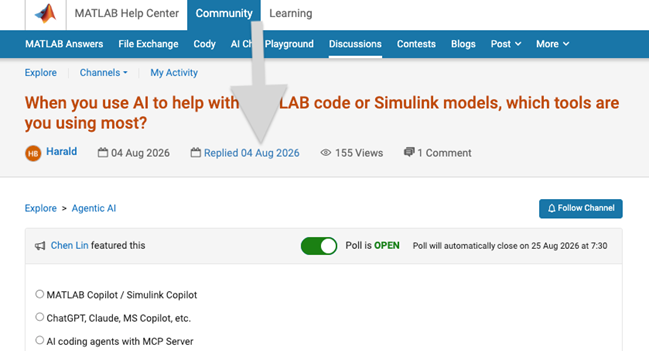
We heard your feedback that it can be difficult to find the latest comment or reply in long threads. To make this easier, you can now jump directly to the latest activity by clicking the latest activity date link at the top of the leaf page. See the screenshot below for an example. This is similar to the experience of MATLAB Answers today.
Thanks again for sharing your feedback and helping us improve the experience.

Very Favorable
21%
Favorable
20%
Neutral
21%
Unfavorable
17%
Very Unfavorable
21%
596 votes

💡About
First, I would like to thank everyone who has downloaded my eds-classification repository so far. This post is meant for those who are currently using the repository or may be interested in using the repository in their research.
To keep things short, I have released v2.0 of the eds-classification series on GitHub and the File Exchange. The update comes with significant changes to the repository structure and functions, and so it is worth noting that the update will likely be incompatible with any scripts written using prior releases.
The update provides several key new features that are meant to improve usability and producton. If you are interested in seeing how eds-classification may help you with your mineralogy research, please check out the release notes for v2 and consider giving the repository a try.
Respectfully,
Austin
📝Release Notes
The full release notes for v2 are available here: https://github.com/weber1158/eds-classification/releases/tag/v2.0
⬇️Download Now

I often see the need of argument validation for which the arguments depend on each other.
function result = myFcn(points, attributes, queryIdx)
% INPUT
% points: [Nx3]
% attributes: [Nx1]
% queryIdx: [Mx1]
%
% OUTPUT
% result: [Mx1]
end
points and attributes depend in size, queryIdx and result as well. The current arguments/end block does not allow to formulate such constraints. The best you can do currently is
function result = myFcn(points, attributes, queryIdx)
arguments(Input)
points (:,3)
attributes (:,1)
queryIdx (:,1)
end
arguments(Output)
result (:,1)
end
assert(height(points) == height(attributes), "Argument validation failed")
...
assert(height(queryIdx) == height(result), "Argument validation failed")
end
Reading just the header without additional comments is unclear for a developer and prone to misunderstanding.
What do you think of the following language extension proposal?
function result = myFcn(points, attributes, queryIdx)
arguments(Input)
points (N,3)
attributes (N,1)
queryIdx (M,1)
end
arguments(Output)
result (M,1)
end
end
The intention is clear for the reader at first sight and gives you guarantees about input/output parameters (in contrast to simple comments). Validating the parameter "points" sets the (temporary) variable N, which can be reused in further argument validations. To be discussed if N and M are valid just within the arguments block or also in the whole function.
What is your opinion on such a language improvement?

What did you guys do? It's impossible to edit figures on the fly now. Even simple things like removing data series and then removing them from the legend have become impossible without meddling with code. It used to be you could do little touch ups and even copy series from one figure to the next in the most expeditious and simple way, that to me was a big plus of using Matlab over python. Now this is so backwards and unintuitive, what were you guys thinking?
AI writes all my code now
18%
Multiple times a day
24%
A few times a week
15%
A few times a month
7%
Only for suggestions
22%
It is not allowed for my work
14%
758 votes

I've left Matlab Answers in spring 2023. At this time the forum was full of interesting programming questions, e.g about optimizing code. A bunch of experienced Matlab users have discussed diefferent approachs and compared them. Some questions have concerned beginner problems and home work solutions, others belonged to professionally used tools for scientific work
Every week some new tools for dailiy use have been posted in the FileExchange.
Today, 3 years later, the traffic is much lower and questions concern the correct usage of Matlab commands usually. Submissions in the FileExchange are very specific and rarely useful for general programming jobs.
What has happend?

Hi everyone,
Simulations have a way of outgrowing the machine they run on (at least mine do). Bigger sweeps, longer regression suites, more data to pull in. At some point your workstation just isn't beefy enough!
I've just published a post on running larger MATLAB and Simulink simulations in the cloud (e.g. AWS): more compute when we need it, without changing how we work day to day.
The example is from automotive, but the same applies to aerospace, robotics, and beyond.
If you want to read more, here's the link: https://blogs.mathworks.com/engineering/2026/07/14/on-scaling-model-based-design-into-the-cloud/
How are others handling scaling for simulation? what's working for you?
Cheers,
George

Looking for an on-campus job next semester? We’re hiring MATLAB Student Ambassadors to host fun events, share MATLAB resources on social media, and connect with your student community.
Learn more here: https://www.mathworks.com/academia/students/student-ambassadors.html


How does everyone use MatLab right now? I can't think of any ideas what i can use this software for!

Hi everyone
It is my pleasure to be able to report on a project that several teams at MathWorks have been working on for some time now. A new object management system that promises to make object oriented code in MATLAB a lot faster.
The new system is available as a limited beta in the pre-release of MATLAB 2026b. It is not turned on by default. If you are developing OOP code, we'd love you to try it out. Most of the time, no code changes will be necessary but there are a small number of well-defined case where you will need to update your code.
The team are currently looking for MATLAB developers to work with who would like to try this out.
More details, including how to join the beta, are available in the following blog post https://blogs.mathworks.com/matlab/2026/07/14/objects-are-about-to-get-much-faster-in-matlab/
Best wishes,
Mike

MATLAB Editor (built-in editor)
74%
VS Code (Visual Studio Code)
18%
Jupyter Notebook / MATLAB Kernel
2%
PyCharm (via plugins or external )
2%
Sublime Text / Atom
1%
Others (please specify in commets)
2%
960 votes

Hello everyone,
Does anyone know of a reliable tool (or workflow) that can automatically convert MATLAB code to C++ code? I am aware of MATLAB Coder, but I would like to know if there are any third‑party tools or scripts that can perform a similar translation, especially for numerical/computational code.
Any suggestions or experiences would be greatly appreciated. Thank you!

I follow a lot of astronomical/astrophysical missions and notice they have now gotten massive in size, scope, and data. Petabyte datasets are now commonplace. Some are now moving essentially to private clouds where researchers create accounts and use primarily FOSS tools to process data. Some examples are the Vera Rubin Observatory's Rubin Science Platform and ESA's Datalabs. Jupyter has entrenched itself deeply despite its many shortcomings. I can't create accounts on any of these platforms but I am guessing that getting support for license-servers and other paraphernalia associated with closed-source software won't be easy.
It makes sense at some level when datasets get so big they can't be practically served to a researcher's machine. But, I do wonder what this public data in private clouds means for MATLAB and similar paid software. All the projects say that FOSS encourages reproducibility but I've been burned more than once in my working life by randomly phased Python package updates and abandoned projects.
I'm retired now and don't have a dog in the fight. My MATLAB home license is just for self-improvement. I was just curious whether Mathworks and similar providers will have to give up on the basic science community and focus on applied, mission-critical areas where "some guy on Github" is not sufficient traceability.

Hi everyone,
I'm interested in learning how developers compare code, configuration files, JSON data, or text changes when working outside of version control systems.
Common scenarios include:
- Comparing two versions of a script
- Reviewing generated output
- Checking configuration changes
- Comparing API responses or JSON files
- Reviewing documentation updates
I've used IDE comparison features and online diff tools. One browser-based tool I've found useful for quick comparisons is Text Differ:
I'm curious what workflows or tools other community members prefer. Do you rely on built-in editor features, version control diffs, or dedicated comparison tools?
Looking forward to hearing your experiences.
We’re excited to share that our new unified search experience is now live!
Anywhere you see the MATLAB Help Center | Community | Learning header, the search icon will now take you to the same results page. This makes it much easier to find content across different areas in one place—and you’ll also see an AI-powered response at the top to help you get quick answers.
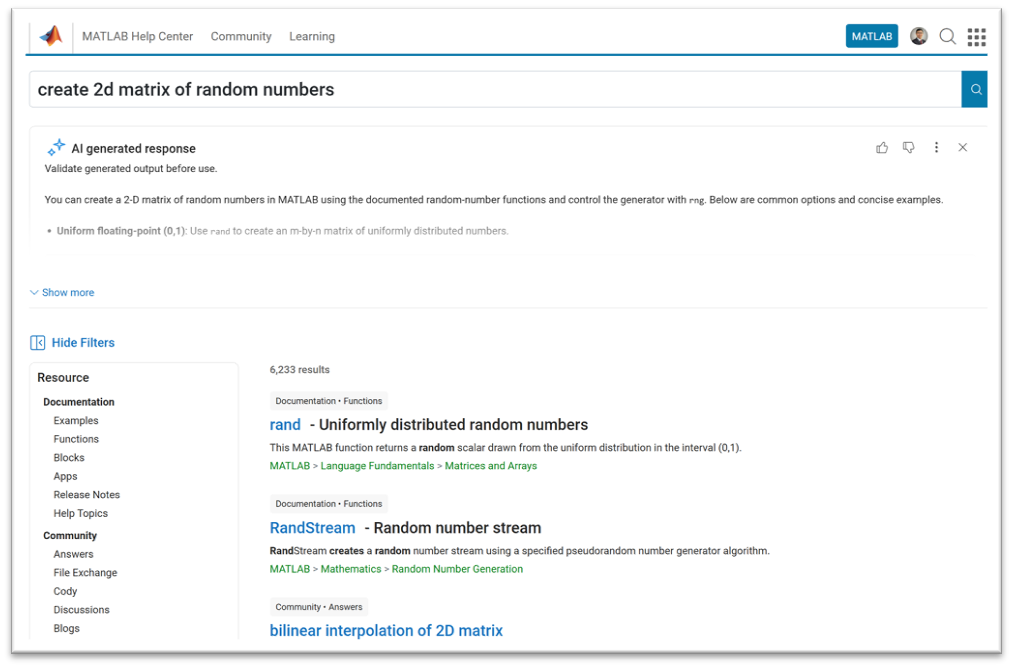
A quick note: search from the homepage, product pages, solutions, and a few other areas will continue to work as they do today.
This update is all about making it easier to discover related content across the site, instead of being limited to one area at a time.
Give it a try and let us know what you think—we’d love your feedback!
var = yes;
86%
var=no;
6%
I don't mind either way
8%
765 votes
<80 characters
14%
80 characters
25%
100 characters
22%
120 characters
16%
>120 characters
15%
something else (comment below)
9%
198 votes

