Results for

I am unable to submit an entry for the One Button contest using the supplied minihackContest.submit function. I keep getting the error "Submission failed: HTTP 500 Something went wrong. Please try again in a moment.". It happens to me both in a MATLAB session as well as on a MATLAB Online session. No idea what I am doing wrong...

Currently, MathWorks provides free access to MATLAB Online for anyone with a personal account. Each account receives 20 hours of usage per month and includes access to the following 10 toolboxes:
- Control System Toolbox(控制系统工具箱)
- Curve Fitting Toolbox(曲线拟合工具箱)
- Deep Learning Toolbox(深度学习工具箱)
- Image Processing Toolbox(图像处理工具箱)
- Optimization Toolbox(优化工具箱)
- Signal Processing Toolbox(信号处理工具箱)
- Statistics and Machine Learning Toolbox(统计与机器学习工具箱)
- Symbolic Math Toolbox(符号数学工具箱)
- Text Analytics Toolbox(文本分析工具箱)
I would like to know whether it is possible to customise the selection of these 10 toolboxes. For example, I mainly work in computer vision, but Computer Vision Toolbox is not included in the current offering, which is quite disappointing because I cannot use it.
At the same time, several of the included toolboxes are not useful for my work, such as Control System Toolbox and Signal Processing Toolbox. Therefore, it would be great if users could choose the toolboxes that best fit their needs rather than being limited to a fixed set of toolboxes.

I have been using MATLAB on a daily basis for more than 30 years. For the past few months, I have been working with version 2026, and the problems I have encountered are staggering, especially when debugging functions.
The issues started to appear gradually with R2026a. Suddenly, the cursor would disappear, copy and paste would stop working, and MATLAB often had to be restarted because of these issues. In addition, the new figure UI is painfully slow, and entering debug mode has become frustrating. When stepping through code, MATLAB can take several seconds to respond to a debugging command such as Step.
Today, I finally got fed up and reinstalled R2024b. It works perfectly fine.

Hi there,
Is there a change in the json response when I do http write to a channel ?
I send:
POST /update.json HTTP/1.1
Content-Type: application/x-www-form-urlencoded
Host: api.thingspeak.com
Connection: close
Content-Length: 102
apikey=xxxxxxxxxxxx&field1=-4.803&field3=18&field4=91&field5=109&field6=56&field7=0&field8=7
and I don't receive the normal response
I get sth like:
'unsafe-eval'; style-src 'self' https: 'unsafe-inline'; connect-src 'self' https: https://*.mathworks.com https://*.thingspeak.com https://*.omtrdc.net https://*.demdex.net; frame-src 'self' https: https://*.mathworks.com

Hello everyone, I am new to Matlab.
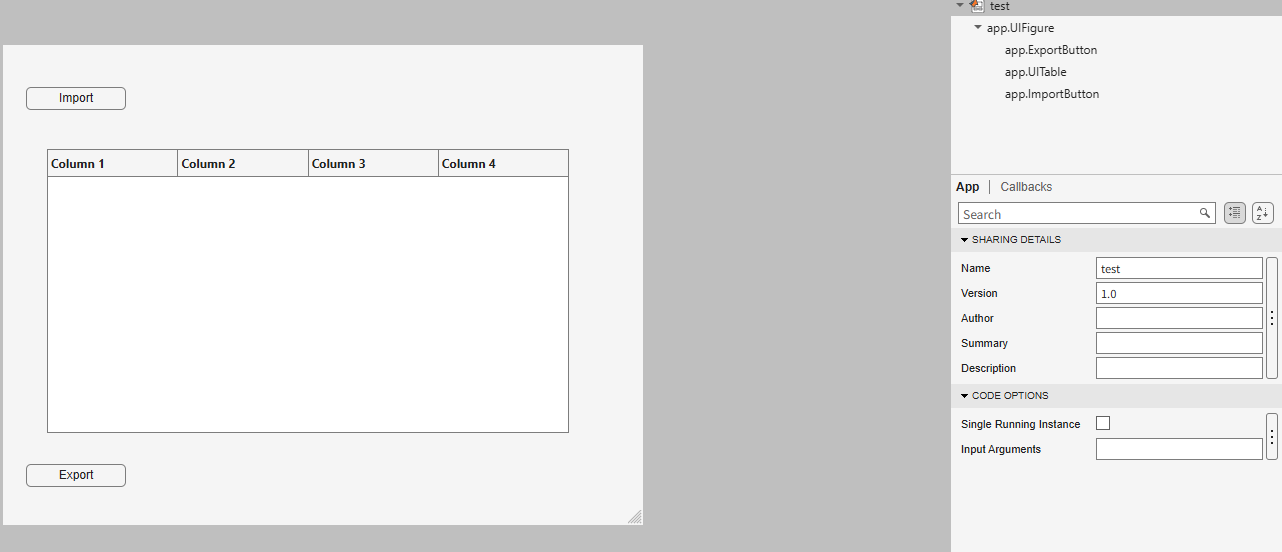
I am trying to create an app to export the 5th column into a new sheet in the imported Excel file when I click Export button.
How can I write code in ExportButtonPushed
classdef test < matlab.apps.AppBase
% Properties that correspond to app components
properties (Access = public)
UIFigure matlab.ui.Figure
ExportButton matlab.ui.control.Button
UITable matlab.ui.control.Table
ImportButton matlab.ui.control.Button
end
% Callbacks that handle component events
methods (Access = private)
% Button pushed function: ImportButton
function ImportButtonPushed(app, event)
[file, location] = uigetfile( ...
{'*.xlsx;*.xlsm', 'Excel files'; '*.txt', 'Text files'; '*.*', 'All files'}, ...
'File Selector');
figure(app.UIFigure)
if isequal(file, 0), return, end
fullPath = fullfile(location, file);
try
[~,~,ext] = fileparts(fullPath);
if any(strcmpi(ext, {'.xlsx','.xlsm','.xls'}))
T = readtable(fullPath, 'Sheet', 1, 'VariableNamingRule', 'preserve');
else
T = readtable(fullPath, 'VariableNamingRule', 'preserve');
end
catch ME
uialert(app.UIFigure, ME.message, 'Read error');
return
end
if width(T) < 5
uialert(app.UIFigure, 'The file needs at least 5 columns.', 'Import error');
return
end
app.UITable.Data = T;
app.UITable.ColumnName = T.Properties.VariableNames;
lengthlist = T{:,5};
end
% Button pushed function: ExportButton
function ExportButtonPushed(app, event)

As a long-standing request from users, we are happy to announce that HDFql now supports MATLAB for managing HDF5 and MAT files.
In short, HDFql (Hierarchical Data Formal query language) is the first high-level, declarative language for managing HDF5 or MAT data. Designed to be as simple and powerful as SQL, it dramatically reduces the learning effort and time required to work with HDF5. With its intuitive syntax, HDFql provides a clean interface for reading and writing HDF5 data across programming languages (C, C++, Java, Python, C#, Fortran, R, and now MATLAB) and platforms (Windows, Linux, and macOS). In addition, HDFql is based on a flexible parallel architecture that transparently leverages available cores and, in MPI clusters, nodes to efficiently process large volumes of data.
Key benefits of HDFql include enabling users to replace dozens of lines of complex HDF5 code with just a few lines of simple code, helping AI models generate better code using far fewer tokens, and making AI-generated code easier for humans to review.
Happy coding, prompting, or reviewing with HDFql in MATLAB!

We use Timecontrol for statistic automations. Yesterday at 2026-10-220 10:00pm CET Time control stopped working. There is new new time in the "Run At" field, although the script should run every 5 minutes. We had the same problem in September, see https://de.mathworks.com/matlabcentral/answers/2184870-thingspeak-timecontrol-stopped-working-at-all?s_tid=srchtitle
Has anybody also prolems with Timecontrol?

I am frequently facing issue with the onramp training of not proceeding to the next task or section, even after successfully completion of the current task or complete section.

For the past several days I have been experiencing a problem with data visualization on two of my ThingSpeak channels.
The data appears to be uploaded and stored correctly, and new entries are still being added to the channels. However, the visualizations are not working correctly.
The standard Field Charts show only a very small number of data points instead of the normal continuous measurements. Most of the points are compressed on the left side of the chart, while one or a few points appear far to the right and are connected by long straight lines. The time axis is also incorrect and sometimes shows repeated dates such as “01 Jan”.
The numeric widgets are affected as well and display incorrect values. Some custom visualizations also remain blank or fail to load.
The problem appeared suddenly and affects two separate channels which had previously been working correctly. I did not make any significant changes to the channels before the problem started.
This seems somewhat similar to the ThingSpeak chart/timeline issue reported in June 2026, when charts were displaying incorrect time ranges and the DAYS/RESULTS settings were not working correctly. However, my current problem also affects numeric widgets and custom visualizations, and the charts show incorrect dates and strangely positioned data points.
Could this be a regression or a similar issue with the ThingSpeak visualization system?
Has anyone else experienced the same problem recently?

The Ran In tag still shows R2026a on Answers and Discussions (as does the Executing In popup), even though both are actually running R2026b.
This seems to be always be an issue whenver the site updates to the latest release. Seems like it should be pretty straightforward to update those message at the same time the underlying release is updated. Or am I underestimating the complexity of that task?
matlabRelease

What if MATLAB could show you not only the final output, but also how your code reaches that result?
Imagine an interactive tool that visualizes variable changes, function calls, matrix transformations, and execution flow as a program runs. Engineers could watch algorithms evolve, identify unexpected behavior, and understand complex simulations through live visualizations.
The idea is to build a Live MATLAB Execution Explorer that combines code tracing, variable timelines, and 3D engineering simulations in one interface.
From debugging control systems to teaching numerical methods, this could transform how students, researchers, and engineers interact with code.
The challenge? Capturing execution data efficiently without significantly affecting performance.
The vision: Turn programming from something we read into something we can see, explore, and understand.
#MATLAB #Simulink #EngineeringInnovation #Simulation #DeveloperTools

I recently had an idea for a side project: building an app/extension that can interactively follow simulations and visualise the live flow of code execution.
For this, I would need access to variables, datasets, and the function call stack during execution, ideally without interfering with the actual code execution.
However, I found that MATLAB's current architecture makes this difficult, as the entire application runs in a single thread and there are no publicly exposed APIs to access runtime variables without interrupting execution.
Can anyone suggest a possible workaround or an alternative approach to achieve this?
I recently had an idea for a side project: building an app/extension that can interactively follow simulations and visualise the live flow of code execution.
For this, I would need access to variables, datasets, and the function call stack during execution, ideally without interfering with the actual code execution.
However, I found that MATLAB's current architecture makes this difficult, as the entire application runs in a single thread and there are no publicly exposed APIs to access runtime variables without interrupting execution.
Can anyone suggest a possible workaround or an alternative approach to achieve this?

Hello everyone
After you read the blog post about all the new goodness in MATLAB 2026b I am sure you'll rush out to install it. If you do one more thing, however, I suggest that you install this add-on from MATLAB File-Exchange since it will make object-oriented code much faster.
"How much faster?" I hear you ask. This much faster:
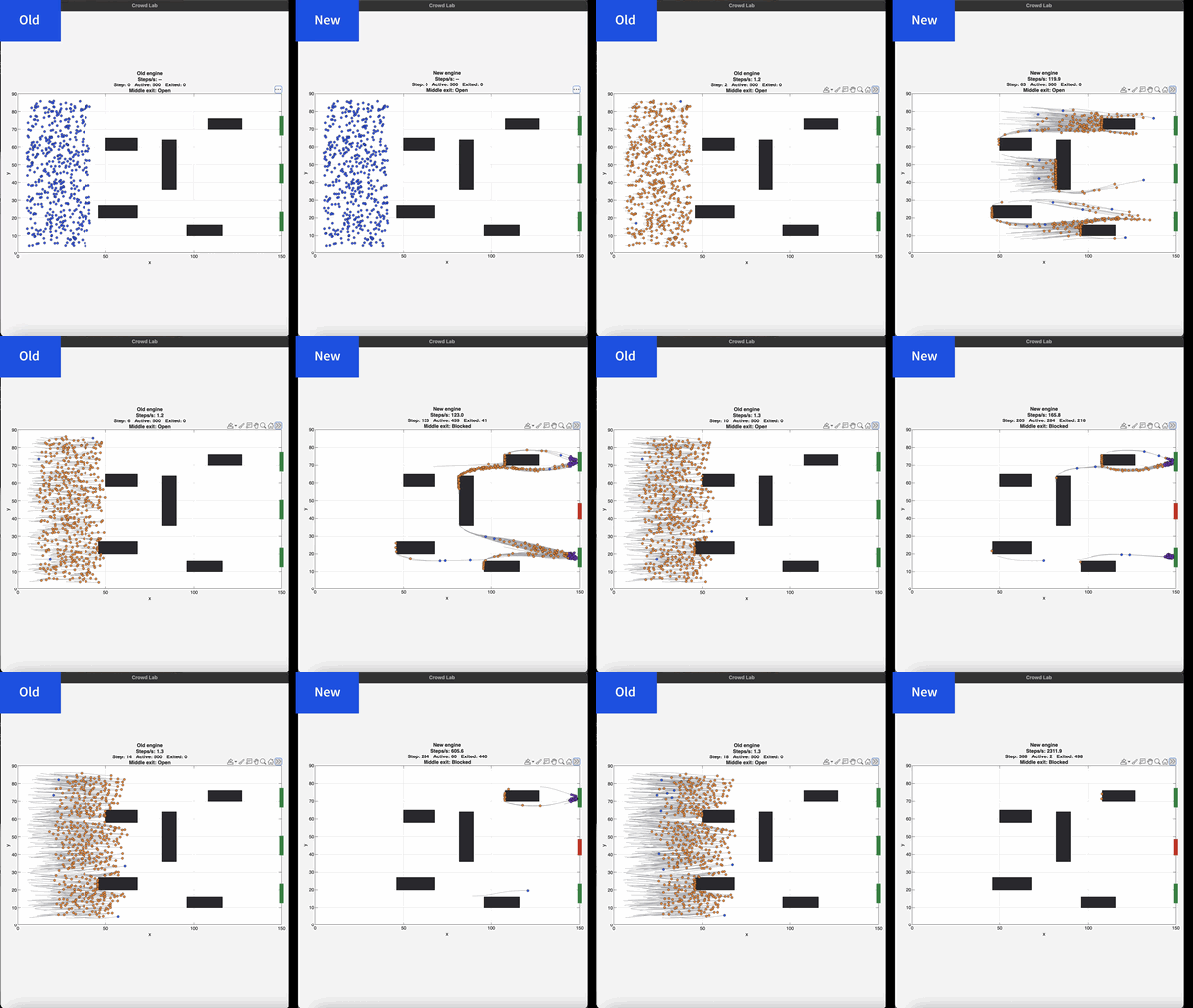
If you prefer numbers to pictures, all of the details are in a blog post from when we released the limited beta: Objects are about to get much faster in MATLAB » The MATLAB Blog - MATLAB & Simulink
"Why didn't we make this the default?" I hear you ponder. Because there is a small chance that the new system will break your code. It's a very small chance and I've personally not seen any code that does get broken. However, such code does exist and we want to be give you the chance to discover this and work with us to make your code compatibile before it does become the default.
I hope you enjoy using 2026b as much as we enjoyed making it.
Cheers,
Mike
I keep forgetting the functions and lack of pratices would be the reason

Extremely--I have real work to do
24%
Maybe talk about something else?
24%
Neutral
24%
Not very much
24%
Let's talk about nothing else
5%
21 votes

Hey, this is a safe space to share your cool projects you know. I have pet ducks, I use ThingSpeak to open the door to their house each morning. I just finished an upgrade to the LED strip lights on my driveway that are controlled via ThingSpeak. And the valves for my drip irrigation system. You got it. Controlled by ThingSpeak. Let me know your last cool project you finished or the one you keep dreaming of starting. I need some more inspiration :)

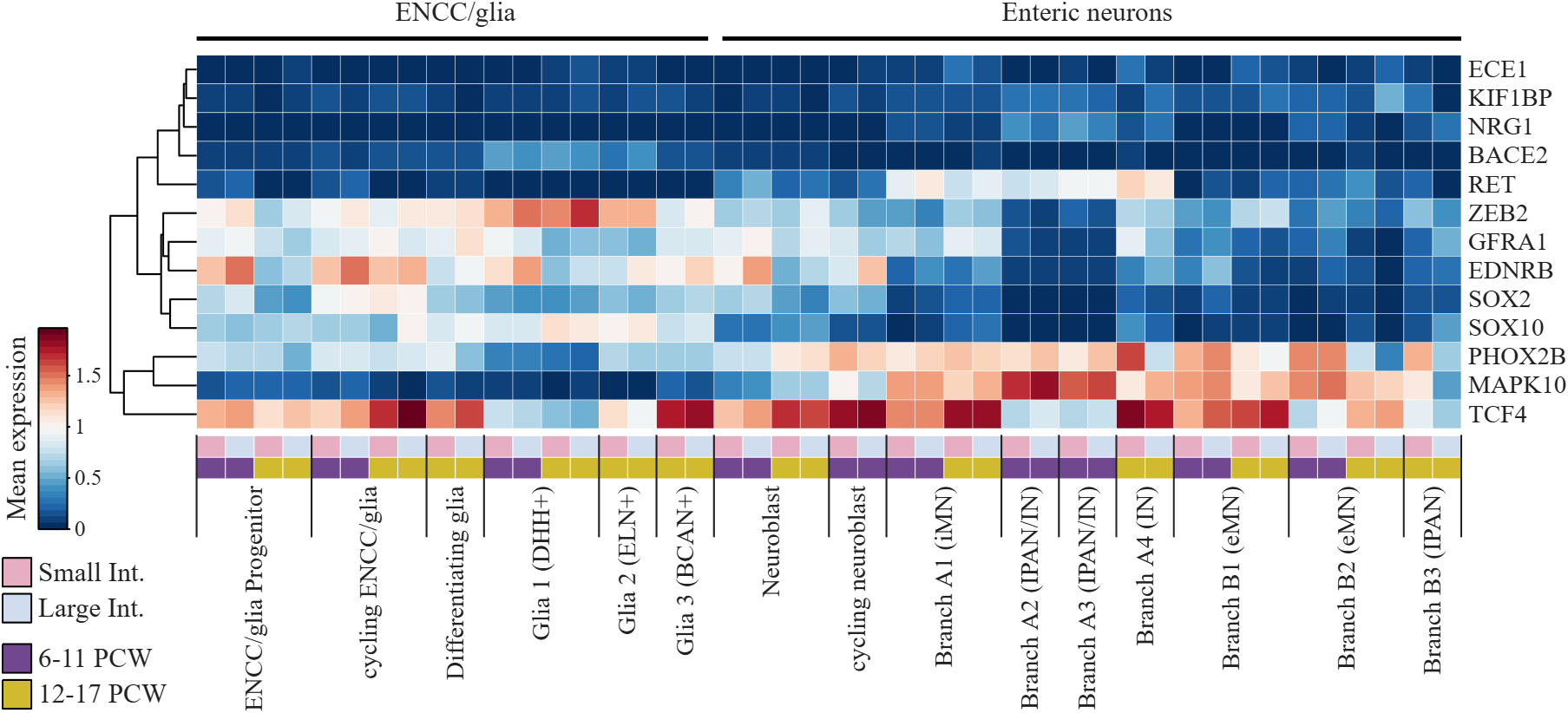
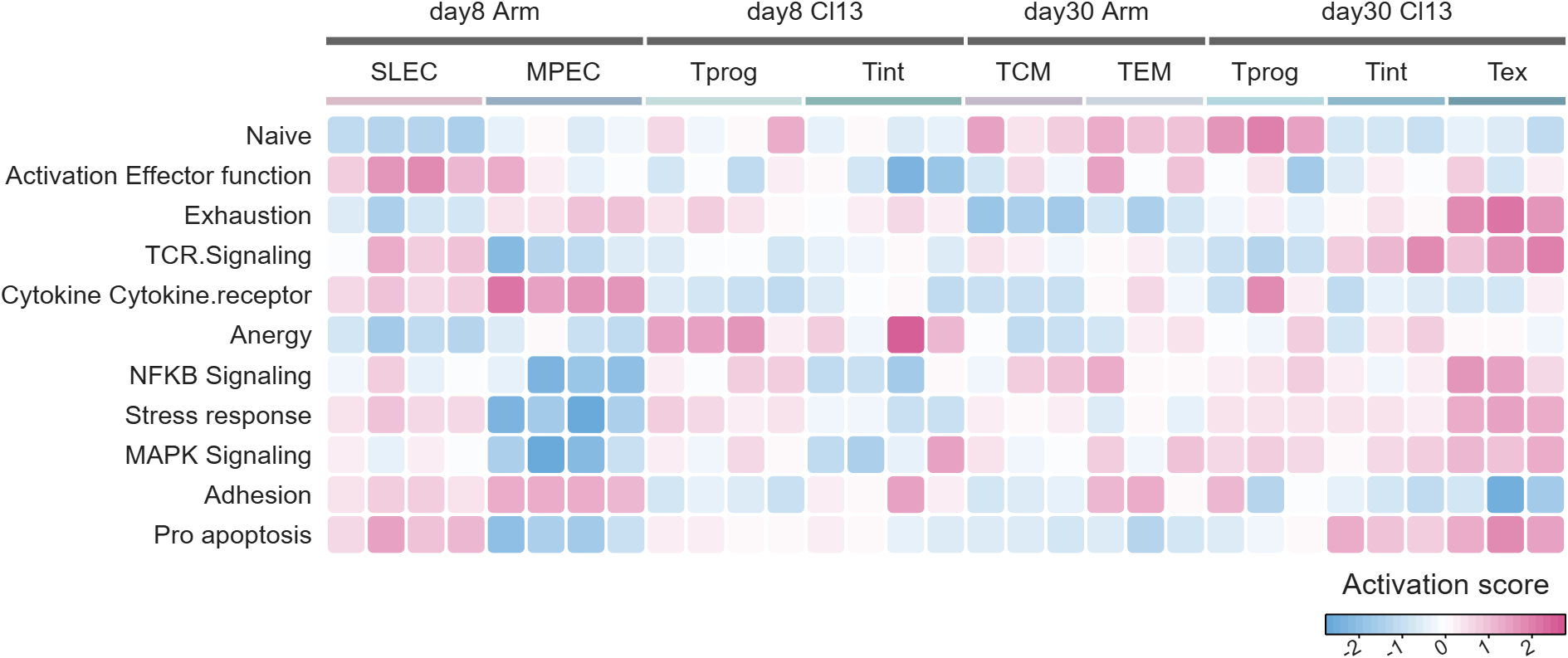
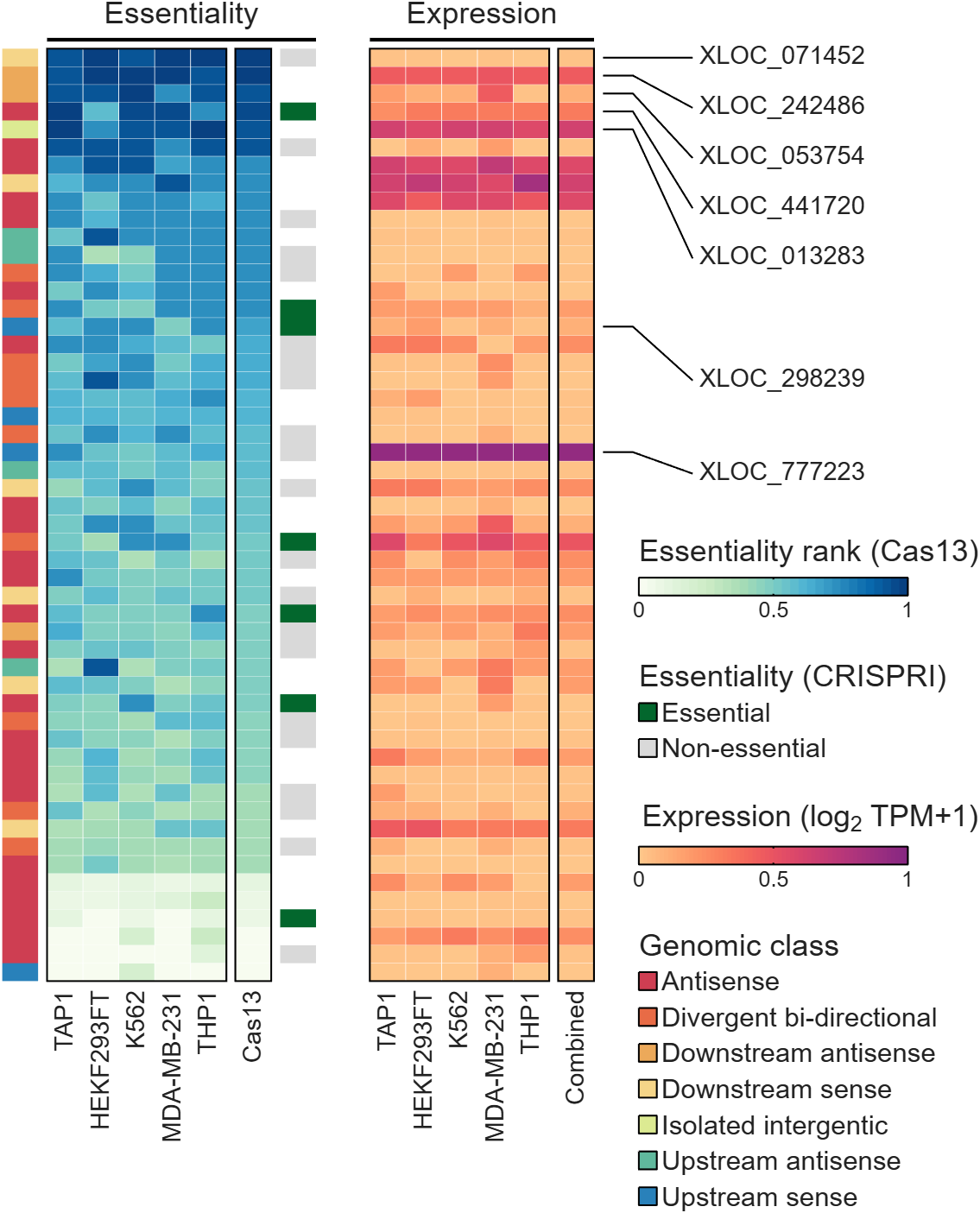
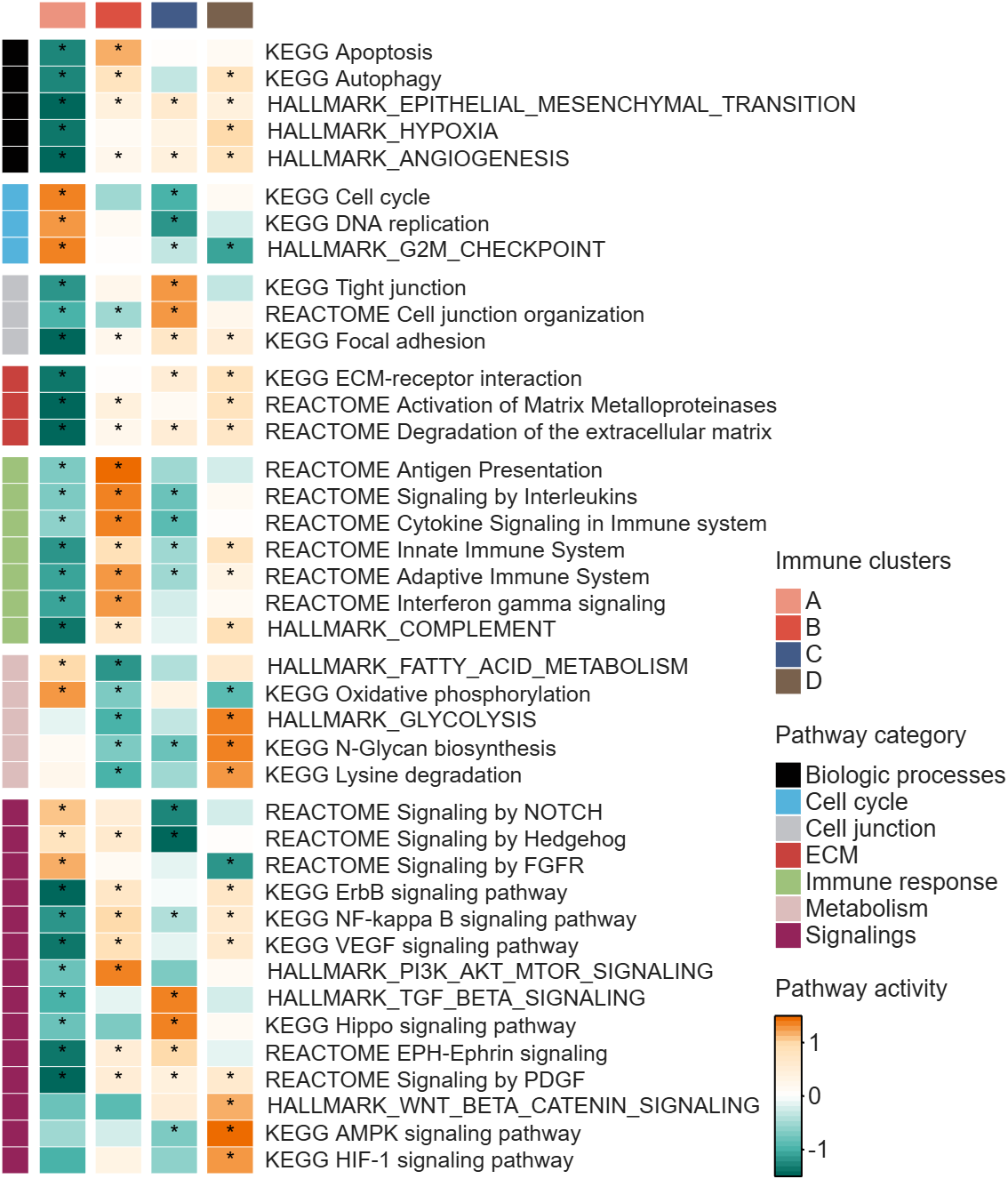
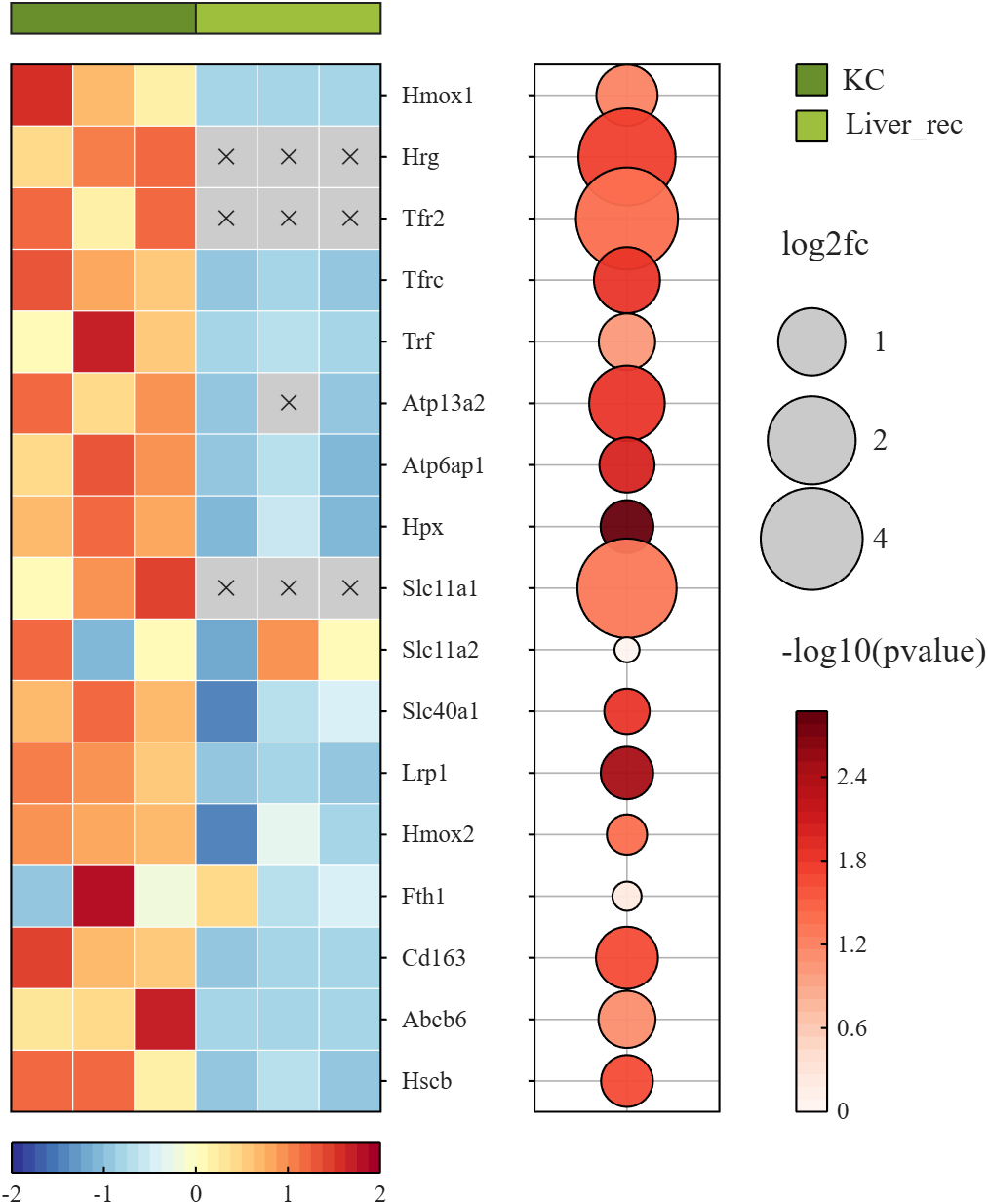
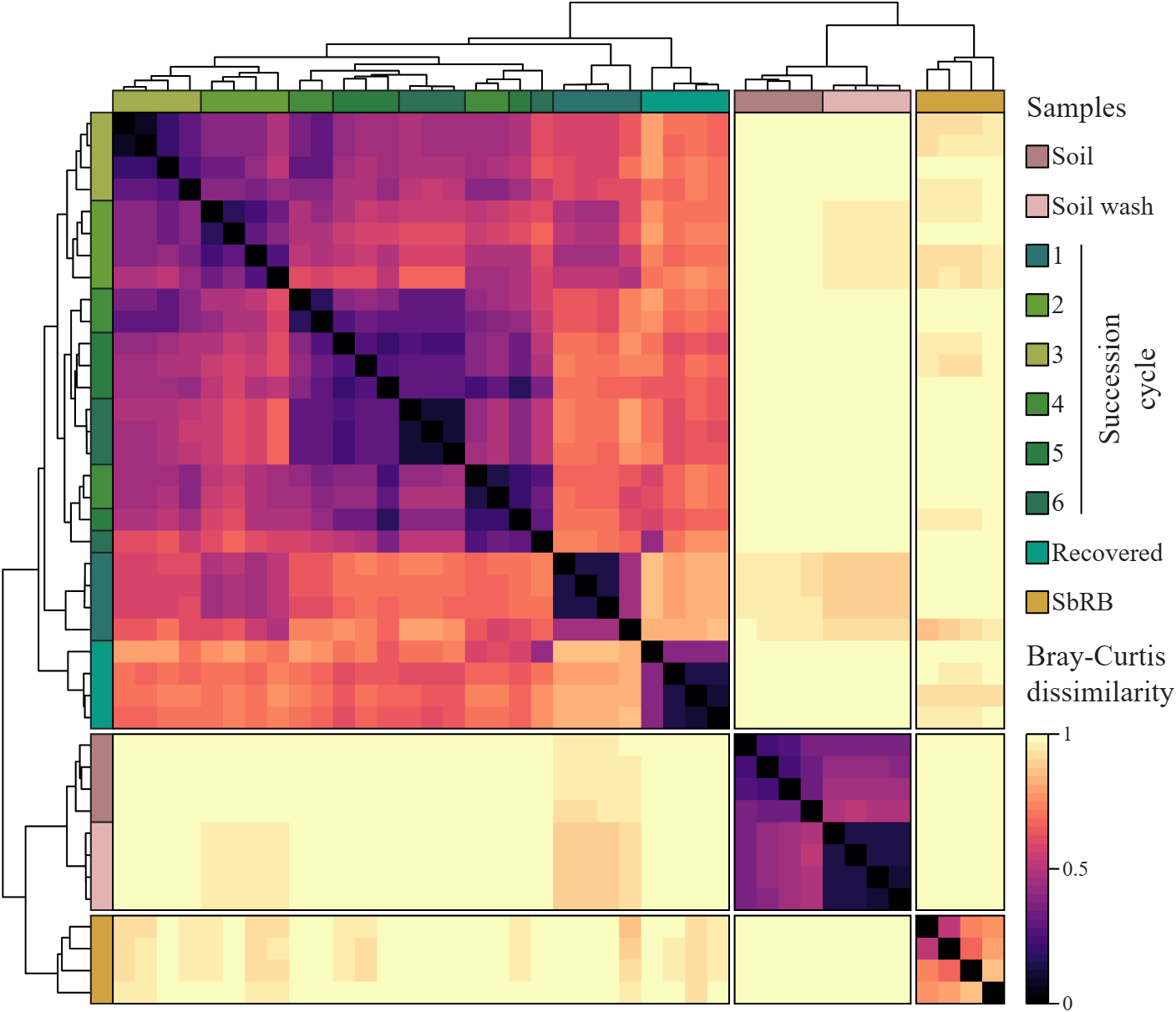
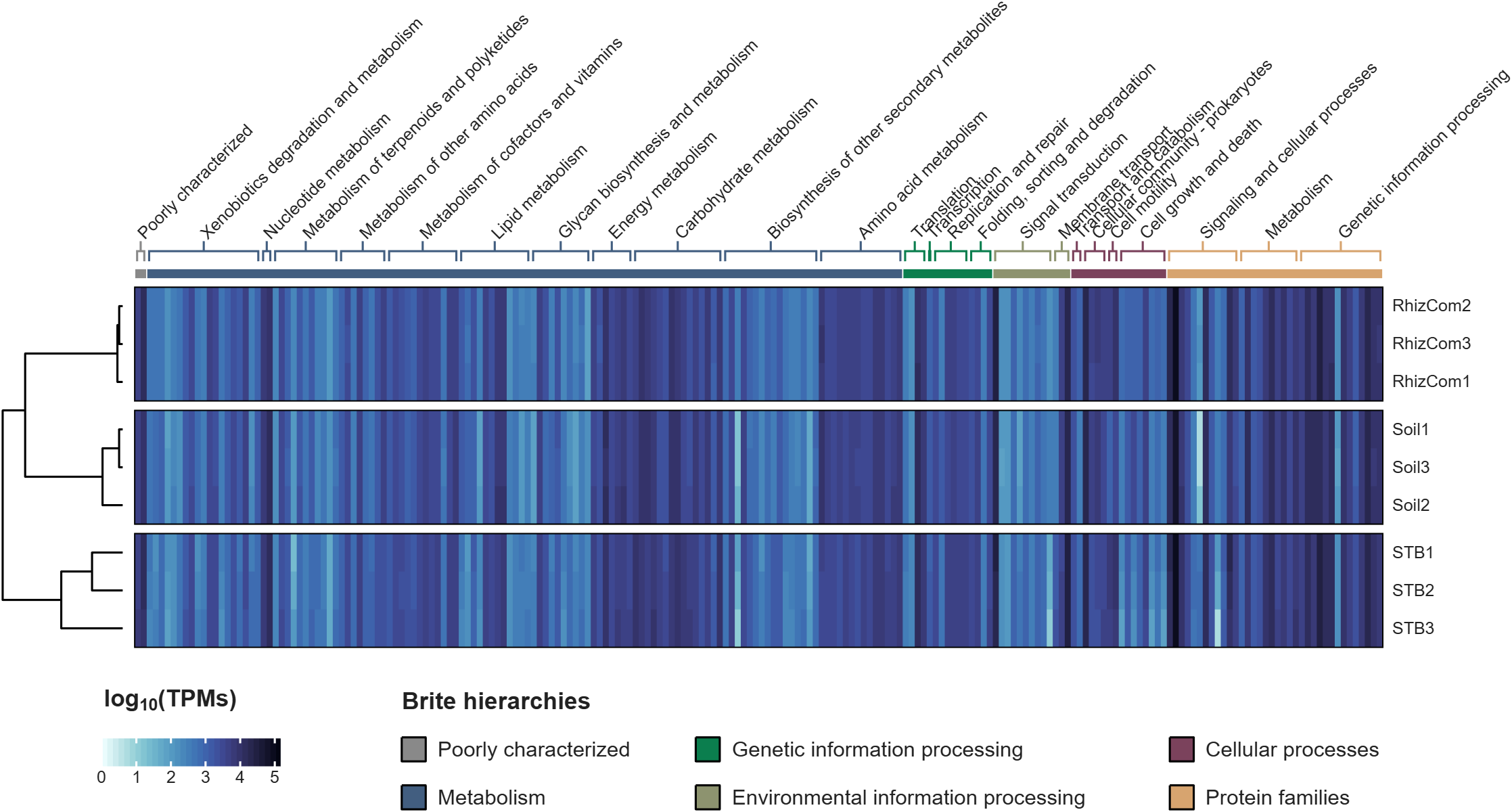
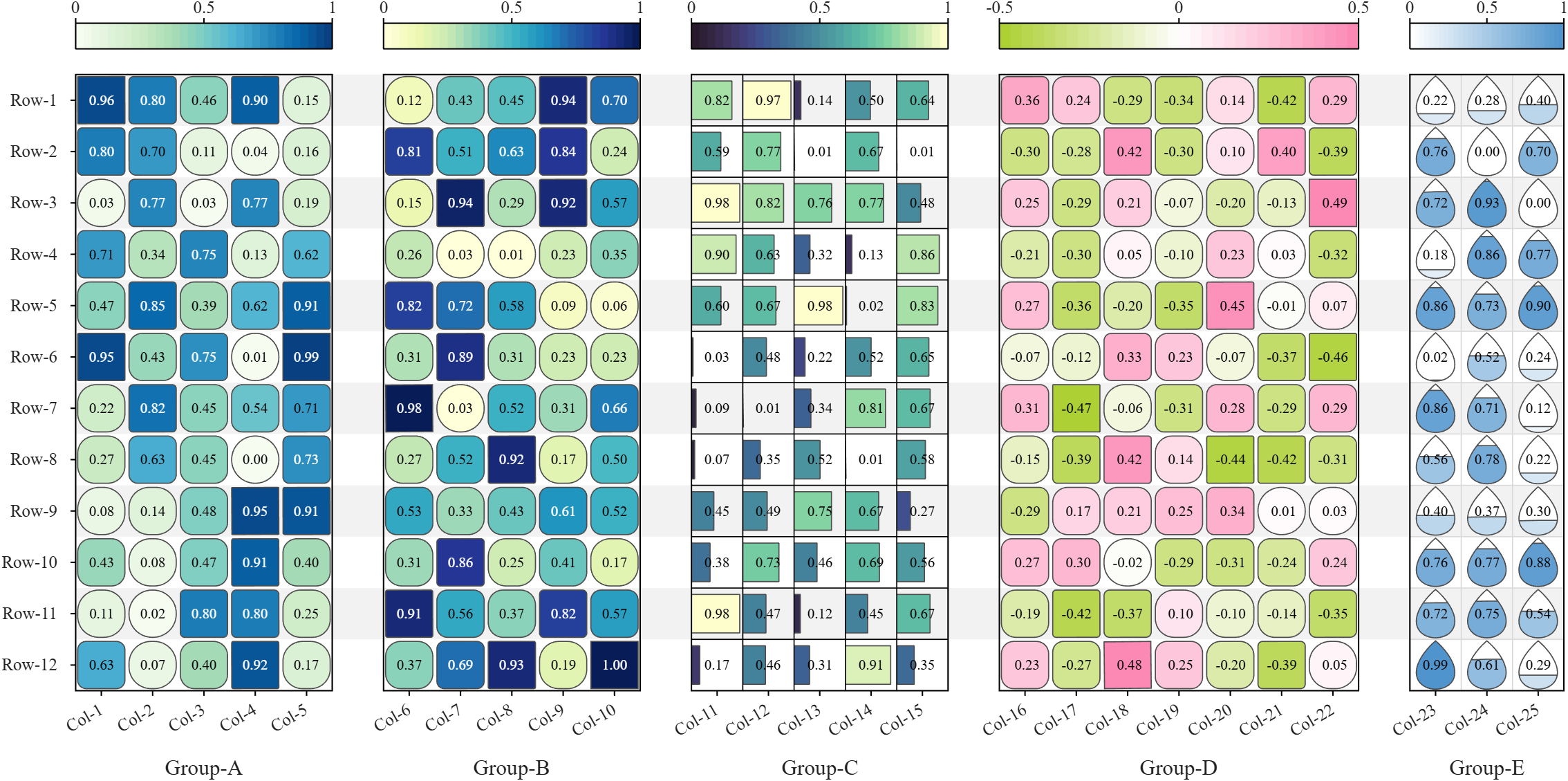
All these examples are plotted using SHeatmap. For details, please refer to the relevant examples in the demo_SColorbar folder included in the toolbox.
Hi everyone
Some of my colleauges at MathWorks are conducting a survey on how people use science and engineering file formats such as NetCDF, HDF5, Zarr and so on.
It will only take a few minutes to fill out and is completely anonymous unless you want to be contacted. Your thoughts, details of usage in your domain or industry, and current friction points will help us improve MATLAB to better support the kind of work you do in the future!
If there's anything not covered by the survey that you'd like to mention, feel free to reply to this thread.
Cheers,
Mike

TokaLab is an open-access virtual tokamak platform built in MATLAB for nuclear fusion modeling, diagnostics, inverse problems, and computational experimentation.
- App installer for MATLAB Online — run TokaLab directly in your browser.
- Two new tutorials covering the core modules, SimPla and SynDiag, in detail.
- Two new modules: TokaPlot for advanced plotting, and SynRad for radiation generation.
- Real tokamak geometries, supporting more realistic tokamak modeling.

