A Tip for Solving Systems of Equations with solve in the Symbolic Math Toolbox
Recently, I encountered an issue where solve returned no solution for a system of equations, even though the system obviously has solutions. This can be easy to overlook.
For example:
syms a b c x
equs = [a*x^2+b*x+c==0;
a==1];
St = solve(equs,x)
St is returned as an empty set, suggesting that there is no solution???
However, since a is constrained by the equation a == 1, the correct way is:
S = solve(equs,[x,a])
disp(S.x)
disp(S.a)
Here, a must also be included in the list of variables to solve for. Only then will solve treat a as an unknown, apply the constraint a == 1, and substitute it into the equation during the solving process.
symvar(equs)
Based on the output of the symvar function, a is already identified as one of the symbolic variables (unknowns) in the system of equations. However, the actual behavior of solve appears to contradict this expectation. In practice, a must still be explicitly included in the variable list passed to solve; otherwise, it is treated as a symbolic parameter rather than a variable to be solved for.
Takeaway: When using solve for a system of equations, any symbol that appears in the equations and is constrained by additional equations (such as a == 1) should generally be included in the variable list. Otherwise, solve may treat it as a symbolic parameter rather than an unknown, which can lead to an empty solution set or unexpected results.
Am I missing something here? I'd love to hear your thoughts.
12 Comments
Time Descending
That looks like a bug to me. At minimum it's an unexpected, if not indefensible, result based on the doc page for solve. If you do report it as a bug to Technical Support, would you mind updating your post with their response.

I think it would be better to submit this as a "bug". The documentation really is hard to explain in a case like mine. It would be great if someone could help me file a bug report.
I also tried the following:
syms x a
equs = [x==2;
a*1==a];
s1= solve(equs,x)
s1 =
2
It's not an empty set. In addition, when I specify the variable a to solve for:
s2= solve(equs,[x,a])
How come a is calculated as equal to 0??? It becomes hard to explain.
[s1,s2,params,cond] = solve(equs,x,a,ReturnConditions=true)
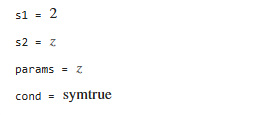 (The execution result couldn't actually be rendered, so I pasted the result here.)
If I don't explicitly specify the "ReturnConditions=true" argument parameter, it would be better to have the following output by default:
[s1,s2] = solve(equs,x,a)
default output:
s1 =
a
s2 =
z
params =
z
cond =
symtrue
Such a default output would be more acceptable.But in fact, the actual output from executing the above is as follows, which is not so easy to accept.
[s1,s2] = solve(equs,x,a)
s1 = 2
s2 = 0
(The execution result couldn't actually be rendered, so I pasted the result here.)

Feel free to suggest this is a bug. I think it is more of a failure to communicate. ;-) However, what matters is the opinion of those who work at TMW.
Looking at what you did, I think you misunderstand the mathematics in this case.
syms x a
equs = [x==2;
a*1==a];
Do you recognize that the second of those equations is trivially true, regardless of the value of x or of a? As such, solve has no problem.
s1 = solve(equs,x)
So there, solve finds a solution, and it is the expected solution. The above is completely different from your original problem, where your second equation was a==1, but a was never specified as an unknwon.
Next, you instructed solve that a was an unknown, something to be solved for.
s2 = solve(equs,[x,a])
This is simple linear algebra. You have two equations, in two unknowns. As it turns out, the resulting equations are not sufficient to determine a unique solution. They are technically known as rank deficient. But see what happens.
[A,B] = equationsToMatrix(equs,[x,a])
This matrix problem will be viewed as the solution to the matrix equation:
A*[x;a] == [2;0]
In MATLAB, we solve it as:
A\B
And as you can see, 2 and 0 are the same values returned by solve. However, you should seee the warning message, indicating the solution is not unique.
This is not hard to explain. It is simply a result linear algebra predicts, but I'm not going to teach a basic course in linear algebra here.
Next, you tried this:
[s1,s2,params,cond] = solve(equs,x,a,ReturnConditions=true)
In fact, this is a more general solution. What does it mean? x is found to be 2, which is good, and thouroughly consistent with our expectations. a is found to be ANY value you want it to take on. solve called it the number z. What you do is pick some number for z, then plug it in as a=z.
In the previous case, solve returned a SPECIFIC solution, where zero was a as good a choice as any other.
Again, really this case reduces to understanding the linear algebra. It is also completely different from your original problem, or even the simpler version I reduced it to, where the problem becomes one of knowing if a is a parameter versus an unknown to be solved for. That difference is fundamental.
If you want to try to convince MathWorks this is a bug, you can try. My guess is they will see it as I have explained. In that case, they will be very nice, but nothing will be done to "repair" the bug you have reported, because this is fundamental to how MATLAB deals with parameters, and how a parameter is not an unknown to be solved for. It is not a bug in solve itself by that argument. I suppose they might be able to catch flawed problems like this, then throwing a warning message when one or more of the equations have no dependence on the unknowns. That is at least a possibility to happen at some time in the future.
Far better IMHO would be to try to convince them to expand the documentation for solve, showing why things like this happen. I think you will have some degree of success there.
You can argue it is a bug. And I originally thought it looked like one. But think about it.
syms x a
At this point, both x and a are just symbolic things. They have no values, and could be anything.
eq1 = x == 2;
eq2 = a == 1;
We still know nothing at this point. But now apply solve.
solve([eq1,eq2],x)
Solve returns nothing, because it cannot find any value of x that satisfies all of the supplied relations. a can be any value at all. The statement a==1 does not specify a value for a. It is merely a test. And since solve is not told to vary anything but x, while leaving all other parameters at their values, then no solution can exist.
Change the problem.
eq3 = (a-1)*(x-2) == 0;
Now can solve handle equations 1 and 3? Of course.
solve([eq1,eq3],x)
So regardless of the value of a, solve can handle the redundant system with no issues. Even if a-1 was zero, eq3 is still satisfied, so there are no conditions on the solution.
But in the original form, it seems clear that solve cannot find a solution, because unless a is specified as an unknown, then it cannot vary a. And a==1 is NOT an assignment, but a test. That is why this final query works, because solve is now allowed to vary a.
sol = solve([eq1,eq2],[x,a])
As such, no bug. Solve is doing exactly as it must. Maybe you can call it an artifact perhaps, of the way symbolic parameters are handled. But one thing we should all know is that sometimes when you ask a question of a computer, you must ask carefully, else you can expect strange results.
In the context of solve, each element of eqns is non "merely a test." According to the doc page the eqns input (as used here) is an array of "symbolic equations" that form a "system equations" (quoting from the doc page).
The doc page further states: "Y = solve(eqns,vars) solves the system of equations eqns for the variables vars ..."
In this case, eqns (or equs as used in the OP) has a solution for x that solves the system of equations (even if the user did not request that "a" also be returned).
OTOH, if solve returned the expected result for x, then subs-ing back into into equs and attempting to verify the solution using isAlways won't work. Perhaps the documentation should better explain what solve tries to do in this situation and why it fails.
If solve can identify that equs(2) is independent of the requested solution variable, then perhaps a more defensible result (though still likely not consistent with the doc), would be to eliminate equs(2) from consideration and solve whatever is left over, unless equs(2) is demonstrably false (e.g., based on assumptions).
Yes, it is a system of equations. Feel free to call it that. However, there is no value of x that will cause the second equation to yield a true statement.
Solve is not asked to infer a value for a, but only for x. All parameters not identified as unknowns are presumed to be unknown constants. For example...
syms x a
eq = x/(a-1) == 2
Sol = solve(eq,x,returnconditions = true)
Based on your response, solve SHOULD have stated this solution fails to exist when a==1, but it identified no such issue. The point is, solve does not worry about the parameters in a problem. They are considered fixed, but with no known value. Yes, maybe it should have caught the issue here, but it did not. Again, this means the expression a==1 is not used to infer a value for a parameter that was not explicitly stated to be an unknown. a is a fixed parameter, and so the two-equation problem with only x as a variable cannot have a solution in the eyes of solve.
Could the documentation for solve be written in a better way? I will always agree with that, but I have a tendency to want to be exhaustive and to over-document code.
I can see where solve gets confused. Not that it totally should be confused. But I can see where it went.
You gave it a system of 2 equations, in one unknown. It is conceptually no different from this simpler form:
syms a x
eq1 = [x == 2;a == 1];
solve(eq1,x)
If a is not an unknown, then the second clause in the pair becomes a problem, because solve cannot establish if it is true.
I'll instead try a slightly different problem. Does solve succeed now?
eq2 = [x == 2, 2*x == 4];
solve(eq2,x)
And logically, solve is now happy. Two equations, with one unknown. They are redundant of course, but solve did not complain here. Solve can also know when the equations posed are inconsistent, for example here:
eq3 = [x == 2, 2*x == 5];
solve(eq3,x)
In the latter case, solve returns no solution. And we would have no complaints. The issue is why the first problem returns the same empty result as the third. In the latter case, the problem indeed has no solution due to the inconsistency. I suppose it might be nice if solve were able to explain why it found no solution for eq1, ascompared to eq3.
Returning to eq1, here if a is not specified as an unknown, then a apparently is a parameter in the eyes of solve. But it has no known value, and so a lies in a netherworld, in limbo. Can we still have a in the second clause and see solve be happy? Well, apparently yes. For example, consider eq4.
eq4 = [x == 2;a*(x-2) == 0];
solve(eq4,x)
Here the value of a is known to be irrelevant. One might think a==0 is a problem, but not so, since if a were zero, then the second clause is still trivially true. And solve seems to understand that.
s = solve(eq4,x,returnconditions = true)
Anyway, the problem we saw with eq1 is that when a is not listed as an unknown, then the second clause can never be known to be true or not. And then no solution can be known to exist, even though the two clauses are independent. Solve knowns only that you gave it two equations to be solved.
Thank you, your analysis is very unique and insightful. It does make it quite puzzling why there is no solution — at least in mathematical form, it's not so easy to accept.

Your understanding is correct.
ARGH!!!!!!! Why is it that some results in a dicsussion fail to show?
I have gotten stung by this discussions bug more than once now in a discussion. Some of those results disappear!!!!!!!
All I can do is copy over the complete set of computations I gave in my first comment. Note the failure of solve(eq2,x) to show a result, as well as for eq4.
syms a x
eq1 = [x == 2;a == 1];
solve(eq1,x)
eq2 = [x == 2, 2*x == 4];
solve(eq2,x)
eq3 = [x == 2, 2*x == 5];
solve(eq3,x)
eq4 = [x == 2;a*(x-2) == 0];
solve(eq4,x)
s = solve(eq4,x,returnconditions = true)
As I am editing this, every one of those solves shows a result. But not so when I click on submit.
I also posted this thread but it wouldn't display. Later I tried using the 'disp' function to show the results, but it still failed to display.
Anyway, it all seems to come down to the idea that if a is a parameter, then it is seen to be fixed, but unknown. I think of it as if somebody "knows" the value of a, but they are keeping it a secret. 007 level security clearance only, and solve lacks the necessary clearance.
Then you create a "system" of equations of the general form
syms a x
eq1 = [x == 2, a == 1];
This is entirely valid to write. But then if you ask solve to do its job, it thinks it needs to vary x such that both of the supplied equations hold true. Is there any value of x, such that both equations are simultaneously true? Again, remember that x is an unknown, but a is NOT a variable we can solve for. a has that fixed, high security clearance value. (I'm pretty sure the value of a is supposed to be 42, but I also lack the 007 clearance, for good reason.) And this gets into the distinction of
a = 1
versus
a == 1
the former is a statement where we set the value of a to 1, but the latter is just a test of equality.
Does all of this make sense, and explain why solve fails on eq1, when x is given as the unknown, but not a?
solve(eq1,x)
I hope so. It should also explain why this is not truly a bug, even though it feels sort of like one. Everybody knows what you wanted to say there. Better would probably have been to subs in the value of a into the quadratic first. Then solve will not be confused. Or, we need to work on giving solve the necessary security clearances, but they are only given out rarely, and I'm not at all sure I like the idea of giving a computer code a license to kill these days.
Sign in to participate
Tags

