EVERDROP: two moves from one button, and pixel art without imread
EVERDROP is a falling-block game on a five-column board, played with a single button. The contest harness gives a game exactly one signal, pressed, which is true on the frame a tap arrives. There is no hold, no release and no mouse position. Here are three things that made the game work inside those limits, and a short story of how it was built.
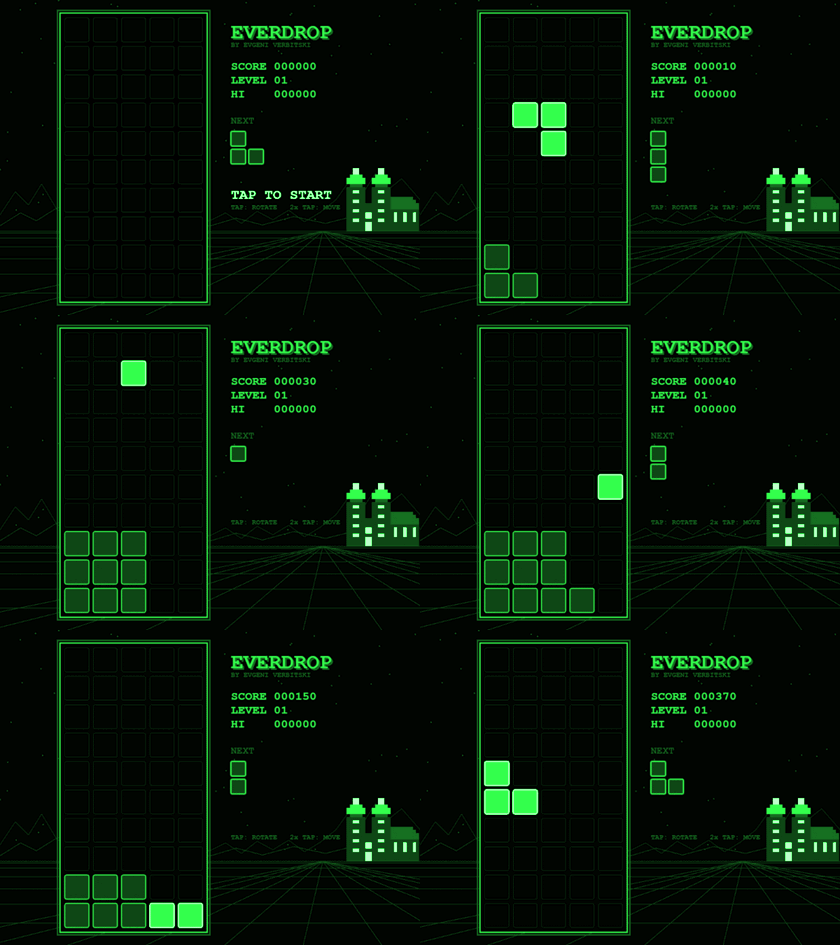
Time-lapse of the game, played by a small test bot through the same tap input.
1. Two actions from one tap: act first, undo later
I wanted two moves: rotate the piece, and shift it sideways. The obvious way is to wait a moment after a tap to see whether a second one follows. That makes every rotation feel late.
So the first tap rotates at once and remembers the old shape. If a second tap comes within 0.3 seconds, the rotation is taken back and the piece moves one column instead.
if pressed
if s.tap < 0.3 && ~isempty(s.undoShape)
s = undoRotation(s);
s = stepSideways(s);
else
s.undoShape = s.shape;
s.undoCol = s.pc;
s = rotatePiece(s);
end
s.tap = 0;
end
s.tap is the time since the last tap, increased by dt every frame. Sideways movement goes right until the wall, then left, so one direction is enough.
2. Pixel art as text
imread is on the banned list, so a picture has to live in the code. I store it as a character matrix, one character per pixel, and turn it into colours with ismember:
art = ['....WW......WW...........'
'...BBBB....BBBB..........']; % 20 rows in the game
[~, idx] = ismember(art, '.BWKO');
image(ax, 'XData', [651 795], 'YData', [323 437], ...
'CData', reshape(shades(idx, :), [size(art), 3]), ...
'AlphaData', idx > 1);
shades is a small colour table with one row per letter. The dot is transparent through AlphaData. A 25 by 20 picture costs about 600 characters, and you can edit it in the MATLAB editor like a drawing.
3. Many lines, one graphics object
The floor grid and the mountain ridges are each a single line. Separate segments are joined by putting NaN between them in the coordinate vectors. The whole background is a handful of objects created once in init, and render never touches them.
One more small thing
The blinking prompt needs no timer. render sets its visibility from the running clock in the state: mod(s.clock, 0.8) < 0.55. Calling render twice with the same state gives the same picture, as the contract asks.
How it was built: one evening with an AI assistant
I built EVERDROP in one evening, working with an AI coding assistant (Claude), mostly from my phone. I described the idea in one sentence, asked for a sketch of the screen first, and then steered: how pieces move, what a tap does, what the screen should look like. The assistant wrote the code and ran it in my MATLAB with simulated taps after every change, so most mistakes were caught before I saw them.
Three things I learned:
- Read the rules first. We spent hours on a version with sound, a window of its own and a hold-to-drop control. Then we read the contest rules: 10,000 characters, no audio functions, and a harness that only reports taps. The entry had to be rebuilt from the ideas, not the code. Hold-to-drop did not survive.
- The AI tests logic, not feel. It could prove that a double tap moves a piece. It could not tell me whether 0.3 seconds feels right under a real finger. That part was mine.
- Short instructions work, if you look at every result. Most of my messages were one line: "green on black", "remove moving lines", "add mountains". Each time I got a screenshot back and decided again. It also said no a few times. When I showed it a picture to copy, it drew its own instead.
The validator in the starter project made the loop safe: change, validate, play, repeat.
The game uses 8,731 of the 10,000 characters. You can play it here: https://www.mathworks.com/matlabcentral/communitycontests/contests/10/entries/16663
Tags


