Create Interactive GUIs

Produce powerful all-purpose GUIs with minimal effort.

You are now following this Submission

The function described here offer an extraordinary easy access to produce comfortable user interaction usable by any MATLAB program and every MATLAB user. Its possibilities are unlimited, its usage almost idiot proof. Virtually no programming is required to use it; certainly no knowledge about programming is required to understand it. It uses MATLAB classes but hides them from the user.

All functions described here can also be constructed using GUIDE, but with considerable more time, effort and pain... Furthermore the result are less reusable, transferable or readable.

Example:
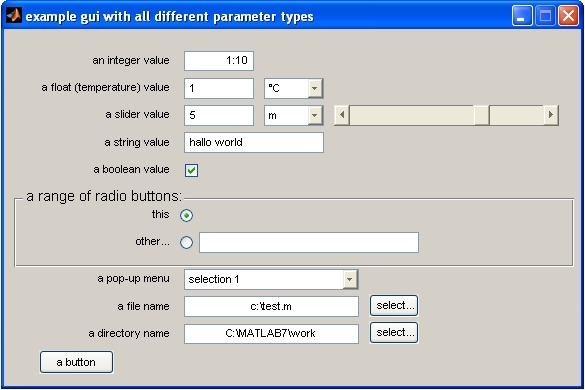
Imagine you want to call a function with a couple of parameters. You don't want to type each parameter in the command line every time and want to make your function usable to others and give it a nice graphical user interface that everybody can understand. Here is the solution! The examples in the image on that page and on the webpage (below) show how to create this gui in 8 readable lines.

For further reading see:
<a href="http://www.soton.ac.uk/~bleeck/parameter/index.htm"> the documentation</a> for another example how to use it see <a href="http://www.mathworks.com/matlabcentral/fileexchange/loadFile.do?objectId=7676&objectType=file" > the "sudoku" game </a> on the File exchange

Cite As

Stefan Bleeck (2026). Create Interactive GUIs (https://in.mathworks.com/matlabcentral/fileexchange/5615-create-interactive-guis), MATLAB Central File Exchange. Retrieved .

Acknowledgements

Inspired: Sudoku

Categories

Find more on Sudoku in Help Center and MATLAB Answers

General Information

MATLAB Release Compatibility

  • Compatible with any release

Platform Compatibility

  • Windows
  • macOS
  • Linux
Version Published Release Notes Action
1.0.0.0

update links in description