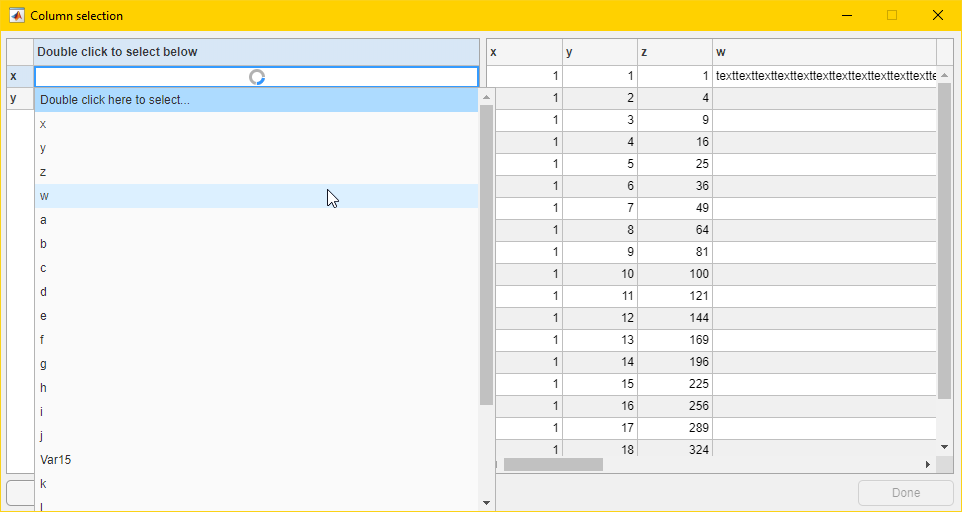
GUI utility to enable your users to assign fields from their data tables to important fields in your application.

You are now following this Submission
- You will see updates in your followed content feed
- You may receive emails, depending on your communication preferences
MATLAB Table Field Selector
A configurable UI enabling your users to select which fields in a table are relevant to your application. For the purposes of this documentation, the fields your application needs are called "metanames". Fields your users provide are just called "fields".
Operation
Call select(config, t) on the user table t and a config struct. A modal uifigure will be created waiting for the user to finish selections. The return value will be a containers.Map object whose keys are your metanames and whose values are the user's fields. If the user clicks "Cancel" or closes the uifigure without clicking "Done" an empty array will be returned.
Configuration
To configure, create a config struct with the following fields.
-
metanames- A list of names suitable for display. The user will select fields to match these. -
default_selection- The default selection value for metanames. Must be a scalar string.
User Guide
For each field on the left table, please use the table drop-downs to select columns from the table preview on the right. Double click in the left-hand table cells to change them. To exit early, click "Cancel" or close the window. To finish click "Done". The "Done" button will only highlight once all cells have been filled.
Cite As
William Warriner (2026). Table Field Selector (https://github.com/wwarriner/matlab_table_field_selector), GitHub. Retrieved .
General Information
- Version 1.0.0 (21.5 KB)
-
View License on GitHub
MATLAB Release Compatibility
- Compatible with any release
Platform Compatibility
- Windows
- macOS
- Linux
Versions that use the GitHub default branch cannot be downloaded
| Version | Published | Release Notes | Action |
|---|---|---|---|
| 1.0.0 |
