RF Toolbox provides functions and apps for designing, modeling, analyzing, and visualizing radio frequency (RF) networks used in wireless communications, radar, and signal integrity applications.
You can model RF networks—including filters, transmission lines, amplifiers, and mixers—using measurement data, network parameters, RF system parameters, or physical properties. Idealized baseband models enable you to perform high-level simulation of RF components for integration with system-level testbenches and DSP algorithm development. The RF Budget Analyzer app lets you analyze gain, noise, and power budget of transceiver chains and generate RF Blockset models.
You can analyze and convert S, Y, Z, and T network parameters, and visualize the results using Cartesian plots, polar plots, or Smith charts. You can also de-embed, check, and enforce passivity, and compute group and phase delay. Rational function fitting lets you model interconnects and export them to Simulink, SPICE, or Verilog®-A.

S-Parameters
Read and write N-port Touchstone® files. Visualize S-parameter data on Cartesian, polar, or Smith charts. Convert to Y, Z, T, ABCD, single-ended, differential, and other formats. De-embed measurements to remove the effects of test fixtures and access structures.

RF Budget Analysis
Determine system-level specifications of RF transceivers for wireless communications and radar systems. Analyze noise, power, gain, and nonlinearity budgets for a cascade of RF components. Use harmonic balance to accurately analyze nonlinear effects.

System Simulation
Simulate RF components such as amplifiers, mixers, and filters in MATLAB with idealized baseband models that include thermal and phase noise specifications, nonlinearity parameters such as IP3 and saturation, measured data such as S-parameters, and AM-PM characteristics.

Rational Fitting
Fit S-parameters and other frequency-domain data, and extract equivalent poles and zeros. Check and enforce passivity and causality. Use the resulting rational object to perform time-domain simulation with RF Blockset or SerDes Toolbox, or export it as an equivalent SPICE netlist or Verilog-A module.

RF Network Design
Design RF circuits such as filters and matching networks using lumped RLC elements, transmission lines characterized by physical properties, or measured S-parameters. Select RLC components by vendor and specifications from substrate-scalable Modelithics® libraries.
Product Resources:
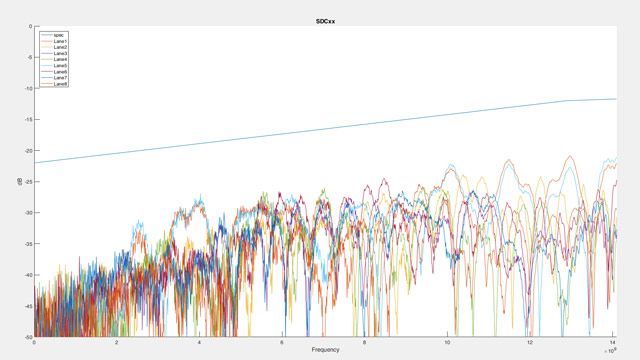
“High-throughput, low-latency passive copper cables and active optical cables play a vital role in high-performance computing, providing interconnections between the tens, hundreds, or even thousands of nodes in a high-performance computing cluster. … The S-Parameter Compliance Tool automates many manual processing steps, calculates decibel loss and other performance metrics, and generates a comprehensive report in Microsoft® Excel® format with detailed results and graphs. I estimate that development time would have been five to 10 times longer without the built-in functionality provided by MATLAB and RF Toolbox.”
RF Toolbox FAQs
RF Toolbox provides functions, objects, and apps for designing, modeling, analyzing, and visualizing networks of radio frequency (RF) components, supporting wireless communications, radar, and signal integrity applications.
You can build networks of RF components such as filters, transmission lines, matching networks, amplifiers, and mixers, specifying them using measurement data like Touchstone files, network parameters, or physical properties.
RF Toolbox lets you read and write N-port Touchstone files, visualize S-parameter data on cartesian, polar, or Smith charts, convert among network parameter formats, and de-embed measured data to remove test fixture effects.
The RF Budget Analyzer app analyzes transceiver chains in terms of noise, power, gain, and nonlinearity budgets using Friis and harmonic balance for non-linear effects, and generates RF Blockset models for circuit envelope simulation.
Yes, using rational fitting, you can model components like backplanes and interconnects and export them as Simulink blocks, SPICE netlists, or Verilog-A modules for time-domain simulation in RF Blockset or SerDes Toolbox.
RF Toolbox supports designing RF circuits such as filters and matching networks using lumped RLC elements, transmission lines characterized by physical properties, or measured S-parameters, with component selection from substrate-scalable Modelithics libraries.
You can convert among S, Y, Z, T, and other network parameter formats, as well as convert single-ended measurements into differential formats. Additionally you can de-embed measurements,
Yes, RF Toolbox provides functions to check and enforce passivity and causality, and compute group and phase delay for your RF networks. You can also use IEEE P370 standard function for quality checks.
Try RF Toolbox for Free
Discover the possibilities today.
Ready to Buy?
Get pricing information and explore related products.
Are You a Student?
Your school may already provide access to MATLAB, Simulink, and add-on products through a campus-wide license.
What's Next?
Panel Navigation

Discovery


