Train PyTorch Channel Prediction Models
R2026bThis example shows how to train a PyTorch™ based channel prediction neural network using data that you generate in MATLAB.
While this example demonstrates the use of PyTorch for training a channel prediction neural network, the Deep Learning Toolbox provides robust tools for implementing similar models directly within MATLAB.
Introduction
Wireless channel prediction is a crucial aspect of modern communication systems, enabling more efficient and reliable data transmission. Recent advancements in machine learning, particularly neural networks, have introduced a data-driven approach to wireless channel prediction. This approach does not rely on predefined models but instead learns directly from historical channel data. As a result, neural networks can adapt to realistic data, making them less sensitive to disturbances and interference.
Channel prediction using neural networks is fundamentally a time series learning problem since it involves forecasting future channel states based on past estimations. This method is particularly advantageous in environments where spatial correlation is minimal or absent, such as crowded urban areas with numerous moving objects. By focusing on temporal correlations and historical data, neural networks provide a computationally efficient and scalable solution across various environments.
Unlike single‑tap or isotropic scattering models, CDL channels exhibit clustered multipath dynamics and non‑isotropic Doppler spectra, leading to temporal correlations that vary across delay clusters. This motivates the use of gated recurrent unit (GRU) networks, whose nonlinear gates can selectively emphasize relevant temporal structures that linear predictors (e.g., LMMSE/Wiener filters) cannot exploit [1],[2].
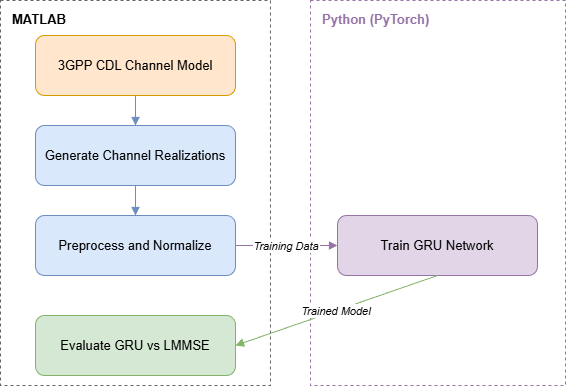
This example generates 3GPP CDL channel realizations in MATLAB, preprocesses them into sequence data, and trains a PyTorch GRU network by calling Python from MATLAB. The trained model is then evaluated in MATLAB against an LMMSE (Wiener filter) baseline across multiple prediction horizons.
PyTorch Code
In this example, you train a GRU network defined in PyTorch. The nr_channel_predictor.py file contains the neural network definition, training and other functionality for the PyTorch network. First create a Python wrapper for the functionality provided in the nr_channel_predictor.py file
The nr_channel_predictor_wrapper.py file contains the interface functions that minimize data transfer between MATLAB and Python processes. This example utilizes the following functions in the nr_channel_predictor_wrapper.py file:
construct_model:Constructs and optionally loads a PyTorch model for channel prediction,train:Trains a channel predictor PyTorch model using offline training,predict:Generates predictions using a trained PyTorch model and input data,save:Saves the state dictionary of a PyTorch model to a file,load:Loads a state dictionary into a PyTorch model from a specified file.
The PyTorch Wrapper Template section shows how to create the interface functions using a template.
The first step of designing an AI-based system is to prepare training and testing data. This example follows the Preprocess Data for AI-Based CSI Prediction example that shows how to preprocess the channel estimates.
Load the preprocessed channel estimates data. If you have run the previous step, then the example uses the data that you prepared in the previous step. Otherwise, the example prepares the data as shown in the Preprocess Data for AI-Based CSI Prediction example.
Generating about 110k samples of training and validation data requires 10 frames of channel realization and takes about 50 seconds using Parallel Computing Toolbox® and a six core Intel® Xeon® W-2133 CPU @ 3.60GHz.
horizon = 10; % ms maxDoppler = 5; numSamples =500000; if ~exist("inputData","var") || ~exist("targetData","var") || ~exist("dataOptions","var") || ... ~exist("channel","var") || ~exist("carrier","var") useParallel =
true; [inputData,targetData,dataOptions,systemParams,channel,carrier,sdsChan] = prepareData(numSamples, ... useParallel,horizon,maxDoppler); end
Starting parallel pool (parpool) using the 'Processes' profile ...
04-Mar-2026 19:56:27: Job Queued. Waiting for parallel pool job with ID 3 to start ...
Connected to parallel pool with 6 workers.
Starting channel realization generation
6 worker(s) running
00:01:11 - 100% Completed
Starting CSI data preprocessing
6 worker(s) running
00:00:35 - 100% Completed
See the channel and carrier variables for current channel and carrier configurations. The inputData variable contains samples of 2-by- arrays, where is the number of transmit antennas and is the number of consecutive slot-spaced time samples.
[Ntxiq,Nseq,Nsamples] = size(inputData)
Ntxiq =
16
Nseq =
68
Nsamples =
461760
Permute the data to bring batches to the first dimension as the PyTorch networks expect batch to be the first dimension.
inputDataPerm = permute(inputData,[3,2,1]);
targetDataPerm = permute(targetData,[2,1]);
Separate the data into training and validation. Define the number of training and validation samples.
numTraining = 90000;
numValidation = 10000;
Randomly sample the input and target data on the time dimension to select training and validation samples. Since each -by- sample is independent, this case has no time continuity requirement.
idxRand = randperm(size(targetDataPerm,1));
Select training and validation data.
xTraining = inputDataPerm(idxRand(1:numTraining),:,:);
xValidation = inputDataPerm(idxRand(1+numTraining:numValidation+numTraining),:,:);
yTraining = targetDataPerm(idxRand(1:numTraining),:);
yValidation = targetDataPerm(idxRand(1+numTraining:numValidation+numTraining),:);
Set Up Python Environment
Before running this example, set up the Python environment as explained in Call Python from MATLAB for Wireless. Specify the full path of the Python executable to use in the pythonPath field below. The helperSetupPyenv function sets the Python environment in MATLAB according to the selected options and checks that the libraries listed in the requirements_chanpre.txt file are installed. This example is tested with Python version 3.11.
if ispc pythonPath =".\.venv\Scripts\pythonw.exe"; else pythonPath =
"./venv_linux/bin/python3"; end requirementsFile = "requirements_chanpre.txt"; executionMode =
"OutOfProcess"; currentPyenv = helperSetupPyenv(pythonPath,executionMode,requirementsFile);
Setting up Python environment
Parsing requirements_chanpre.txt
Checking required package 'numpy'
Checking required package 'torch'
Required Python libraries are installed.
You can use the following process ID and name to attach a debugger to the Python interface and debug the example code.
fprintf("Process ID for '%s' is %s.\n", ...
currentPyenv.ProcessName,currentPyenv.ProcessID)
Process ID for 'MATLABPyHost' is 50792.
Preload the Python module for faster start.
module = py.importlib.import_module('nr_channel_predictor_wrapper');Initialize Neural Network
Initialize the channel predictor neural network. Set GRU hidden size to 128 and number of hidden GRU layers to 2. Layer normalization stabilizes training across Doppler conditions, while a dropout rate of 0.3 mitigates overfitting to specific cluster realizations. The chanPredictor variable is the PyTorch model for the GRU based channel predictor.
gruHiddenSize = 128;
gruNumLayers  = 2;
channelInfo = info(channel);
Ntx = channelInfo.NumTransmitAntennas;
chanPredictor = py.nr_channel_predictor_wrapper.construct_model(...
    Ntx, ...
    gruHiddenSize, ...
    gruNumLayers);

py.nr_channel_predictor_wrapper.info(chanPredictor)
Model architecture:
ChannelPredictorGRU(
  (gru): GRU(16, 128, num_layers=2, batch_first=True, dropout=0.3)
  (layer_norm): LayerNorm((128,), eps=1e-05, elementwise_affine=True)
  (fc): Linear(in_features=128, out_features=16, bias=True)
)

Total number of parameters: 157456
Train Neural Network
The nr_channel_predictor_wrapper.py file contains the MATLAB interface functions to train the channel predictor neural network. Set values for hyperparameters number of epochs, batch size, initial learning rate, validation frequency, and validation patience in epochs. Use early stopping with patience 6 to avoid overfitting, which is especially relevant because CDL realizations contain time‑varying cluster reappearance patterns. The training uses a per-sample normalized mean squared error (NMSE) loss, where each sample's MSE is divided by that sample's target power before averaging across the batch. This approach removes batch-composition effects—such as a single strong or weak target skewing the normalization—and typically yields smoother optimization for sequence models. Note that some published works use batch-level NMSE (total MSE divided by total target power), so reported loss values may differ slightly when comparing results.
Call the train function with required inputs to train and validate the chanPredictor model. Set the verbose variable to true to print out training progress. Training for a maximum epochs of 2000 with early stopping takes more than one hour on a PC that has NVIDIA® TITAN V GPU with a compute capability of 7.0 and 12 GB memory. Set trainNow to true by clicking the check box to train the network. If your GPU runs out of memory during training, reduce the batch size.
trainNow =false; if trainNow numEpochs =
2000; batchSize = 512; initialLearningRate = 3e-3; validationFrequency = 5; validationPatience = 6; verbose = true; tStart = tic; result = py.nr_channel_predictor_wrapper.train( ... chanPredictor, ... xTraining, ... yTraining, ... xValidation, ... yValidation, ... initialLearningRate, ... batchSize, ... numEpochs, ... validationFrequency, ... validationPatience, ... verbose); et = seconds(toc(tStart)); et.Format = "hh:mm:ss.SSS";
The output of the train Python function is a cell array with seven elements. The output contains the following in order:
Trained PyTorch model
Training loss array (per iteration)
Validation loss array (per epoch)
Elapsed time in Python (seconds)
Best validation loss
Best epoch (epoch at which best validation loss occurred)
Final epoch (last epoch before early stopping or completion)
Parse the function output and display the results.
    chanPredictor = result{1};
    trainingLoss = single(result{2});
    validationLoss = single(result{3});
    elapsedTimePy = result{4};
    bestValidationLoss = result{5}
    bestEpoch = result{6}
    finalEpoch = result{7}
    etInPy = seconds(elapsedTimePy);
    etInPy.Format="hh:mm:ss.SSS";
Save the network for future use together with the training information.
    modelFileName = sprintf("chanpre_gru_hor%d_epochs%d_ts%s",dataOptions.Horizon, ...
        numEpochs,string(datetime("now",Format="dd_MM_HH_mm")));
    fileName = py.nr_channel_predictor_wrapper.save( ...
        chanPredictor, ...
        modelFileName, ...
        Ntx, ...
        gruHiddenSize, ...
        gruNumLayers, ...
        batchSize, ...
        initialLearningRate, ...
        numEpochs, ...
        validationFrequency);
    infoFileName = modelFileName+"_info";
    save(infoFileName,"dataOptions","trainingLoss","validationLoss", ...
        "etInPy","et","initialLearningRate","batchSize","numEpochs","validationFrequency", ...
        "Ntx","gruHiddenSize","gruNumLayers");
    fprintf("Saved network in '%s' file and\nnetwork info in '%s.mat' file.\n", ...
        string(fileName),infoFileName)
else
When called with a filename as the last input, the construct_model function creates a neural network and loads the trained weights from the file. Run the network with xValidation input by calling the predict Python function.
    numEpochs = 2000;
    horizon = 10;
    modelFileName = sprintf("channel_predictor_gru_horizon%d_epochs%d.pth",horizon,numEpochs);
    infoFileName = sprintf("channel_predictor_gru_horizon%d_epochs%d_info.mat",horizon,numEpochs);
    chanPredictor = py.nr_channel_predictor_wrapper.construct_model( ...
        Ntx, ...
        gruHiddenSize, ...
        gruNumLayers, ...
        modelFileName);
    yOut = py.nr_channel_predictor_wrapper.predict( ...
        chanPredictor, ...
        xValidation);
Calculate the per-sample normalized mean square error (NMSE) loss to match the training loss definition.
    y = single(yOut);
    err = mean(abs(y - yValidation).^2, 2);
    pwr = mean(abs(yValidation).^2, 2);
    bestValidationLoss = mean(err ./ pwr);
Load the training and validation loss logged during training.
    load(infoFileName,"validationLoss","trainingLoss","etInPy","et")
end
fprintf("Validation Loss: %f dB",10*log10(bestValidationLoss))
Validation Loss: -35.737782 dB
The overhead caused by the Python interface is insignificant.
fprintf("Total training time: %s\nTraining time in Python: %s\nOverhead: %s\n", ...
et,etInPy,et-etInPy)
Total training time: 00:16:08.913
Training time in Python: 00:16:08.490
Overhead: 00:00:00.422
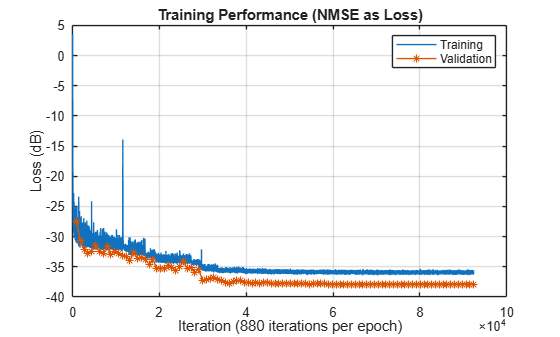
Plot the training and validation loss. As the number of iterations increases, the loss value converges to less than -35 dB. The training loss is higher than the validation loss because the GRU uses dropout regularization (p=0.3), which is active only during training. Dropout randomly disables neurons during training, inflating the measured loss, while validation uses the full network.
figure()
plot(10*log10(trainingLoss));
hold("on")
numIters = size(trainingLoss,2);
iterPerEpoch = numIters/length(validationLoss);
plot(iterPerEpoch:iterPerEpoch:numIters,10*log10(validationLoss),"*-");
hold("off")
legend("Training", "Validation")
xlabel(sprintf("Iteration (%d iterations per epoch)",iterPerEpoch))
ylabel("Loss (dB)")
title("Training Performance (NMSE as Loss)")
grid("on")
Investigate Network Performance
Test the network for different horizon values. The helperChanPreCompareNetworks function trains and tests the GRU channel prediction network for the horizon values specified in the horizonVec variable. For robustness, train the GRU with five different random initialization, and pick the model achieving the lowest validation loss.
trainForComparisonNow =false; if trainForComparisonNow horizonVec = [1 2:4:90]; gruHiddenSize = 128; gruNumLayers = 2; numEpochs = 5; batchSize = 512; initialLearningRate = 3e-3; validationFrequency = 5; validationPatience = 6; stride = 10; if validationFrequency > numEpochs error("numEpochs is less than validationFrequency. Increase " + ... "numEpochs or reduce validationFrequency to collect data.") end compTable = helperChanPreCompareNetworks(channel,carrier, ... Nseq,horizonVec,stride, ... GRUHiddenSize=gruHiddenSize, ... GRUNumLayers=gruNumLayers, ... NumTraining=numTraining, ... NumValidation=numValidation, ... NumEpochs=numEpochs, ... BatchSize=batchSize, ... InitialLearningRate=initialLearningRate, ... ValidationFrequency=validationFrequency, ... ValidationPatience=validationPatience); save("dChannelPredictionNetworkHorizonResults_trials","compTable","horizonVec","numEpochs", ... "numTraining","numValidation") else load("dChannelPredictionNetworkHorizonResults","compTable","horizonVec","numEpochs", ... "numTraining","numValidation") end
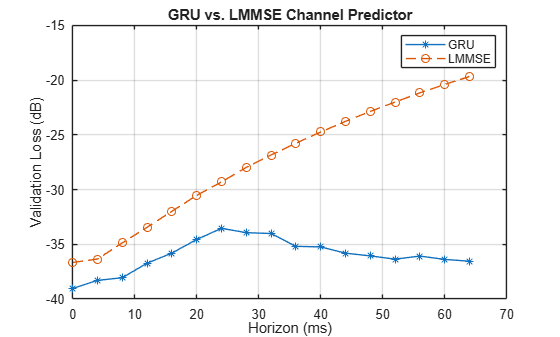
The plotValidationLoss function plots the validation loss for the GRU network alongside the LMMSE (Wiener filter) baseline. As the prediction horizon increases, the validation loss (NMSE) also increases, reflecting the reduced temporal correlation of the fading process at longer look‑ahead times. In CDL channels, each delay cluster corresponds to a superposition of Doppler components rather than a single Doppler shift, producing multiple characteristic time scales [4]. The nonlinear gating of GRUs can selectively emphasize or suppress these Doppler components depending on the prediction horizon, causing the characteristic rise and oscillations in NMSE beyond ~30 ms, [3]. The GRU consistently outperforms the LMMSE predictor, demonstrating the advantage of nonlinear sequence modeling for channel prediction. Minor non‑monotonic fluctuations in NMSE are expected due to small optimization induced variations during training especially for very low NMSE values. Note that, these results represent a specific GRU network working on a specific simulated channel. Performance varies with network architecture and channel realizations.
plotValidationLoss(compTable);
References
[1] W. Jiang and H. D. Schotten, "Recurrent Neural Network-Based Frequency-Domain Channel Prediction for Wideband Communications," 2019 IEEE 89th Vehicular Technology Conference (VTC2019-Spring), Kuala Lumpur, Malaysia, 2019, pp. 1-6, doi: 10.1109/VTCSpring.2019.8746352.
[2] O. Stenhammar, G. Fodor and C. Fischione, "A Comparison of Neural Networks for Wireless Channel Prediction," in IEEE Wireless Communications, vol. 31, no. 3, pp. 235-241, June 2024, doi: 10.1109/MWC.006.2300140.
[3] I. Goodfellow, Y. Bengio, and A. Courville, Deep Learning. Cambridge, MA: MIT Press, 2016.
[4] 3GPP, Study on channel model for frequencies from 0.5 to 100 GHz (Release 19), 3GPP TR 38.901, V19.1.0, Oct. 2025
PyTorch Wrapper Template
You can use your own PyTorch models in MATLAB using the Python interface. The py_wrapper_template.py file provides a simple interface with a predefined API. This example uses the following API set:
construct_model: returns the PyTorch neural network modeltrain: trains the PyTorch modelsave: saves the PyTorch model weights and metadataload: loads the PyTorch model weightsinfo: prints or returns information on the PyTorch model
The Online Training and Testing of PyTorch Model for CSI Feedback Compression example shows an online training workflow and uses the following API set in addition to the one used in this example.
setup_trainer: sets up a trainer object for with online trainingtrain_one_iteration: trains the PyTorch model for one iteration for online trainingvalidate: validates the PyTorch model for online trainingpredict: runs the PyTorch model with the provided input(s)
You can modify the py_wrapper_template.py file. Follow the instruction in the template file to implement the recommended entry points. Delete the entry points that are not relevant to your project. Use the entry point functions as shown in this example to use your own PyTorch models in MATLAB.
Local Functions
function [inputData,targetData,dataOptions,systemParams,channel,carrier,sdsChan] = ... prepareData(numSamples,useParallel,horizon,maxDoppler) rng(123) carrier = nrCarrierConfig; nSizeGrid = 52; % Number resource blocks (RB) systemParams.SubcarrierSpacing =15; % 15, 30, 60, 120 kHz carrier.NSizeGrid = nSizeGrid; carrier.SubcarrierSpacing = systemParams.SubcarrierSpacing; systemParams.DelayProfile = "CDL-C"; % "CDL-A",...,"CDL-E","TDL-A",...,"TDL-E" systemParams.DelaySpread = 300e-9; % s systemParams.TxAntennaSize = [2 2 2 1 1]; % [M N P Mg Ng] rows, columns, polarizations, row panels, column panels systemParams.RxAntennaSize = [2 1 1 1 1]; systemParams.MaximumDopplerShift = maxDoppler; % Hz systemParams.Carrier = carrier; channel = helper3GPPChannel(systemParams); chanInfo = info(channel); Nrx = chanInfo.NumReceiveAntennas; Nsc = carrier.NSizeGrid*12; Tc = 0.423/systemParams.MaximumDopplerShift; numerology = (systemParams.SubcarrierSpacing/15)-1; Tslot = 1e-3 / 2^numerology; coherenceTimeInSlots = Tc / Tslot; sequenceLength = ceil(coherenceTimeInSlots*0.8); maxHorizon = 100; numSlotsPerFrame = sequenceLength + maxHorizon + 10; stride = 10; samplesPerSubCarrierRx = floor((numSlotsPerFrame-sequenceLength+1)/stride); numFrames = ceil(numSamples / (samplesPerSubCarrierRx*Nrx*Nsc)); saveData =
true; dataDir = fullfile(pwd,"Data"); dataFilePrefix = "nr_channel_est"; resetChannel = true; sdsChan = helper3GPPChannelRealizations(... numFrames, ... channel, ... carrier, ... UseParallel=useParallel, ... SaveData=saveData, ... DataDir=dataDir, ... DataFilePrefix=dataFilePrefix, ... NumSlotsPerFrame=numSlotsPerFrame, ... ResetChannelPerFrame=resetChannel); SNR = 20; [sdsPreprocessed,dataOptions] = helperPreprocess3GPPChannelData( ... sdsChan, ... TrainingObjective="prediction", ... AverageOverSlots=false, ... TruncateChannel=false, ... InputSequenceLength=sequenceLength, ... PredictionHorizon=horizon, ... PredictionWindowStride=stride, ... AddNoise=true, ... SNR=SNR, ... DataComplexity="real (interleaved)", ... DataDomain="Frequency-Spatial (FS)", ... UseParallel=useParallel, ... SaveData=saveData); data = readall(sdsPreprocessed); inputCells = cellfun(@(C) C{1}, data, UniformOutput=false); targetCells = cellfun(@(C) C{2}, data, UniformOutput=false); inputData = cat(3, inputCells{:}); targetData = cat(2, targetCells{:}); featuresMax = max(inputData,[],[2 3]); featuresMin = min(inputData,[],[2 3]); dataMax = max(featuresMax); dataMin = min(featuresMin); inputData = (inputData-dataMin) / (dataMax-dataMin); targetData = (targetData-dataMin) / (dataMax-dataMin); dataOptions.Normalization = "min-max"; dataOptions.MinValue = dataMin; dataOptions.MaxValue = dataMax; dataOptions.Horizon = horizon; end function plotValidationLoss(compTable) metric = "BestValidationLoss"; % Plot GRU results gruMask = compTable.Model == "GRU"; gruVal = compTable{gruMask, metric}; if ~isempty(gruVal) gruHorizons = compTable.Horizon(gruMask); plot(gruHorizons, 10*log10(gruVal), "-*") hold("on") end % Plot LMMSE baseline if available lmmseMask = compTable.Model == "LMMSE"; lmmseVal = compTable{lmmseMask, metric}; if ~isempty(lmmseVal) lmmseHorizons = compTable.Horizon(lmmseMask); plot(lmmseHorizons, 10*log10(lmmseVal), "--o") hold("off") end grid("on") xlabel("Horizon (ms)") ylabel("Validation Loss (dB)") if any(lmmseMask) legend("GRU", "LMMSE") title("GRU vs. LMMSE Channel Predictor") else title("GRU Channel Predictor") end end

