Central Body Coordinate Transform
R2026bTransform coordinate frames between International Celestial Reference System (ICRF) and fixed-frame
Since R2026b
Central Body Coordinate Transform block
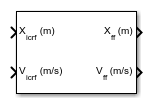
To add a block to a model, double-click the canvas and start typing the block name. Then, select the block from the list.
Libraries:
Aerospace Blockset /
Spacecraft /
Spacecraft Dynamics
Description
The Central Body Coordinate Transform block converts position, velocity, and acceleration when transforming between ICRF and fixed-frame coordinate frames for central bodies in spacecraft and orbital simulations. When source and target central bodies are the same, the block supports only acceleration transformation and quaternion output.
Ports
Input
Position of the spacecraft with respect to ICRF or fixed-frame outport coordinate frame, specified as a 3-element vector or numSat-by-3 array. numSat is the number of spacecraft.
Dependencies
To change the coordinate frame for this port, set the Input coordinate frame parameter.
Data Types: double
Velocity of the spacecraft with respect to ICRF or fixed-frame outport coordinate frame, specified as a 3-element vector or numSat-by-3 array. numSat is the number of spacecraft.
Dependencies
To enable this port, select the Input velocity parameter.
Data Types: double
Acceleration of the spacecraft with respect to ICRF or fixed-frame outport coordinate frame, specified as a 3-element vector or numSat-by-3 array. numSat is the number of spacecraft.
Dependencies
To enable this port, select the Input acceleration and Input velocity parameters.
Moon libration angles for transformation between the ICRF and Moon-centric fixed-frame using the Moon-centric Principal Axis (PA) system, specified as a 3-element vector. To get these values, use the Moon Libration block.
Note
The fixed-frame used by this block when the Central
body parameter on the Source tab
is set to Moon is the Mean Earth/pole
axis (ME) system. For more information, see Algorithms.
Dependencies
To enable this port, on the Source or Target tab:
Set the Central body parameter to
Moon.Select the Input Moon libration angles parameter.
Data Types: double
Source spin axis angles, specified as a 3-element vector.
Dependencies
To enable this port:
On the Source tab, set the Central body parameter to
Custom.Set the Central body spin axis source parameter to
Port.
Data Types: double
Target spin axis angles, specified as a 3-element vector.
Dependencies
To enable this port, on the Target tab:
Clear the Use same central body as Source parameter.
Set the Central body parameter to
Custom.Set the Central body spin axis source parameter to
Port.
Data Types: double
Julian date, specified as a positive scalar between minimum and maximum Julian dates.
Specify the Julian dates in Barycentric Dynamical Time (TDB).
Dependencies
To enable this port, set the Time source
parameter to Port (Julian date).
Data Types: double
Fixed Julian date for a specific epoch that is the most recent midnight at or before the interpolation epoch, specified as a positive scalar. The sum of tutc (JD) and ΔTutc (JD) must fall between the minimum and maximum Julian date.
Dependencies
To enable this port, set the Time source
parameter to Port (T0 and elapsed Julian
time).
Data Types: double
Elapsed Julian time with respect to ΔTutc, specified as a positive scalar of elapsed time in UTC (Universal Coordinated Time). The sum of tutc,0 (JD) and ΔTutc (JD) must fall between the minimum and maximum Julian date.
Dependencies
To enable this port, set the Time source
parameter to Port (T0 and elapsed Julian
time).
Data Types: double
Source custom central body position with respect to the solar system barycenter, in the ICRF coordinate frame.
Dependencies
To enable this port:
On the Source tab, set the Central body parameter to
Custom.On the Target tab, clear the Use same central body as Source parameter.
Data Types: double
Source custom central body velocity with respect to the solar system barycenter, in the ICRF coordinate frame.
Dependencies
To enable this port:
On the Source tab, set the Central body parameter to
Custom.On the Target tab, clear the Use same central body as Source parameter.
Select the Input velocity parameter.
Data Types: double
Target custom central body position with respect to the solar system barycenter, in the ICRF coordinate frame.
Dependencies
To enable this port:
On the Target tab, clear the Use same central body as Source parameter.
On the Target tab, set the Central body parameter to
Custom.
Data Types: double
Target custom central body velocity with respect to the solar system barycenter, in the ICRF coordinate frame.
Dependencies
To enable this port:
On the Target tab, clear the Use same central body as Source parameter.
On the Target tab, set the Central body parameter to
Custom.Select the Input velocity parameter.
Data Types: double
Output
Position of the spacecraft with respect to ICRF or fixed-frame outport coordinate frame, returned as a 3-element vector or m-by-3 array. m is the number of spacecraft.
Dependencies
To change the coordinate frame for this port, set the Input coordinate frame parameter.
Data Types: double
Velocity of the spacecraft with respect to ICRF or fixed-frame outport coordinate frame, returned as a 3-element vector or numSat-by-3 array. numSat is the number of spacecraft.
If the position input X is
numSat-by-3, the velocity output
V is numSat-by-3 whether the
velocity input is a 3-element vector or an
numSat-by-3 array.
Dependencies
To enable this port, select the Input velocity parameter.
Acceleration of the spacecraft with respect to ICRF or fixed-frame outport coordinate frame, returned as a 3-element vector or numSat-by-3 array. numSat is the number of spacecraft.
If the position input X is numSat-by-3, the
acceleration output A is
numSat-by-3 whether the velocity input is a 3-element
vector or an numSat-by-3 array.
Dependencies
To enable this port, select the Input acceleration and Input velocity parameters.
Coordinate system transformation between the ICRF and fixed-frame coordinate system at the current timestep, returned as a 4-element array.
Dependencies
To enable this port, select the Output quaternion (ICRF to Fixed-frame) parameter.
Data Types: double
Time at current time step, returned as a scalar Julian date.
This value equals the Start date/time parameter value plus the elapsed simulation time.
Dependencies
To enable this port, select the Output current date/time (UTC Julian date) parameter.
Data Types: double
Parameters
To edit block parameters interactively, use the Property Inspector. From the Simulink® Toolstrip, on the Simulation tab, in the Prepare gallery, select Property Inspector.
Main
Select this parameter to convert the velocity and enable the velocity input port, V. To convert only the position, clear this parameter.
Programmatic Use
To set the block parameter value programmatically, use
the set_param function.
To get the block parameter value
programmatically, use the get_param function.
| Parameter: | velIn |
| Values: | on (default) | off |
| Data Types: | logical |
Example: set_param(gcb,"velIn",1)
Select this parameter to convert the acceleration and enable the acceleration input port, A. To convert only the position, clear this parameter.
Programmatic Use
To set the block parameter value programmatically, use
the set_param function.
To get the block parameter value
programmatically, use the get_param function.
| Parameter: | accIn |
| Values: | off (default) | on |
| Data Types: | logical |
Example: set_param(gcb,"accIn",1)
To add output transformation quaternion port for the quaternion transformation between the ICRF to the fixed-frame coordinate system, select this parameter. Otherwise, clear this parameter.
Programmatic Use
To set the block parameter value programmatically, use
the set_param function.
To get the block parameter value
programmatically, use the get_param function.
| Parameter: | outputTransform |
| Values: | off (default) | on |
Example: set_param(gcb,"outputTransform",1)
To output the current date or time, select this parameter. Otherwise, clear this parameter.
Dependencies
To enable this parameter, set the Time Source parameter to
Dialog.
Programmatic Use
To set the block parameter value programmatically, use
the set_param function.
To get the block parameter value
programmatically, use the get_param function.
| Parameter: | dateOut |
| Values: | off (default) | on |
| Data Types: | logical |
Example: set_param(gcb,"dateOut",1)
Time source method, specified as one of these values:
Dialog— Use block dialog box parameter.Port (Julian date)— Use the TJD port.Port (T0 and elapsed Julian time)— Use the tutc,0 (JD) and ΔTutc (JD) ports.
Programmatic Use
To set the block
parameter value programmatically, use the set_param
function.
To get the block
parameter value programmatically, use the get_param
function.
| Parameter: | timeSrc |
| Values: | Dialog (default) | Port (Julian date) | Port (T0 and elapsed Julian
time) |
Initial start date and time of simulation, specified as a Julian or Gregorian date. For Georgian dates, include the year, month, day, hours, minutes, seconds as 1D or 6-element array. The block uses this value to define initial conditions.
Tip
To calculate the Julian date, use the juliandate
function.
Tunable: Yes
Dependencies
To enable this parameter, set the Time
Source parameter to
Dialog.
Programmatic Use
Programmatic Use
To set the block parameter value programmatically, use
the set_param function.
To get the block parameter value
programmatically, use the get_param function.
| Parameter: | startDate |
| Values: |
juliandate (2020, 1, 1, 12, 0, 0)
(default) | valid scalar Julian date | valid Gregorian date |
| Data Types: | char |
Select one of these ephemeris models defined by the Jet Propulsion Laboratory. The block uses ephemeris data to calculate relative celestial positions of central bodies required for line of sight access calculations.
Note
This feature requires the Ephemeris Data for Aerospace Toolbox add-on.
| Ephemeris Model | Description |
|---|---|
|
|
Released in 1998. This ephemeris takes into account the Julian date range 2305424.50 (December 9, 1599) to 2525008.50 (February 20, 2201). This block implements these ephemerides with respect to the International Celestial Reference Frame version 1.0, adopted in 1998. |
|
|
Released in 2008. This ephemeris takes into account the Julian date range 2414992.5 (December 4, 1899) to 2469808.5 (January 2, 2050). This block implements these ephemerides with respect to the International Celestial Reference Frame version 1.0, adopted in 1998. |
|
|
Released in 2010. This ephemeris takes into account the Julian date range 2378480.5 (December 16, 1799) to 2524624.5 (February 1, 2200). This block implements these ephemerides with respect to the International Celestial Reference Frame version 2.0, adopted in 2010. |
|
|
Released in 2013. This ephemeris takes into account the Julian date range 2287184.5 (December 21, 1549) to 2688976.5 (January 25, 2650). This block implements these ephemerides with respect to the International Celestial Reference Frame version 2.0, adopted in 2010. |
|
|
Released in April 2014. This ephemeris takes into account the Julian date range 2287184.5, (December 21, 1549 ) to 2688976.5, (January 25, 2650). This block implements these ephemerides with respect to the International Celestial Reference Frame version 2.0, adopted in 2010. |
The Central Body Coordinate Transform block loads Jet Propulsion Laboratory planetary ephemeris data when:
The source central body differs from the target central body.
You define the source or target custom central body with respect to the solar system barycenter.
Programmatic Use
To set the block parameter value programmatically, use the set_param function.
To get the block parameter value programmatically, use the get_param function.
| Parameter: | ephemerisModel |
| Values: |
DE405
(default) |
DE421
|
DE423
|
DE430
|
DE432t
|
Control how much data is loaded into memory during simulation and how much data is included in generated code for the block:
Clear this parameter to include data for the complete date range defined in the Ephemeris model table.
Select this parameter to limit the loading of ephemeris data to a specified date range.
Dependencies
To enable this parameter, select the Limit ephemerides date range parameter.
Programmatic Use
To set the block parameter value programmatically, use the set_param function.
To get the block parameter value programmatically, use the get_param function.
| Parameter: | useEphemerisDateRange |
| Values: |
on
(default) |
off
|
Start date of ephemerides date range, specified as a Julian date.
Programmatic Use
To set the block parameter value programmatically, use the set_param function.
To get the block parameter value programmatically, use the get_param function.
| Parameter: | ephemerisStartDate |
| Values: |
juliandate(2020, 1, 1)
(default) | Julian date |
End date of ephemerides date range, specified as a Julian date.
Dependencies
To enable this parameter, select the Limit ephemerides date range parameter.
Programmatic Use
To set the block parameter value programmatically, use the set_param function.
To get the block parameter value programmatically, use the get_param function.
| Parameter: | ephemerisEndDate |
| Values: |
juliandate(2035, 1, 1)
(default) | Julian date |
Out-of-range block behavior, specified as one of these values.
| Action | Description |
|---|---|
None
| No action. |
Warning (default) |
Warning in the Diagnostic Viewer. Model simulation continues. |
Error
|
Error in the Diagnostic Viewer. Model simulation stops. |
Programmatic Use
To set the block parameter value programmatically, use the set_param function.
To get the block parameter value programmatically, use the get_param function.
| Parameter: | action |
| Values: |
Warning
(default) |
Error
|
None
|
Source
Celestial central body for source position, specified as Earth, Moon, Mercury, Venus, Mars, Jupiter, Saturn, Uranus, Neptune, Sun, or Custom.
Programmatic Use
To set the block parameter value programmatically, use the set_param function.
To get the block parameter value programmatically, use the get_param function.
| Parameter: | sourceCentralBody |
| Values: |
Earth
(default) |
Moon
|
Mercury
|
Venus
|
Mars
|
Jupiter
|
Saturn
|
Uranus
|
Neptune
|
Sun
|
Custom
|
Input coordinate frame, specified as ICRF
or Fixed-frame.
Programmatic Use
To set the block parameter value programmatically, use
the set_param function.
To get the block parameter value
programmatically, use the get_param function.
| Parameter: | sourceFrame |
| Values: | ICRF (default) | Fixed-frame |
Example: set_param(gcb,"sourceFrame","Fixed-frame")
Select this parameter to use Earth orientation parameters for the transformation between the ICRF and fixed-frame coordinate systems. Otherwise, clear this parameter.
Dependencies
To enable this parameter, on the Source tab, set Central
body to Earth.
Programmatic Use
To set the block parameter value programmatically, use
the set_param function.
To get the block parameter value
programmatically, use the get_param function.
| Parameter: | sourceUseEOPs |
| Values: | on (default) | off |
Example: set_param(gcb,"useEOPs",0)
Custom list of Earth orientation data, specified in a MAT file. To create this file, see aeroReadIERSData.
Dependencies
To enable this parameter:
Set Central body on the Source tab to
Earth.Select the Use Earth orientation parameters (EOPs) parameter.
Programmatic Use
To set the block parameter value programmatically, use the set_param function.
To get the block parameter value programmatically, use the get_param function.
| Parameter: | sourceEOPFile |
| Values: |
aeroiersdata.mat
(default) | MAT file |
To specify Moon libration angles via the φ θ ψ input port for Moon orientation, select this parameter. Otherwise, clear this parameter.
Dependencies
To enable this parameter, on the Source tab, set the
Central body parameter to
Moon.
Programmatic Use
To set the block
parameter value programmatically, use the set_param
function.
To get the block
parameter value programmatically, use the get_param
function.
| Parameter: | sourceUseMoonLib |
| Values: | off (default) | on |
Rotational rate of a custom central body, specified as a scalar.
Dependencies
To enable this parameter, on the Source tab, set the
Central body parameter to
Custom.
Programmatic Use
To set the block parameter value programmatically, use
the set_param function.
To get the block parameter value
programmatically, use the get_param function.
| Parameter: | sourceCustomOmega |
| Values: | 4.06124975e-3 (default) | scalar |
| Data Types: | double |
Example: set_param(gcb,"sourceCustomOmega","4.06124975e-3")
Central body spin axis source, specified as
Port or
Dialog. The block uses the spin axis to
calculate the transformation from the ICRF to the fixed-frame coordinate
system for the custom central body.
Dependencies
To enable this parameter, on the Source tab, set the
Central body parameter to
Custom.
Programmatic Use
To set the block parameter value programmatically, use
the set_param function.
To get the block parameter value
programmatically, use the get_param function.
| Parameter: | sourcePoleSrc |
| Values: | Port (default) | Dialog |
Example: set_param(gcb,"sourcePoleSrc","Dialog")
Right ascension of central body spin axis at J2000 (2451545.0 JD, 2000 Jan 1 12:00:00 TT), specified as a double scalar.
Dependencies
To enable this parameter:
Set Central body to
Custom.Set Central body spin axis source to
Dialog.
Programmatic Use
To set the block parameter value programmatically, use
the set_param function.
To get the block parameter value
programmatically, use the get_param function.
| Parameter: | sourceRA |
| Values: | 317.68143 (default) | double scalar |
| Data Types: | double | fi |
Example: set_param(gcb,"sourceRA","317.68143")
Right ascension rate of the central body spin axis, specified as a double scalar, in specified angle units/century.
Dependencies
To enable this parameter:
Set Central body to
Custom.Set Central body spin axis source to
Dialog.
Programmatic Use
To set the block parameter value programmatically, use
the set_param function.
To get the block parameter value
programmatically, use the get_param function.
| Parameter: | sourceRARate |
| Values: | -0.1061 (default) | double scalar |
| Data Types: | double |
Example: set_param(gcb,"sourceRARate","-0.1061")
Declination of the central body spin axis at J2000 (2451545.0 JD, 2000 Jan 1 12:00:00 TT), specified as a double scalar.
Dependencies
To enable this parameter:
Set Central body to
Custom.Set Central body spin axis source to
Dialog.
Programmatic Use
To set the block parameter value programmatically, use
the set_param function.
To get the block parameter value
programmatically, use the get_param function.
| Parameter: | sourceDec |
| Values: | 52.88650 (default) | double scalar |
| Data Types: | double |
Example: set_param(gcb,"sourceDec","52.88650")
Declination rate of the central body spin axis, specified as a double scalar, in specified angle units/century.
Dependencies
To enable this parameter:
Set Central body to
Custom.Set Central body spin axis source to
Dialog.
Programmatic Use
To set the block parameter value programmatically, use
the set_param function.
To get the block parameter value
programmatically, use the get_param function.
| Parameter: | sourceDecRate |
| Values: | -0.0609 (default) | double scalar |
| Data Types: | double |
Example: set_param(gcb,"sourceDecRate","-0.0609")
Rotation angle of the central body x axis with respect to the ICRF x-axis at J2000 (2451545.0 JD, 2000 Jan 1 12:00:00 TT), specified as a double scalar, in specified angle units.
Dependencies
To enable this parameter:
Set Central body to
Custom.Set Central body spin axis source to
Dialog.
Programmatic Use
To set the block parameter value programmatically, use
the set_param function.
To get the block parameter value
programmatically, use the get_param function.
| Parameter: | sourceRotAngle |
| Values: | 176.630 (default) | double scalar |
| Data Types: | double |
Example: set_param(gcb,"sourceRotAngle","176.630")
Rotation rate of the central body x-axis with respect to the ICRF x-axis (2451545.0 JD, 2000 Jan 1 12:00:00 UTC), specified as a double scalar, in angle units/day.
Dependencies
To enable this parameter:
Set Central body to
Custom.Set Central body spin axis source to
Dialog.
Programmatic Use
To set the block parameter value programmatically, use
the set_param function.
To get the block parameter value
programmatically, use the get_param function.
| Parameter: | sourceRotRate |
| Values: | 350.89198226 (default) | double scalar |
| Data Types: | double |
Example: set_param(gcb,"sourceRotRate","350.89198226")
Target
Option to use the same central body for the target as specified as the source body.
The Central Body Coordinate Transform block lets you define source and target central bodies. You cannot set the same planet for both central bodies using the Central body parameter. To use the same central body for the source and target, select this parameter.
Programmatic Use
To set the block parameter value programmatically, use
the set_param function.
To get the block parameter value
programmatically, use the get_param function.
| Parameter: | useSourceCentralBodyForTarget |
| Values: |
on
(default) |
off
|
Celestial central body for target position, specified as
Moon, Earth,
Mercury,
Venus, Mars,
Jupiter,
Saturn,
Uranus, Neptune,
Sun, or
Custom.
Programmatic Use
To set the block
parameter value programmatically, use the set_param
function.
To get the block
parameter value programmatically, use the get_param
function.
| Parameter: | targetCentralBody |
| Values: | Moon (default) | Earth | Mercury | Venus | Mars | Jupiter | Saturn | Uranus | Neptune | Sun | Custom |
Example: set_param(gcb,"targetCentralBody","Mercury")
Output coordinate frame for all ports, specified as ICRF or
Fixed-frame.
Dependencies
To enable this parameter, clear the Use same central body as Source parameter on the Target tab.
Programmatic Use
To set the block parameter value programmatically, use
the set_param function.
To get the block parameter value
programmatically, use the get_param function.
| Parameter: | targetFrame |
| Values: | ICRF (default) | Fixed-frame |
Example: set_param(gcb,"targetFrame","ICRF")
Select this parameter to use Earth orientation parameters for the transformation between the ICRF and fixed-frame coordinate systems. Otherwise, clear this parameter.
Dependencies
To enable this parameter, on the Target tab:
Clear the Use same central body as Source parameter.
Set the Central body parameter to
Earth.
Programmatic Use
To set the block parameter value programmatically, use
the set_param function.
To get the block parameter value
programmatically, use the get_param function.
| Parameter: | targetUseEOPs |
| Values: | on (default) | off |
Example: set_param(gcb,"targetUseEOPs",1)
Custom list of Earth orientation data, specified in a MAT file. For information on how
to create this file, see aeroReadIERSData.
Dependencies
To enable this parameter, on the Target tab:
Clear the Use same central body as Source parameter.
Select the Use Earth orientation parameters (EOPs) parameter.
Set the Central body parameter to
Earth.
Programmatic Use
To set the block
parameter value programmatically, use the set_param
function.
To get the block
parameter value programmatically, use the get_param
function.
| Parameter: | targetEOPFile |
| Values: | aeroiersdata.mat (default) | MAT file |
Example: set_param(gcb,"targetEOPFile","aeroiersdata.mat")
To specify Moon libration angles (φ θ ψ) for Moon orientation, select this parameter. Otherwise, clear this parameter.
Dependencies
To enable this parameter, on the Target tab:
Clear the Use same central body as Source parameter.
Set the Central body parameter to
Moon.
Programmatic Use
To set the block
parameter value programmatically, use the set_param
function.
To get the block
parameter value programmatically, use the get_param
function.
| Parameter: | targetUseMoonLib |
| Values: | off (default) | on |
Example: set_param(gcb,"sourceUseMoonLib",1)
Rotation rate of the target body x axis with respect to the ICRF x-axis (2451545.0 JD, 2000 Jan 1 12:00:00 UTC), specified as a double scalar, in angle units/day.
Dependencies
To enable this parameter, on the Target tab:
Clear the Use same central body as Source parameter.
Set the Central body parameter to
Custom.
Programmatic Use
To set the block parameter value programmatically, use
the set_param function.
To get the block parameter value
programmatically, use the get_param function.
| Parameter: | targetCustomOmega |
| Values: | 4.06124975e-3 (default) | double scalar |
| Data Types: | double |
Example: set_param(gcb,"targetRotRate","350.89198226")
Central body spin axis source, specified as
Port or
Dialog. The block uses the spin axis to
calculate the transformation from the ICRF to the fixed-frame coordinate
system for the custom central body.
Dependencies
To enable this parameter, on the Target tab:
Clear the Use same central body as Source parameter.
Set the Central body parameter to
Custom.
Programmatic Use
To set the block parameter value programmatically, use
the set_param function.
To get the block parameter value
programmatically, use the get_param function.
| Parameter: | targetPoleSrc |
| Values: | Port (default) | Dialog |
| Data Types: | double |
Example: set_param(gcb,"targetPoleSrc","Dialog")
Right ascension of central body spin axis at J2000 (2451545.0 JD, 2000 Jan 1 12:00:00 TT), specified as a double scalar.
Dependencies
To enable this parameter, on the Target tab:
Clear the Use same central body as Source parameter.
Set the Central body parameter to
Custom.Set the Central body spin axis source parameter to
Dialog.
Programmatic Use
To set the block parameter value programmatically, use
the set_param function.
To get the block parameter value
programmatically, use the get_param function.
| Parameter: | targetRA |
| Values: |
317.68143
(default) | double scalar |
| Data Types: | double |
Example: set_param(gcb,"targetRA","317.68143")
Right ascension rate of the central body spin axis, specified as a double scalar, in specified angle units per century.
Tunable: Yes
Dependencies
To enable this parameter, on the Target tab:
Clear the Use same central body as Source parameter.
Set the Central body parameter to
Custom.Set the Central body spin axis source parameter to
Dialog.
Programmatic Use
To set the block parameter value programmatically, use
the set_param function.
To get the block parameter value
programmatically, use the get_param function.
| Parameter: | targetRARate |
| Values: | -0.1061 (default) | double scalar |
| Data Types: | double |
Example: set_param(gcb,"targetRARate","-0.1061")
Declination of the central body spin axis at J2000 (2451545.0 JD, 2000 Jan 1 12:00:00 TT), specified as a double scalar.
Tunable: Yes
Dependencies
To enable this parameter, on the Target tab:
Clear the Use same central body as Source parameter.
Set the Central body to
Custom.Set the Central body spin axis source to
Dialog.
Programmatic Use
To set the block parameter value programmatically, use
the set_param function.
To get the block parameter value
programmatically, use the get_param function.
| Parameter: | targetDec |
| Values: | 52.88650 (default) | double scalar |
| Data Types: | double |
Example: set_param(gcb,"targetDec","52.88650")
Declination rate of the central body spin axis, specified as a double scalar, in specified angle units per century.
Tunable: Yes
Dependencies
To enable this parameter, on the Target tab:
Clear the Use same central body as Source parameter.
Set the Central body to
Custom.Set the Central body spin axis source parameter to
Dialog.
Programmatic Use
To set the block parameter value programmatically, use
the set_param function.
To get the block parameter value
programmatically, use the get_param function.
| Parameter: | targetDecRate |
| Values: | -0.0609 (default) | double scalar |
| Data Types: | double |
Example: set_param(gcb,"targetDecRate","-0.0609")
Rotation angle of the central body x-axis with respect to the ICRF x-axis at J2000 (2451545.0 JD, 2000 Jan 1 12:00:00 TT), specified as a double scalar, in specified angle units.
Dependencies
To enable this parameter, on the Target tab:
Clear the Use same central body as Source parameter.
Set the Central body to
Custom.Set the Central body spin axis source parameter to
Dialog.
Programmatic Use
To set the block parameter value programmatically, use
the set_param function.
To get the block parameter value
programmatically, use the get_param function.
| Parameter: | targetRotAngle |
| Values: | 176.630 (default) | double scalar |
| Data Types: | double |
Example: set_param(gcb,"targetRotAngle","176.630")
Rotation rate of the central body x-axis with respect to the ICRF x-axis (2451545.0 JD, 2000 Jan 1 12:00:00 UTC), specified as a double scalar, in angle units/day.
Dependencies
To enable this parameter, on the Target tab:
Clear the Use same central body as Source parameter.
Set the Central body to
Custom.Set the Central body spin axis source parameter to
Dialog.
Programmatic Use
To set the block parameter value programmatically, use
the set_param function.
To get the block parameter value
programmatically, use the get_param function.
| Parameter: | targetRotRate |
| Values: | 350.89198226 (default) | double scalar |
| Data Types: | double |
Example: set_param(gcb,"targetRotRate","350.89198226")
Units
Parameter and port units, specified as Metric (m/s),
Metric (km/s), Metric (km/h),
English (ft/s), or English
(kts).
Programmatic Use
To set the block parameter value programmatically, use
the set_param function.
To get the block parameter value
programmatically, use the get_param function.
| Parameter: | units |
| Values: | Metric (m/s) (default) | Metric (km/s) | Metric (km/h) | English (ft/s) | English (kts) |
Algorithms
The Central Body Coordinate Transform block works in the ICRF and fixed-frame coordinate systems.
ICRF — International Celestial Reference Frame. For Earth central body, this frame can be treated as equal to the ECI coordinate system realized at J2000 (Jan 1 2000 12:00:00 TT). For more information, see ECI Coordinates. For other central bodies, the ICRF coordinate frame is an inertial coordinate frame with its origin placed at the center of the central body.
Fixed-frame — Fixed-frame is a generic term for the coordinate system that is fixed to the central body. The axes of the system rotate with the central body and are not fixed in inertial space.
When Central Body is
Earthand the Use Earth orientation parameters (EOPs) parameter is selected, the fixed-frame coordinate system for Earth is the International Terrestrial Reference Frame (ITRF). This reference frame is realized by the IAU2000/2006 reduction from the ICRF coordinate system using the earth orientation parameter file provided. If the Use Earth orientation parameters (EOPs) parameter is not selected, the block still uses the IAU2000/2005 reduction, but with Earth orientation parameters set to 0.When Central Body is
Moonand the Input Moon libration angles parameter is selected, the fixed-frame coordinate system for the Moon is the Mean Earth/pole axis frame (ME). This frame is realized by two transformations. First, the values in the ICRF frame are transformed into the Principal Axis system (PA), the axis defined by the libration angles provided as inputs to the block. For more information, see Moon Libration. The states are then transformed into the ME system using a fixed rotation from the "Report of the IAU/IAG Working Group on Cartographic Coordinates and Rotational Elements: [1]. If the Input Moon libration angles parameter is not selected, the fixed frame is defined by the directions of the poles of rotation and prime meridians defined in [1].In all other cases, the fixed frame for each central body is defined by the directions of the poles of rotation and prime meridians defined in the [1].
References
[1] Seidelmann, P. Kenneth et al. "Report of the IAU/IAG Working Group on Cartographic Coordinates and Rotational Elements: 2006." Celestial Mech Dyn Astr 98, no 1 (2007): 155–80.
Version History
Introduced in R2026b
MATLAB Command
You clicked a link that corresponds to this MATLAB command:
Run the command by entering it in the MATLAB Command Window. Web browsers do not support MATLAB commands.


Select a Web Site
Choose a web site to get translated content where available and see local events and offers. Based on your location, we recommend that you select: .
You can also select a web site from the following list
How to Get Best Site Performance
Select the China site (in Chinese or English) for best site performance. Other MathWorks country sites are not optimized for visits from your location.
Americas
- América Latina (Español)
- Canada (English)
- United States (English)
Europe
- Belgium (English)
- Denmark (English)
- Deutschland (Deutsch)
- España (Español)
- Finland (English)
- France (Français)
- Ireland (English)
- Italia (Italiano)
- Luxembourg (English)
- Netherlands (English)
- Norway (English)
- Österreich (Deutsch)
- Portugal (English)
- Sweden (English)
- Switzerland
- United Kingdom (English)