speechTransmissionIndex
Syntax
Description
[___] = speechTransmissionIndex(___,
specifies options using one or more name-value arguments.Name=Value)
speechTransmissionIndex(___) without any output
arguments plots the uncorrected MTF and displays the STI and MTI.
Examples
Load the impulse response and sample rate from an existing audio file.
[ir,fs] = audioread("ChurchImpulseResponse-16-44p1-mono-5secs.wav");Calculate the speech transmission index (STI) using the full indirect method.
sti = speechTransmissionIndex(ir,fs)
sti = 0.4792
Simulate the impulse response of a room using acousticRoomResponse.
fs = 48e3; roomDimensions = [50,80,15]; tx = [25,2,5]; rx = [25,4,2]; ir = acousticRoomResponse(roomDimensions,tx,rx,... SampleRate=fs,ImageSourceOrder=6,... MaxNumRayReflections=50,NumStochasticRays=4000);
Generate the speech transmission index for public address (STIPA) excitation signal using stipaExcitation.
x = stipaExcitation(fs);
Model a real-world measurement by filtering the excitation signal through the impulse response.
y = fftfilt(ir',x);
Calculate STIPA using speechTransmissionIndex.
sti = speechTransmissionIndex(y,x,fs)
sti = 0.6179
To apply ambient noise correction to the speech transmission index (STI) calculation, you need to measure both the acoustic level of the test signal and the background noise. Use the indirect method if the signal level and impulse response were measured separately.
Load the impulse response and sample rate from an existing audio file.
[ir,fs] = audioread("ChurchImpulseResponse-16-44p1-mono-5secs.wav");The IEC 602618-16:2020 standard recommends specific speech levels for each of the seven octave bands representing typical male speech, so that their combined level is 60 dB A-weighted.
standardSignalLevel = 60 + [-2.5 0.5 0 -6 -12 -18 -24];
Confirm the signal level corresponds to a 60 dB A-weighted signal.
standardSignalIntensity = db2pow(standardSignalLevel); aWeighting = db2pow([-16.1 -8.6 -3.2 0 1.2 1 -1.1]); pow2db(sum(aWeighting.*standardSignalIntensity))
ans = 60.0205
To simulate a condition with a raised vocal effort, set the A-weighted speech level to 70 dB. These values are from a study that amended the standard typical male speech spectrum [2].
raisedSignalLevel = [67.3 70.3 69.6 63.6 57.6 51.6 45.6];
Confirm the raised level corresponds to a 70 dB A-weighted signal.
raisedSignalIntensity = db2pow(raisedSignalLevel); pow2db(sum(aWeighting.*raisedSignalIntensity))
ans = 69.6547
Calculate the STI for both the standard and raised speaking levels by using the OperationalSignalLevel name-value argument. The STI for the raised speaking voice is higher than the standard speaking voice.
standardSTI = speechTransmissionIndex(ir,fs,OperationalSignalLevel=standardSignalLevel)
standardSTI = 0.4792
raisedSTI = speechTransmissionIndex(ir,fs,OperationalSignalLevel=raisedSignalLevel)
raisedSTI = 0.5078
Load the impulse response and sample rate from an existing audio file.
[ir,fs] = audioread("ChurchImpulseResponse-16-44p1-mono-5secs.wav");Calculate the speech transmission index (STI), modulation transfer index (MTI), and modulation transfer function (MTF).
[sti,mti,mtf] = speechTransmissionIndex(ir,fs)
sti = 0.4792
mti=1×7 table
125 250 500 1000 2000 4000 8000
_______ ______ _______ _______ _______ _______ _______
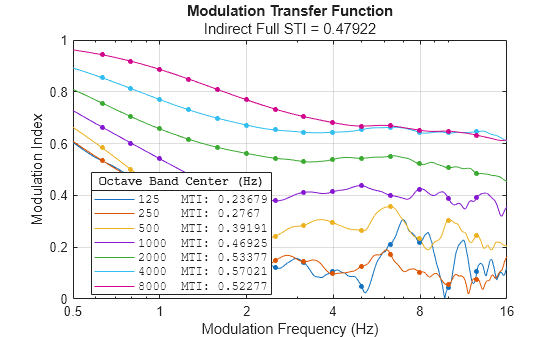
0.23679 0.2767 0.39191 0.46925 0.53377 0.57021 0.52277
mtf=14×7 table
125 250 500 1000 2000 4000 8000
________ ________ _______ _______ _______ _______ _______
0.63 0.53326 0.53476 0.58379 0.6637 0.75643 0.8541 0.94291
0.8 0.47081 0.46602 0.50007 0.60231 0.70411 0.81263 0.91801
1 0.41848 0.39282 0.42025 0.54126 0.6568 0.77004 0.88643
1.25 0.36372 0.30972 0.35542 0.48247 0.61687 0.73048 0.84927
1.6 0.28554 0.22537 0.29849 0.43454 0.58553 0.69813 0.80911
2 0.18122 0.13482 0.25023 0.40107 0.56226 0.67173 0.76941
2.5 0.12269 0.14755 0.24224 0.37902 0.54325 0.65261 0.73321
3.15 0.14069 0.1435 0.28479 0.41172 0.53038 0.64377 0.70414
4 0.10554 0.097203 0.29454 0.41365 0.53862 0.64385 0.68115
5 0.049324 0.12636 0.26394 0.43722 0.54322 0.65395 0.66781
6.3 0.20993 0.17308 0.35553 0.4005 0.552 0.66281 0.66887
8 0.21814 0.10417 0.23267 0.42406 0.52152 0.64389 0.65192
10 0.043357 0.055335 0.30427 0.38937 0.50608 0.64095 0.64827
12.5 0.10681 0.076817 0.24498 0.39135 0.48466 0.64566 0.63223
Plot the uncorrected MTF by calling speechTransmissionIndex with no output arguments. The convenience plot also displays the STI and MTI for each octave band.
speechTransmissionIndex(ir,fs)
Input Arguments
Impulse response used to calculate the full indirect STI, specified as a column vector or row vector. The impulse response should either be noiseless or have a signal-to-noise ratio greater than or equal to 20 dB.
Data Types: single | double
Sample rate in Hz, specified as a scalar equal to or greater than 16 kHz.
Data Types: single | double
Received signal used to calculate the modulation transfer ratio, specified as a column vector or an N-by-14-by-7 array where N corresponds to the length of the signal. The received and transmitted signal dimensions must match, or the transmitted signal may be represented as a scalar corresponding to its modulation depth.
Data Types: single | double
Transmitted signal, specified as a column vector, an N-by-14-by-7 array where N corresponds to the length of the signal, or a scalar in the range [0,1]. If the transmitted signal is an array, then its dimensions must match the received signal. If the transmitted signal is a scalar, its value corresponds to the modulation depth.
Use stipaExcitation to generate either direct STIPA or direct full STI
signals.
Data Types: single | double
Name-Value Arguments
Specify optional pairs of arguments as
Name1=Value1,...,NameN=ValueN, where Name is
the argument name and Value is the corresponding value.
Name-value arguments must appear after other arguments, but the order of the
pairs does not matter.
Example: speechTransmissionIndex(ir,fs,AddOperationalAmbientNoise=false)
Signal level at measurement time, specified as a 1-by-7 row vector corresponding to the measured speech level for octave bands with center frequencies 125, 250, 500, 1000, 2000, 4000, and 8000 Hz.
Record the signal level at the same time as when you measure
ir or processed or
reference. If you specify RawSignalLevel,
you must also specify RawNoiseLevel.
Data Types: single | double
Noise level near measurement time, specified as a 1-by-7 row vector corresponding to the measured speech level for octave bands with center frequencies 125, 250, 500, 1000, 2000, 4000, and 8000 Hz.
Record the noise level measurement in the same scenario as the measurements and
RawSignalLevel, but without the signal transmission. If you
specify RawNoiseLevel, you must also specify
RawSignalLevel.
Data Types: single | double
Option to remove ambient noise contributions from audio signal, specified as
true or false.
A measurement is considered noise-free when the signal-to-noise ratio is equal to
or greater than 20 dB for all octave bands with center frequencies 125, 250, 500,
1000, 2000, 4000, and 8000 Hz. To remove ambient noise, you must also specify
RawSignalLevel and RawNoiseLevel.
Data Types: logical
Option to remove auditory masking and threshold effects from audio signal,
specified as true or false.
A measurement is considered noise-free when the signal-to-noise ratio is equal to
or greater than 20 dB for all octave bands with center frequencies 125, 250, 500,
1000, 2000, 4000, and 8000 Hz. To remove auditory contributions from raw signals, you
must also specify RawSignalLevel and
RawNoiseLevel.
Data Types: logical
Signal level in dB, specified as a 1-by-7 row vector corresponding to the measured or expected noise level for each octave band. If unspecified, the speech level corresponds to a 60 dB A-weighted typical male speech level.
Data Types: single | double
Noise level in dB, specified as a 1-by-7 row vector corresponding to the measured or expected noise level for each octave band. If you do not specify this argument, the function uses background noise corresponding to the NC-35 rating. The NC-35 rating represents a relatively quiet indoor environment, such as a library.
Data Types: single | double
Option to add ambient noise contributions to MTF for operational signal and noise
levels, specified as true or false. When you set
this argument to true, this function adds ambient noise
contributions to the MTF using OperationalSignalLevel and
OperationalNoiseLevel.
Before adjusting operational ambient noise, the MTF should correspond to a
noiseless measurement. Either capture the signal under noiseless conditions or remove
ambient noise with RemoveRawAmbientNoise and, if relevant, remove
auditory masking and threshold effects with
RemoveRawAuditoryContributions.
Data Types: logical
Option to add auditory masking and threshold effect contributions to MTF for
operational signal and noise levels, specified as true or
false. When you set this argument to true,
this function corrects the MTF using OperationalSignalLevel and
OperationalNoiseLevel.
Data Types: logical
Output Arguments
Speech transmission index (STI), returned as a scalar between [0,1]. The STI quantifies how the channel affects the speech signal. As the value increases from 0 to 1, the quality of speech transmission increases. For more information on how to interpret this value, see Interpreting Speech Transmission Index.
Modulation transmission index (MTI), returned as a table with variables corresponding to the octave band center frequencies 125, 250, 500, 1000, 2000, 4000, and 8000 Hz. The MTI represents the transmission quality for each octave band.
Modulation transfer function (MTF), returned as a table. The MTF quantifies how individual modulation frequencies that cover the range of human speech are affected by the channel. The table size and variables depend on the method of analysis:
Full (Direct and Indirect) — 14 rows with row names corresponding to the modulation frequencies analyzed and seven columns with variables corresponding to the octave band center frequencies that carry the pink noise signals.
STIPA (Direct) — Two rows with row names
f1andf2and seven columns with variables corresponding to the octave band center frequencies that carry the pink noise signals. This table describes the frequencies [1].Octave band center frequency, Hz 125 250 500 1000 2000 4000 8000 First modulation frequency, Hz 1.60 1.00 0.63 2.00 1.25 0.80 2.50 Second modulation frequency, Hz 8.00 5.00 3.15 10.0 6.25 4.00 12.5
More About
The table provides guidance for interpreting STI values based on a native listener with no hearing impairment [1].
| Category | Nominal STI Value | Comment |
|---|---|---|
| A+ | > 0.76 | Excellent intelligibility |
| A | 0.74 | High intelligibility |
| B | 0.7 | High intelligibility |
| C | 0.66 | High intelligibility |
| D | 0.62 | Good intelligibility |
| E | 0.58 | High quality public address systems |
| F | 0.54 | Good quality public address systems |
| G | 0.5 | Target value for voice alarm systems |
| H | 0.46 | Lower limit for voice alarm systems |
| I | 0.42 | Limited intelligibility |
| J | 0.38 | Not suitable for public address systems |
| U | < 0.36 | Not suitable for public address systems |
Algorithms
This diagram provides a high-level overview of the algorithm.
References
[1] IEC 60268-16:2020. "Sound system equipment — Part 16: Objective rating of speech intelligibility by speech transmission index." International Electrotechnical Commission.
[2] Leembruggen, Glenn, et al. “The Effect on STI Results of Changes to the Male Test-Signal Spectrum.” Institute of Acoustics, vol. 38 pt. 2, 2016, pp. 78–87.
Extended Capabilities
C/C++ Code Generation
Generate C and C++ code using MATLAB® Coder™.
Version History
Introduced in R2026a
MATLAB Command
You clicked a link that corresponds to this MATLAB command:
Run the command by entering it in the MATLAB Command Window. Web browsers do not support MATLAB commands.
Select a Web Site
Choose a web site to get translated content where available and see local events and offers. Based on your location, we recommend that you select: .
You can also select a web site from the following list
How to Get Best Site Performance
Select the China site (in Chinese or English) for best site performance. Other MathWorks country sites are not optimized for visits from your location.
Americas
- América Latina (Español)
- Canada (English)
- United States (English)
Europe
- Belgium (English)
- Denmark (English)
- Deutschland (Deutsch)
- España (Español)
- Finland (English)
- France (Français)
- Ireland (English)
- Italia (Italiano)
- Luxembourg (English)
- Netherlands (English)
- Norway (English)
- Österreich (Deutsch)
- Portugal (English)
- Sweden (English)
- Switzerland
- United Kingdom (English)