Evaluate Room Noise and Design for Compliance Using ANSI/ASA S12.2-2019
R2026bIn this example, you
evaluate background noise in a room using the procedures defined in ANSI/ASA S12.2‑2019 [1],
determine compliance with recommended noise criteria, and
assess design changes to bring a workspace into compliance.
The workflow described here applies to measured audio data and simulated room noise, enabling both field measurements and early‑stage design studies.
Audio Toolbox© provides a suite of functions in support of ANSI/ASA S12.2–2019 workflows:
noiseCriteria- Noise criteria, the baseline and most common rating systemroomNoiseCriteria- Room noise criteria, required to apply level corrections in the presence of surging or low frequency random oscillationsroomCriteria- Room criteria, most suitable as a diagnostic tool for HVAC systemsnoiseCriteriaCurves- Noise criteria curves defined in standard, including interpolationnoiseCriteriaRecommendations- Noise criteria recommendations for each rating system
Define Noise Criteria Requirements
The first step is to define acceptable background noise levels based on the intended use of the room.
ANSI/ASA S12.2‑2019 provides recommended dBA, noise criteria (NC), room noise criteria (RNC), and room criteria (RC) values typical of occupied spaces.
To query the standard recommendations, call noiseCriteriaRecommendations with the noise type and target occupancy. In this example, you model a workshop.
noiseCriteriaRecommendations("NC",Occupancy="Shops and garages")
ans = 1×2 table
         Occupancy         Recommendation
    ___________________    ______________

    "Shops and garages"       50    60
The standard recommends a maximum noise rating between NC-50 and NC-60. The range indicates that it is not recommended to attempt to design for less than NC-50, and that the max rating should be less than 60. Because low-frequency fluctuations often occur in machinery-dominated spaces, compliance may ultimately be evaluated using RNC rather than NC. ANSI/ASA S12.2-2019 provides the same recommendations for both NC and RNC rating systems.
Requirement:
The workspace shall not exceed a rating of NC‑60, consistent with the recommended criteria for this occupancy type.
If surging or large random fluctuations are detected, ANSI/ASA S12.2‑2019 requires the result to be reported using RNC, which uses the same numerical criteria values.
Observe or Model the Room
ANSI/ASA S12.2‑2019 does not prescribe how room noise is generated or modeled; it only defines how noise is measured and evaluated. In practice, room noise may be evaluated using:
Measured data, acquired with a sound level meter or calibrated measurement microphone, or
Simulated data, generated from an acoustic model of the space.
This example uses acoustic simulation to represent a workshop containing a noise‑producing machine (for example, an air compressor).
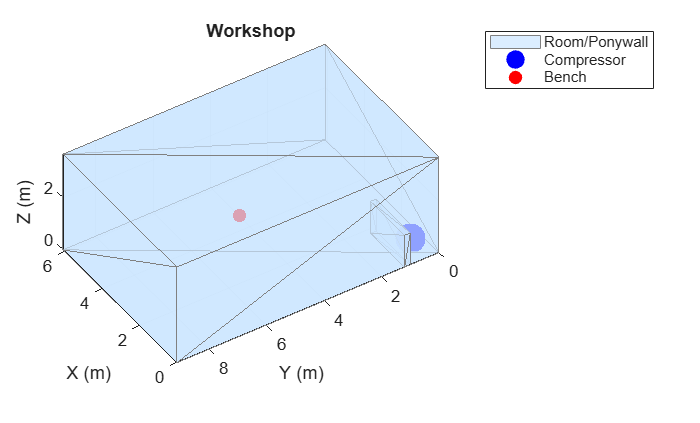
Define a rectangular room with a partial enclosure (pony wall) around the machine.
roomDims = [6.10, 9.14, 3.66]; % [L W H] in meters
ponywallDims = [1.83, 0.2, 1.22]; % [L W H] in meters (approx 4 ft tall)

compPos = [0.75, 0.5, 0.25];   % Machine location
benchPos = [3, 5, 1.6];        % Worker location
Create and visualize the room geometry.
[roomTri1,roomMaterial] = iCreateRoom(roomDims, ponywallDims);

iPlotRoom(roomTri1,compPos,benchPos);
Conduct or Simulate a Noise Measurement
Measurement Notes from ANSI/ASA S12.2‑2019
When performing real‑world measurements, the standard specifies:
Measurements shall be made at typical ear height
1.6 m for standing adults
1.2 m for seated adults
The microphone shall be located:
At least 0.6 m from reflecting surfaces
At least 1.2 m from the intersection of two surfaces
To characterize an entire room, the microphone may be slowly swept (≤ 0.5 m/s) for at least 20 s
For NC evaluation, use LEQ measured with an integrating‑averaging meter
For RNC evaluation, octave‑band levels must be obtained using:
Fast time weighting
Z‑weighting
100 ms time resolution
At least 150 samples (≥ 15 s total duration) if level correction is required (surging or large random fluctuations detected)
The measurement functions, noiseCriteria, roomNoiseCriteria, and roomCriteria accept either SPL readings or audio signals. In the case of SPL readings, it is assumed that the readings represent correctly calibrated measurements. In the case of audio signals, the SPL readings are derived internally and it is assumed the audio represents correctly calibrated measurements, although you can additionally specify the pressure reference and calibration factor to the functions so that they may be applied internally.
The simulation in this example represents a compliant measurement at the worker position.
Simulate Measured Audio
Measurement Notes from ANSI/ASA S12.2‑2019
ANSI/ASA S12.2‑2019 does not prescribe a specific microphone or data‑acquisition system, but it assumes that:
Sound pressure levels are properly calibrated and expressed in dB re 20 µPa
Measurements are equivalent to those obtained using a Class 2 or better sound level meter (ANSI/ASA S1.4 / IEC 61672)
Any post‑processed data (measured or simulated) represents physical sound pressure
In practice, this requires applying an appropriate calibration factor to the recorded or simulated signal so that its amplitude corresponds to real acoustic pressure.
Load and Calibrate the Source Noise
Load recorded machinery noise to represent the operating sound of a compressor or similar equipment. In a real‑world workflow, this recording would be obtained using a calibrated measurement microphone. Here, a calibration factor is applied explicitly to represent that step.
[audioIn,fs] = audioread("WashingMachine-16-44p1-stereo-10secs.wav");
audioIn = mean(audioIn,2); % Convert to mono
Apply microphone calibration factor. This factor converts the recorded signal to physical sound pressure (Pa). Calibration can happen during acquisition (hardware calibration) or during post-processing, as shown here. If the calibration factor is unknown, you may use calibrateMicrophone to determine a calibration factor. The value shown here is illustrative; you should use the calibration factor appropriate to your microphone and data‑acquisition chain, or, in the case of modeling, appropriate to your modeled overall SPL.
CalibrationFactor = 5; % Example only; replace with microphone calibration factor
audioIn = audioIn*CalibrationFactor;
Simulate Measurement at Workstation
Use acousticRoomResponse to model sound propagation from the machine to the worker position and generate the time‑domain signal that would be measured by a calibrated microphone.
ir1 = acousticRoomResponse(roomTri1,compPos,benchPos, ...
    MaterialAbsorption=roomMaterial, ...
    SampleRate=fs);
audioAtBench1 = fftfilt(ir1(:),audioIn);
The resulting signal represents a calibrated acoustic pressure waveform measured at the workstation location. This signal can now be evaluated using the procedures defined in ANSI/ASA S12.2‑2019, exactly as if it were acquired during a field measurement.
Evaluate Noise Using Noise Criteria (NC)
Evaluate the noise using the engineering method based on NC curves.
noiseCriteria(audioAtBench1,fs)
Warning: Large random fluctuations detected. To follow ANSI/ASA S12.2-2019, use roomNoiseCriteria instead.
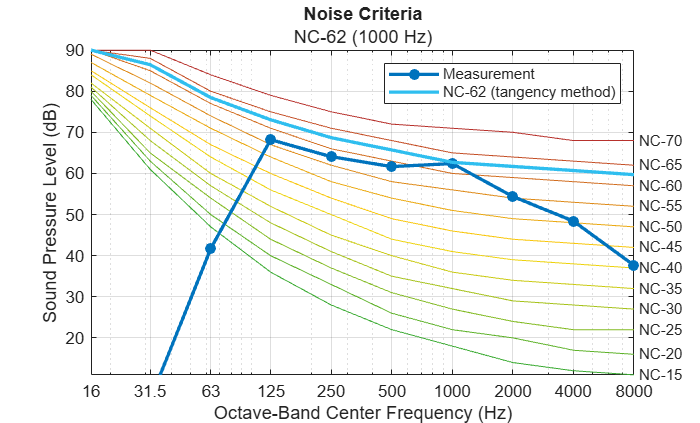
A warning is issued indicating that large random fluctuations were detected. According to ANSI/ASA S12.2‑2019, if surging or large random fluctuations are present, the RNC method must be applied instead.
Retrieve detailed outputs for inspection. Turn off surging and random fluctuation screening to avoid further warnings.
[nc,sil,spectrumImbalance,rattleRisk] = noiseCriteria(audioAtBench1,fs, ...
    ScreenLargeRandomFluctuations=false, ...
    ScreenSurging=false)
nc =
"NC-62 (1000 Hz)"
sil =
56.7123
spectrumImbalance = struct with fields:
    Summary: ""
    Details: [5×4 table]
rattleRisk = struct with fields:
    Summary: "No acoustically induced vibrations and rattles issues detected."
    Details: [3×3 table]
At this point:
An NC rating is reported, but
The standard requires transitioning to RNC due to detected fluctuations
Evaluate Room Noise Criteria (RNC)
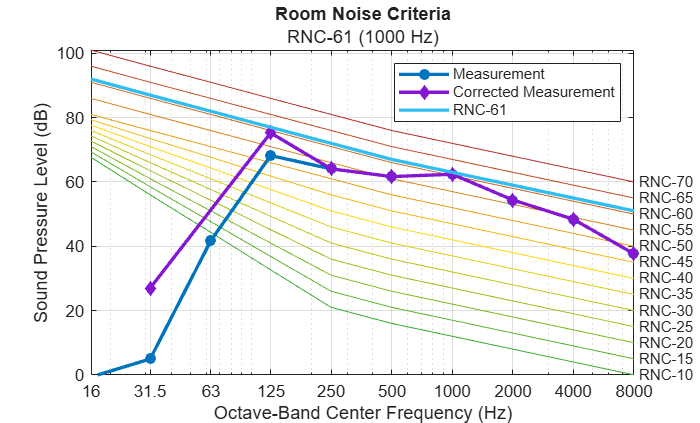
Apply the RNC method, which accounts for low‑frequency surging and turbulence.
roomNoiseCriteria(audioAtBench1,fs)
Diagnose the Noise Using Room Criteria (RC Mark II)
The RC Mark II method is not required for compliance in this example, but it is useful for diagnosing HVAC‑like noise characteristics.
roomCriteria(audioAtBench1,fs)
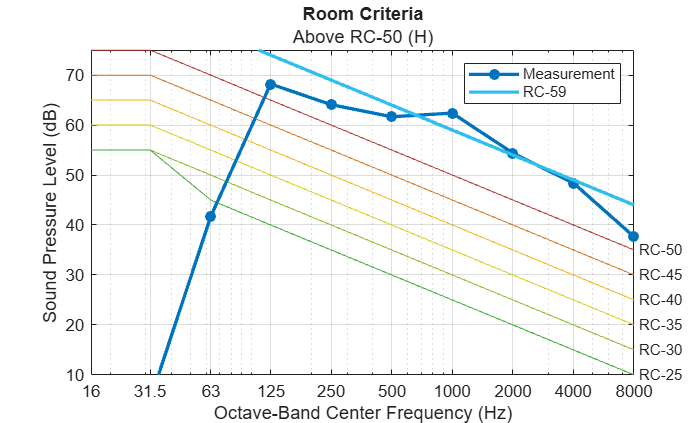
The measurement is above the highest standard RC curve (RC-50) and has an H (hiss) spectral tag, indicating that the spectrum has more energy in its higher frequencies than a neutral (N) spectrum would have. For RC‑based specifications, any spectrum tag except N is considered unacceptable. Call the function again for further diagnostics, including the mid-frequency average (LMF, average of LEQ at 500, 1000, and 2000 Hz) and the quality assessment indicator (QAI, a measure of deviation from the shape of the reference curve).
[rc,LMF,QAI] = roomCriteria(audioAtBench1,fs)
rc =
"Above RC-50 (H)"
LMF =
59.4832
QAI =
43.5000
Model Design Mitigation and Re‑Evaluate
Interpreting the RNC Result
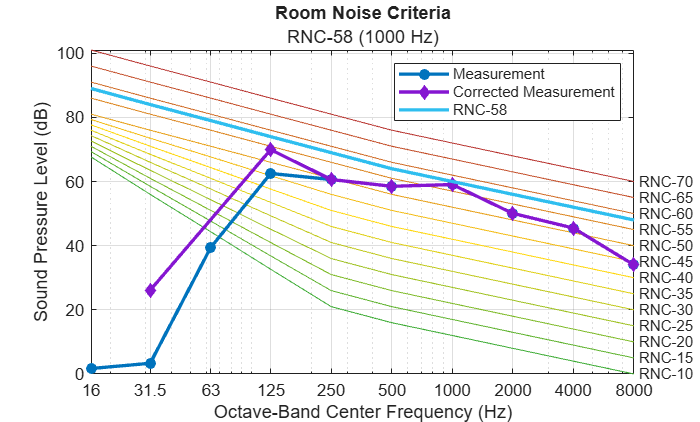
After applying RNC corrections, the reported rating is determined using the tangency method. In this case, the octave bands contacting the highest RNC curve are mid‑ and high‑frequency bands, rather than the low‑frequency bands associated with surging.
While ANSI/ASA S12.2‑2019 focuses on evaluation rather than design guidance, it explicitly distinguishes between evaluation methods intended for time‑varying system instability (such as surging and turbulence) and those arising from excessive octave‑band levels that affect perceived loudness.
Mitigation Strategies in Practice
In practice, mitigation strategies are typically selected based on the mechanism responsible for non‑compliance. [2]
Low‑frequency surging or large random fluctuations are recognized as indicators of system instability. In such cases, mitigation efforts focus on the generation mechanism, for example by adjusting fan selection, redesigning ductwork to reduce turbulence, or improving mechanical isolation.
If mid‑ and high‑frequency broadband noise limits compliance with NC or RNC criteria, then compliance is typically addressed by reducing overall sound levels at the receiver. Common approaches include reducing broadband source noise, interrupting direct sound paths using partial enclosures or barriers, and increasing acoustic absorption in the room or along the transmission path.
Modeled Mitigation
In this example, compliance is limited by mid‑ and high‑frequency spectral energy, not by the low‑frequency bands associated with surging. To illustrate how design changes can be assessed within the ANSI/ASA S12.2‑2019 evaluation workflow, a simplified architectural modification is applied.
Increase the height and length of the ponywall.
ponywallDims2 = [3, 0.2, 2]; % [L W H] in meters

[roomTri2,roomMaterial2] = iCreateRoom(roomDims,ponywallDims2);

iPlotRoom(roomTri2,compPos,benchPos);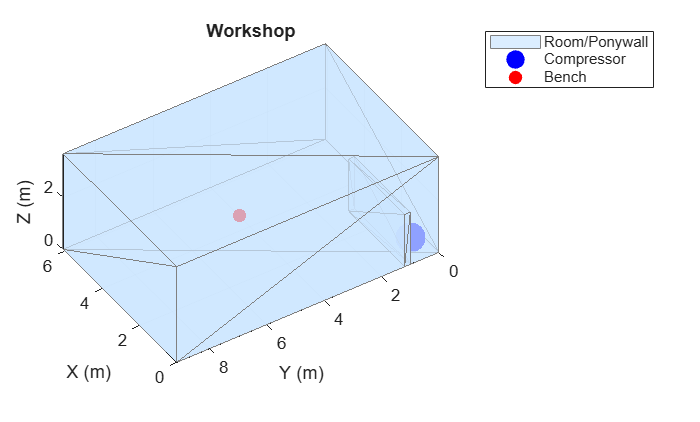
Repeat the simulated measurement.
ir2 = acousticRoomResponse(roomTri2,compPos,benchPos, ...
    MaterialAbsorption=roomMaterial2, ...
    SampleRate=fs);
audioAtBench2 = fftfilt(ir2(:),audioIn);
Evaluate the modified design using RNC.
roomNoiseCriteria(audioAtBench2,fs);
Report Findings
Initial evaluation:
Large random low‑frequency fluctuations were detected
ANSI/ASA S12.2‑2019 required use of the RNC method
The workspace noise was reported as RNC‑61, exceeding the recommended maximum of RNC‑60
No large spectrum imbalance or acoustically induced rattles were detected
A room criteria (RC) analysis indicates a spectrum with hiss
After design modification:
Increasing the pony wall height reduced transmission of mid‑ and high‑frequency sound from the machine to the workstation
The recalculated rating was RNC‑58
The workspace now meets the recommended criteria for a workshop environment
Further enclosure or acoustic treatment may yield additional improvement.
Summary
This example demonstrated a complete ANSI/ASA S12.2‑2019‑compliant workflow:
Define noise criteria requirements by occupancy
Measure or simulate room noise using standard‑compliant techniques
Evaluate NC and screen for surging and fluctuations
Apply RNC where required
Use RC Mark II as a diagnostic tool
Assess design changes and re‑evaluate compliance
The same workflow applies directly to real measurements collected in occupied spaces or to simulated designs evaluated during early‑stage engineering.
References
[1] Acoustical Society of America, Criteria for Evaluating Room Noise, ANSI/ASA S12.2‑2019 (Melville, NY: Acoustical Society of America, 2019; reaffirmed 2023).
[2] ASHRAE. 2011 ASHRAE Handbook—HVAC Applications. Chapter 48: "Noise and Vibration Control." Atlanta: American Society of Heating, Refrigerating and Air‑Conditioning Engineers, 2011.
Supporting Functions
Create Room
function [TR,Material] = iCreateRoom(roomDims, ponywallDims)
% Returns triangulation object for a room with a ponywall

L = roomDims(1);
W = roomDims(2);
H = roomDims(3);

% Room vertices
roomVerts = [
    0 0 0;
    L 0 0;
    L W 0;
    0 W 0;
    0 0 H;
    L 0 H;
    L W H;
    0 W H];

roomFaces = [
    1 2 3; 1 3 4;    % bottom
    5 6 7; 5 7 8;    % top
    1 2 6; 1 6 5;    % front
    2 3 7; 2 7 6;    % right
    3 4 8; 3 8 7;    % back
    4 1 5; 4 5 8];   % left

% Ponywall vertices
pwL = ponywallDims(1);
pwW = ponywallDims(2);
pwH = ponywallDims(3);
pwBase = [0 1 0];

pwVerts = [
    pwBase;
    pwBase + [pwL 0 0];
    pwBase + [pwL pwW 0];
    pwBase + [0 pwW 0];
    pwBase + [0 0 pwH];
    pwBase + [pwL 0 pwH];
    pwBase + [pwL pwW pwH];
    pwBase + [0 pwW pwH];
    ];

pwFaces = [
    1 2 3; 1 3 4; % bottom
    5 6 7; 5 7 8; % top
    1 2 6; 1 6 5; % front
    2 3 7; 2 7 6; % right
    3 4 8; 3 8 7; % back
    4 1 5; 4 5 8; % left
    ];

% Combine
allVerts = [roomVerts; pwVerts];
pwFaces = pwFaces + size(roomVerts,1);
allFaces = [roomFaces; pwFaces];

TR = triangulation(allFaces,allVerts);


% -------------------------------------------------------------------------
% Build per‑triangle material mapping
numRoomTris = size(roomFaces,1);
numPonyTris = size(pwFaces,1);

Material = strings(numRoomTris + numPonyTris, 1);

% --- Room surfaces ---
Material(1:2)   = "ConcreteFloor";     % floor
Material(3:4)   = "PlasterOnLathDropCeiling"; % ceiling
Material(5:12)  = "StandardBrick"; % walls (front, right, back, left)

% --- Pony wall surfaces ---
Material(numRoomTris+1:end) = "AcousticPlaster";

end
Plot Room
function iPlotRoom(TR, compPos, benchPos)
figure
trisurf(TR, ...
    FaceColor=[0.8 0.9 1], ...
    FaceAlpha=0.7, ...
    EdgeColor=[0.5 0.5 0.5]);
hold on
plot3(compPos(1),compPos(2),compPos(3),"ob", ...
    MarkerSize=16, ...
    LineWidth=2, ...
    MarkerFaceColor='b');
plot3(benchPos(1),benchPos(2),benchPos(3),"or", ...
    MarkerSize=6, ...
    LineWidth=2, ...
    MarkerFaceColor="r");
legend("Room/Ponywall","Compressor","Bench")
xlabel("X (m)")
ylabel("Y (m)")
zlabel("Z (m)")
grid on
axis equal
view([65 27])
view([236.97 40.20])
title("Workshop")
hold off
end
See Also
acousticRoomResponse | noiseCriteria | noiseCriteriaCurves | noiseCriteriaRecommendations | roomCriteria | roomNoiseCriteria

