Set Up Workspace and Start Virtual Vehicle Composer
R2026bLaunch Virtual Vehicle Composer
To launch the Virtual Vehicle Composer, in the MATLAB® Toolstrip, on the Apps tab, under Automotive, click the Virtual Vehicle Composer icon.
To create a new virtual vehicle:
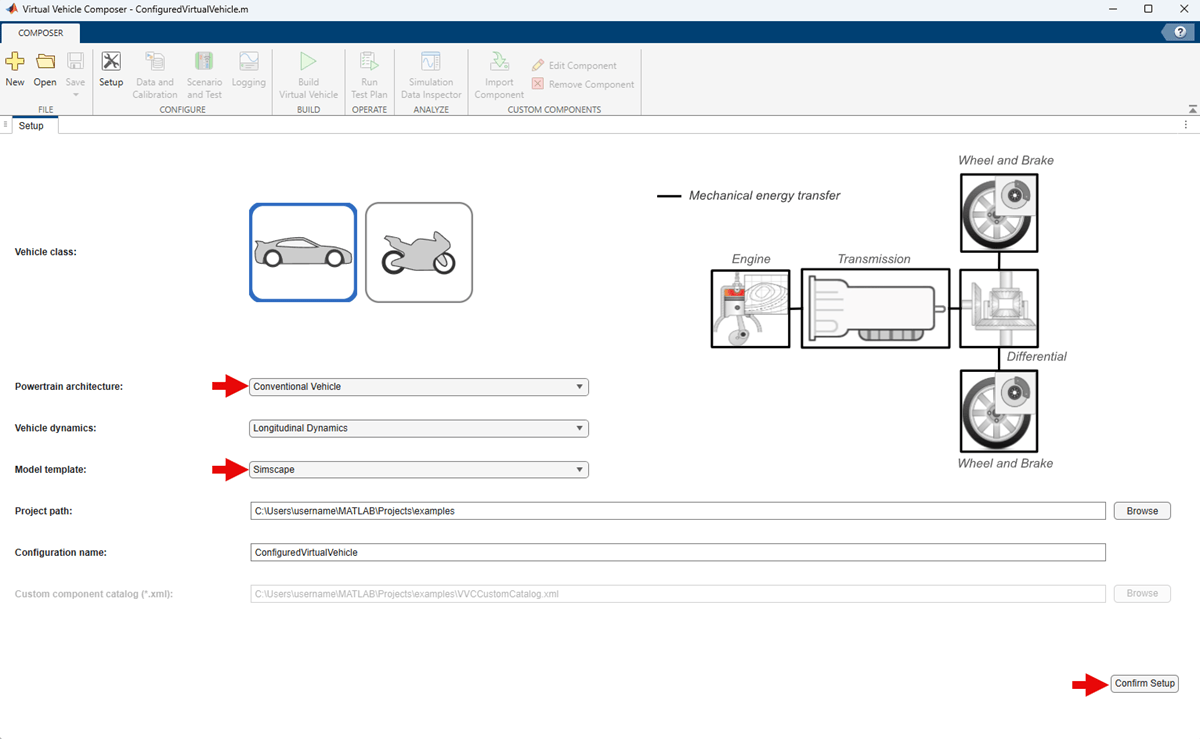
In the Virtual Vehicle Composer toolstrip, click New.
On the Setup tab, set Powertrain architecture to
Conventional
                            Vehicle
. While this example uses a conventional vehicle, you can also use the steps in this workflow to configure any of the seven hybrid electric vehicle options.Set Model template to
Simscape.Set Project path to
C:\Users\<user_name>\examples.When you are ready for the app to build your vehicle, click Confirm Setup.