Configure Polyspace Options in Simulink
When running a Polyspace® analysis from Simulink®, you can configure Simulink configuration parameters related to the analysis as well as advances Polyspace analysis options. You can reuse existing configuration across multiple analysis.
To get started with Polyspace analysis in Simulink, see Run Polyspace Analysis on Code Generated with Embedded Coder.
Set Configuration Parameters in Simulink
To set configuration parameters in Simulink, open the Polyspace Code Verifier app. Then on the Polyspace tab of the Simulink Toolstrip, click Settings to open the Configuration Parameters dialog box.
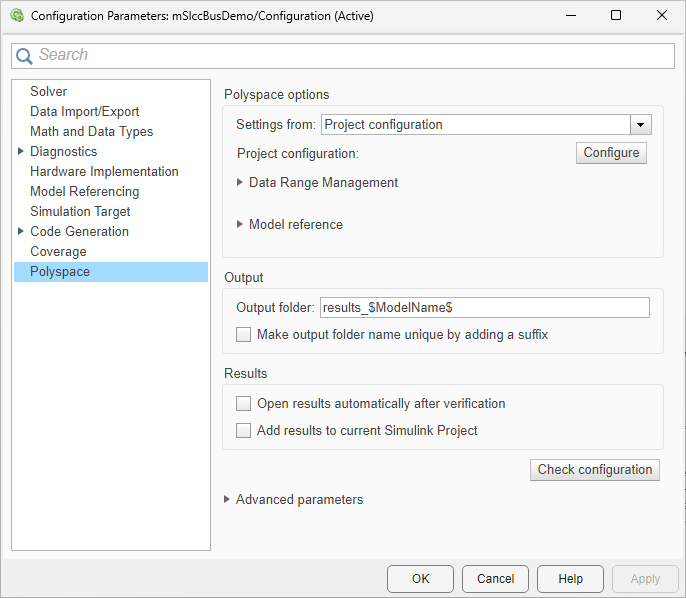
These parameters in this window are various model configuration parameters that affects the Polyspace analysis. Use these options to prepare your Simulink model for the analysis of code generated from it.
Set Polyspace Analysis Options
You can set Polyspace configurations options from the Configuration pane of the Polyspace Platform user interface. To review and update the configurations options, in the Polyspace tab, select Settings > Project Settings. The Polyspace Platform user interface opens with the Configuration tab.
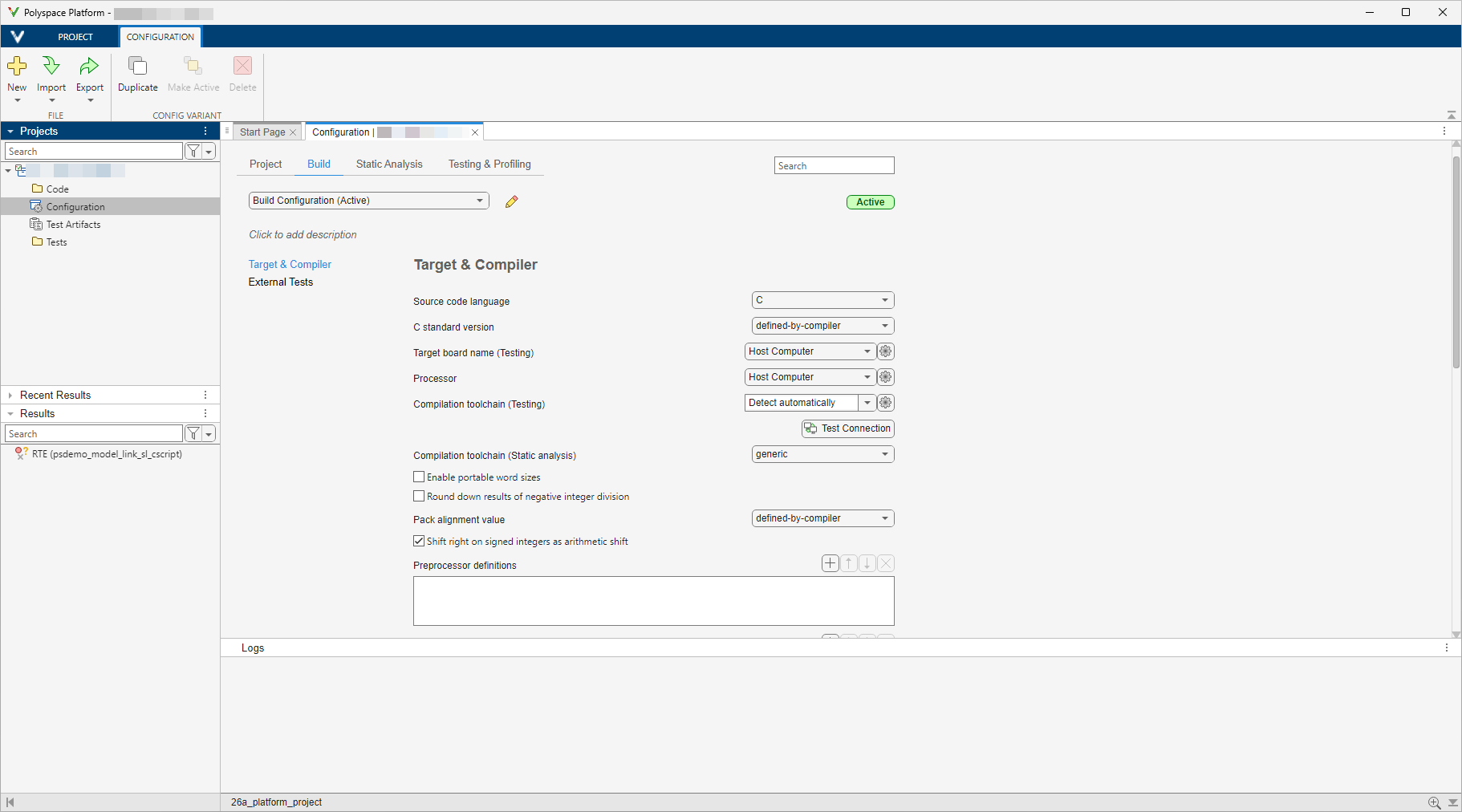
In the Configuration pane of the Polyspace platform user interface, you can specify the analysis options. These options configure how Polyspace run the analysis of the generated code. For example:
On the Build tab, click Target & Compiler to specify your compiler and target hardware options.
In the Static Analysis tab, click Inputs & Stubbing to specify options to stub certain functions for the analysis. Alternatively, click Advanced and specify the option
Functions to stub (-functions-to-stub)in the Other field.
For the full list of options, see Configuration.To create an options file that you can specify in the Other field, see -options-file.
If an option in the Configuration Parameters dialog box directly conflicts with an option in the Polyspace Configuration pane, the option specified in the Simulink model Configuration Parameters dialog box takes precedence. For instance, say you specify these options:
The configuration parameter Settings from (C): You select this value
Project configuration and MISRA C 2012 checking for generated code.The Polyspace analysis option
Check MISRA C:2012 (-misra3): You disable this Polyspace option.
The configuration specified by the configuration parameter is given precedence and Polyspace checks for violations of MISRA C™:2012 rules.
Share and Reuse Configuration
You can specify the model configuration parameters and Polyspace options once and share them across multiple models.
Model Configuration options — Share and reuse the options set in the Simulink models Configuration Parameters dialog box. See Share a Configuration with Multiple Models (Simulink).
Polyspace options — Reuse the
.psprjxproject file across different models and Polyspace analysis by selecting the Use custom project file in the Simulink model Configuration Parameters dialog box and specifying the filename. Reusing a project file that is not generated from Simulink can result in unexpected results.
By default, After you configure a Polyspace analysis, the configurations are saved in the project file modelname_config.psprjxpslink_config subfolder of the results folder. Use this .psprjx project file to reuse the options associated with the project.
If you run an analysis from the command line, you can set these options with the pslinkoptions function. See also pslinkoptions Properties.

