dlaccelerate
Accelerate deep learning function
Description
Use dlaccelerate to speed up deep learning function
evaluation.
The returned AcceleratedFunction object caches the
traces of calls to the underlying function and reuses the cached
result when the same input pattern reoccurs.
Try using dlaccelerate for function calls that:
are long-running
have
dlarrayobjects, structures ofdlarrayobjects, ordlnetworkobjects as inputsdo not have side effects like writing to files or displaying output
Invoke the accelerated function as you would invoke the underlying function. Note that the accelerated function is not a function handle.
Note
When using the dlfeval function, the software automatically
accelerates the forward and predict functions for
dlnetwork input. If you accelerate a deep learning function where the
majority of the computation takes place in calls to the forward or
predict functions for dlnetwork input, then you might
not see an improvement in training time.
For more information, see Deep Learning Function Acceleration.
accfun = dlaccelerate(fun)AcceleratedFunction object that retains the underlying traces of
the specified function handle fun.
Caution
An AcceleratedFunction object is not aware of updates to the underlying
function. If you modify the function associated with the accelerated function, then
clear the cache using the clearCache object function or alternatively use the command
clear functions.
Examples
Load the dlnetwork object and class names from the MAT file dlnetDigits.mat.
s = load("dlnetDigits.mat");
net = s.net;
classNames = s.classNames;
Accelerate the model loss function modelLoss listed at the end of the example.
fun = @modelLoss;
accfun = dlaccelerate(fun);
Clear any previously cached traces of the accelerated function using the clearCache function.
clearCache(accfun)
View the properties of the accelerated function. Because the cache is empty, the Occupancy property is 0.
accfun
accfun =
  AcceleratedFunction with properties:

          Function: @modelLoss
           Enabled: 1
         CacheSize: 50
           HitRate: 0
         Occupancy: 0
         CheckMode: 'none'
    CheckTolerance: 1.0000e-04
The returned AcceleratedFunction object stores the traces of underlying function calls and reuses the cached result when the same input pattern reoccurs. To use the accelerated function in a custom training loop, replace calls to the model gradients function with calls to the accelerated function. You can invoke the accelerated function as you would invoke the underlying function. Note that the accelerated function is not a function handle.
Evaluate the accelerated model gradients function with random data using the dlfeval function.
X = rand(28,28,1,128,"single");
X = dlarray(X,"SSCB");

T = categorical(classNames(randi(10,[128 1])));
T = onehotencode(T,2)';
T = dlarray(T,"CB");

[loss,gradients,state] = dlfeval(accfun,net,X,T);
View the Occupancy property of the accelerated function. Because the function has been evaluated, the cache is nonempty.
accfun.Occupancy
ans =
2
Model Loss Function
The modelLoss function takes a dlnetwork object net, a mini-batch of input data X with corresponding target labels T and returns the loss, the gradients of the loss with respect to the learnable parameters in net, and the network state. To compute the gradients, use the dlgradient function.
function [loss,gradients,state] = modelLoss(net,X,T)

[Y,state] = forward(net,X);
loss = crossentropy(Y,T);
gradients = dlgradient(loss,net.Learnables);

end
Since R2026a
Load example data from WaveformData.mat which contains synthetically generated waveforms with different numbers of sawtooth waves, sine waves, square waves, and triangular waves. The data is a numObservations-by-1 cell array of sequences, where numObservations is the number of sequences. Each sequence is a numTimeSteps-by-numChannels numeric array, where numTimeSteps is the number of time steps in the sequence and numChannels is the number of channels of the sequence. The corresponding targets are in a numObservations-by-1 categorical array.
load WaveformData

numObservations = numel(data);
numChannels = size(data{1},2);
numClasses = numel(unique(labels));
To demonstrate the effect of imbalanced classes for this example, retain all sine waves and remove approximately 30% of the sawtooth waves, 50% of the square waves, and 70% of the triangular waves.
idxImbalanced = (labels == "Sawtooth" & rand(numObservations,1) < 0.7)...
    | (labels == "Sine")...
    | (labels == "Square"  & rand(numObservations,1) < 0.5)...
    | (labels == "Triangle" & rand(numObservations,1) < 0.3);

XTrain = data(idxImbalanced);
TTrain = labels(idxImbalanced);
numObservations = numel(XTrain);

filterSize = 10;
numFilters = 10;
Create a convolutional classification network.
layers = [ ...
    sequenceInputLayer(numChannels,Normalization="zscore",MinLength=filterSize)
    convolution1dLayer(filterSize,numFilters)
    batchNormalizationLayer
    reluLayer
    dropoutLayer
    globalMaxPooling1dLayer
    fullyConnectedLayer(numClasses)
    softmaxLayer];
Create a custom loss function for training a classification network using the trainnet function. In this example, the custom loss function takes predictions Y and targets T and returns the weighted cross-entropy loss for a four-class classification task.
numClasses = 4;
classWeights = rand(numClasses,1);
lossFun = @(Y,T) crossentropy(Y,T,classWeights, ...
    NormalizationFactor="all-elements", ...
    WeightsFormat="C")*numClasses;
Accelerate the custom loss function using the dlaccelerate function.
accLossFun = dlaccelerate(lossFun);
To check whether the loss function supports acceleration, set the CheckMode property of the accelerated function object to "tolerance" and test the accelerated function using the trainnet function for a small number of epochs. When the CheckMode property of the accelerated function is "tolerance", the software checks that the accelerated results and the results of the underlying function are within the tolerance given by the CheckTolerance property. If the values are not within this tolerance, then the function issues a warning. In this example, as the accelerated weighted cross-entropy function supports acceleration, the software does not issue a warning. If your custom loss function does not support acceleration, you might be able to modify it to do so. For more information, see Deep Learning Function Acceleration.
accLossFun.CheckMode = "tolerance";

options = trainingOptions("adam", ...
    MaxEpochs=10, ...
    InitialLearnRate=0.01, ...
    SequenceLength="shortest", ...
    Verbose=false, ...
    Metrics="accuracy");

trainnet(XTrain,TTrain,layers,accLossFun,options);
Even if your function supports acceleration, you might not see any performance improvement if the accelerated function frequently triggers a new trace. This can happen when the input to the function varies in size, for example, if your networks makes predictions of varying length. To check that the trace is being reused and new traces are not being frequently triggered, check the HitRate property of the accelerated function object. In this example, the hit rate is >90% which indicates that the trace is being frequently reused.
accLossFun.HitRate
ans =
98
If the tolerance check did not issue a warning and the hit rate is high, then it is likely that your custom loss function will benefit from acceleration.
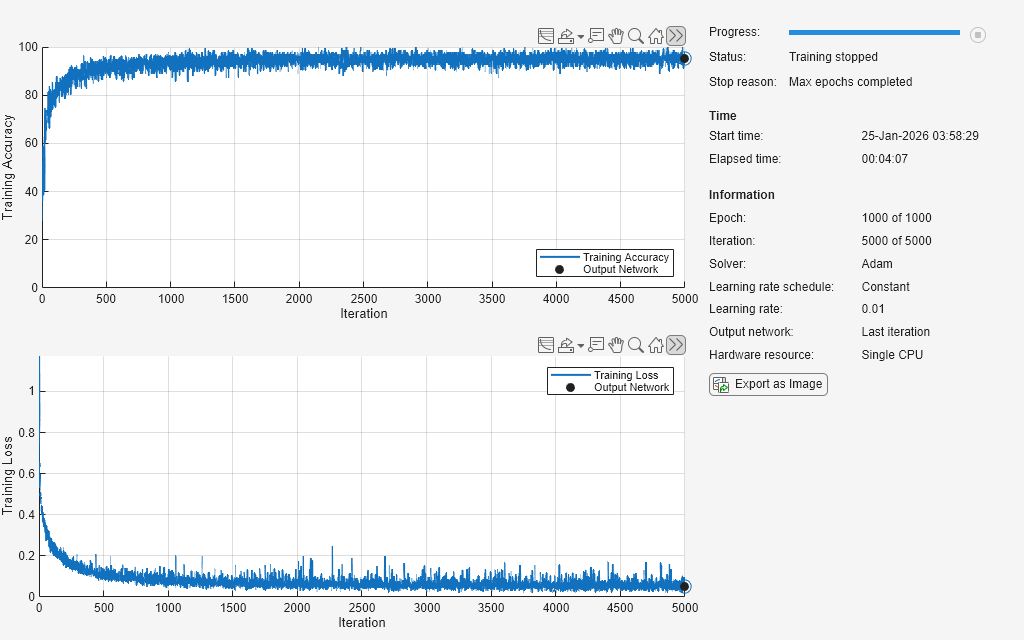
Turn off the accelerated function tolerance check, increase the maximum number of epochs, and train the network using the accelerated loss function.
accLossFun.CheckMode = "none";

options.MaxEpochs = 1000;
options.Plots = "training-progress";
net = trainnet(XTrain,TTrain,layers,accLossFun,options);
Load the dlnetwork object and class names from the MAT file dlnetDigits.mat.
s = load("dlnetDigits.mat");
net = s.net;
classNames = s.classNames;
Accelerate the model loss function modelLoss listed at the end of the example.
fun = @modelLoss;
accfun = dlaccelerate(fun);
Clear any previously cached traces of the accelerated function using the clearCache function.
clearCache(accfun)
View the properties of the accelerated function. Because the cache is empty, the Occupancy property is 0.
accfun
accfun =
  AcceleratedFunction with properties:

          Function: @modelLoss
           Enabled: 1
         CacheSize: 50
           HitRate: 0
         Occupancy: 0
         CheckMode: 'none'
    CheckTolerance: 1.0000e-04
The returned AcceleratedFunction object stores the traces of underlying function calls and reuses the cached result when the same input pattern reoccurs. To use the accelerated function in a custom training loop, replace calls to the model gradients function with calls to the accelerated function. You can invoke the accelerated function as you would invoke the underlying function. Note that the accelerated function is not a function handle.
Evaluate the accelerated model gradients function with random data using the dlfeval function.
X = rand(28,28,1,128,"single");
X = dlarray(X,"SSCB");

T = categorical(classNames(randi(10,[128 1])));
T = onehotencode(T,2)';
T = dlarray(T,"CB");

[loss,gradients,state] = dlfeval(accfun,net,X,T);
View the Occupancy property of the accelerated function. Because the function has been evaluated, the cache is nonempty.
accfun.Occupancy
ans =
2
Clear the cache using the clearCache function.
clearCache(accfun)
View the Occupancy property of the accelerated function. Because the cache has been cleared, the cache is empty.
accfun.Occupancy
ans =
0
Model Loss Function
The modelLoss function takes a dlnetwork object net, a mini-batch of input data X with corresponding target labels T and returns the loss, the gradients of the loss with respect to the learnable parameters in net, and the network state. To compute the gradients, use the dlgradient function.
function [loss,gradients,state] = modelLoss(net,X,T)

[Y,state] = forward(net,X);
loss = crossentropy(Y,T);
gradients = dlgradient(loss,net.Learnables);

end
This example shows how to check that the outputs of accelerated functions match the outputs of the underlying function.
In some cases, the outputs of accelerated functions differ to the outputs of the underlying function. For example, you must take care when accelerating functions that use random number generation, such as a function that generates random noise to add to the function input. When caching the trace of a function that generates random numbers that are not dlarray objects, the accelerated function caches resulting random numbers in the trace. When reusing the trace, the accelerated function uses the cached random values. The accelerated function does not generate new random values.
To check that the outputs of the accelerated function match the outputs of the underlying function, use the CheckMode property of the accelerated function. When the CheckMode property of the accelerated function is "tolerance" and the outputs differ by more than a specified tolerance, the accelerated function throws a warning.
Define an example function myUnsupportedFun that generates random noise and adds it to the input. This function does not support acceleration because the function generates random numbers that are not dlarray objects.
function out = myUnsupportedFun(dlX)

sz = size(dlX);
noise = rand(sz);
out = dlX + noise;

end
Accelerate the function using the dlaccelerate function.
accfun = dlaccelerate(@myUnsupportedFun)
accfun =
  AcceleratedFunction with properties:

          Function: @myUnsupportedFun
           Enabled: 1
         CacheSize: 50
           HitRate: 0
         Occupancy: 0
         CheckMode: 'none'
    CheckTolerance: 1.0000e-04
Clear any previously cached traces using the clearCache function. Clear the cache whenever you change the underlying function.
clearCache(accfun)
To check that the outputs of reused cached traces match the outputs of the underlying function, set the CheckMode property to "tolerance".
accfun.CheckMode = "tolerance"accfun =
AcceleratedFunction with properties:
Function: @myUnsupportedFun
Enabled: 1
CacheSize: 50
HitRate: 0
Occupancy: 0
CheckMode: 'tolerance'
CheckTolerance: 1.0000e-04
Evaluate the accelerated function with an array of ones as input, specified as a dlarray input.
dlX = dlarray(ones(3,3));
dlY = accfun(dlX)
dlY =
  3×3 dlarray

    1.8147    1.9134    1.2785
    1.9058    1.6324    1.5469
    1.1270    1.0975    1.9575
Evaluate the accelerated function again with the same input. Because the accelerated function reuses the cached random noise values instead of generating new random values, the outputs of the reused trace differs from the outputs of the underlying function. When the CheckMode property of the accelerated function is "tolerance" and the outputs differ, the accelerated function throws a warning.
dlY = accfun(dlX)
Warning: Accelerated outputs differ from underlying function outputs.
dlY =
  3×3 dlarray

    1.8147    1.9134    1.2785
    1.9058    1.6324    1.5469
    1.1270    1.0975    1.9575
Random number generation using the like option of the rand function with a dlarray object supports acceleration. To use random number generation in an accelerated function, ensure that the function uses the rand function with the like option set to a traced dlarray object (a dlarray object that depends on an input dlarray object).
Define an example function mySupportedFun that adds noise to the input by generating noise using the like option with a traced dlarray object.
function out = mySupportedFun(dlX)

sz = size(dlX);
noise = rand(sz,like=dlX);
out = dlX + noise;

end
Accelerate the function using the dlaccelerate function.
accfun2 = dlaccelerate(@mySupportedFun);
Clear any previously cached traces using the clearCache function.
clearCache(accfun2)
To check that the outputs of reused cached traces match the outputs of the underlying function, set the CheckMode property to "tolerance".
accfun2.CheckMode = "tolerance";Evaluate the accelerated function twice with the same input as before. Because the outputs of the reused cache match the outputs of the underlying function, the accelerated function does not throw a warning.
dlY = accfun2(dlX)
dlY =
  3×3 dlarray

    1.7922    1.0357    1.6787
    1.9595    1.8491    1.7577
    1.6557    1.9340    1.7431
dlY = accfun2(dlX)
dlY =
  3×3 dlarray

    1.3922    1.7060    1.0462
    1.6555    1.0318    1.0971
    1.1712    1.2769    1.8235
Checking the outputs match requires extra processing and increases the time required for function evaluation. After checking the outputs, set the CheckMode property to "none".
accfun1.CheckMode = "none";
accfun2.CheckMode = "none";
Input Arguments
Output Arguments
More About
Version History
Introduced in R2021aSee Also
AcceleratedFunction | clearCache | dlarray | dlgradient | dlfeval

