Import and Verify Models in Simulink for Transmission System Fault Detection
R2026bThis example shows how to import into Simulink® trained classifiers for detecting sensor drift and shaft wear in an automotive transmission system, and verify that each model's behavior in Simulink is consistent with its behavior in MATLAB®. In particular, verify that the models satisfy the requirements outlined in Simulink Integration Requirements.
Import Models into Simulink
Before importing the models into Simulink, load the sensor drift classifier SDClassifier and the shaft wear classifier SWClassifier into the MATLAB workspace from the faultDetectionModels.mat file. For more information on how to create these classifiers, see Perform Feature Selection and Model Training for Transmission System Fault Detection.
load("faultDetectionModels.mat","SDClassifier","SWClassifier");
Now open the Simulink model AIFaultDetectorComponent, which contains two fault detection subsystems: one for detecting sensor drift and one for detecting shaft wear. Each subsystem extracts tabular features from signal data and then generates fault predictions from the extracted features.
modelName = "AIFaultDetectorComponent";
open_system(modelName);
Open the Sensor Drift Fault Detector subsystem, which corresponds to the SDClassifier model in MATLAB.
open_system("AIFaultDetectorComponent/Sensor Drift Fault Detector");The subsystem consists of an SD Feature Extractor subsystem that extracts the signal peak and signal crest factor features from segmented signals and passes them to a ClassificationTree Predict (Statistics and Machine Learning Toolbox) block that generates sensor drift fault predictions.
Open the Shaft Wear Fault Detector subsystem, which corresponds to the SWClassifier model in MATLAB.
open_system("AIFaultDetectorComponent/Shaft Wear Fault Detector");The subsystem consists of an SW Feature Extractor subsystem that extracts the interquartile range and standard deviation over the computed RPM from segmented signals and passes them to a ClassificationEnsemble Predict (Statistics and Machine Learning Toolbox) block that generates shaft wear fault predictions.
Verify Simulink Integration Requirements
Verify that the Sensor Drift Fault Detector subsystem and the Shaft Wear Fault Detector subsystem are consistent with the MATLAB models SDClassifier and SWClassifier, respectively. In particular, the Simulink models must generate the same predictions as the MATLAB models, and the Simulink models must generate predictions for a test set of vibration and tacho signals within the required time, as outlined in Simulink Integration Requirements.
Load Data and Create Test Set
Load the signal data for the eight fault and failure scenarios described in Fault and Failure Scenarios.
supportFileNames = ["faultScenario1","faultScenario2","faultScenario3","faultScenario4", ...
    "faultScenario5","faultScenario6","faultScenario7","faultScenario8"];
scenarioVarNames = ["dataTable_s1","dataTable_s2","dataTable_s3","dataTable_s4", ...
    "dataTable_s5","dataTable_s6","dataTable_s7","dataTable_s8"];

signalData = table;
for k = 1:numel(supportFileNames)
    d = load(matlab.internal.examples.downloadSupportFile("nnet", ...
        "data/transmissionfaults/" + supportFileNames(k) + ".mat"));
    scenarioTable = d.(scenarioVarNames(k));
    scenarioTable.ScenarioID = repmat(k,height(scenarioTable),1);
    signalData = [signalData; scenarioTable];
end
Use 30% of the signal data for verification of the model behavior in Simulink.
rng(1,"twister");
cv = cvpartition(signalData.ScenarioID,HoldOut=0.3);
signalTestData = signalData(cv.test,:);
numObs = height(signalTestData)
numObs = 552
signalTestData contains the test set observations.
Generate Predictions in MATLAB
Generate test set predictions in MATLAB. For each fault type, first extract the features from signalTestData that were used to train the classifier. Then, use the predict function to compute the predicted labels.
sdPredMatlab = zeros(numObs,1);
swPredMatlab = zeros(numObs,1);

for i = 1:numObs
    v = signalTestData.Vibration{i}.Data;
    sdFeatures = [max(v) peak2rms(v)];
    sdPredMatlab(i) = predict(SDClassifier,sdFeatures);

    tpSec = seconds(signalTestData.TachoPulses{i});
    nPulses = numel(tpSec);
    if nPulses > 1
        dtPulse = diff(tpSec);
        rpmInst = 60 ./ dtPulse;
        rpmIQR = iqr(rpmInst);
        rpmStd = std(rpmInst,0,"omitnan");
    else
        rpmIQR = NaN;
        rpmStd = NaN;
    end
    swPredMatlab(i) = predict(SWClassifier,[rpmIQR rpmStd]);
end
sdPredMatlab contains the test set predicted labels returned by the sensor drift model SDClassifier, and swPredMatlab contains the test set predicted labels returned by the shaft wear model SWClassifier.
Prepare Simulink Input Data
Before generating test set predictions in Simulink, prepare the data. Convert the signal test data into numeric arrays. Then, create grouped simulation data using a Simulink.SimulationData.Dataset object. Each time step provides one full observation window to the fault detection subsystems.
Ts = 0.001;
t = (0:numObs-1)' * Ts;

vibMatrix = zeros(numObs,30000);
tpMatrix = zeros(numObs,30);
nPulsesVec = zeros(numObs,1);

for i = 1:numObs
    vibMatrix(i,:) = signalTestData.Vibration{i}.Data';
    tp = seconds(signalTestData.TachoPulses{i});
    nPulsesVec(i) = numel(tp);
    tpMatrix(i,1:nPulsesVec(i)) = tp';
end

vibIn = timeseries(vibMatrix,t,Name="winVibration");
tpIn = timeseries(tpMatrix,t,Name="winTachoPulses");
nIn = timeseries(int32(nPulsesVec),t,Name="nPulses");

ds = Simulink.SimulationData.Dataset;
ds = ds.addElement(vibIn,"winVibration");
ds = ds.addElement(tpIn,"winTachoPulses");
ds = ds.addElement(nIn,"nPulses");
Configure Simulink Model
Configure the AIFaultDetectorComponent model to load external input (ds) from the workspace.
set_param(modelName,LoadExternalInput="on");
set_param(modelName,ExternalInput="ds");
save_system(modelName);

simIn = Simulink.SimulationInput(modelName);
simIn = simIn.setExternalInput(ds);
simIn = simIn.setModelParameter(Profile="on");
simIn is a Simulink.SimulationInput object, which corresponds to a configuration of the AIFaultDetectorComponent model with the ds test data, ready for simulation.
Run Profiler Results in Simulink Profiler App
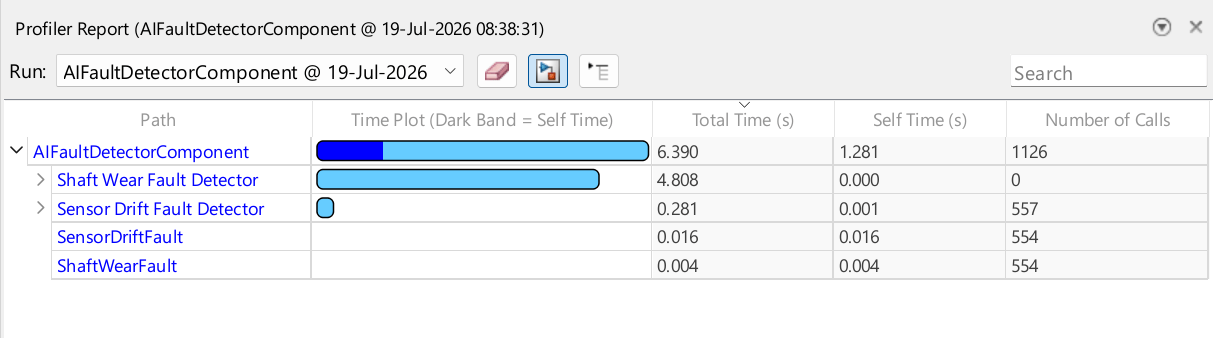
Launch the Simulink Profiler app from the Simulink toolstrip. On the Debug tab, in the Performance section, click the Performance button arrow and select Simulink Profiler. On the Profiler tab, in the Profile section, click Profile.
The app provides a report of the results. Note that execution times can vary across runs.
Generate Predictions in Simulink and Extract Execution Times
Programmatically run a simulation using the simIn object.
simOut = sim(simIn);
Extract execution time information from the Simulink.SimulationOutput object simOut. In particular, use the helper function helperFindProfileNode to find the profiling results for the Sensor Drift Fault Detector and Shaft Wear Fault Detector subsystems.
timingInfo = simOut.getSimulationMetadata.TimingInfo;
profilerData = timingInfo.ProfilerData;
rootNode = profilerData.rootUINode;
sdNode = helperFindProfileNode(rootNode,"AIFaultDetectorComponent/Sensor Drift Fault Detector");
swNode = helperFindProfileNode(rootNode,"AIFaultDetectorComponent/Shaft Wear Fault Detector");
sdInferenceTime = sdNode.totalTime
sdInferenceTime =
0.2671
swInferenceTime = swNode.totalTime
swInferenceTime =
4.7049
sdInferenceTime is the time (in seconds) used to generate predictions for sensor drift detection. Similarly, swInferenceTime is the time (in seconds) used to generated predictions for shaft wear detection.
Extract the generated predictions from simOut. Limit the number of observations to numObs, in case extra sample predictions are made.
yout = simOut.yout;
sdPredSimulink = yout.getElement(1).Values.Data;
sdPredSimulink = sdPredSimulink(1:numObs);

swPredSimulink = yout.getElement(2).Values.Data;
swPredSimulink = swPredSimulink(1:numObs);
sdPredSimulink contains the test set predicted labels returned by the Sensor Drift Fault Detector subsystem, and swPredSimulink contains the test set predicted labels returned by the Shaft Wear Fault Detector subsystem.
Display Verification Results
Verify that the models integrated into the Simulink environment satisfy the requirements described in Simulink Integration Requirements. Use the helper function helperVerifyRequirements to summarize the results in a table.
verificationTable = helperVerifyRequirements( ...
    sdPredMatlab,sdPredSimulink,swPredMatlab,swPredSimulink, ...
    sdInferenceTime,swInferenceTime)
verificationTable = 4×4 table
        RequirementID                                 Description                             Metric      Result
    ______________________    ____________________________________________________________    _______    ________

    "SD_MODEL_EQUIVALENCE"    "Sensor drift predictions match MATLAB (552 observations)"          100    "PASSED"
    "SW_MODEL_EQUIVALENCE"    "Shaft wear predictions match MATLAB (552 observations)"            100    "PASSED"
    "SD_INFERENCE_SPEED"      "Sensor drift inference < 10 sec (0.2671 sec from profiler)"    0.26712    "PASSED"
    "SW_INFERENCE_SPEED"      "Shaft wear inference < 10 sec (4.7049 sec from profiler)"       4.7049    "PASSED"

	Get insights using Copilot
The verification table shows that the models meet all the requirements.
Helper Functions
helperFindProfileNode
The helperFindProfileNode helper function takes in a root node in a Simulink system (root) and a path from that root node (targetPath). The function returns the model contents and structure for the node at the end of the path (node).
function node = helperFindProfileNode(root,targetPath)
node = [];
if strcmp(root.path,targetPath)
    node = root;
    return;
end
for c = 1:numel(root.children)
    node = helperFindProfileNode(root.children(c),targetPath);
    if ~isempty(node)
        return;
    end
end
end
helperVerifyRequirements
The helperVerifyRequirements function determines whether the requirements described in Simulink Integration Requirements are met, given the MATLAB test set predictions for sensor drift and shaft wear (sdPredMatlab and swPredMatlab, respectively), the Simulink test set predictions for sensor drift and shaft wear (sdPredSimulink and swPredSimulink, respectively), and the Simulink inference times for sensor drift and shaft wear (sdInferenceTime and swInferenceTime, respectively). The function returns a table (verificationTable) with the results.
function verificationTable = helperVerifyRequirements( ...
    sdPredMatlab,sdPredSimulink,swPredMatlab,swPredSimulink, ...
    sdInferenceTime,swInferenceTime)

nReqs = 4;
RequirementID = strings(nReqs,1);
Description = strings(nReqs,1);
Metric = zeros(nReqs,1);
Result = strings(nReqs,1);

numObs = height(sdPredMatlab);
sdMatch = isequal(sdPredMatlab,sdPredSimulink);
RequirementID(1) = "SD_MODEL_EQUIVALENCE";
Description(1) = sprintf("Sensor drift predictions match MATLAB (%d observations)",numObs);
Metric(1) = sum(sdPredMatlab == sdPredSimulink) / numObs*100;
if sdMatch
    Result(1) = "PASSED";
else
    Result(1) = "FAILED";
end

swMatch = isequal(swPredMatlab,swPredSimulink);
RequirementID(2) = "SW_MODEL_EQUIVALENCE";
Description(2) = sprintf("Shaft wear predictions match MATLAB (%d observations)",numObs);
Metric(2) = sum(swPredMatlab == swPredSimulink) / numObs*100;
if swMatch
    Result(2) = "PASSED";
else
    Result(2) = "FAILED";
end

RequirementID(3) = "SD_INFERENCE_SPEED";
Description(3) = sprintf("Sensor drift inference < 10 sec (%.4f sec from profiler)",sdInferenceTime);
Metric(3) = sdInferenceTime;
if sdInferenceTime < 10
    Result(3) = "PASSED";
else
    Result(3) = "FAILED";
end

RequirementID(4) = "SW_INFERENCE_SPEED";
Description(4) = sprintf("Shaft wear inference < 10 sec (%.4f sec from profiler)",swInferenceTime);
Metric(4) = swInferenceTime;
if swInferenceTime < 10
    Result(4) = "PASSED";
else
    Result(4) = "FAILED";
end

verificationTable = table(RequirementID,Description,Metric,Result);
end
See Also
Simulink.SimulationData.Datasetsim (Simulink) | Simulink Profiler (Simulink) | predict (Statistics and Machine Learning Toolbox) | predict (Statistics and Machine Learning Toolbox)

