cast
R2026bCast variable to different data type
Syntax
Description
B = cast(A,"like",p)A to the same numerictype and fimath properties as
p. The complexity (real or complex) of
B is determined by both A and
p. If A and p are
both real, then B is also real. Otherwise,
B is complex.
Examples
Define a scalar 8-bit integer.
A = int8(5);
Create a signed fi object with a word length of 24 bits and fraction length of 12 bits.
p = fi([],1,24,12);
Convert A to the same numerictype and fimath properties of the prototype variable p.
B = cast(A,"like",p)B =
5
DataTypeMode: Fixed-point: binary point scaling
Signedness: Signed
WordLength: 24
FractionLength: 12
Since R2026a
To cast a variable to the half data type,
use a numerictype object as the prototype.
A = single([1,2,3]);
p = numerictype("half");
B = cast(A,"like",p)
B =

  1×3 half row vector

     1     2     3
Prototype fi objects of data type half
are not supported.
Cast a variable of single data type to the built-in
double data type using a numerictype
object as the prototype.
A = single(1:4);
p = numerictype('double');
B = cast(A,'like',p)
B =

     1     2     3     4
class(B)
ans =

    'double'
The cast function returns the variable with the
built-in double data type.
Compare this result to using a fi object which specifies
a double data type as the prototype.
A = single(1:4);
p = fi([],numerictype('double'));
B = cast(A,'like',p)
B =

     1     2     3     4

          DataTypeMode: Double
class(B)
ans =

    'embedded.fi'
In this case, the cast function returns the variable
as a fi object with the DataTypeMode set
to Double.
Define a 2-by-3 matrix of ones.
A = ones(2,3)
A = 2×3

     1     1     1
     1     1     1
Create a signed fi object with a word length of 16 bits and a fraction length of 8 bits.
p = fi([],1,16,8)
p =

[]

          DataTypeMode: Fixed-point: binary point scaling
            Signedness: Signed
            WordLength: 16
        FractionLength: 8
Convert A to the same numerictype and fimath properties as p.
B = cast(A,"like",p)B =
1 1 1
1 1 1
DataTypeMode: Fixed-point: binary point scaling
Signedness: Signed
WordLength: 16
FractionLength: 8
This example shows how to write a MATLAB® algorithm that you can execute with different data types without changing the algorithm itself.
To reuse a MATLAB algorithm, define data types separately from the algorithm. This approach allows you to define a baseline by running the algorithm with floating-point data types. You can then test the algorithm with different fixed-point data types and compare the fixed-point behavior to the baseline without making any changes to the original MATLAB code.
The my_filter function takes the input parameter T, which is a structure that defines the data types of the coefficients and the input and output data.
function [Y,Z] = my_filter(B,A,X,Z,T)
% Cast the coefficients to the coefficient type
B = cast(B,'like',T.coeffs);
A = cast(A,'like',T.coeffs);
% Create the output using zeros with the data type
Y = zeros(size(X),'like',T.data);
for i = 1:length(X)
    Y(i) = B(1)*X(i) + Z(1);
    Z(1) = B(2)*X(i) + Z(2) - A(2) * Y(i);
    Z(2) = B(3)*X(i)        - A(3) * Y(i);
end
end
Define coefficients for a filter with the specification [B,A] = butter(2,0.25).
B = [0.097631072937818   0.195262145875635   0.097631072937818];
A = [1.000000000000000  -0.942809041582063   0.333333333333333];
Define floating-point data types.
T_float.coeffs = double([]);
T_float.data   = double([]);
Create a step input using ones with the floating-point data type.
T = 0:20;
X_float = ones(size(T),'like',T_float.data);
Initialize the states using zeros with the floating-point data type.
Z_float = zeros(1,2,'like',T_float.data);Run the my_filter algorithm using floating-point data types.
Y_float = my_filter(B,A,X_float,Z_float,T_float);
Repeat these steps using fixed-point data types and run the my_filter algorithm again.
T_fixed.coeffs = fi([],true,8,6);
T_fixed.data   = fi([],true,8,6);

X_fixed = ones(size(T),'like',T_fixed.data);
Z_fixed = zeros(1,2,'like',T_fixed.data);
Y_fixed = my_filter(B,A,X_fixed,Z_fixed,T_fixed);
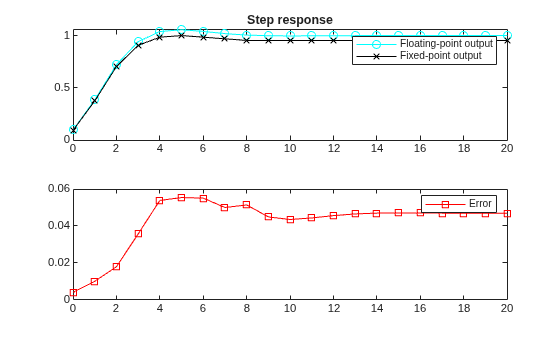
Compare the fixed-point results to the floating-point baseline.
coder.extrinsic('clf','subplot','plot','legend')
subplot(211)
plot(T,Y_float,'co-',T,Y_fixed,'kx-')
legend('Floating-point output','Fixed-point output')
title('Step response')
subplot(212)
plot(T,Y_float - double(Y_fixed),'rs-')
legend('Error')
Input Arguments
Tips
Use the B = cast(A,"like",p) syntax to specify data types
separately from algorithm code. This strategy allows you to:
Reuse your algorithm code with different data types.
Keep your algorithm uncluttered with data type specifications and switch statements for different data types.
Improve readability of your algorithm code.
Switch between fixed-point and floating-point data types to compare baselines.
Switch between variations of fixed-point settings without changing the algorithm code.

