Main Content

nlfilter

R2026b

General sliding-neighborhood operations

Description

B = nlfilter(A,[m n],fun) applies the function fun to each m-by-n sliding block of the grayscale or binary image A.

example

B = nlfilter(A,"indexed",[m n],fun) processes A as an indexed image.

Examples

collapse all

This example shows how to apply a median filter to an image using nlfilter. This example produces the same result as calling medfilt2 with a 3-by-3 neighborhood.

Read an image into the workspace.

A = imread('cameraman.tif'); 

Convert the image to double.

A = im2double(A);

Create the function you want to apply to the image—a median filter.

fun = @(x) median(x(:));

Apply the filter to the image.

B = nlfilter(A,[3 3],fun); 

Display the original image and the filtered image, side-by-side.

montage({A,B})
title('Original Image (Left) and Median Filtered Image (Right)')
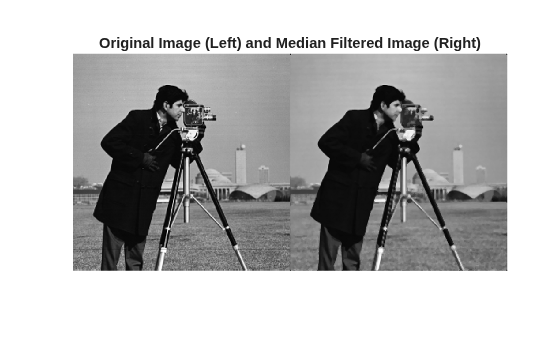
Figure contains an axes object. The hidden axes object with title Original Image (Left) and Median Filtered Image (Right) contains an object of type image.

Input Arguments

collapse all

Image to be filtered, specified as a numeric or logical matrix of any data type supported by fun. When A is grayscale, it can be any numeric type or logical. When A is indexed, it can be logical, uint8, uint16, single, or double.

Data Types: single | double | int8 | int16 | int32 | int64 | uint8 | uint16 | uint32 | uint64 | logical

Block size, specified as a 2-element vector of positive integers. m is the number of rows and n is the number of columns in the block.

Data Types: single | double | logical

Function to process the block, specified as a function handle. The function must accept an m-by-n matrix as input and return a scalar result. Here, c is the output value for the center pixel in the m-by-n block x.

c = fun(x)

When the center pixel's neighborhood extends past the edge of the image, the nlfilter function zero-pads the input image as necessary to create a full m-by-n block. If either dimension of the neighborhood has an even length, the position of the center pixel within the block is found using the floor operation: floor(([m n]+1)/2).

For more information about function handles, see Create Function Handle.

Data Types: function_handle

Output Arguments

collapse all

Filtered image, returned as a matrix. The data type of B depends on the data type of the output from fun.

Tips

  • nlfilter can take a long time to process large images. In some cases, the colfilt function can perform the same operation much faster.

Version History

Introduced before R2006a