fzero
R2026bRoot of nonlinear function
Syntax
Description
Examples
Calculate by finding the zero of the sine function near 3.
fun = @sin; % function
x0 = 3; % initial point
x = fzero(fun,x0)
x =
3.1416
Find the zero of cosine between 1 and 2.
fun = @cos; % function
x0 = [1 2]; % initial interval
x = fzero(fun,x0)
x =
1.5708
Note that and differ in sign.
Create a function and a single-precision scalar start point x0. Find the root of the function using fzero starting from x0.
f = @(x)cosh(x)-2*sinh(x);
x0 = single(1);
[x,fval,exitflag,output] = fzero(f,x0)
x = single

0.5493
fval = single

1.1921e-07
exitflag = single

1
output = struct with fields:
    intervaliterations: 9
            iterations: 3
             funcCount: 21
             algorithm: 'bisection, interpolation'
               message: 'Zero found in the interval [0.547452, 1.32]'
Create a two-element single-precision vector as a start point that brackets the root, and compare the solution and solution process.
x0 = single([-1,1]);
[x2,fval2,exitflag2,output2] = fzero(f,x0)
x2 = single

0.5493
fval2 = single

1.1921e-07
exitflag2 = single

1
output2 = struct with fields:
    intervaliterations: 0
            iterations: 5
             funcCount: 7
             algorithm: 'bisection, interpolation'
               message: 'Zero found in the interval [-1, 1]'
The result is the same. This time, fzero uses many fewer function evaluations.
Compare the single-precision result to the same calculation using standard double-precision data.
x0 = [-1,1];
[x3,fval3,exitflag3,output3] = fzero(f,x0)
x3 =
0.5493
fval3 =
-2.2204e-16
exitflag3 =
1
output3 = struct with fields:
    intervaliterations: 0
            iterations: 7
             funcCount: 9
             algorithm: 'bisection, interpolation'
               message: 'Zero found in the interval [-1, 1]'
Using double-precision data causes fzero to take a few more function evaluations. The accuracy of the result is much higher, with a function value on the order of 2e–16 compared to the single-precision value on the order of 1e–7.
Find a zero of the function f(x) = x3 – 2x – 5.
First, write a file called f.m.
function y = f(x)
y = x.^3 - 2*x - 5;
Save f.m on your MATLAB® path.
Find the zero of f(x)
near 2.
fun = @f; % function
x0 = 2; % initial point
z = fzero(fun,x0)
z =
    2.0946
Since f(x) is a polynomial, you can
find the same real zero, and a complex conjugate pair of zeros, using
the roots command.
roots([1 0 -2 -5])
   ans =
   2.0946
  -1.0473 + 1.1359i
  -1.0473 - 1.1359i
Find the root of a function that has an extra parameter.
myfun = @(x,c) cos(c*x);  % parameterized function
c = 2;                    % parameter
fun = @(x) myfun(x,c);    % function of x alone
x = fzero(fun,0.1)
x =
0.7854
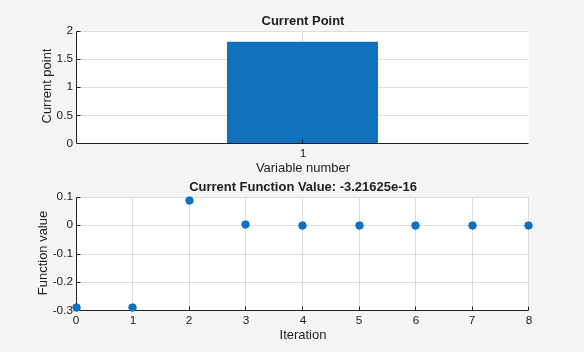
Plot the solution process by setting some plot functions.
Define the function and initial point.
fun = @(x)sin(cosh(x));
x0 = 1;
Examine the solution process by setting options that include plot functions.
options = optimset(PlotFcns={@optimplotx,@optimplotfval});Run fzero including options.
x = fzero(fun,x0,options)
x =
1.8115
Solve a problem that is defined by a problem structure.
Define a structure that encodes a root-finding problem.
problem.objective = @(x)sin(cosh(x));
problem.x0 = 1;
problem.solver = 'fzero'; % a required part of the structure
problem.options = optimset(@fzero); % default options
Solve the problem.
x = fzero(problem)
x =
1.8115
Find the point where exp(-exp(-x)) = x, and display information about the solution process.
fun = @(x) exp(-exp(-x)) - x; % function
x0 = [0 1]; % initial interval
options = optimset(Display="iter"); % show iterations
[x fval exitflag output] = fzero(fun,x0,options)
 Func-count    x          f(x)             Procedure
    2               1     -0.307799        initial
    3        0.544459     0.0153522        interpolation
    4        0.566101    0.00070708        interpolation
    5        0.567143  -1.40255e-08        interpolation
    6        0.567143   1.50013e-12        interpolation
    7        0.567143             0        interpolation

Zero found in the interval [0, 1]
x =
0.5671
fval =
0
exitflag =
1
output = struct with fields:
    intervaliterations: 0
            iterations: 5
             funcCount: 7
             algorithm: 'bisection, interpolation'
               message: 'Zero found in the interval [0, 1]'
fval = 0 means fun(x) = 0, as desired.
Input Arguments
Output Arguments
Algorithms
The fzero command
is a function file. The algorithm, created by T. Dekker,
uses a combination of bisection, secant, and inverse quadratic interpolation
methods. An Algol 60 version, with some improvements, is given in [1]. A Fortran version, upon which fzero is
based, is in [2].
Alternative Functionality
App
The Optimize Live Editor task provides a visual interface for
fzero.
References
[1] Brent, R., Algorithms for Minimization Without Derivatives, Prentice-Hall, 1973.
[2] Forsythe, G. E., M. A. Malcolm, and C. B. Moler, Computer Methods for Mathematical Computations, Prentice-Hall, 1976.

