Property Inspector
View and modify object properties
Description
The Property Inspector is an interactive tool for viewing and modifying the properties of objects, such as graphics objects, within the MATLAB® workspace.
Using this tool, you can:
View and modify properties of selected objects in a figure or app.
Change visual attributes of objects, such as color, font size, and line style.
Edit shared properties of multiple objects at once.
Explore the hierarchy of objects within a figure.
Show or hide objects within a figure.

Open the Property Inspector
Figure: On the Format tab of the figure, in the Enable section, enable plot edit mode by clicking Select & Plot Edit. Then, in the Inspect section, click More Properties.
MATLAB command prompt: Enter
inspect.
Examples
Use the Property Inspector to change the transparency of a surface plot and to change the font size of the axes text.
Create a surface plot and open the Property Inspector. Then, view the
surface properties in the Property Inspector by clicking the surface. Use
the inspect function to enable plot edit mode and open
the Property Inspector.
surf(peaks(25))
inspect
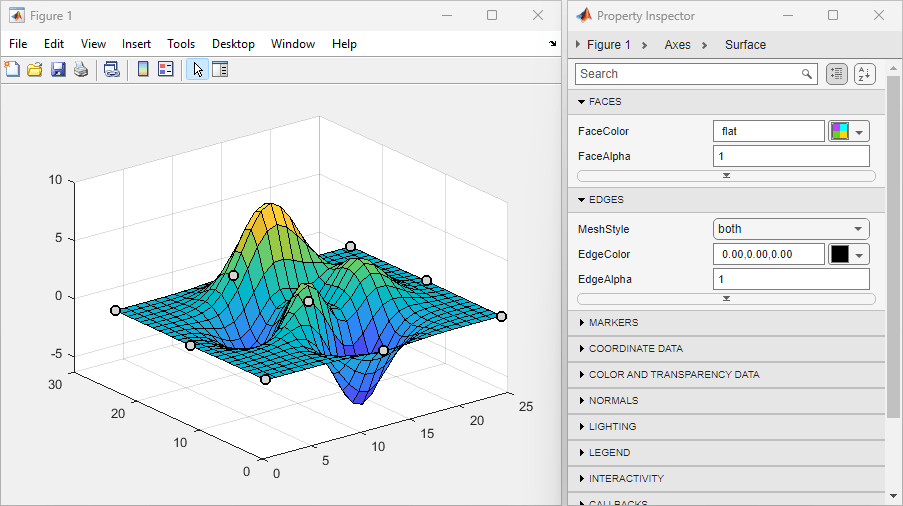
Change the value of the FaceAlpha property to
0.5. The surface plot updates so that it is
semitransparent.
Then, select the axes. To select the axes, you can click the axes directly
in the figure or you can expand the first line labeled Figure 1 >
Axes in the Property Inspector and select the axes object
from the tree. Then, change the value of the FontSize
property to 14 and the FontWeight
property to bold.

Interact with a graphics object in a figure by using the graphics object hierarchy in the Property Inspector.
Create a line plot with a legend and open the Property Inspector. Then, display the graphics object hierarchy by clicking the button next to the figure name.
plot(rand(5))
legend
inspect
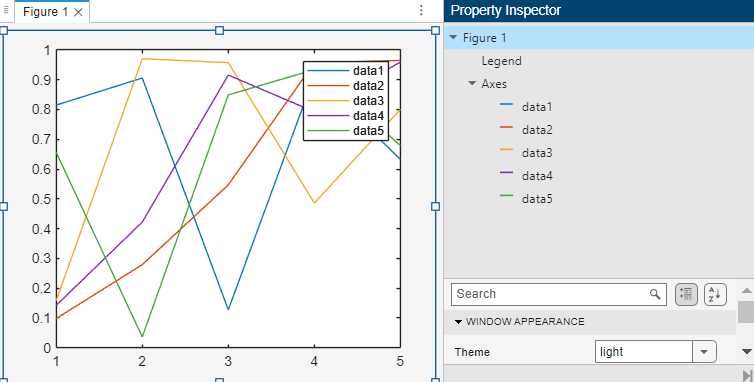
You can interact with the graphics object hierarchy in these ways to control the view of the figure:
To hide an object, right-click its name in the Property Inspector and select Hide. The object still exists, but it is no longer visible in the figure. To display the object again, right-click its name and select Show.
To remove an object from the figure, right-click its name and select Delete.
To select an object to edit, click its name. The figure highlights the selected object, and the Property Inspector updates to display fields where you can view and modify the properties of the object.
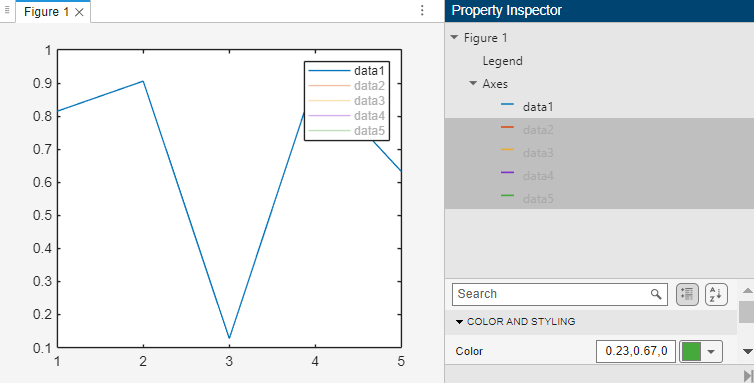
For example, hide all of the data series from data2 to
data5. In the Property Inspector, select
data2, hold Shift, and select
data5. Then, right-click the selection and select
Hide.
Programmatic Use
Version History
Introduced before R2006a

