Main Content

remove

R2026b

Remove search parameters from rfPartSelector object

Since R2026a

    Description

    remove(rfse,'SelectedSearchParameters',Name=Value) removes search parameters from the RF component selection in a third-party database using one or more name-value arguments.

    Note

    Install the third-party component database containing Analog Devices™ amplifiers and mixers with the installRFParts() command.

    remove(rfse,'DisplayColumns',displayFields) removes the display columns specified in displayFields from the part parameter table.

    example

    remove(rfse,'SelectedSearchParameters','all') resets all the selected search parameters.

    Examples

    collapse all

    Install the 3P component installed database.

    installRFParts()
    

    Select the amplifier from the 3P component installed database. To do this, first create an rfPartSelector object to specify the type of component you want to select.

    rfps = rfPartSelector(Type='Amplifier')
    

    Display all the available amplifier components from this database.

    show(rfps,'all')
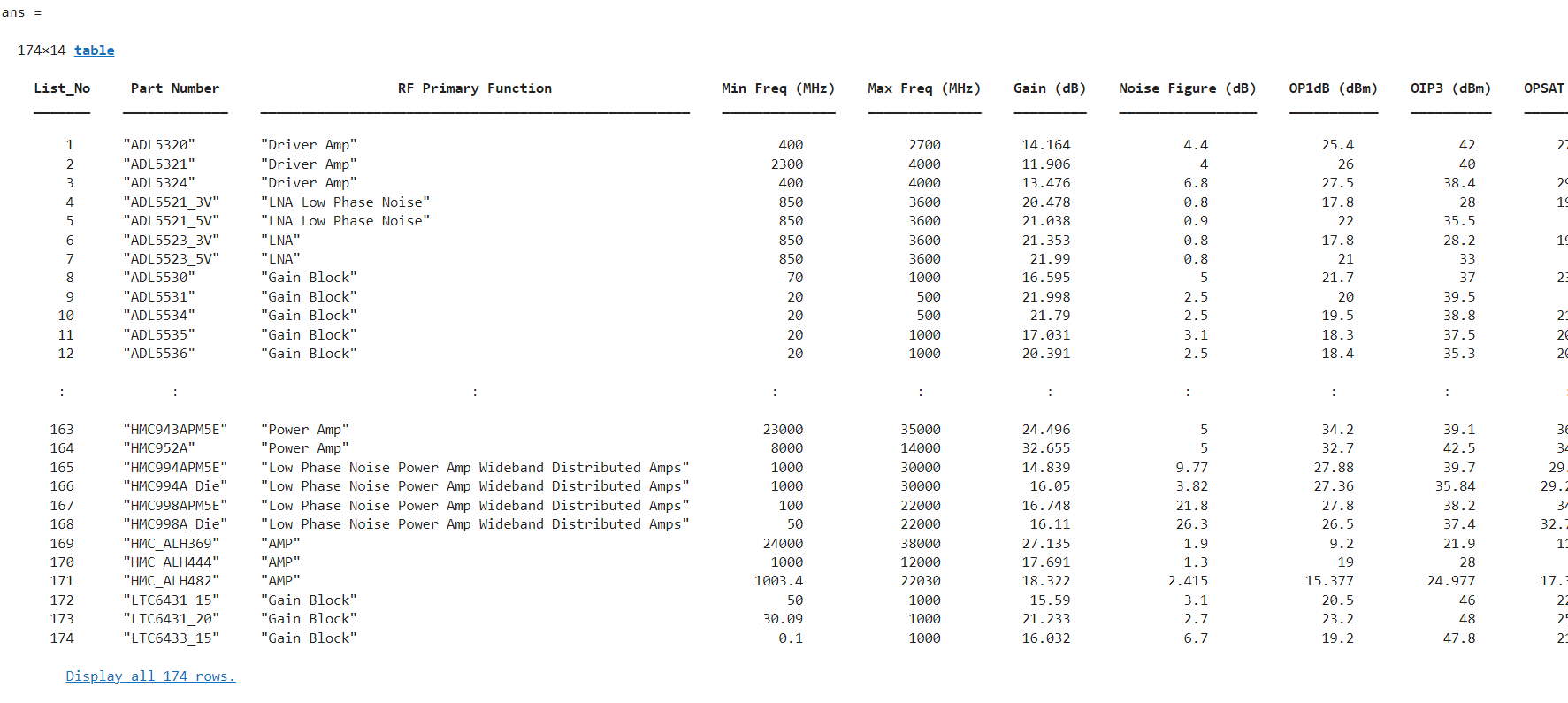
    

    The installed database contains 174 amplifiers. Add parameter filters to select the amplifiers that operates with the gain between 12 dB and 20 dB, noise figure between 4 dB and 10 dB, OP1 between 20 dBm and 30 dBm, and OIP3 between 20 dBm to 30 dBm.

    add(rfps,"SelectedSearchParameters","GainRange",[12 20], "NoiseFigureRange",[4 10],"OP1dBRange",[20 30],"OIP3Range",[20 30])
    

    Display the selected amplifiers.

    show(rfps,'selected')

    

    The part parameter table contains 14 columns. Retain only the columns that are relevant to your search criteria. In this example, five parameters are non-relevant and must be removed from the table.

    remove(rfps,"DisplayColumns","OPSAT (dBm)","Voltage (V)", "Current (mA)", "Operating Temp (degC)","Package Type")
    

    Display the selected amplifiers with the updated part parameter table.

    show(rfps,'selected')

    

    Use the rfPart function to create amplifiers from 3P component data. You can either:

    • Select all amplifiers displayed based on your filtering criteria and generate amplifier objects.

    • Choose a specific amplifier that meets your application requirements and create its amplifier object.

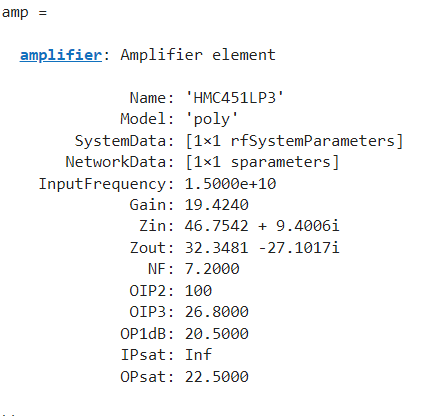
    amp = rfPart(rfps,"HMC451LP3")
    

    Build an RF chain that includes this amplifier, a component modeled from a Touchstone file, and an element created using an rfelement object. Then, calculate the RF budget for the complete chain at an input frequency of 6.09 GHz, an available input power of −30 dBm, and a bandwidth of 10 MHz.

    n = nport('passive.s2p');
    r = rfelement(Gain=10);
    b = rfbudget([amp r n],6.09e9,-30,10e6)
    

    The RF budget result as follows:

    b = 
    
      rfbudget with properties:
    
                   Elements: [1x3 rf.internal.rfbudget.Element]
             InputFrequency:   6 GHz
        AvailableInputPower: -30 dBm
            SignalBandwidth:  10 MHz
                     Solver: Friis      
                 AutoUpdate: true
    
       Analysis Results
            OutputFrequency: (GHz) [     6       6       6]
                OutputPower: (dBm) [-10.64  -0.643  -3.975]
             TransducerGain: (dB)  [ 19.36   29.36   26.03]
                         NF: (dB)  [   8.6     8.6     8.6]
                       IIP3: (dBm) [ 8.511   8.511   8.511]
                       OIP3: (dBm) [    28      38   34.67]
                        SNR: (dB)  [ 65.38   65.38   65.37]


    Input Arguments

    collapse all

    RF part selector, specified as an rfPartSelector object.

    Name of the column to remove, specified based on the part being selected. Specify one or more values according to the selected part.

    Amplifiers

    Mixers (since R2026b)

    Part NumberPart Number
    RF Primary FunctionRF Primary Function
    Min Freq (MHz)Converter Type
    Max Freq (MHz)Model Type
    Gain (dB)Sideband
    Noise Figure (dB)Min RF Freq (MHz)
    OP1dB (dBm)Max RF Freq (MHz)
    OIP3 (dBm)Min IF Freq (MHz)
    OPSAT (dBm)Max IF Freq (MHz)
    Voltage (V)Min LO Freq (MHz)
    Current (mA)Max LF Freq (MHz)
    Operating Temp (degC)Gain (dB)
    Package TypeOperating Temp (degC)
     Package Type

    Name-Value Arguments

    expand all

    Specify optional pairs of arguments as Name1=Value1,...,NameN=ValueN, where Name is the argument name and Value is the corresponding value. Name-value arguments must appear after other arguments, but the order of the pairs does not matter.

    Example: remove(rfse,'SelectedSearchParameters',InputFrequency=2000,RFPrimaryFunction='IQMixer')

    Amplifier

    expand all

    Minimum frequency range of operation, specified as a two-element vector of a nonegative integers in Hz.

    Example: MinFrequencyRange=[5000 10000]

    Maximum frequency range of operation, specified as a two-element vector of a nonegative integers in Hz.

    Example: MaxFrequencyRange=[5000 10000]

    Noise figure range of the selected components, specified as a two-element vector of a nonnegative integers in dB.

    Example: NoiseFigureRange=[2 4.6]

    First-order intercept range of the selected components, specified as a two-element vector of a nonnegative integers in dBm.

    Example: OP1dBRange=[10 19]

    Third-order intercept range of the selected components, specified as a two-element vector of a nonnegative integers in dBm.

    Example: OIP3Range=[10 19]

    Output saturation range of the selected components, specified as a two-element vector of a nonnegative integers in dBm.

    Example: OPSATRange=[10 19]

    Operating voltage range of the selected components, specified as a two-element vector of a nonnegative integers in V.

    Example: VoltageRange=[0.4 5.2]

    Operating current range of the selected components, specified as a two-element vector of a nonnegative integers in mA.

    Example: CurrentRange=[0.2 1.9]

    Mixers

    Since R2026b

    expand all

    Converter type of the mixer, specified as either UpConverter or DownConverter.

    Example: ConverterType='UpConverter'

    Model type of the mixer, specified as either IMT or Non Linear.

    Example: ModelType='IMT'

    Sideband of the mixer, specified as either LSB or USB.

    Example: Sideband='USB'

    Local oscillator (LO) frequency of the mixer, specified as a nonnegative integer in Hz.

    Example: LOFrequency=1500

    Minimum RF frequency range of the mixer in Hz, specified as a two-element vector of nonnegative integers.

    Example: MinRFFreqRange=[5000 10000]

    Maximum RF frequency range of the mixer in Hz, specified as a two-element vector of nonnegative integers.

    Example: MaxRFFreqRange=[5000 10000]

    Minimum intermediate frequency (IF) range of the mixer in Hz, specified as a two-element vector of nonnegative integers.

    Example: MinIFFreqRange=[500 2000]

    Maximum IF frequency range of the mixer in Hz, specified as a two-element vector of nonnegative integers.

    Example: MaxIFFreqRange=[500 2000]

    Minimum local oscillator (LO) frequency range of the mixer in Hz, specified as a two-element vector of nonnegative integers.

    Example: MinLOFreqRange=[1000 3000]

    Maximum LO frequency range of the mixer in Hz, specified as a two-element vector of nonnegative integers.

    Example: MaxLOFreqRange=[1000 3000]

    Applicable to both Amplifiers and Mixers

    Since R2026b

    expand all

    Part number of a third-party component, specified as a string. The value you specify in PartNumber must match with a part number in the installed database. To display the part numbers of all parts in the installed third-party database, use the show function.

    Example: PartNumber='ADL5240AMP'

    Primary function of the component, specified as a character vector. The value you specify in RFPrimaryFunction must match with a primary function of the component in the installed database. To display the primary function of the component of all the parts in the installed third-party database, use the show function.

    Example: RFPrimaryFunction='IQMixer'

    Component frequency in Hz, specified as a nonnegative integer.

    Example: Freqeuncy=500

    Component gain range in dB, specified as a two-element vector of a nonnegative integer.

    Example: GainRange=[10 20]

    Operating temperature range of the selected components in C, specified as a two-element vector of a nonnegative integers.

    Example: OperatingTempRange=[10 32]

    Package type of the selected components, specified as a character vector. The value you specify in Package must match the component package type in the installed database. To display the packages of all parts in the installed third-party database, use the show function.

    Example: Package='8-Lead-LFCSP

    Version History

    Introduced in R2026a

    expand all