Main Content

readall

R2026b

Read all signals from datastore

The function has changed. For more information, see Version History.

Description

data = readall(sds) reads all signal data from the datastore sds.

example

data = readall(sds,UseParallel=par) enables you to read data in parallel. (since R2026a)

To read data in parallel, you must have a Parallel Computing Toolbox™ license and create the signalDatastore object sds using file data.

Examples

collapse all

Specify the path to four signals included with MATLAB®. The signals are recordings of a bird chirp, a gong, a train, and a splat. All signals are sampled at 8192 Hz.

folder = fullfile(matlabroot,"toolbox","matlab","audiovideo", ...
         ["chirp.mat","gong.mat","train.mat","splat.mat"]);
Fs = 8192;
sds = signalDatastore(folder,SampleRate=Fs);

Read the data in the first variables of all the files in the datastore and plot the Fourier synchrosqueezed transform of each signal.

data = readall(sds);

tiledlayout("flow")
for i = 1:length(data)
    nexttile
    fsst(data{i},Fs,"yaxis")
end
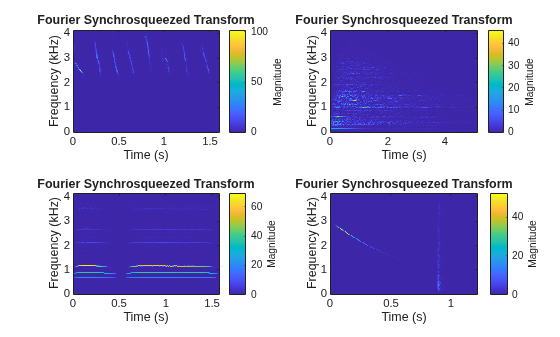
Figure contains 4 axes objects. Axes object 1 with title Fourier Synchrosqueezed Transform, xlabel Time (s), ylabel Frequency (kHz) contains an object of type image. Axes object 2 with title Fourier Synchrosqueezed Transform, xlabel Time (s), ylabel Frequency (kHz) contains an object of type image. Axes object 3 with title Fourier Synchrosqueezed Transform, xlabel Time (s), ylabel Frequency (kHz) contains an object of type image. Axes object 4 with title Fourier Synchrosqueezed Transform, xlabel Time (s), ylabel Frequency (kHz) contains an object of type image.

Input Arguments

collapse all

Signal datastore, specified as a signalDatastore object.

Option to read data in parallel using a pool of workers, specified as one of these values:

  • "off" — Read data serially on the MATLAB® client.

  • "auto" — Read data using a parallel pool if one is open or if MATLAB can automatically create one. If a parallel pool is not available, read data serially on the MATLAB client.

  • "on" — Read data using a parallel pool if one is open or if MATLAB can automatically create one. If a parallel pool is not available, throw an error.

If you do not have a parallel pool open and automatic pool creation is enabled, MATLAB opens a pool using the default cluster profile. To use a parallel pool to run computations in MATLAB, you must have Parallel Computing Toolbox. For more information, see Run MATLAB Functions with Automatic Parallel Support (Parallel Computing Toolbox).

Note

Parallel reading is supported only if you create the signalDatastore object sds using file data.

Before R2026b: To run in parallel, set this argument to true (1).

Data Types: char | string

Output Arguments

collapse all

All signals in the signal datastore, returned as a cell array. Each cell of data contains signals from a file or a member. Use the ReadOutputOrientation property of the datastore to control the orientation of data as either a column array or a row array.

Tips

When reading file data, because this function reads all the data in the files at once, you may run out of memory if your data set is large.

Extended Capabilities

expand all

Version History

Introduced in R2020a

expand all