sinc
Sinc function
Syntax
Description
Examples
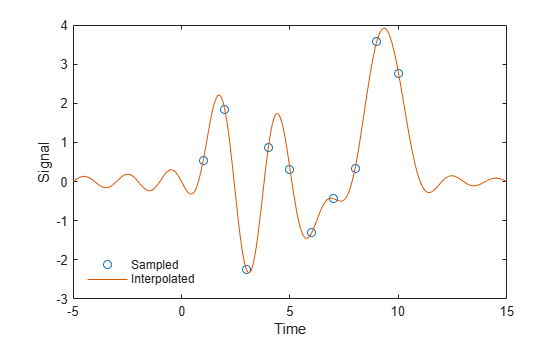
Perform ideal bandlimited interpolation of a random signal sampled at integer spacings.
Assume that the signal to interpolate, x, is 0 outside of the given time interval and has been sampled at the Nyquist frequency. Reset the random number generator for reproducibility.
rng default t = 1:10; x = randn(size(t))'; ts = linspace(-5,15,600); [Ts,T] = ndgrid(ts,t); y = sinc(Ts - T)*x; plot(t,x,'o',ts,y) xlabel Time, ylabel Signal legend('Sampled','Interpolated','Location','SouthWest') legend boxoff
Input Arguments
Input array, specified as a real-valued or complex-valued scalar, vector,
matrix, or N-D array. When x is
nonscalar, sinc is an element-wise operation.
Data Types: single | double
Complex Number Support: Yes
Output Arguments
Sinc of the input array, x, returned as a real-valued
or complex-valued scalar, vector, matrix, or N-D array of
the same size as x.
More About
The sinc function is defined by
This analytic expression corresponds to the continuous inverse Fourier transform of a rectangular pulse of width 2π and height 1:
The space of functions bandlimited in the frequency range is spanned by the countably infinite set of sinc functions shifted by integers. Thus, you can reconstruct any such bandlimited function g(t) from its samples at integer spacings:
Extended Capabilities
The
sinc function fully supports tall arrays. For more information,
see Tall Arrays.
C/C++ Code Generation
Generate C and C++ code using MATLAB® Coder™.
GPU Code Generation
Generate CUDA® code for NVIDIA® GPUs using GPU Coder™.
The sinc function fully supports
thread-based environments. For more information, see Run MATLAB Functions in Thread-Based Environment.
This function fully supports GPU arrays. For more information, see Run MATLAB Functions on a GPU (Parallel Computing Toolbox).
Version History
Introduced before R2006aSince R2026a, the sinc function uses sinpi
instead of sin to calculate the sinc output.
The change results in higher accuracy for integer inputs.
For an input x as integers from 1 to 5, this code shows the
difference between sinc outputs. The sinc function
returns exact zeros, agreeing with the sinc
definition.
x = 1:5; y = struct("sin",sin(pi*t)./(pi*t), ... "sinpi",sinpi(t)./(pi*t), ... "sinc",sinc(t))
y = struct with fields:
sin: [3.8982e-17 -3.8982e-17 3.8982e-17 -3.8982e-17 3.8982e-17]
sinpi: [0 0 0 0 0]
sinc: [0 0 0 0 0]
MATLAB Command
You clicked a link that corresponds to this MATLAB command:
Run the command by entering it in the MATLAB Command Window. Web browsers do not support MATLAB commands.
Select a Web Site
Choose a web site to get translated content where available and see local events and offers. Based on your location, we recommend that you select: .
You can also select a web site from the following list
How to Get Best Site Performance
Select the China site (in Chinese or English) for best site performance. Other MathWorks country sites are not optimized for visits from your location.
Americas
- América Latina (Español)
- Canada (English)
- United States (English)
Europe
- Belgium (English)
- Denmark (English)
- Deutschland (Deutsch)
- España (Español)
- Finland (English)
- France (Français)
- Ireland (English)
- Italia (Italiano)
- Luxembourg (English)
- Netherlands (English)
- Norway (English)
- Österreich (Deutsch)
- Portugal (English)
- Sweden (English)
- Switzerland
- United Kingdom (English)