Model Hierarchy and Equivalence Sets
R2026bIn SimBiology, you can organize a model into a hierarchy of submodels, where each submodel encapsulates a distinct biological component. When you build physiologically-based pharmacokinetic (PBPK) models or other large-scale models, you often work with biological components—organs, cell populations, signaling pathways—that interact through shared biological entities. For example, multiple organs may draw from the same venous blood pool, or the same cytokine may participate in dynamics captured by different cell models. Each component has its own internal dynamics, yet certain quantities represent the same physical entity across components.
To represent this structure, use a model hierarchy and equivalence sets. A model hierarchy organizes related submodels under a parent model. An equivalence set identifies quantities in different submodels that represent the same biological entity, so that SimBiology can resolve them to a single quantity during simulation.
A hierarchy of submodels with equivalence sets has several benefits:
Each submodel is self-contained and can be developed, tested, and reused independently.
Adding or removing a biological component requires only adding or removing the corresponding submodel and updating the equivalence sets, without modifying the internal dynamics of other submodels.
The hierarchy makes the model easier to understand, communicate, and manage as complexity grows.
Model Hierarchy
A model hierarchy consists of a parent model that contains one or more submodels. Each submodel is itself a complete model. A submodel can contain model components, including compartments, species, and reactions, as well as other submodels.
For example, a PBPK model might contain liver submodel and gut submodel, each with a compartment named Venous Blood:
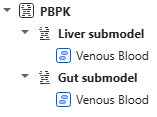
Each quantity in the hierarchy has a fully qualified name that identifies its
location in the hierarchy. In this PBPK model, the fully qualified name of the
compartment in the liver submodel is: PBPK.[Liver submodel].[Venous
Blood].
Fully qualified names distinguish quantities that have the same local name but belong to different submodels.
Equivalence Sets
Because each submodel is self-contained, a single biological entity can have
multiple representations across submodels. For example, if both a liver submodel and
a gut submodel interact with venous blood, each must have its own Venous
Blood compartment. But biologically, there is only one venous blood
pool.
An equivalence set groups quantities in different models that represent the same biological entity. During simulation, SimBiology designates one quantity in the equivalence set as the resolved quantity and uses that quantity in place of the other equivalent quantities.
For example, if both the liver and gut submodels contain a Venous Blood compartment, you can create an equivalence set for those compartments and set one of the compartments as a resolved quantity.

Each equivalence set has these characteristics:
All quantities in the set must be the same type (all compartments, all species, or all parameters).
Each quantity in the set must be in a different model.
Making compartments equivalent does not automatically make their species equivalent. If the dynamics of your model depend on shared species (for example, a drug that flows between organs through the blood), you must create separate equivalence sets for those species. During dimensional analysis, if a volume correction or scaling is required, the software uses the volume of the parent compartment of the resolved species. For details about volume scaling, see Derive ODEs from SimBiology Reactions.
Propagation of Equivalence Sets
An equivalence set belongs to the model where you create it. This ownership determines where the equivalence set is visible during simulation.
When you create an equivalence set in a submodel, SimBiology automatically propagates corresponding equivalence sets to ancestor models. This propagation ensures that equivalences declared at lower levels remain available when you simulate higher levels of the hierarchy.
When you simulate a model, SimBiology uses equivalence sets owned by that model. Equivalence sets owned only by ancestor models are not visible when you simulate a lower-level submodel in isolation.
This behavior allows you to simulate either a complete model hierarchy or an individual submodel while maintaining consistent equivalence relationships.
Resolved Quantities
An equivalence set can contain multiple quantities, but SimBiology must use one quantity as the representative quantity during simulation. This representative quantity is the resolved quantity.
You can explicitly select the resolved quantity for an equivalence set. If you do not specify one, SimBiology selects one automatically using the following steps:
If the owning model of the equivalence set has a quantity in the set, that quantity becomes the resolved quantity.
Otherwise, the software searches the child models. The resolved quantity of the first child model that has a quantity in the set is selected.
You can simulate any model in the hierarchy, not just the top-level model. For example, you might simulate a single organ submodel in isolation during development or validation.
Equivalence Set Hierarchy
When a model has submodels that also contain their own equivalence sets, equivalence sets form a hierarchy of supersets and subsets that mirrors the model hierarchy. A higher-level equivalence set can contain quantities that are also part of lower-level equivalence sets. In this case, the lower-level sets are subsets of the higher-level set.
Each equivalence set in the hierarchy has its own resolved quantity. Because related equivalence sets represent the same biological entities at different levels of the hierarchy, changes to one set can affect related sets. For instance:
Removing or splitting a quantity from a set also removes it from all supersets and subsets.
Deleting a subset removes its quantities from the parent set. If fewer than two quantities remain in the parent set, the parent set is also deleted.
Merging source sets into a target set deletes each source set and all of its supersets and subsets.

