Variant Sink
R2026bRoute amongst multiple outputs using variants
Variant Sink block

To add a block to a model, double-click the canvas and start typing the block name. Then, select the block from the list.
Libraries:
Simulink /
Signal Routing
Description
The Variant Sink block enables you to include multiple implementations of a component on the destination (sink) of a signal in a single layer.
For example, suppose you want to simulate this model to control the speed of the car
windshield wiper by using different rain sensors. The Variant Source block switches between different rain sensors. The control
logic uses this information to output the result to the Variant Sink
block. The Variant Sink then switches between the wiper motor model
during simulation and the D/A (Digital-to-Analog) block output during
code generation. The variant blocks switch between choices based on the Types of Variant Control Modes in Variant Blocks you select. For
more information, see Introduction to Variant Controls.
Note
At most, one variant choice connected to output port of the Variant Sink block is active during simulation.

The Variant Sink block has only one input port and one or more output ports. You can connect the varying choices to the output port of the block so that, at most, one choice is active during model execution.
The Variant Sink block is associated with a Variant control mode and a Variant activation time. The variant control mode determines how to specify the variant control. The variant activation time determines a time to activate the choices and to decide whether to include only the active choice or both active and inactive choices in the generated code. During simulation, Simulink® connects the active choice directly to the input port of the Variant Sink block and ignores the inactive choices.
Using a Variant Sink block allows you to:
Propagate variant conditions throughout the model.
Visualize all possible implementations of variant choices in a single layer of your model, which improves model readability.
Simulink eliminates inactive blocks throughout the model, which improves runtime performance. If all the variant choices are inactive, Simulink removes the variant region completely from your model.
Variant sources and sinks provide variant component interfaces that you can use to quickly model variant choices.
The color and icon of the variant badge on the block icon changes depending on the values of the Variant activation time, Variant control mode, and Allow zero active variant controls parameters set on the block. For more information, see Variant Badges.
Examples
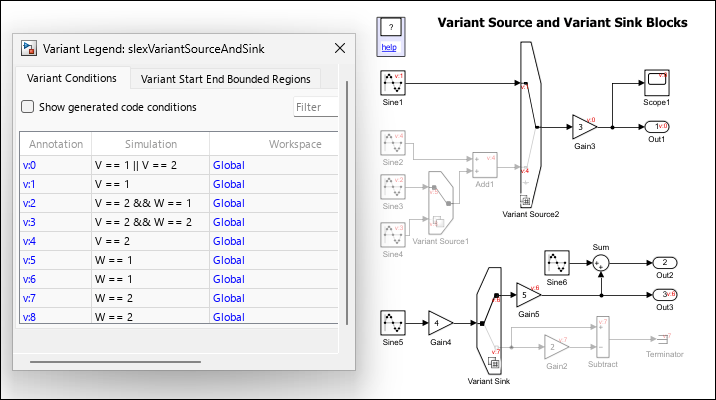
Variant Source and Variant Sink Blocks
Consider the slexVariantSourceAndSink model containing two Variant Source blocks Variant Source1 and Variant Source2, and a Variant Sink block. The variant conditions at the inports and the outports of the Variant Source and the Variant Sink blocks determine the activation and deactivation of the blocks connected to them. V and W are the variant control variables and are defined in the PostLoadFcn callback of the model.
Limitations
The Variant Sink block works with time-based, function-call, and action signals. You cannot use SimEvents®, Simscape™ Multibody™, or other non-time-based signals with these blocks.
Ports
Input
Output
Parameters
The variant control that determines the active variant choice can be any of these types.
expression— The software chooses the active variant based on the evaluation of the variant conditions. When a condition expression evaluates totrue, the corresponding variant choice becomes active. When a condition expression evaluates tofalse, the corresponding variant choice becomes inactive. See Switch Between Choices Using Condition Expressions in Variant Blocks.label— The software chooses the active variant based on the name of the variant. The variant control is a string and does not require you to create any variable in any workspaces. See Switch Between Choices Using Labels in Variant Blocks.sim codegen switching— Automatically switch between the variants for simulation and code generation workflows without creating any workspace variable. When you simulate a model, the software automatically chooses thesimbranch as the active choice. Similarly, when you do a software-in-the-loop (SIL) or processor-In-Loop (PIL) simulation, generate code, or use external mode, the software automatically chooses thecodegenbranch. See Switch Between Choices for Simulation and Code Generation Workflows Without Using Control Variables in Variant Blocks.
For more information on variant control modes, see Introduction to Variant Controls. For a comparison between different types of variant control modes, see Compare Different Types of Variant Control Modes in Variant Blocks.
Dependencies
The availability of different variant activation times depends on the type of the Variant control mode that you specify. The Variant activation time parameter determines the time when the software sets the active choice. The parameter also determines which variability to include in the generated code. This table explains the variant activation time supported by each variant control mode.
| Variant activation time | ||||
|---|---|---|---|---|
| Variant control mode | update diagram | update diagram analyze all
choices | code compile | startup |
expression | ✓ | ✓ | ✓ | ✓ |
label | ✓ | x | x | x |
sim codegen switching | ✓ | ✓ | x | x |
Programmatic Use
Block Parameter:
VariantControlMode
|
| Type: character vector |
Values:
'expression' | 'label' | 'sim
codegen switching' |
Default:
'expression'
|
This parameter determines which variability to include in the simulation and code generation workflows. For more information, see Activate Variant During Different Stages of Simulation and Code Generation Workflow.
update diagram— When you execute the model, only the active choice is included in the simulation and the code generation workflow. Generated code contains only the active choice.update diagram analyze all choices— When you execute the model, both active and inactive choices are analyzed for consistency across the model. However, only the active choice is included in the simulation and the code generation workflow. Generated code contains only the active choice.code compile— When you execute the model, both active and inactive choices are analyzed for consistency across the model, and all choices are included in the simulation and the code generation workflow. Generated code contains both the active and inactive choices enclosed in the preprocessor conditionals#ifand#elif. However, the executable built from the generated code contains only active choice.startup— When you execute the model, both active and inactive choices are analyzed for consistency across the model, and all choices are included in the simulation and the code generation workflow. With this option, you can improve the speed of iterative simulations using fast restart. For more information, see Run Iterative Simulations Without Recompiling Model for Variant Systems Using Fast Restart. Code generated from the model contains both the active and inactive choices that are enclosed in regularifconditions. The executable built from the generated code also contains both active and inactive choices.inherit from Simulink.VariantControl— When you execute the model, the block inherits the activation time from its variant control variables of typeSimulink.VariantControl. If a variant block has multiple variant control variables of typeSimulink.VariantControl, then all those variables must have the same activation time.
Dependencies
The availability of different variant activation times depends on the type of the variant control mode that you specify. The Variant activation time parameter determines when the software sets the active choice. The parameter also determines which variability to include in the generated code. This table explains the variant activation time supported by each variant control mode.
| Variant activation time | ||||
|---|---|---|---|---|
| Variant control mode | update diagram | update diagram analyze all
choices | code compile | startup |
expression | ✓ | ✓ | ✓ | ✓ |
label | ✓ | x | x | x |
sim codegen switching | ✓ | ✓ | x | x |
Programmatic Use
Block Parameter:
VariantActivationTime
|
| Type: character vector |
Values:
'update diagram' | 'update diagram analyze all
choices' | 'code compile' |
'startup'
|
Default:
'update diagram'
|
The table has a row for each variant choice connected to the output port of the Variant Sink block. If there are no variant choices, the table is empty.
You can use buttons to the left of the Port and associated conditions table to modify the elements in the table.
| To... | Click... |
|---|---|
Add a new output port: Create a new output port as a variant choice and add an entry for the new choice in the table. |  |
Delete selected port: Delete the selected variant choices from the block and their entries from the table. Alternatively, you can remove the selected variant choices by pressing the Delete key on your keyboard. |  |
Create/Edit selected variant
object: Create or edit a Note For a model that uses the base workspace, this
operation creates the
|  |
Number of the output port that is connected to one variant choice upstream of the Variant Sink block. This value is read-only.
Click to add a port or to delete an existing one.
A name for a choice, specified as a string.
Dependencies
To enable this parameter, set Variant control
mode to label.
Programmatic Use
To set the block parameter value programmatically, use
the set_param function.
To get the block parameter value
programmatically, use the get_param function.
| Parameter: | VariantControls |
| Values: | variant controls that are associated with variant choices |
| Data Types: | char |
Example: set_param(gcb, 'VariantControls', {'A == 1','A ==
2'}), where gcb is the
Variant Sink or Variant Source
block.
Example: get_param(gcb, 'VariantControls'),
where gcb is the Variant Sink or
Variant Source block.
Specify (sim) to activate the corresponding variant
choice during simulation. Specify (codegen) to activate
the corresponding variant choice while performing code generation workflows
such as SIL, PIL, external mode, and so on.
Dependencies
To enable this parameter, set Variant control
mode to sim codegen
switching.
Programmatic Use
To set the block parameter value programmatically, use
the set_param function.
To get the block parameter value
programmatically, use the get_param function.
| Parameter: | VariantControls |
| Values: | variant controls that are associated with variant choices |
| Data Types: | char |
Example: set_param(gcb, 'VariantControls',
{'(sim)','(codegen)'}), where gcb
is the Variant Sink or Variant Source
block.
Example: get_param(gcb, 'VariantControls'),
where gcb is the Variant Sink or
Variant Source block.
Specify the condition expression to determine the active choice. When a condition
expression evaluates to true, the software activates the
corresponding variant choice. When a condition expression evaluates to
false, the software deactivates the corresponding variant
choice.
The variant controls can be:
Boolean condition expression for rapid prototyping. For example,
A == 1,A ~= B,A && B == 1, and so on.A
Simulink.VariantExpressionobject that contains a condition expression for condition reuse. See Use Simulink.VariantExpression Objects for Variant Condition Reuse of Variant Blocks.Default Variant Choice if none of the choices evaluates to
true.
Here, A and B are operands called
as variant control variables. ==,
~=, and && are operators in the
condition expression. The condition expression can contain one or more such variant
control variables and operators. For information on supported types and storage location
of variant control variables, see Types of Variant Control Variables (Operands) in Variant Blocks. For information
on operators, see Types of Operators in Variant Blocks for Different Activation Times.
For more information, see Switch Between Choices Using Condition Expressions in Variant Blocks.
In Variant Assembly Subsystem block, this parameter is a list of
auto-generated boolean expressions with Variant control variable on
the left-hand side and the members of the Variant enumeration
choice are on the right-hand side of the expressions. Both the sides of
the expressions are connected with ==. This parameter is
read-only.
Programmatic Use
To set the block parameter value programmatically, use
the set_param function.
To get the block parameter value
programmatically, use the get_param function.
The programmatic parameter name is VariantControl for Variant Subsystem blocks, and VariantControls for Variant Source, Variant Sink, and Variant Start blocks. See Hierarchical Variant Block Parameters and Inline Variant Block Parameters.
Variant Subsystem block:
| Parameter: | VariantControl |
| Values: | variant control that is associated with the variant choice |
| Data Types: | char |
Example: set_param(gcb, 'VariantControl', 'V == 3'), where
gcb is the variant choice of the Variant
Subsystem block.
Example: get_param(gcb, 'VariantControl'), where
gcb is the variant choice of the Variant
Subsystem block.
Variant Source, Variant Sink, and Variant Start blocks:
| Parameter: | VariantControls |
| Values: | variant controls that are associated with variant choices |
| Data Types: | char |
Example: set_param(gcb, 'VariantControls', {'A == 1','A ==
2'}), where gcb is the Variant
Sink, Variant Source, or Variant Start
block.
Example: get_param(gcb, 'VariantControls'), where
gcb is the Variant Sink, Variant
Source, or Variant Start block.
This parameter is read-only.
This parameter displays the condition expression specified as
Simulink.VariantExpression object. To change or edit the condition
expression, use the Simulink.VariantExpression parameter dialog box
that appears when you double-click the object in the workspace.
Note
The operands that you specify in a condition expression of type
Simulink.VariantExpression must be defined in the base
workspace or a data dictionary. Specifying operands that are defined in the mask
or model workspace is not supported.
This list contains the labels of all the variant choices. To set an active choice, select a label from the list. The corresponding choice becomes active. Alternatively, to change the active choice in label mode, you can follow the approaches described in Set Active Choices Using Variant Control Labels.
Dependencies
To enable this parameter, set Variant control mode to
label.
Programmatic Use
Parameter:
LabelModeActiveChoice
|
| Type: character vector |
| Value: If no label mode active choice is specified, the value is empty. If a label mode active choice is specified, the value is the variant control label for the active choice. |
Default: '' |
off— Simulink generates an error when there is no active variant choice.on— When you select this parameter and if there is no active variant choice, Simulink simulates the model without any active variant choice connected to the Variant Sink block. Simulink disconnects all the blocks connected to the input and output stream of Variant Sink block, thus removing the variant regions completely from the model execution.
Consider the car windshield wiper example in the Description section. Suppose you do not want
to pass the wiper speed to either of the variant choices, wiper
motor and D/A. When you simulate the model with
Allow zero active variant controls set to
on and if there is no active variant choice in the
Variant Sink controlled by mode block, Simulink disconnects the Variant Sink controlled by
mode block and all its connected blocks, which removes the
variant region completely from the model.
This table shows the code that you generate with and without the Allow zero
active variant controls parameter for the code
compile activation time. In the code that you generate
with Allow zero active variant controls set to
off, only the variant choices wiper
motor and D/A are conditional, whereas the
Gain block is unconditional. The Gain
block is unconditional, and so it executes for either of the choices. This
code support only scenarios where either of the choices evaluate to
true. If none of the choices evaluate to
true, both the choices are removed from compilation.
The output of the Gain remains unused and this results in an
error. In the code that you generate with Allow zero active
variant controls set to on, the variant
choices wiper motor, D/A, and the
connected Gain blocks are conditional. So, if none of the
choices evaluate to true, the Gain block
is also removed, thus enabling you to completely remove the variant region
from code compilation.
| Generated code without Allow zero active variant controls | Generated code with Allow zero active variant controls |
|---|---|
/* If none of the conditions Mode == 1 or Mode == 2 evaluate to true, the output of Gain remains unused which resuls in an error.*/ /* logic for Gain; */ # if Mode == 1 /* logic for wiper motor; */ # elif Mode == 2 /* logic for digital to analog conversion; */ # endif |
# if Mode == 1 /* logic for wiper motor; */ # elif Mode == 2 /* logic digital to analog conversion; */ # endif /* The logic for Gain is executed only if either of the conditions evaluate to true. Gain is removed from code compilation if none of the condition evaluates to true. */ # if (Mode == 1) ∥ (Mode == 2) /* logic for Gain; */ # endif |
Dependencies
This parameter is available only if you set Variant control
mode to expression.
Programmatic Use
Block Parameter:
AllowZeroVariantControls
|
| Type: character vector |
Values:
'off' | 'on'
|
Default:
'off'
|
When you select this option, Simulink annotates the variant condition expression on each port of the Variant Sink block.
Programmatic Use
Block Parameter:
ShowConditionOnBlock
|
| Type: character vector |
Values:
'off' | 'on'
|
Default:
'off'
|
Block Characteristics
Data Types |
|
Direct Feedthrough |
|
Multidimensional Signals |
|
Variable-Size Signals |
|
Zero-Crossing Detection |
|
Programmatic Use: Add Block
To add the block programmatically, use the add_block function with one of these library block paths as the source.
"simulink/Signal Routing/Variant Sink"
Example: add_block("simulink/Signal Routing/Variant Sink","myModel/myBlock",MakeNameUnique="on")
For information about programmatic access to individual block parameters, see the Programmatic Use section of parameter descriptions on this page.
Extended Capabilities
Version History
Introduced in R2016aTo remove variant choices from the Variant Source and
Variant Sink blocks, select the entries for the
variant choices in the Port and associated conditions
table and press the Delete key on your keyboard. This
action is equivalent to clicking the Delete selected port button in the Port and associated
conditions table.
See Also
Variant Source | Manual Variant Source | Manual Variant Sink | Variant Subsystem
Topics
- Generate Code for Variant Source and Variant Sink Blocks (Simulink Coder)

