Filter Transient Signals
R2026bTransient signals occur when physical switches bounce or when sensors produce momentary fluctuations that do not represent actual state changes. For example, when a mechanical switch opens or closes, the contacts can bounce several times before settling, which can generate multiple false signals.
You can filter transient signals by implementing debouncing techniques, such as:
Using the
durationoperatorAdding intermediate states that use temporal logic
You can also add appropriate time thresholds so that signals remain stable before state transitions occur.
When filter signals, make sure to:
Set appropriate time thresholds based on your system dynamics.
Consider the sampling rate of your system when choosing threshold values.
Add fault detection logic to identify when signals fluctuate excessively.
Test your debouncing logic with realistic noisy input signals.
Filter Signals by Using the duration Operator
To filter transient signals with the duration operator, add
transition conditions that check how long a signal maintains its state. You can use
expressions like [duration(signal>=threshold) > delay_time] in your
transition guards to move from one state to another only after the signal remains above the
threshold for the specified time.
The duration operator measures time in seconds. Set the delay time
based on how much noise exists in your system. Use longer times for noisier signals and
shorter times for cleaner signals. This technique prevents your control system from reacting
to rapid signal spikes or drops, so that it responds to switch changes that persist for the
time you specify.
In this chart, a motor controller filters transient signals from temperature and
vibration sensors using the duration operator.
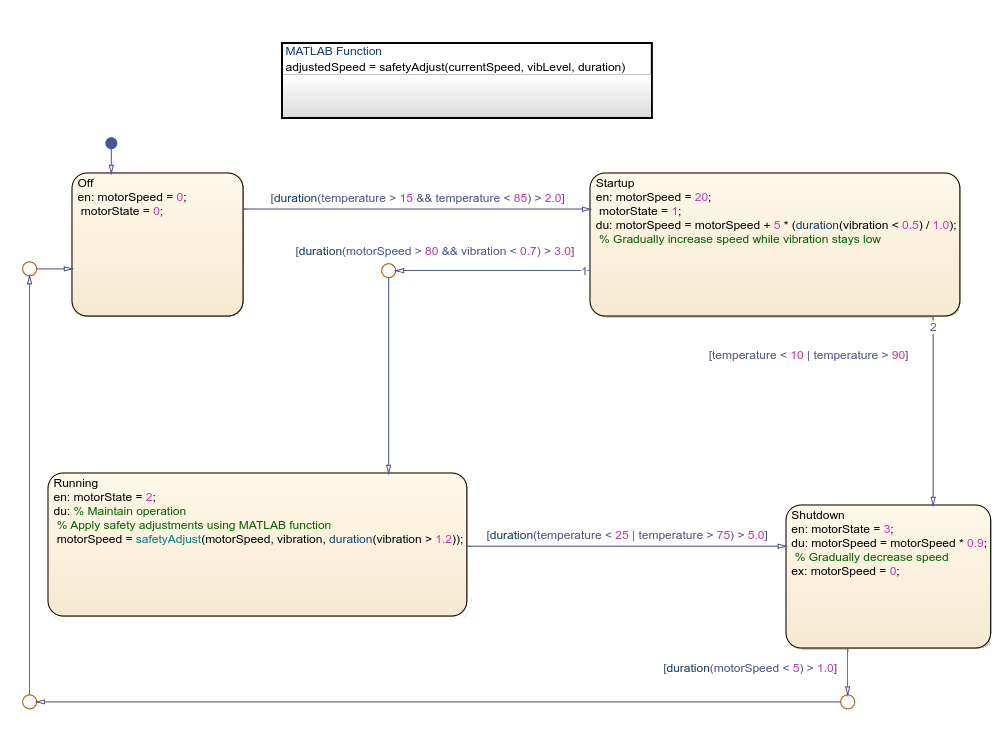
As the chart transitions through the Off, Startup,
Running, and Shutdown states, it also monitors
sensor values by using duration conditions. These conditions require
signals to persist before triggering transitions. The Running state uses
a MATLAB function to adjust motor speed based on vibration levels that exceed thresholds for
the specified durations.
Benefits of Using the duration Operator
Use the duration operator when you want to:
Filter out transient signals without adding intermediate states to your chart.
Measure how long a condition is continuously true.
Create compact state diagrams with fewer total states.
Implement debouncing logic directly in transition conditions.
Create threshold-based transitions without tracking time manually.
Simplify code generation by reducing the number of state variables.
Filter Signals by Using Intermediate States and Temporal Logic
You can also use intermediate states and temporal logic to filter transient signals. Use this approach when you have complex filtering requirements or need to detect faults.
In this chart, a motor controller filters transient signals by using intermediate states that check whether the signal persists before the state transitions.
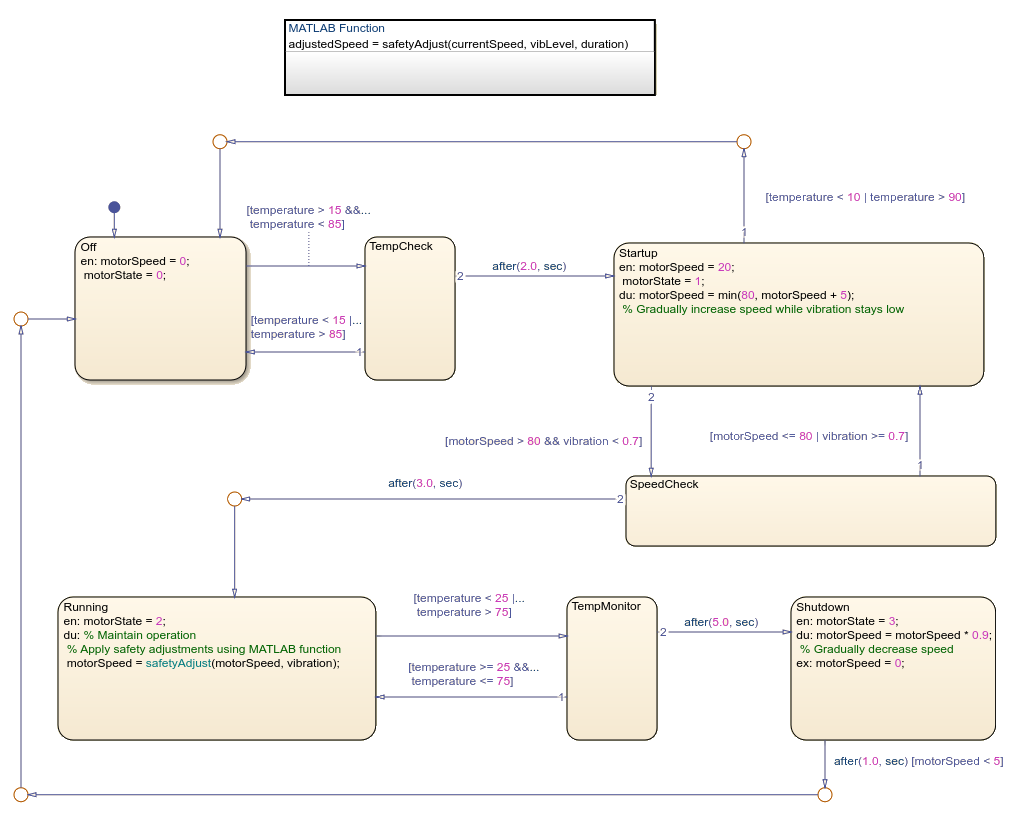
The controller uses after operators to implement debouncing between
the operation states Off, Startup,
Running, and Shutdown. The intermediate states
create time delays that prevent the system from responding to momentary sensor
fluctuations.
Benefits of Using Intermediate States
Use intermediate states when you want to:
Implement debouncing logic by using explicit state transitions and timing.
Create visual representations of the filtering process that show the intermediate steps.
Define different recovery paths based on signal behavior during transitions.
Create filtering logic that uses time thresholds and additional conditions.
Isolate transient behavior states from normal operation states in your chart hierarchy.
Capture and preserve signal history during transition periods.
Monitor how signals behave during transition periods.
Create modular filtering components that you can reuse across multiple charts.

