writeFrames
R2026bSyntax
Description
writes video frames with the specified timestamps to disk.files = writeFrames(gTruth,location,timestamps)
specifies options using one or more name-value arguments in addition to any
combination of input arguments from previous syntaxes. For example,
files = writeFrames(___,Name=Value)ImageFormat="jpg" sets the returned video frames to the
JPEG format.
Examples
Load a ground truth object that contains rectangle labels for a video into the workspace.
data = load("peopleWalkingGroundtruth.mat");
gTruth = data.peopleWalking;Gather rectangle labels from the video.
labelTypes = labelType.Rectangle; [labelData,timestamps] = gatherLabelData(gTruth,labelTypes);
Write the image frames associated with the gathered label data to a temporary folder location. Use the timestamps returned by the gatherLabelData function to indicate which video frames to write.
outputFolder = fullfile(tempdir,"videoFrames");
fileNames = writeFrames(gTruth,outputFolder,timestamps);Write images extracted for training to folder:
C:\Users\user\AppData\Local\Temp\videoFrames
Writing 600 images extracted from atrium.mp4...Completed.
Create an image datastore of the written video image frames, and a box label datastore of the corresponding rectangle label data.
imds = imageDatastore(fileNames{1});
blds = boxLabelDatastore(labelData{1}); Combine the datastores using the combine function.
ds = combine(imds,blds);
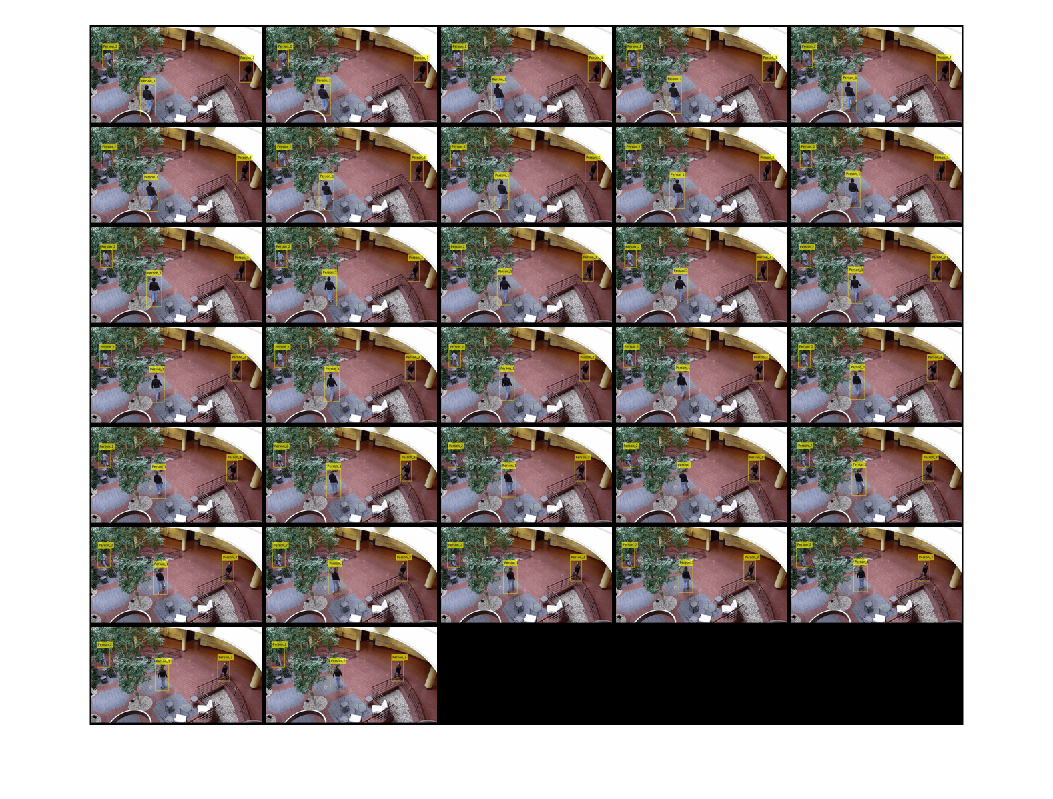
Visualize the written video image frames using the montage function.
frameData = {};
while hasdata(ds)
data = read(ds);
% Only visualize frames with box data.
if ~isempty(data{2})
frameData{end + 1} = insertObjectAnnotation(data{1},"Rectangle",data{2},data{3});
end
end
figure
montage(frameData,BorderSize=3)
Input Arguments
Ground truth labels, specified as a groundTruth object or as an
array of groundTruth objects.
Destination folder to which to write the video frames, specified as a string scalar or character vector.
Timestamps, specified as an M-by-1 cell array of
duration vectors, where
M is the number of groundTruth
objects in gTruth. To use this argument, you must
specify an input ground truth object that contains duration-based data. If
the input ground truth object does not have duration-based data, the
function ignores the timestamps argument and writes all image data from the
ground truth object.
Name-Value Arguments
Example: writeFrames(gTruth,location,ImageFormat="jpg") sets the
returned video frames to the JPEG format.
Specify optional pairs
of arguments as Name1=Value1,...,NameN=ValueN, where
Name is the argument name and Value is the
corresponding value. Name-value arguments must appear after other arguments, but the
order of the pairs does not matter.
Prefix for output filenames, specified as a string scalar or character vector. The output image files use this naming convention::
NamePrefix_source_number_image_number.ImageFormat, where,
NamePrefixis the filename prefix, specified by theNamePrefixname-value argument.source_number corresponds to the ground truth object. For example, if the input
gTruthis an array of three ground truth objects, the function outputs files with three different source_number values,1,2, and3, corresponding to the index of each ground truth object in the array.image_number is the image or video frame number.
The default value NamePrefix depends on the source
of the data.
Video or custom data source —
NamePrefixuses the name of the data source,sourceName.Image datastore —
NamePrefixuses the value"datastore".
The function ignores this argument when:
The input
groundTruthobject was created from an image sequence data source.The array of input
groundTruthobjects all contain image datastores using the same customreadfunction.Any of the input
groundTruthobjects contain datastores and use the defaultreadfunctions.
Option to perform computations in parallel using a parallel pool of workers, specified as one of these values:
"off"— Run in serial on the MATLAB client."auto"— Use a parallel pool if one is open or if MATLAB can automatically create one. If a parallel pool is not available, run in serial on the MATLAB client."on"— Use a parallel pool if one is open or if MATLAB can automatically create one. If a parallel pool is not available, throw an error.
If you do not have a parallel pool open and automatic pool creation is enabled, MATLAB opens a pool using the default cluster profile. Using parallel computing requires Parallel Computing Toolbox™. For more information, see Run MATLAB Functions with Automatic Parallel Support (Parallel Computing Toolbox).
Dependencies
To enable parallel processing, change the default cluster profile to use a local cluster.
Data Types: char | string
Flag to display training progress at the MATLAB® command line, specified as a numeric or logical
1 (true) or
0 (false). This argument
applies only for groundTruth objects
created using a video file or a custom data source.
Output Arguments
File paths of written frames, returned as an M-by-1 cell array. M is the number of ground truth objects. Each cell contains an N-element vector of strings, where N is the number of image frames written to the specified folder. Each string specifies the full path of an output file. The output files use this naming convention:
NamePrefix_source_number_image_number.ImageFormat, where,
NamePrefixis the filename prefix, specified by theNamePrefixname-value argument.source_number corresponds to the ground truth object. For example, if the input
gTruthis an array of three ground truth objects, the function outputs files with three different source_number values,1,2, and3, corresponding to the index of each ground truth object in the array.image_number is the image or video frame number.
Extended Capabilities
writeFrames has automatic parallel support.
To run computations in parallel, set the UseParallel argument to "on" or "auto".
For more information, see Run MATLAB Functions with Automatic Parallel Support (Parallel Computing Toolbox).
Version History
Introduced in R2025aThe UseParallel argument for the
writeFrames function now accepts
"off", "auto", or
"on" instead of logical true or
false values. Using logical values is not
recommended.
MATLAB Command
You clicked a link that corresponds to this MATLAB command:
Run the command by entering it in the MATLAB Command Window. Web browsers do not support MATLAB commands.
Select a Web Site
Choose a web site to get translated content where available and see local events and offers. Based on your location, we recommend that you select: .
You can also select a web site from the following list
How to Get Best Site Performance
Select the China site (in Chinese or English) for best site performance. Other MathWorks country sites are not optimized for visits from your location.
Americas
- América Latina (Español)
- Canada (English)
- United States (English)
Europe
- Belgium (English)
- Denmark (English)
- Deutschland (Deutsch)
- España (Español)
- Finland (English)
- France (Français)
- Ireland (English)
- Italia (Italiano)
- Luxembourg (English)
- Netherlands (English)
- Norway (English)
- Österreich (Deutsch)
- Portugal (English)
- Sweden (English)
- Switzerland
- United Kingdom (English)