3-D Human Pose Estimation from Monocular Images
R2026bThis example shows how to estimate 3-D human body keypoints from a single RGB image by combining deep learning-based 2-D human pose estimation and monocular depth estimation. Estimating 3-D human pose from a monocular image supports applications such as sports analytics and human-computer interaction. In this example, you:
Detect a person in a monocular RGB image by using the YOLOv4 object detector.
Estimate 2-D human body keypoints for the detected person by using the HRNet pose estimation model.
Segment the detected person by using the Segment Anything Model 2 (SAM 2) segmentation model to generate a binary mask and isolate foreground depth values.
Estimate a depth map and focal length from the monocular RGB image by using the Depth Pro model.
Convert 2-D human body keypoints to 3-D by combining pose and depth information.
Generate a 3-D point cloud of the segmented person from the estimated depth map. Visualize the reconstructed 3-D skeleton in the point cloud.
Load Data
Download the squat exercise video and extract a frame for 3-D human pose estimation.
downloadFolder = pwd;
dataFilename = "SquatExerciseVideo.zip";
dataUrl = "https://ssd.mathworks.com/supportfiles/vision/data/" + dataFilename;
zipFile = fullfile(downloadFolder,dataFilename);
if ~exist(zipFile,"file")
    disp("Downloading Squat Exercise Video (8 MB)...")
    websave(zipFile,dataUrl);
end
Downloading Squat Exercise Video (8 MB)...
unzip(zipFile,downloadFolder)
Create a VideoReader object to read a video into the MATLAB® workspace. The video used in this example shows a person performing a squat.
reader = VideoReader("SquatExerciseVideo.mp4");Read Video Frame
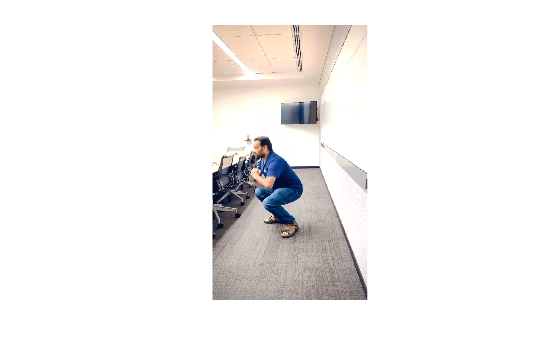
Read and display a video frame for processing. The frame shows a person performing a squat against an indoor background.
frame = read(reader,700);
figure
imshow(frame)
Detect Person Using YOLOv4
Use a YOLOv4 object detector trained on the COCO data set to detect the person in the image.
detector = yolov4ObjectDetector("tiny-yolov4-coco");
[bboxes,scores,labels] = detect(detector,frame);
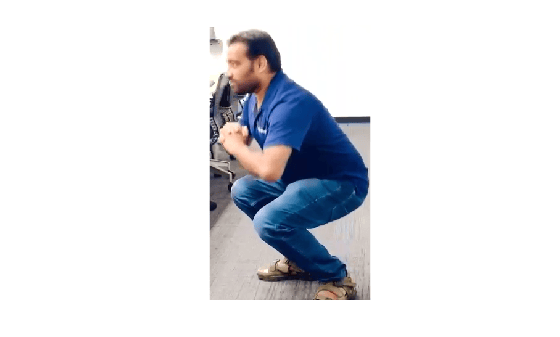
The detector returns bounding boxes sorted by confidence score. Select the first bounding box to obtain the highest-confidence person detection. Use the detected bounding box to extract the region of interest for pose estimation, depth estimation, and segmentation.
bbox = bboxes(1,:);
personImage = imcrop(frame,bbox);
figure
imshow(personImage)
Estimate 2-D Human Body Keypoints Using HRNet
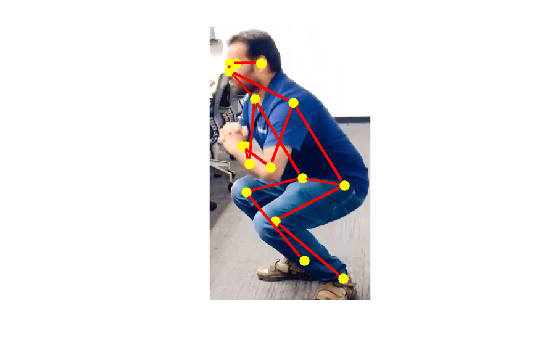
Estimate human body keypoints for the detected person by using a pretrained HRNet keypoint detector. This example uses the human-full-body-w32 keypoint detector trained on the COCO keypoint detection data set. The keypoint detector predicts 17 body keypoints covering the nose, eyes, ears, shoulders, elbows, wrists, hips, knees, and ankles. The detect function returns the image coordinates of the estimated keypoints.
keypointDetector = hrnetObjectKeypointDetector("human-full-body-w32");
personBbox = [3,3,size(personImage,2),size(personImage,1)];
keypts = detect(keypointDetector,personImage,personBbox);
Retrieve the keypoint connections that define the human skeleton. Overlay the detected keypoints and skeletal connections on the detected region.
objectSkeleton = keypointDetector.KeypointConnections;
detectedKeypts = insertObjectKeypoints(personImage,keypts,Connections=objectSkeleton,...
    ConnectionColor="red",LineWidth=5,KeypointSize=8,KeypointColor="yellow");
figure
imshow(detectedKeypts);
Segment Detected Person and Generate Mask Using SAM 2
Use the SAM 2 segmentation model to segment the detected person and generate a binary mask. First, extract image embeddings from the detected region. Then, use the bounding box as a spatial prompt to segment the person from the embeddings. The resulting mask identifies pixels that belong to the person and excludes background pixels. Use the mask to reject keypoints that fall outside the segmented person before converting the 2-D keypoints to 3-D.
segModel = segmentAnythingModel("sam2-small");
personEmbeddings = extractEmbeddings(segModel,personImage);
mask = segmentObjectsFromEmbeddings(segModel,personEmbeddings,...
    size(personImage),BoundingBox=personBbox);
Estimate Depth Map Using Depth Pro
Use the Depth Pro model to estimate a depth map for the detected region. The model predicts a dense depth map and estimates the camera focal length from the image. The depthMap output contains metric depth, which is the estimated distance from the camera for each pixel in the detected region. The focalLength output contains the estimated camera focal length in pixels.
depthModel = depthpro();
[depthMap,focalLength] = estimateDepth(depthModel,personImage);
figure
imshow(depthMap,[])
colormap(jet)
colorbar
title("Estimated Depth Map")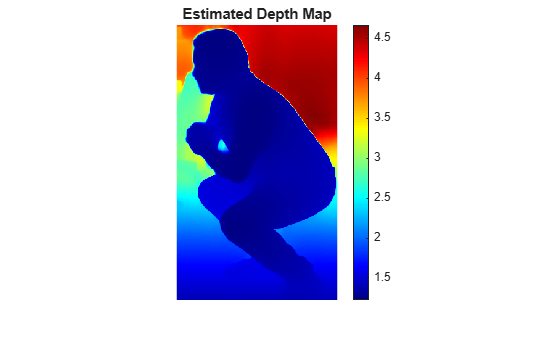
Convert 2-D Human Body Keypoints to 3-D Using Depth Map
Use the estimated 2-D keypoints, depth map, and focal length to compute 3-D human body keypoints.
Verify that each keypoint lies in the segmented person region.
Compute a robust depth estimate by taking the median depth value in a 5-by-5 neighborhood centered on the keypoint. Using the median depth value reduces the effect of noise and outlier pixels.
Convert the 2-D image coordinates to 3-D camera coordinates by using the pinhole camera back-projection equations: and . denotes the image center, denotes the estimated focal length, and is the median depth value computed from the local neighborhood around the keypoint.
[H, W, ~] = size(personImage);
Set up the camera parameters. Assume the principal point is at the image center. Initialize the 3-D keypoints array with NaN values to indicate keypoints that cannot be converted. For example, keypoints that fall outside the segmented region cannot be converted.
cx = W / 2;
cy = H / 2;
fx = focalLength;
fy = focalLength;
windowSize = 5;
halfWin = floor(windowSize/2);
keypts3D = nan(size(keypts,1),3);

for idx = 1:size(keypts,1)
    u = round(keypts(idx,1));
    v = round(keypts(idx,2));
    u = max(1,min(u,W));
    v = max(1,min(v,H));
    if ~mask(v,u)
        continue
    end
    uStart = max(1,u-halfWin);
    uEnd = min(W,u+halfWin);
    vStart = max(1,v-halfWin);
    vEnd = min(H,v+halfWin);
    depthWindow = depthMap(vStart:vEnd,uStart:uEnd);
    z = median(depthWindow(:));
    xcam = (u-cx)*z/fx;
    ycam = (v-cy)*z/fy;
    keypts3D(idx,:) = [xcam,ycam,z];
end
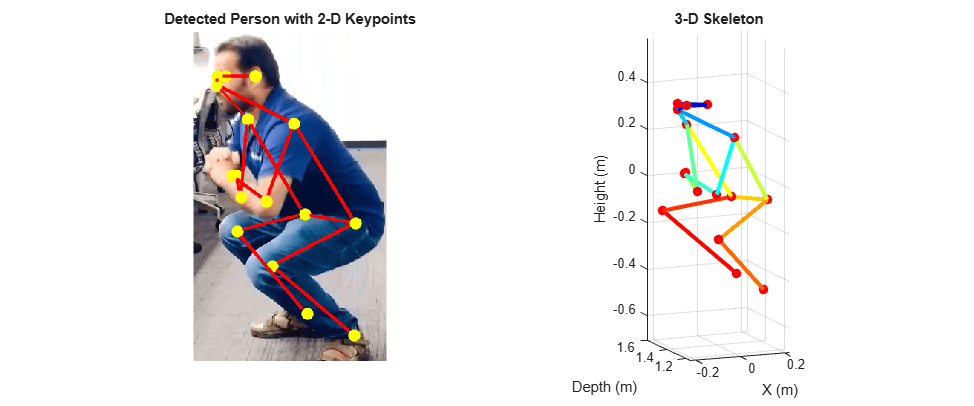
Visualize the estimated human pose as a 3-D skeleton in both image and 3-D coordinate spaces. The left panel shows the detected 2-D keypoints overlaid on the detected region. The right panel shows the reconstructed 3-D keypoints and skeletal connections.
figure(Position=[100,100,1200,500]);
ax1 = subplot(1,2,1);
imshow(detectedKeypts,Parent=ax1);
title(ax1,"Detected Person with 2-D Keypoints")
ax2 = subplot(1,2,2);
hold(ax2,"on")
numConnections = size(objectSkeleton,1);
connectionColors = jet(numConnections);
for j = 1:numConnections
    startIdx = objectSkeleton(j,1);
    endIdx = objectSkeleton(j,2);
    if startIdx <= size(keypts3D,1) && endIdx <= size(keypts3D,1)
        if ~any(isnan(keypts3D(startIdx,:))) && ~any(isnan(keypts3D(endIdx,:)))
            plot3(ax2,...
                [keypts3D(startIdx,1), keypts3D(endIdx,1)],...
                [keypts3D(startIdx,3), keypts3D(endIdx,3)],...
                [-keypts3D(startIdx,2), -keypts3D(endIdx,2)],...
                Color=connectionColors(j,:),LineWidth=3);
        end
    end
end
validIdx = ~any(isnan(keypts3D),2);
scatter3(ax2,keypts3D(validIdx,1),keypts3D(validIdx,3),...
    -keypts3D(validIdx,2),50,"filled",MarkerFaceColor="r");
grid(ax2,"on")
axis(ax2,"equal")
view(ax2,[-23 12])
xlabel(ax2,"X (m)")
ylabel(ax2,"Depth (m)")
zlabel(ax2,"Height (m)")
title(ax2,"3-D Skeleton")
Generate 3-D Point Cloud of Detected Person Using Depth Map
Generate a dense 3-D representation of the detected person by reconstructing a point cloud from the estimated depth map and focal length. To convert the depth map to 3-D points, create a cameraIntrinsics object from the estimated focal length and image center. Use pcfromdepth to back-project each pixel into 3-D space. The resulting point cloud provides 3-D context for the estimated pose. Use the point cloud to visualize the 3-D skeleton in the reconstructed geometry.
intrinsics = cameraIntrinsics([fx fy],[cx cy],[H W]);
pc = pcfromdepth(depthMap,1,intrinsics);
pc.Color = personImage;
Apply the segmentation mask to remove background points and retain only the points that belong to the detected person.
pcPerson = select(pc,mask);
pcLocation = pcPerson.Location;
pcColor = pcPerson.Color;
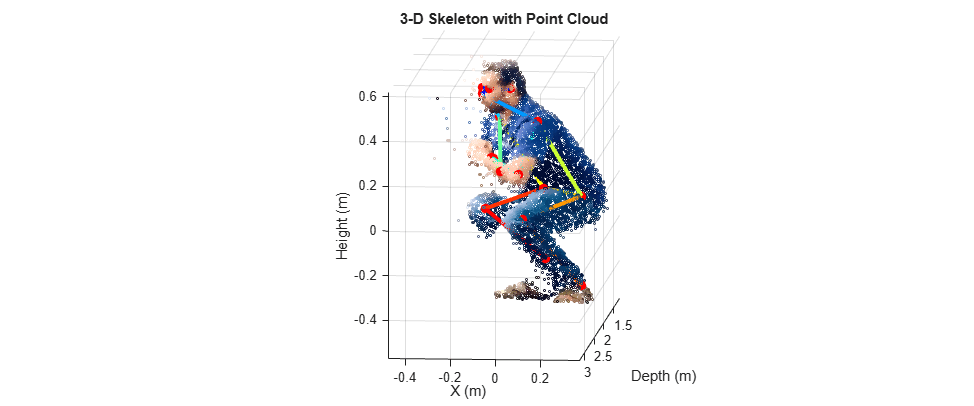
Display the reconstructed 3-D skeleton with the point cloud of the segmented person. The point cloud captures the person's geometric structure, while the keypoints and skeletal connections indicate the estimated human pose.
figure(Position=[100,100,1200,500]);
scatter3(pcLocation(:,1),pcLocation(:,3),-pcLocation(:,2),...
    2,single(pcColor)./255);
hold on
for j = 1:numConnections
    startIdx = objectSkeleton(j, 1);
    endIdx = objectSkeleton(j, 2);
    if startIdx <= size(keypts3D, 1) && endIdx <= size(keypts3D, 1)
        if ~any(isnan(keypts3D(startIdx,:))) && ~any(isnan(keypts3D(endIdx,:)))
            plot3([keypts3D(startIdx,1),keypts3D(endIdx,1)],...
                [keypts3D(startIdx,3),keypts3D(endIdx,3)],...
                [-keypts3D(startIdx,2),-keypts3D(endIdx,2)],...
                Color=connectionColors(j,:),LineWidth=3);
        end
    end
end
validIdx = ~any(isnan(keypts3D),2);
scatter3(keypts3D(validIdx,1),keypts3D(validIdx,3),...
    -keypts3D(validIdx,2),50,"filled",MarkerFaceColor="r");
grid("on")
axis("equal")
view([-5 -8])
xlabel("X (m)")
ylabel("Depth (m)")
zlabel("Height (m)")
title("3-D Skeleton with Point Cloud")
See Also
yolov4ObjectDetector | hrnetObjectKeypointDetector | depthpro | segmentAnythingModel | estimateDepth | cameraIntrinsics | pcfromdepth | insertObjectKeypoints | extractEmbeddings | segmentObjectsFromEmbeddings

